Desert Online General Trading LLC
Dubai, United Arab Emirates
Desert Online General Trading LLC
Dubai, United Arab Emirates


⚡ Print smarter, faster, greener — your office’s new MVP!
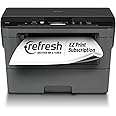
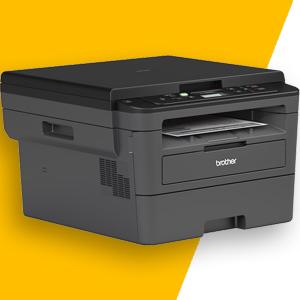
The Brother HL L2390DW is a certified refurbished monochrome laser printer designed for home and small office use. It delivers rapid printing speeds of up to 32 pages per minute, supports wireless and mobile device printing, and features automatic duplex printing to save paper. With a 250-sheet capacity and flatbed scanning/copying, it combines efficiency and versatility in a compact footprint. Backed by a 1-year warranty and Brother’s customer support, it’s a reliable, eco-conscious choice for modern professionals.




| B&W Pages per Minute | 32 ppm |
| Color Pages per Minute | 10 |
| Total Usb Ports | 1 |
| Hardware Connectivity | USB |
| Connectivity Technology | Wi-Fi, USB, Ethernet |
| Resolution | 1200 |
| Additional Printer Functions | Copy |
| Control Method | Voice |
| Controller Type | Vera, Amazon Alexa |
| Print media | Envelopes, Paper (plain), Card stock |
| Scanner Type | document |
| Maximum Copy Speed Black and White | 32 ppm |
| Display Type | LCD |
| Compatible Devices | Smartphones, Tablets, Laptops |
| Printer Type | Laser |
| Additional Features | Auto-Duplex |
| Printer Output Type | Monochrome |
| Item Weight | 22.7 Pounds |
| Item Dimensions D x W x H | 40"D x 16.1"W x 23"H |
| Paper Size | 8.5 inch x 14 |
| Maximum Sheet Capacity | 250 |
| Media Size Maximum | 8.5 x 14 inch |
| Wattage | 420 watts |
| Is Electric | Yes |
| Power Consumption | 420 Watts |
| Duplex | Automatic |
| Dual-sided printing | Yes |
| Color | Black/Grey |
S**5
Pretty good printer
So, for awhile now, I've been considering getting a laser printer since inkjet printers have not been kind to me, at least ink wise. I don't print stuff off very often, like once a month at most, so with an inkjet the ink would dry up or whatever by the time I used it again so even after like getting it to work or whatever, I would have to buy a new cartridge. Which, considering how expensive ink is these days, I could easily buy a cheap inkjet printer for $30 which is less than the cost of the ink for some brands and just buy a new printer every time the ink ran out.So, to avoid that, I decided to go with a laser printer. I rarely ever need to print in color. If I do need to print in color, I'll spend the few cents and go to Office Depot or a friend's house, but most of my printing needs are satisfied with black and white prints. (I play D&D so I mostly just need to print off character sheets and basic maps so black and white is all I need) and I knew I wanted to get a Brother it was just a matter of which one.I looked at a few different models and finally decided on this one since it had all the stuff I needed to do. Automatic 2 sided printing, scanning, copying, print from wifi or mobile device. I don't need fax but I definitely needed to at least scan stuff so this is definitely a good middle ground. It's a bit big so you'll have to make sure you have room for it. It's about a foot tall and about as deep as my dresser (which is where I keep it at the moment. I'll probably move it to the closet sooner or later)It prints FAST! I printed out almost 200 pages (double sided) in like half an hour give or take. It's definitely fast, and the quality is amazing! The text is crisp and pristine. Pictures aren't the same quality like on an inkjet printer. They look fine, but that's not what this is meant for. This is meant for office work like documents with maybe a few graphs here and there.It's quiet-ish. It's definitely quieter than some other printer's I've used, but it's not like whisper quiet. Unless everyone in the house is a light sleeper, I don't see why it would wake anyone up.Set up was fairly simple. It took awhile for me since my internet speeds are VERY slow (which doesn't impact the printing) so it took forever to download the software onto my laptop in order to print stuff, but if you have decently fast internet speeds the download shouldn't take too long. After it got downloaded it was only a few clicks away from being set up.But honestly, my friend bought the same one a few years earlier (I didn't know this when I bought it just a fun coincidence) she's still using the toner that came with the printer and she hasn't had to buy more toner once. So yeah, I don't have to worry about buying toner for AWHILE! But seriously, this was the best $100 I've spent. Definitely worth it.
M**K
EXCELLENT PRINTER SO FAR
This is my second Brother printer. I bought the first because it was inexpensive. It lasted about 5 years without difficulty. I upgraded to this model because it includes a scanner while maintaining a small footprint. Both printers provide consistent, very clear text. There is the option to purchase larger cartridges so that less changing is necessary. There is a bit of a learning curve with this model. The setup was automatic, but I then had to learn how to set different functions by programing characters one by one into the display. While, I've grown used to this, it, the process, nevertheless, still seems tedious. I had to contact customer service early in my experience with the printer when I lost my network connection. I was happily surprised to reach a technician in the evening. She was very patient and helpful. While I seldom invest in extended warranties, I routinely do so with printers. Of all the electronics I own, printers have created the most angst!
N**N
Perfect Office Needs
Rating: ★★★★★ (5/5)I recently purchased a Brother brand printer, and it has proven to be a reliable workhorse with a few minor quirks. Here's my detailed review:Setup & Connectivity: ★★★☆☆ (3/5)The initial setup and Wi-Fi connectivity proved to be a bit challenging. Unlike some other printers that come with detailed instructions, the Brother printer's setup process felt less intuitive. Connecting it to Wi-Fi took a few attempts and required a bit of patience. It would be immensely helpful if the setup process were more user-friendly.Cable Not Included: ★★★★☆ (4/5)One notable drawback was the absence of a USB cable in the box. While many printers come with a USB cable for wired setup, this one didn't include one. This could be an inconvenience for users who prefer a wired connection or don't have a spare cable on hand. However, this is a minor issue as most setups nowadays are wireless.Performance & Print Quality: ★★★★★ (5/5)Once I had the printer up and running, it performed admirably. Printing quality was excellent, with sharp text and vibrant colors for photos. It handled various paper sizes and types with ease, making it suitable for both everyday document printing and occasional photo printing.Speed & Efficiency: ★★★★★ (5/5)The Brother printer proved to be impressively fast, particularly for its price range. It spat out pages with impressive speed and efficiency, which is a huge plus for busy households or small offices where time is of the essence.Reliability & Durability: ★★★★★ (5/5)Reliability is where this Brother printer truly shines. It consistently delivered crisp prints without paper jams or other hiccups. The build quality feels solid, suggesting that it should hold up well over time, making it a long-term investment.Additional Features: ★★★★☆ (4/5)The printer comes with a range of useful features, such as automatic duplex printing, which helps save on paper costs. It also has mobile printing capabilities, allowing you to print from your smartphone or tablet. However, some users might miss the absence of a touch screen or a more intuitive control panel.Value for Money: ★★★★☆ (4/5)Despite the initial setup challenges and the missing USB cable, the Brother brand printer offers excellent value for its price. Its performance, reliability, and print quality make it a strong contender in the market.In conclusion, the Brother brand printer is a dependable workhorse that excels in performance, reliability, and print quality. While the setup process could be more user-friendly, and the absence of a USB cable was a minor inconvenience, these issues can be overcome with a bit of patience and an extra cable purchase. Once set up, this printer delivers exceptional results, making it a worthwhile investment for home or small office printing needs.It would have been my fault to setup the wifi connect so I'm giving 5 stars overall.
Trustpilot
3 weeks ago
2 months ago