
🎞️ Digitize your legacy in a snap — because your memories deserve the spotlight!
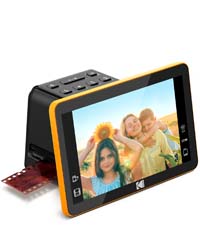
The KODAK Mini Digital Film & Slide Scanner is a compact, all-in-one device designed to convert a wide range of vintage film formats—including 35mm, 126, 110, Super 8, and 8mm—into high-quality 14 to 22 megapixel JPEG images. Featuring a 2.4-inch color LCD screen, it allows users to preview and edit scans on the spot without needing a computer. Equipped with multiple easy-load adapters and supporting SD cards up to 32GB, it streamlines bulk digitization of slides and negatives. The package includes international power adapters and connectivity cables, making it a versatile tool for preserving and sharing analog memories in the digital age.




| ASIN | B07JJBGG1D |
| Best Sellers Rank | #123,197 in Office Products ( See Top 100 in Office Products ) #70 in Slide & Negative Scanners |
| Customer Reviews | 4.2 4.2 out of 5 stars (3,459) |
| Date First Available | October 18, 2018 |
| Is Discontinued By Manufacturer | No |
| Item Weight | 1 pounds |
| Item model number | RODFD20 |
| Manufacturer | Kodak |
| Product Dimensions | 2.76 x 5.91 x 7.48 inches |
S**R
Easy to use AND it works!
Wow! I've scanned "old school" with a flat bed scanner for years. This was freakishly fast and easy! I scanned hundreds of slides in one day. The quality is good. Good enough for photos, etc. Rather than scan at 4"x6" @ 300 pixels/inch as I normally would, it scans 80"X53" @ 72 pixels/inch, or 3840px X 5760px. If you're like me and have a few important family history photos you'd like scanned with more pixels, pull out your flat bed scanner. But this one does a great job, unless you're trying to zoom in on a photo to crop out that one person. I could not believe how fast I zipped through the photos. And all those pictures are now digitized and shared on Google Photos & my Apple Photos. I did not have the time to see if I could hook it up to my computer and scan them straight in. I put in a memory card and about every 33 photos, pulled it out and added it to my computer. That's probably the hard way, but I only had one day to do this, and I just didn't try to make that part easier. Scanning was so easy, I just didn't care! I would definitely buy this again, and will certainly tell others about it. This is a life changer and for the price? AMAZING!!! Pros? Did I say this was FAST?!! Easy. Great job. Cheap in comparison. It made the job accomplishable. Light & portable. Cons? No zooming in, no increasing pixel depth.
N**Y
Good for purpose but don't expect exhibition prints
OK, folks, here's the deal. This scanner functions very well for its intended purpose. It creates files that are perfectly suitable for posting online, sharing via email, and printing at relatively small sizes. 8 x 10 would be pushing it. I see that Amazon is selling much cheaper units that appear to have the same specs. I paid extra for, frankly, the Kodak brand, should I need customer support (not so far). Pluses: it's quick to use; you can digitize quite a few negatives or slides in a relatively short time. The files are adequate for online posting and small prints. Minuses: it doesn't clean up dirty, scratched, or dusty source material. You really need external editing software to produce adequate images. I use Lightroom, which is excellent for correcting the color casts that appear on many scans, removing dust spots and scratches, and dialing back the over-saturation on many images. There's a lot of editing software out there that can do the same. Don't expect exhibition quality prints. However, I've attached a scan which came out quite well, and shows the resolution and color capability of the unit. I would expect that I could make a decent 5" x 7" print from this file. Do not use the 22 MB file size. It gives you no more detail, and if you need to up-res your file for printing, your editing software will do a much better job. If you scan something, and think, "Wow, that's a great slide/negative. I'd like to make an 11" x 14 print from it," then stop there and either send the slide/neg to ScanCafe or a similar service, or purchase an Epson V600, which will yield a much higher quality scan. But I've sent a number of scans of old negatives to folks pictured in them, and they've asked for larger file size copies from which they can make prints, so the quality is still pretty good. Bottom line: if you have realistic expectations and are willing to spend a little time in editing software (don't bother with the unit's editing controls), you will be quite happy with the results.
R**N
It works as described and overall is easy to use
I have only used the KODAK Mini Digital Film & Slide Scanner, which Converts 35mm, 126, 110, Super 8 & 8mm Film Negatives to jpg format, for converting 35 mm color slides taken with type 135 color slide film. My slides are mounted on commercial slide mounts used for slide projectors. I am able to process approximately five to six slides per minute when I am set up and organized by having the projector slide carousels that my slides are stored in sitting on a table next to the converter so I can pull the slides out and insert them in the converter and then put the converted slides back in the carousel in proper order as they are automatically pushed out of the converter. I haven't had any difficulty using the converter using the internal memory since I do not have an SD card like are used in many digital cameras. The internal memory in the converter will hold approximately 45 color photographs at 14 megapixel image quality before it has to be uploaded into a computer, and then formatted before the converter will input more photos into memory again. The instruction book DOES NOT have instructions on how to format the internal memory, and I had to experiment before discovering how to do this, which is to use the same procedure for formatting an external SD card. I do not recommend using the converter for doing entire Super 8 mm and 8 mm movies because each frame must be done individually, which would take many hours to do just a few minutes of movie time. Super 8 movies run at 24 frames per second and 8mm movies run at 16 frames per second, so for each minute this means that 1,440 and 960 photos, respectively, must be processed one at a time for each minute of movie. However, for obtaining one or just a few frames from a movie, the scanner is perfectly fine, but the image quality will not be any better than what is in the movie that is usually poor to begin with. My overall opinion is that the KODAK Mini Digital Film & Slide Scanner is easy to use and is a good device for which it is intended.
J**R
This scanner is compact and very easy to use. Picture quality is excellent, and brightness/contrast features are very helpful for old film which has degraded a bit. It's most important feature for me is the capacity to scan 110 slides (not just negatives), so thank you to Kodak for adding this.
U**O
Se volete tramutare in digitale qualsiasi vostro supporto,e' il prodotto perfetto!
E**S
I purchased the Kodak digital film and slide scanner in order to convert slides and photo negatives dating from the 1960s right up to the early 2010s into digital images on a SD card. I then uploaded the images from the SD card to my home computer system and created various photo albums using Google Photos. I was amazed at how clear the majority of the images and colours were after conversion. There were a few that were not quite right but the built in photo resolution, brightness and colouration editing processes allowed me to adjust and improve these aspects where necessary. I was able to recreate many happy family memories which I've been able to share with family members via mobile phones and by displaying on a smart TV using screen mirroring or the Miracast for android to tv app. The only downside to this project was that some of the older slides were framed in plastic folders which were too thick to be placed securely into the slide holder to enable it to be closed properly. I had to open these slides up and transfer the film to more modern slide frames. Overall, however, I am very pleased with this purchase and am impressed by how easy it was to use the scanner and the fantastic quality of the computerised digital images produced by it. We now have 60 years worth of family memories available for easy viewing almost at the flick of a switch !
W**I
It's quick and easy to learn to use and can adjust to color/exposure easily. It's not made all that solid and seems very similar to my other one that was less than half the price.
M**U
画像確認には良い。
Trustpilot
1 month ago
2 weeks ago



