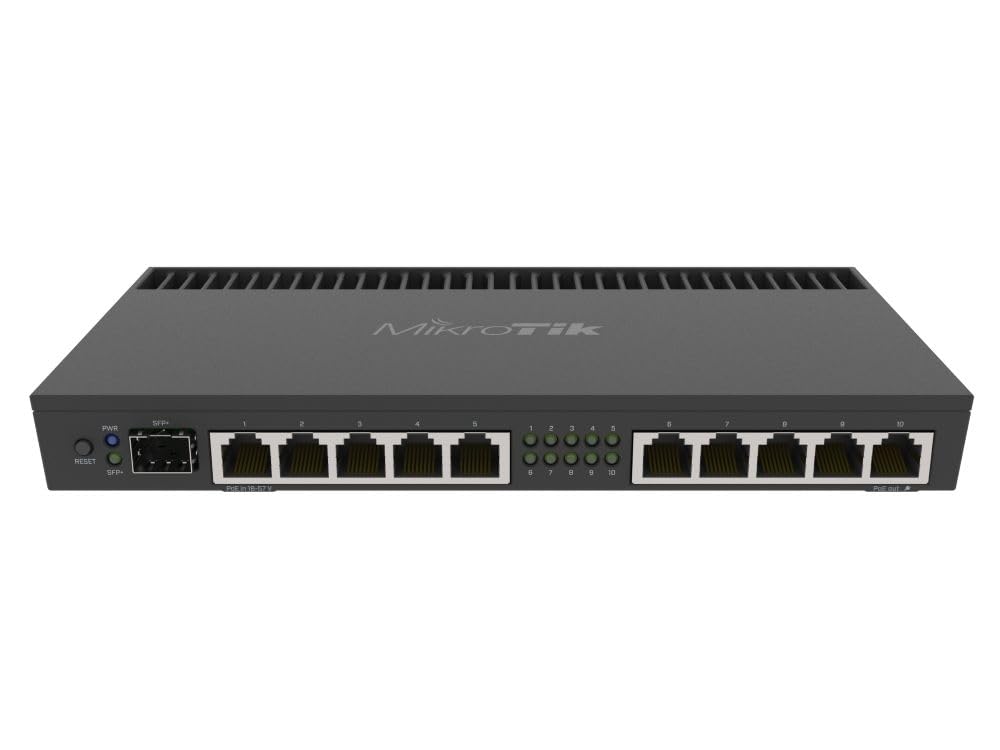
🚀 Power your network like a pro — speed, security, and style in one sleek box!
The MikroTik RB4011iGS+RM is a powerhouse router featuring a quad-core Cortex A15 CPU, 1GB RAM, and 10 Gigabit Ethernet ports plus a 10Gbps SFP+ interface. Designed for professionals and small offices, it offers IPsec hardware acceleration for secure VPNs, PoE output on port 10, and a compact, rackmountable matte black metal enclosure. Ideal for users demanding high-speed, reliable, and secure wired networking with future-ready connectivity.
| ASIN | B07HBW2NTR |
| Best Sellers Rank | #44,527 in Electronics ( See Top 100 in Electronics ) #310 in Computer Routers |
| Customer Reviews | 4.8 4.8 out of 5 stars (440) |
| Date First Available | September 14, 2018 |
| Is Discontinued By Manufacturer | No |
| Item Weight | 1.39 pounds |
| Item model number | RB4011IGS+RM |
| Manufacturer | Mikrotik |
| Product Dimensions | 4.72 x 8.98 x 1.18 inches |
T**R
Fast little router with lots of options built-in.
This is a great little router. If you are concerned about it being too difficult to setup, they have a very nice 'getting started' program where basically you just enter in some simple details and the router is up and running. It literally takes minutes. I opted for this router because I wanted a box that was able to run from existing POE on my network and one that had the speed to give me the full 1 gig bandwidth I pay for while at the same time providing robust firewall and port forwarding so I don't have to compromise on what I am able to do on my LAN. The SFP port is exactly what I needed to connect to my ISP's network. The box has 10 etherports so if you don't have many devices to connect, that's all you will need. I have the SFP port to my ISP, and the 10 network jacks are for the LAN. Very simple, and very fast.
W**E
Powerful Home/Small Office Router
I have been using this new Mikrotik RB4011 for a month now, and it was a much needed upgrade. I have Spectrum 100/10Mbps internet service a my old router did not have the CPU power that this one dose, so no more slow speedtests. I am now seeing consistent higher than advertised results. I have also noticed that pings in online games are lower and website page loads are faster. This is a device that should be set up though by some one who knows a little about networking, or knows a lot about networking and there is a comprehensive GUI called WinBox or the ssh console to setup this router to do all kinds of things. I have mine blocking known spam/hacker IPs and I block ad servers with the DNS server. I also use the VPN for when I need to get something from home. I have not use the POE yet but plan on plugging my Mikrotik Access Point into it when I run a longer cable. We have a lot of Mikrotik devices at work and they are solid pieces of equipment. In my photos you can see I have other Mikrotik devices that are old and still work great, but don't have the CPU for routing like this dose. This router dose get warm, there are no fans but a big heat sink, even with no load it is warm. The power connector is a big block and has a way to keep from pulling out, but I would have liked to see a C14 computer connector as this is a higher end router. I was thinking of waiting for the version of this router with wireless, but I didn't need it because I have the central AP, it is a little more, and wasn't available yet. I also don't have a use for the ears but it is nice to have the option. If you are looking for a good home or small office router this is a great and powerful option.
G**I
Great Device!
This thing is amazing! I cannot believe how much functionality you get in such a small device at that price. Every network geek out there should have one of these in their toolbox somewhere.
A**E
This is what you want for fast internet
25 May 2020: I recently increased my Internet speed to 500mbps and I wanted to actually use that speed, so I purchased a gigabit TP-Link Safestream Multi WAN VPN Router. Unfortunately, it would only pass 78mbps. I chatted with support we tried all their ideas to no avail. Of course, they blame my cables or switches or computers or whatever. They wanted me to perform a complex test of installing special software on two computers and hooking them exclusively to the router. Too much work. I returned it and purchased the MikroTik RB4011 Ethernet 10-Port Gigabit Router (RB4011iGS+RM) and it worked perfectly right out of the box (proving there is nothing wrong with my stuff as I expected). The MikroTik hardware screams quality, with a gadget to keep it from coming unplugged, and a heavy-duty heat sink, which I've never seen before on a router. It is infinitely configurable with the most complex GUI I've ever seen, but as I said, it works perfectly without changing anything at all! I highly recommend it.
C**E
Great SOHO router!
This router is not for the non-techy but those who enjoy a highly customizable device using terminal and a program called winbox will love it. It comes with two switch chips and is very capable; mikrotik recommends setting up two bridge interfaces, one for each switch and from there it’s up to you. VLANs are hard to figure out at first but once you do it once, it becomes easy. This device meets our small business needs perfectly - speed, firewall, fine network segmentation, built-in wireguard for secure remote access. Highly recommend!
C**0
very good Enterprise device, terrible rack mount kit.
Unlike the standard rack setup of the MikeoTik 3000rm or the Ubiquiti ER4 rack mount kit; the "Kit" on this is a very flimsy design with only 1 screw on just the bottom of each arm assembly to hold the rack mount to the device; there is no top screw mount. This should really have 2 on top and 2 on bottom of each side. Also the fit to the device has a lot of slop to it and not a tight fit. The device itself is substantially built and this "feels" like an afterthought. Best to wall mount or shelf mount the device instead of using the rack ear kit. The rack mount "kit" needs a substantial implementation redesign or the 4011 needs a bigger chassis with typical rack ears.
R**K
Finally Something Worth the Money
We have been using 5 of these routers for 1 to 3 years. Never an issue, set up was easy, works better than expected. A few tricks to successful configuration, but after a few tweaks and a round or two of reconfigure, all has been working great. You really can't beat this router for future, form and function. Not recommended for a novice, unless you intend for this product to be a learning experience. For those with moderate levels of expertise in router and network configuration, this will do most anything you will want it to do. I highly recommend this product.
I**.
Delivery is quick . Thank you for the delivery . I love this item .
F**T
Les supports pour retenir le router en place dans un boitier 19 pouces ne sont vraiment pas efficaces. Le routeur n'est retenu aucunement. Il me faut une meilleure soltution. J'attends votre retrour. Merci
T**Y
This is a decent router from Mikrotik with lots of powerful features. There's also a wireless version of this router but I personally found the UniFi wireless solution works much better than Mikrotik's and decided to stick with UniFi instead. Hardware You do get a lot of hardware for your money, with a quad-core CPU, 1 GB of RAM, 10GbE SFP+, 10 Gigabit Ethernet etc., Port 10 also supports Passive POE out (which works fine with UniFi kit too!). The LED's on the RB4011 are really bright and can light up a house at night. There is no way to turn the LEDs off and I've ended up using some black electrical tape to cover them up. The device is passively cooled and the case works as a heatsink which means it's silent but it does get quite warm. Mine spends most of its time around mid 30 degree Celsius. Getting Started I simply connected my PC to port 2 on the RB4011 and the router issued an 192.168.88.x address. Using my browser I was able to connect to the RB4011 and begin the basic configuration in WebFig. Out of the box the MikroTik has a couple of quick start options which will give you the very basic config but this device really isn't for beginners and without a basic understanding of routing, switching, DHCP etc. you will struggle to configure this device any further. Routing The MikroTik RB4011 a very powerful router with an insane amount of features. The device runs MikroTik's RouterOS and offers several routing features only normally found on more expensive enterprise level products. The routing performance of the RB4011 is great and even ploughing several gigabits per second through it the CPU barely seems to break a sweat. From what I can tell MikroTik's routers are excellent at routing and is one of their strong points. Switching The RB4011 is not going to be great as a switch and if you specifically require wire speed switching you will be better off buying a dedicated device instead. The reason why the RB4011 is not a great switch is because of the use of its 2 x Realtek RTL8367 chips. These chips do not support hardware offloading when you are using VLANs and therefore any switching and inter-VLAN routing is performed by the CPU via one or more bridges. The block diagram for the RB4011 also indicates that ports 1-5 and 6-10 are both connected via 2.5Gbs links back to the CPU so this means you will never be able to achieve full switching speed for all 10 ports. Bridging Be prepared to learn about bridging with the RB4011. For most configuration scenarios, ports and VLANs that you want to route between (including the 2.4GHz and 5Ghz Wireless interfaces) need adding to a bridge which performs software based switching. Although the concept of PVIDs, tagged and untagged VLANs are heavily used with the bridge, the implementation may take a little getting used to and is not as obvious as other products. It does seem to work really well though. Management Tools There's a few choices for managing MikroTik devices. WebFig is management GUI built into the device and can be accessed via your browser. WinBox is an external application downloaded from MikroTik's website that provides a multi-window interface for managing the device. There's also an Android app which also allows you to fully manage your device (and looks very modern compared to the other options). Out of the GUI options I do prefer to use WinBox but it does have quite a 'legacy' look about it which can be distracting but it's actually very responsive and feature rich. You will definitely want to learn the CLI on RouterOS which is different to every other router or switch I've ever used and feels a bit more like a programming language than configuring a switch. You can even create scripts to perform certain tasks if required. Logging and debugging tools I have to say that MikroTik provides much better logging and debugging functionality in RouterOS than I've seen in various other products. I've found the debug logging and build-in tools such as 'Torch' incredibly useful for diagnosing what's (or not) going on, compared to say EdgeRouter and the majority of home products (Netgear, DLink etc.) Support/Updates MikroTik is not as common as other manufacturers and their support channels do seem much narrower. You will find far less configuration examples online of how to achieve certain scenarios. The forums are also full of people asking questions with either no replies or being blamed for misconfiguration when there are bugs in hardware or software affecting lots of people. For me it doesn't inspire confidence in getting support when I need it and you should definitely consider if that is important to you. MikroTik do release regular updates to RouterOS though with different branches (stable, long term, testing and development) so if you do experience issues there's a chance it will eventually get fixed. It's a decent router with lots of features and technology and I highly recommend it. Pros: - A lot of hardware for your money - 10GbE SFP+ port - 10 x Gigabit Ethernet ports - Decent performance despite being software based switching - Fanless design so silent in operation - More features and functionality than other products in the same class - Regular software updates with different branches (stable, long term, testing and development) - RJ45 serial port on the rear of the device Cons: - Fairly steep learning curve and unlike anything else - Poor quality switching chips - LEDs cannot be turned off - No USB port for 3G/4G dongle - Serial cable not supplied
O**R
Très content de ce routeur qui rempli son job à merveille. La prise en charge de RouterOS et l'ouverture des ports ou de certains services (comme le SIP) sont un peu complexes et nécessite pas mal de documentation voir des échanges sur le forum. Mais au final ça en vaut la peine. Je recommande fortement ce produit pour toute personne voulant sécuriser/personnaliser son réseau domestique/entreprise, mais certaines compétences techniques sont nécessaires Ce matériel ne s'adresse clairement pas aux novices.
I**C
L'ho acquistato per fare piccoli esperimenti con le reti, il funzionamento è impeccabile. Va detto che è un prodotto che va programmato per sfruttarlo al meglio. Volendo si può sfruttare la programmazione di fabbrica ma così facendo non lo si sfrutta pienamente. Avevo letto che si scaldava molto ... FALSO.
Trustpilot
1 week ago
5 days ago



