
DOWNLOAD THE APP


Customer Services
Copyright © 2025 Desertcart Holdings Limited
DOWNLOAD THE APP
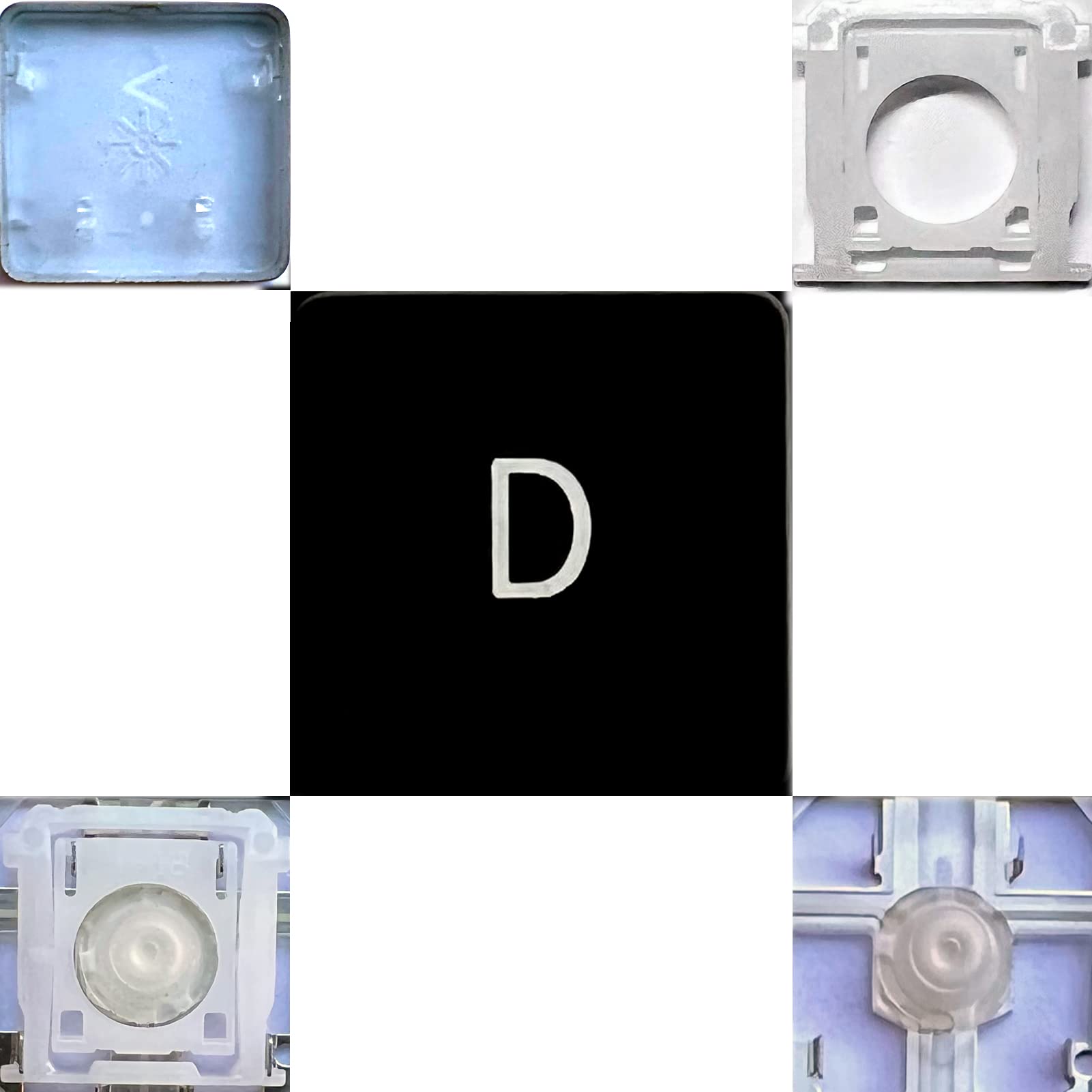
⌨️ Upgrade your MacBook keys — because every keystroke deserves perfection!
Dolphin.dyl Replacement Individual Key is a precision-engineered key for MacBook Air and Retina MacBook Pro models from 2012 onward. Featuring the latest white hinge piece for enhanced stability, it offers easy installation and optional free rubber cup buttons. Ideal for restoring your keyboard’s original feel with expert support to ensure perfect compatibility.
| ASIN | B07Y6SLQ75 |
| Best Sellers Rank | #656 in Computer Keyboards |
| Customer Reviews | 3.2 3.2 out of 5 stars (151) |
| Date First Available | September 21, 2019 |
| Item Weight | 3 ounces |
| Manufacturer | Dolphin.dyl |
| Product Dimensions | 1 x 1 x 1 inches |
C**Z
Right size, Perfect fit
So my kitty cat, Harvey, loves to lay on my laptop and apparently his little claws hooked right under the keys. And I couldn't find the hinge part of the key because my room has the shaggy kind of carpeting. After a week of looking, I decided to order this key. It came with the key and hinge. It does not have the little rubber piece but that's okay because I had found mine. It was very easy to install. And works perfectly like nothing ever happened and like if it's always been there. It came new and the person who shipped it made sure it steady and not shaking around by taping it to a piece of card stock. I also decided to buy a keyboard cover while I was at it but that's a review for another seller. This was for a MacBook Pro A1502
D**4
MacBook only
Didn’t see that this was for a MacBook until after it came and noticed it didn’t work. Also, they will let you return it but YOU HAVE TO PAY THE RETURN POSTAGE!
D**Y
Silicone cup missing
I wish that i could send the screenshot where it says the rubber silcone cup was included. Nowhere does it say you have to request for it. I'm livid because this was the piece that i really needed.😡. 2 stars for fast shipping.
@**H
Worked perfectly on my (2012) 13” MacBook Air, key feels natural when typing, visually identical to Apple OEM
My wife has a 2012 MacBook Air and her “F” key was kindly removed by (then) 2 year old son. Subsequently the MacBook Air sat around in corners feeling neglected. This (very inexpensive) replacement key (and switch mechanism) worked perfectly. I did have to email and request for the replacement rubber bumper (which sits underneath the key), but the seller was very quick to respond and accommodate me. Not everyone will need the rubber bumper replacement, hence why it is not included. Now the MacBook Air is back in daily use :) While some may ding a star for not having instructions included, you can easily find dozens of How-To videos on YouTube.
A**R
Didn't fit
Wrong size didn't fit
A**N
Fits my HP 15.6” Laptop Keyboard
This fit perfect for my HP 15.6” 15t Series Laptop. Tech stores wanted me to pay $180 to replace the entire hand rest of my laptop just to fix one key when this product costed $11. Even though this key doesn’t match the font, it still does the job for my laptop. It does feel a tiny bit different to press than the other keys but you don’t really notice when you’re typing a lot. Hopefully it lasts!
H**H
Does not fit (wrong size and fitting)
The key sent by you (left command key) does not fit into my keyboard. I had specific 2019 MacBook Pro (Model Identifier:MacBookPro15,2). The key sent is smaller and the assembly is different than my existing keys.
S**N
Make sure you just need the two pieces
The key is an exact match for the macbook air mid-2013 it was needed for. Be careful though, this listing doesn't include the little rubber springy piece. If your key fell off but the little rubber "nipple" is still there, then it is probably okay. Otherwise you'll need a third piece that isn't included. I can't imaging that piece is terribly expensive, it would be nice if the seller updated this listing to include all three pieces. Search youtube for a video on how to install this key. There's one from another keyboard replacement company that shows the process in detail. This is relatively straightforward to do, but you will need tweezers, a very small (think eyeglass repair) screwdriver, and possibly a magnifying glass.
Trustpilot
1 day ago
1 month ago