Some deliveries may take a little longer than usual due to regional shipping conditions.

DOWNLOAD THE APP


Customer Services
Copyright © 2025 Desertcart Holdings Limited
DOWNLOAD THE APP


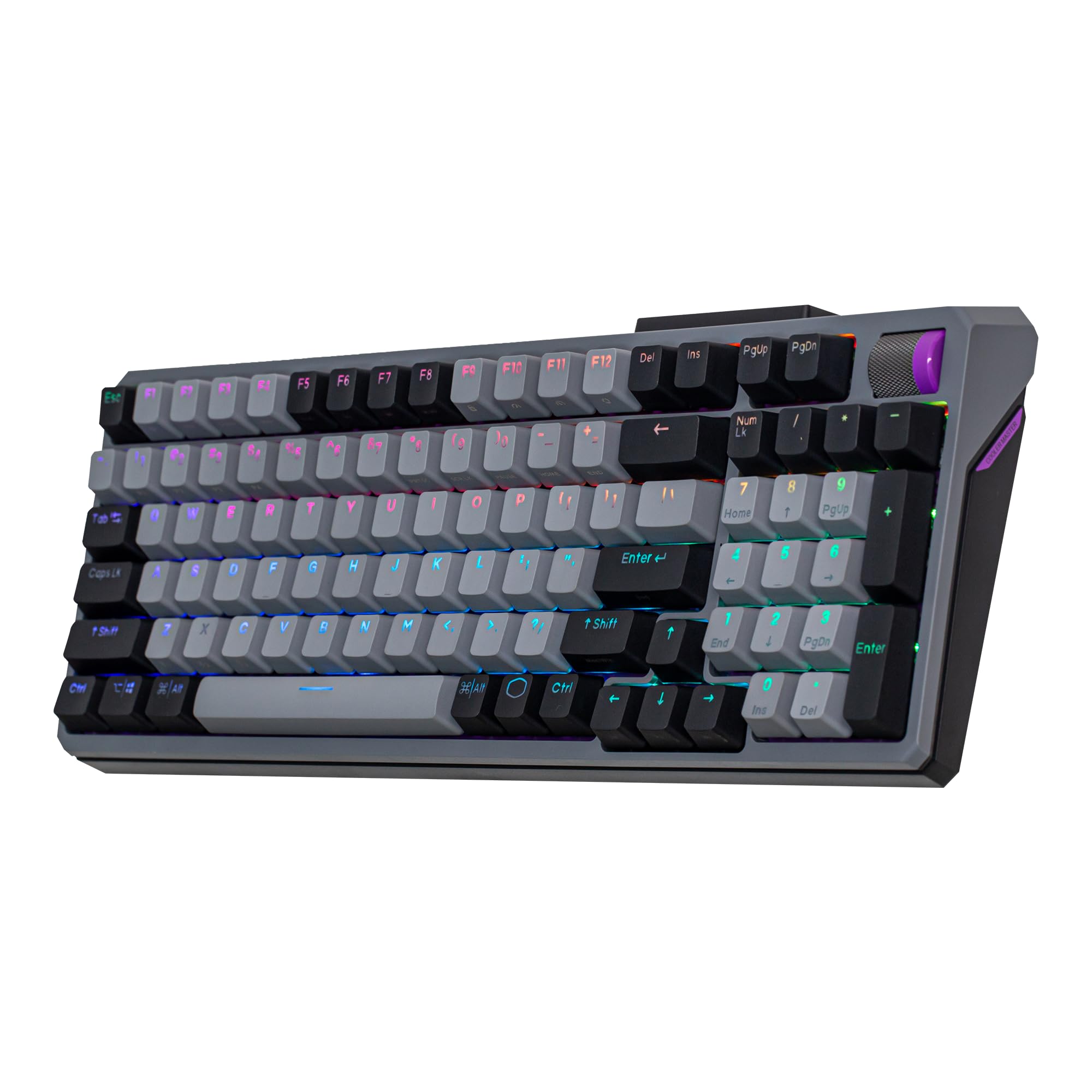


⌨️ Elevate your desk game with the MK770 — where sleek meets smart connectivity!
The Cooler Master MK770 is a premium 98-key wireless mechanical keyboard featuring hot-swappable Kailh Box V2 Soft Click White switches, hybrid tri-mode connectivity (Bluetooth 5.1, 2.4GHz wireless, and wired USB-C), and a compact layout that retains a full numpad. Designed for professionals and gamers alike, it offers quiet, cushioned keystrokes with silicone shock absorbers, customizable RGB lighting controlled via a multifunctional roller, and seamless OS compatibility for both Windows and macOS. Its modern, space-saving design and versatile connectivity make it a standout choice for multitasking millennials seeking productivity and style in one package.


| ASIN | B0CTN3MKDS |
| Are Batteries Included | Yes |
| Batteries | 1 Lithium Polymer batteries required. (included) |
| Best Sellers Rank | 169,877 in Computers & Accessories ( See Top 100 in Computers & Accessories ) 2,718 in Keyboards (Computers & Accessories) |
| Brand | Cooler Master |
| Colour | Soft Click White |
| Customer Reviews | 4.2 4.2 out of 5 stars (115) |
| Date First Available | 16 May 2025 |
| Delivery information | We cannot deliver certain products outside mainland UK ( Details ). We will only be able to confirm if this product can be delivered to your chosen address when you enter your delivery address at checkout. |
| Guaranteed software updates until | unknown |
| Hardware Platform | Laptop |
| Item Weight | 1.05 kg |
| Item model number | MK-770-GKKW1-US |
| Lithium Battery Energy Content | 4000 Milliampere Hour (mAh) |
| Lithium Battery Packaging | Batteries contained in equipment |
| Lithium Battery Weight | 45 Grams |
| Manufacturer | Cooler Master |
| Number Of Lithium Ion Cells | 1 |
| Number of USB 2.0 Ports | 1 |
| Power Source | Battery Powered |
| Product Dimensions | 38.07 x 14.05 x 4.29 cm; 1.05 kg |
| Series | MK770 Kailh Box V2 Soft Click White Switches |
D**H
I’ve had this for about a month now and I love it so far. I work from home and use this keyboard on the daily, both for work and gaming. The keys are wonderfully clicky, plus it comes with 8 extra silent switches as well as a key and switch puller to swap them if need be, I personally have put a silent switch on my space bar, as it’s probably my most used key and when jumping in games the clicky sound did start to annoy me lol. It has three modes for connecting to your computer, a wired setting, a Bluetooth setting, and also one of those little usb things like a mouse. I haven’t tried the Bluetooth but with the other two settings I’ve never had any kind of lag or delay issues. It comes with instruction on all of the extra buttons and how to change the lighting settings, which was very helpful, and overall I find it very easy to remember the functions of the specialty keys. The lighting is great, once you figure it out what’s what it is very easy to change the lighting settings, and has some great presets, as well as you can manually change the color by using the “red blue and green” keys to make it exactly the color you want. Overall, at ~80 it’s an absolutely amazing price for a keyboard I foresee a long future of continued use.
S**Y
After spending weeks researching for the perfect keyboard, I ended up finding the Cooler Master MK770 almost by accident — and honestly, it turned out to be a hidden jewel in its price range. Since I struggled to find good real-world reviews when I was shopping, I’m writing this to help anyone else in the same situation. My Requirements ============== I needed a keyboard that: • Works on both Windows and macOS without constant remapping • Provides an excellent typing experience for heavy daily use • Has a numpad for my workflow (I rely on custom AutoHotkey mappings and enter numbers frequently) • Can handle occasional gaming • Isn't overpriced like some premium 200+ USD options Gaming keyboards were either TKL (missing productivity keys) or Windows-only. Productivity keyboards like Logitech MX series lack a 2.4GHz dongle or wired mode. So finding all these features in one board seemed impossible… until the MK770. Pros ==== • True Windows/macOS compatibility Switching is dead simple — just press Fn + Shift. No need for remapping every time. • Dual OS legends printed on the keycaps Unlike many keyboards, this one includes both Mac and Windows labels natively. No swapping keycaps or guessing. • Amazing typing experience The factory switches feel soft, creamy, clicky, and genuinely satisfying. One reviewer even called it the best typing experience they’ve had in years — I agree. • Tri-mode connectivity 1. Bluetooth 2. 2.4GHz wireless 3. Wired Bluetooth is great for normal use and less demanding gaming, but you can switch to 2.4GHz or wired for competitive gaming. • Excellent sound dampening Very quiet and refined for a board in this price category. • Solid plastic build Not metal, but definitely sturdy and well-made. • Bluetooth pairing up to 3 devices Switching between them is nearly seamless. • 4 onboard profiles Great for different setups or custom lighting/macros. • MasterPlus software support Includes remapping and macro creation. • 3-way multifunction roller Controls volume by default and can be remapped (could potentially be customized to do scrolling via AutoHotkey, haven't tested it yet though). • Compact 95% layout Keeps the numpad and all major keys but trims unused spaces. • Modern, clean aesthetics This was the deciding factor for me over the YUNZII YZ98. • Function row is not offset This is a big plus for me. Unlike many keyboards this means no muscle memory relearning and no mispressing when switching between keyboards. Cons ==== 1. Terrible battery life (the biggest downside) Even though it's advertised as 4000 mAh, it drains extremely fast. With RGB: expect daily charging, maybe more My workaround: • Static lighting at the dimmest setting • Auto-sleep at 3–5 minutes This gives me about 2–5 days per charge. 2. MasterPlus software is weak • Doesn’t refresh battery or brightness status when changed from the keyboard • Requires restarting the app to update info • No battery percentage indicator Workaround: connect via Bluetooth → check OS Bluetooth settings for percentage 3. No dedicated CapsLock/NumLock indicators Instead of an LED, the key just flashes white or disables RGB briefly. You can’t tell whether the lock is currently on — it’s very inconvenient. 4. Some users reported sluggish input Not everyone experiences it, but it’s worth mentioning. 5. My wired-mode issue (may not affect others) The first time I plugged it in wired, it charged but didn’t register inputs. After several keyboard system resets and replugging, it worked and never failed again. Likely a first-time driver installation glitch. Conclusion ========= The Cooler Master MK770 delivers a rare combination of: • Full OS compatibility • Great typing • Numpad productivity • Gaming capability • Attractive design • Tri-mode connectivity If you can tolerate the battery and software flaws, this keyboard is one of the best options in its price bracket — especially for mixed Windows/macOS users. Will I keep it? Probably yes, because nothing else meets my exact use case without going above $200. Would I buy it again? Probably not, mainly because of the battery and software — but for now, it’s still the best option for my workflow.
J**O
I had been looking for a creator kit for a while now and decided to take a change on Cooler Master because of the modularity. So far it has been a great addition to my setup. I’ve been using it for a little over a week now and I love how modular it is and being able to move the parts around is super handy, especially for multi-purpose user like me that’s using it for gaming and photo editing. The buttons and dials feel solid as well. Setup took a bit of time, and the software could be smoother, but once it’s going, it works great.
L**C
Was looking to replace my Corsair K70 Mk.2 with something more solid. My requirements were: - Have Bluetooth connectivity - 2.4 GHz connectivity - Wired connectivity - Must have USB-C - Be from a reputable brand This keyboard fulfils all my requirements and I’m very happy with the build of it. Don’t be fooled by it’s plastic body, it’s very solid. If you are a programmer, home and end keys are on the numpad. THE ONLY THING… is that the keyboard doesn’t prop up high enough with the feet extended. So for that I give it a 4 star rating.
A**A
No, es mucho más la publicidad que lo que se puede hacer. Las partes no encajan como uno quiere sino a cómo reciba la corriente. Un error comprarlo. Además no tiene una base en donde el panel se pueda visualizar bien en vertical o inclinado
Trustpilot
3 weeks ago
2 months ago