
DOWNLOAD THE APP


Customer Services
Copyright © 2025 Desertcart Holdings Limited
DOWNLOAD THE APP
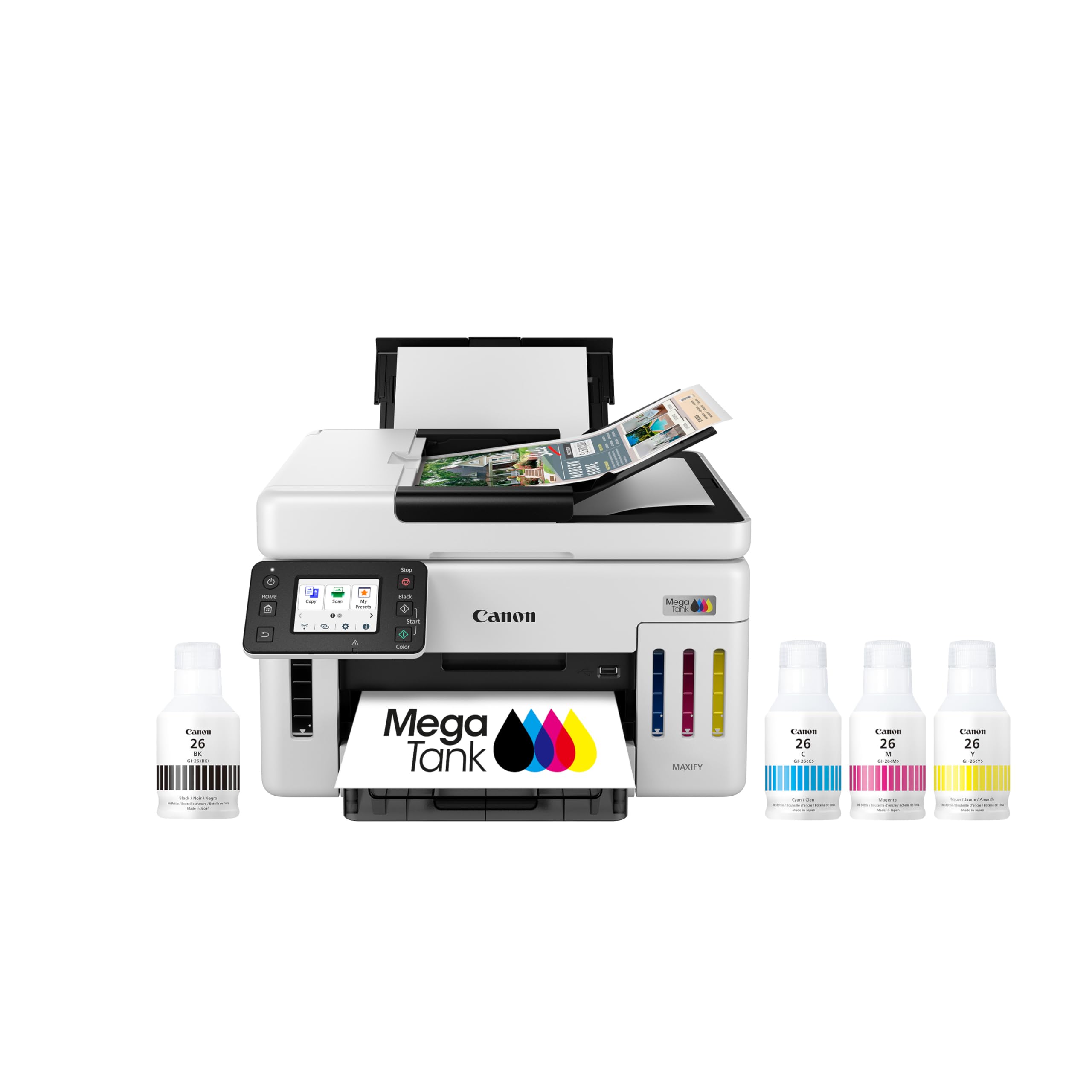
🖨️ Print smarter, not harder — stay ahead with Canon Megatank GX6120!
The Canon Megatank GX6120 is a wireless all-in-one inkjet printer designed for professionals who demand reliability and efficiency. Featuring up to 2 years of included pigment ink, a sharp 2.7” touchscreen, and fast print speeds of 24 ppm (B&W) and 15.5 ppm (color), it delivers vibrant, water-resistant prints. Its compact design fits any workspace, while Wi-Fi connectivity and an auto document feeder streamline your workflow. Ideal for busy managers seeking cost-effective, high-quality printing, scanning, and copying in one sleek device.

| ASIN | B0DSXR7ZDG |
| Additional Printer Functions | All In One |
| B&W Pages per Minute | 24 ppm |
| Best Sellers Rank | #67,003 in Office Products ( See Top 100 in Office Products ) #68 in Ink Tank Printers |
| Brand | Canon |
| Built-In Media | Ink Bottles |
| Color | White |
| Color Pages per Minute | 15.5 ppm |
| Connectivity Technology | Wi-Fi |
| Customer Reviews | 4.0 out of 5 stars 353 Reviews |
| Display Type | LCD |
| Dual-sided printing | No |
| Duplex | Automatic |
| EU Spare Part Availability Duration | 1 Years |
| Ink Color | cyan, magenta, yellow, black |
| Item Dimensions D x W x H | 15.8"D x 16.2"W x 10"H |
| Item Type Name | Inkjet Printer |
| Item Weight | 25.6 Pounds |
| Manufacturer | Canon |
| Maximum Copy Resolution Black and White | 600 x 600 dpi |
| Maximum Copy Resolution Color | 4800 x 1200 dpi |
| Maximum Copy Speed Black and White | 24 ppm |
| Maximum Media Size | US #10 |
| Maximum Print Resolution Black and White | 600 x 600 dpi |
| Maximum Sheet Capacity | 50 |
| Maximum print Resolution Color | 4800 x 1200 dpi |
| Model Name | MAXIFY GX6120 |
| Model Number | 6882C002 |
| Model Series | GX |
| Number of Trays | 1 |
| Other Special Features of the Product | Display Screen |
| Paper Size | 4” x 6”, 5” x 5” (Square), 5” x 7”, 7” x 10”, 8” x 10”, Letter (8.5” x 11”), Legal (8.5” x 14”), U.S. #10 Custom Size: Width: 3.5” - 8.5” / Length: 5” x 47” |
| Print media | Paper (plain) |
| Printer Connectivity Type | Wi-Fi |
| Printer Output Type | Color |
| Printer Type | Inkjet |
| Printing Technology | Inkjet |
| Resolution | 4800 x 1200 |
| Scanner Type | Automatic Document Feeder |
| Special Feature | Display Screen |
| UPC | 013803381276 |
| Warranty Description | 3 Year Limited |
| Warranty Type | Limited |
G**U
Great quality and cost efficient
Bought this to replace an old Epson all-in-one that still worked well but shut done unexpectedly when it said the waste ink pads were full. You can buy the parts but then need a code from Epson to reset. I actually got a code (only works with Windows) but it still insisted I bring it in for authorized service. Obviously no more Epson products in my home! There are fewer ink tank printers out there than regular cartridge printers, but it is well worth the cost and effort to find an ink tank printer such as this. Instead of 12 - 30 ml of ink in a typical cartridge (of which some is always wasted), you get 132 ml of each color and 167 ml black ink included with the printer. You can also see the ink level and can refill whenever you want, so no more frantic late night trips to Staples when you have a report due the next day. Setup is easier than it sounds. My computers and printer are all connected via wifi and each computer connects on its own to the printer. You initially fill the 4 ink tanks (bottles make it fool-proof) then print a page that it uses to check alignment. The instructions then tell you to download a program from Canon, which I did for my first computer. However, I skipped that step for my other computers (all Macs), as well as my phone, and they were all able to find the printer and connect almost immediately without having to download any additional programs or drivers. The downloaded Canon program facilitates printing and scanning, but really does nothing different or better than what already comes on the Mac. As others have mentioned, you need to go into settings and disable auto-off, so that the printer is able to respond to print jobs wirelessly. This uses minimal energy – less than a typical nightlight. Quality is great. I would have no concerns about using this for making handouts that contain print and graphics for business meetings. I've only printed photos on plain paper so far but they are vibrant and look very good. This machine comes with all pigment (as opposed to dye) ink. Pigment ink tends to cost a bit more, but the ink already comes included with the printer. Pigment ink also is more durable and UV resistant, and much less resistant to water smearing. (The HP tank printer that I looked at only used pigment ink for black, but dye ink for colors.) I purposely tried to smear the output from this printer with water, and was very pleased with the result. Scanning quality is very good and works with my Mac natively. And as expected, copy quality is also very good. If you need to change any settings, the touchscreen on the printer is bright and easy to use. One additional benefit of this machine is the rear printer slot which you can use for thick card stock that would typically not work in the paper tray. Overall, an excellent printer. The initial cost is higher, but the much lower ink costs make this a bargain in the long run. Highly recommended.
A**D
Bottom Line - I am impressed with this purchase - but a problem developed
This printer was delivered rapidly. It was sufficiently well packaged that nothing arrived broken. The setup instructions were a bit terse but I had no trouble understanding them. One tip - if you are setting up to use USB as I did, do NOT plug the USB cable in until the directions specifically tell you to do so. If you do, Windows will install its generic driver and that is not the driver you want. Just follow their directions and don't anticipate and you'll be fine. In my situation I have two desktop computers. Neither has WiFi but both have USB ports. While each desktop is on a LAN, I preferred not to use a LAN connection for this printer. Rather, I have a USB switch that switches a Canon Laser Printer and Fujitsu Scanner between each of the desktops. I wanted that switch to also select which computer drives this GX6020 inkjet printer. I had to install the Canon software on each desktop and, after that, everything worked beautifully. Windows would queue up a print job on a computer that was not connected to the inkjet - and printing would commence right away when the switch toggled. This pleased me. Others have reviewed the printer in detail. I'll observe that the B&W print quality for reports or other text printing is excellent. I use inkjet printer paper from OfficeMax with excellent results. The color printing is also very good especially since it is a 4 color printer (Black, Cyan, Magenta, Yellow). I print photographs on glossy photo paper with good results. Paper handling has been good. This printer has only two options for paper. There is a bottom mounted cassette that is typically used to hold your high volume paper - in my case, this is 8-1/2x11" paper. My use case has me randomly printing 4x6" photographs from time to time. There is no convenient place to keep this photo paper stored inside the printer. Rather there is a "rumble seat" that folds out from the rear of the printer into which envelopes, 4x6" photo paper, or other paper can be inserted. I found that I could store a dozen 4x6 sheets in this fold-out and just keep it folded out all the time. I don't like this because dust will settle on the top-most photo paper, but it works. The instructions weren't real clear on this next point: When you load paper into the cassette or into the "rumble seat" the printer will ask you to specify the paper time. Make certain you remember exactly what you selected. Then when you want to print something from Windows, your printer dialog box will let you specify the paper to use and the source. Make certain to use the exact same name in Windows that you used in the Canon setup. Also, tell windows to make the paper selection "Automatic" rather than specify the tray to use. If you tell Windows to print on "4x6 glossy photo" then the printer will look and see which tray contains "4x6 glossy photo" and will use that for your printing. I don't use the scanning or sheet feeding much but they work fine. The duplexing I do use a lot and that has been flawless. Like everyone else, I've done a ton of printing and haven't seen a measurable change in the ink levels. Bottom line: I'm impressed with this purchase. 5/30/25 Update - after almost 2 years of use, I'm starting to have issues with the print head clogging. I'm still using the original ink that came with the printer. In the past, doing a Deep Clean has been successful in restoring print head operation. However, now it is insufficient. I'll try removing the print head and soaking it on a wet paper towel to see if I can restore operation. I'll mention that I also have a Brother printer - in 5 years of intermittent use it has not clogged once. The Epson that I had before this Canon did not clog once either. Therefore, I suspect print head clogging could be an issue with this printer.
T**D
Tempermental Printer - DO NOT BUY
If I had it to do over, knowing what I know now, I would not have purchased this printer. UPDATED: 6/25/2025. DO NOT BUY THIS PRINTER - 1. current price is ludicrous 2. Uninstalled it after 2day's experience. Once again it stopped printing and the ever UNhelpful Canon online help suggested restoring my computer to a previous date. Have done this before for other reasons. After saving to my external hard drive I did a restore to 6/19/25 and after it restarted I met the blue screen of death I have had heard others refer to as kissing your computer goodbye. I turned the printer off waited a few minutes and rebooted and thankfully my computer started up perfectly. That sealed it - this printer is a piece of **** Original review: When it is working it is a great printer. But it is very temperamental. I have owned several other Canon and HP color printers and this is the first one that will be printing just fine and then suddenly stop printing. No matter what you try it won't print. Then 30 or 45 minutes later it spits out the page(s) you were trying to print. Another issue is the maintenance cartridge(which I had no idea existed). If the printer stops printing in color you will probably try the regular cleaning, then check the print head alignment and finally, because it takes a lot of ink, you opt for the deep cleaning (please try this b4 they have you manually trying to align the print heads) and it starts that process only to tell you it can't do it because your maintenance cartridge is full. First time you will learn that there is a maintenance cartridge. It's located in the back and you have to use a penny to unscrew the cover take it out and replace it. Unless you want to go get one fromyan office supply store, if that have it, it will be two days to get it (prime) from Amz. or Walmart. I recommend buying the two pack ($24) so you have it on hand because you will need it sooner than you might think. All my original ink cartridges are 2/3 full and already the maintenance cartridge must be replaced. All the other color printers I have owned have worked for years with only ink cartridges being replaced until they finally died or were to expensive to repair. This Canon is way to temperamental and high maintenance for my liking.
M**H
A Great All In One Printer
I have only had this printer 24 hours but so far I am very impressed. What really impresses me is the speed of copying / scanning. If you follow the directions and use your phone to get it setup it goes pretty smoothly. For the cost this is a great alternative to a high end photo printer which does one thing but definitely prints better photos but not by much. My wife and neighbors really couldn't tell the differences between GX6021 photo prints and a dye sub print. It is so convenient to load 4X6 sheets in the back and then go hang out in the family room watching TV and print pictures in the den. It is also super easy to scan and print using your smart phone. I could go on and on about all of the print, scan, copy, connectivity options but you get the idea. Not to mention the monster ink tank system. What is totally amazing and blows my two old printers out of the water is the plain paper color printing and copying. The above photo was taken with my phone. It is a 3D card that has actual ribbon and cutouts on it. On a whim to test the scanner operation and printer I did a quick copy on plain paper at 200 DPI. I was blown away with the results. The only minus I see so far is that it won't print borderless but I am okay with that considering the cost vs benefits and the ink savings. So far I am very happy I made this purchase. I will report back later if the printer fails in the near future.
N**R
AirPrint issues
This prints pretty well and the convenience of the ink tanks is good. I selected this model because a use a family member likes having the rear tray to print on card stock occasionally. I have had the yellow color get clogged and had to run a clean program which filled up the waste tank. I was not aware of a waste tank that must be purchased and replaced when it fills up when I bought this. I also have connectivity problems with AirPrint from my Mac and iPhones. It is haphazard whether it works each time I do not know if this the printer or the router (orbi 773).
A**N
This Printer is a Winner
In the 11-12 years since I last purchased a Canon printer a LOT of things have changed for the setup, and definitely for the better. Basically almost a plug and play - plug in the power cord and turn on and then follow directions on the printer screen. Maybe 10 munutes at most from out of box to up and running, and a good 5 minutrs of that is the printer doing callibration and alignment after ink is installed. Installation process and connecting to WiFi was seamless, and initial print quality looks very good. Did test run on a couple of documents, a photo, then tested the scanning function which also let me test the ADF. This thing is lightning fast with print speed. I am impressed! Set a tickler on my calendar to see long ink lasts and 🤞for positive results.
R**N
Canon GX6021 Great print quality, easy to use, sometimes "disappears from the network
EDIT: I dropped one star for this printer because recently it has "disappeared" from the network. Neither my wife or I can print from our computers when this happens. Usually, hocus pocus with powering down the printer, restarting our computers, or setting up wifi settings again (even though they are correct) as brought the printer back on line. My old Canon never had this problem. So far the quality and ease of use of the Canon GX6021 printer have been great. It was easy to connect to our wifi. I like that I can scan and copy a document using the document feeder on top of the printer. I've also used envelopes in the back paper tray and that has worked very well. The ink was easy to add. I will say to carefully check any new ink bottles you buy for this printer because not all of them have the same amount of ink in them. I purchased some replacement ink to had on hand and it was not the original 170 mL of black, and 135 mL of other colors but all 70 mL. I suppose that's OK but I'd rather be able to completely fill an empty tank if possible. The only real down side has been the printer shows that it's not connected (via the print menu in our computers) but the wifi icon shows it is on the printer itself. I've found power cycling the printer usually fixes this. It does go into an energy saving sleep mode and a few times has not been awakened by a print command. EDIT: It is happening with increasing frequency. (I'm giving it 3 out of 5 stars because of the random disconnects). I am happy with the quality and features but not happy about the disconnects.
B**G
Phenomenal printer, and the ADF works great as well.
I have owned 6 Canon printers over the last 20 years. The Canon MX922 was the best printer I ever owned. I have put this Maxify printer through its paces after reading the instructions, and it has come out on top. I have used 20 lb Cotton Bond paper, all the way up to cardstock, and this printer shines. I have found that this printer prints best on Hammer Mill premium color copy 28 lb paper. I use this printer mainly for novelistic timesheets and invoices. My customers love the crisp text print on snow white paper. It makes for a more professional look. I have printed four sizes of envelopes without any issues. This is the printer that you want whether for business or home use. Set up an installation on a computer was a breeze, as I set it up using my wireless router. A word of advice when using an Android tablet; download the Canon print app and the Mopria print app from the Google Play Store to get the best printing possible. I would recommend this printer to anyone wanting a good quality and robust printer that will most likely last a few years. I have already ran $815 sheets of paper through this printer without any jams or hang ups. UPDATE 5.7.2025: 12,500 sheets of paper, and still no problems whatsoever. This printer is turning out to be one of the best printers I have ever owned. I have never experienced any of the problems that other people are talking about in their reviews. At 11,500 Sheets, I have ran the maintenance program five times, and this printer still prints flawless text, and great presentations. I also print CAD drawings in color without any issues. Each CAD drawing is on an 8.5 x 11 sheet of paper, then I taped them together, take them to FedEx / Kinkos and copy the taped sheets for 36 x 24 blueprints. This is a lot cheaper than buying a plotter. This printer is the one to purchase if you want crystal clear text.
Trustpilot
5 days ago
4 days ago