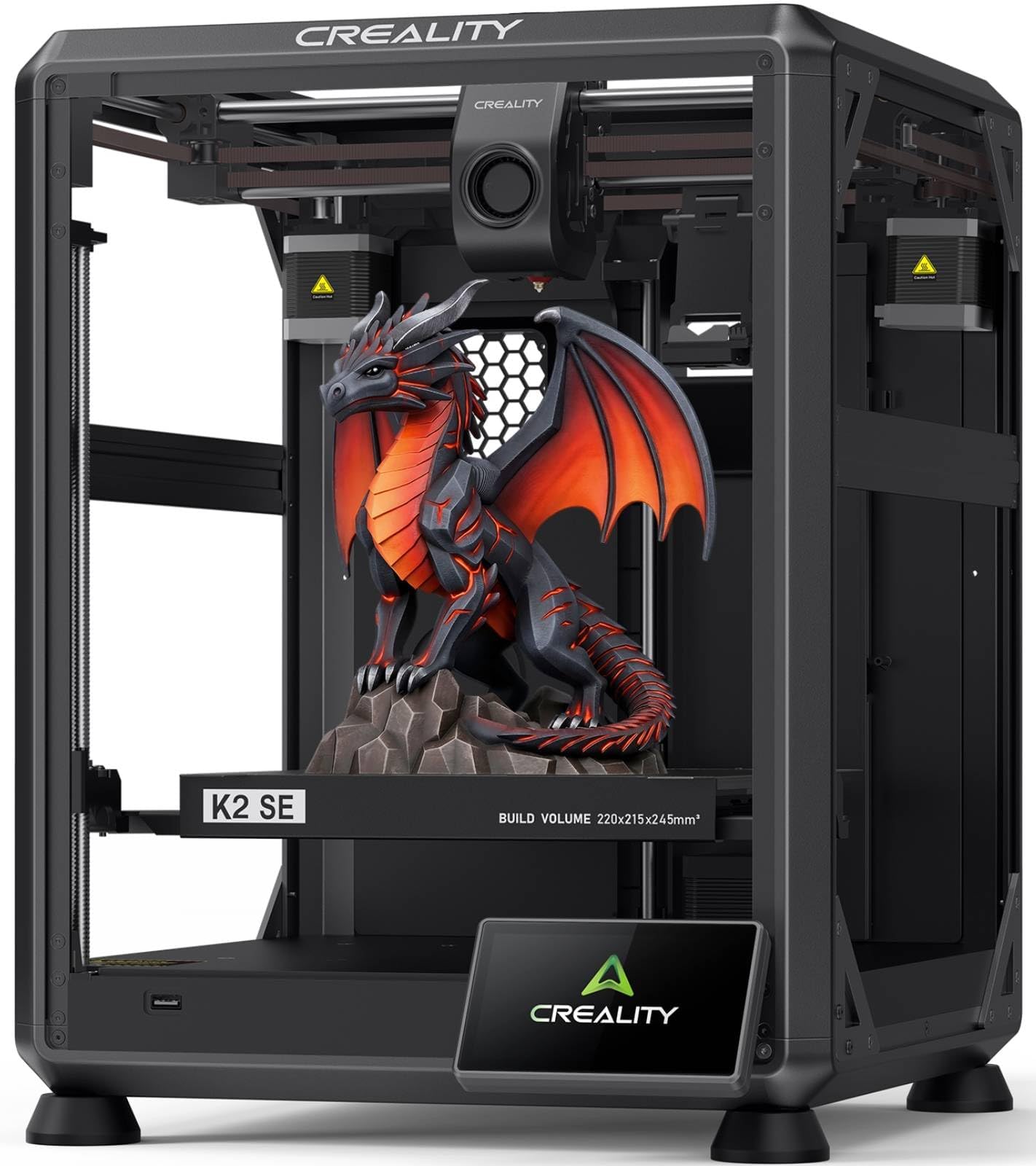
🚀 Print Fast, Print Smart, Print Bold with Creality K2 SE!
The Creality K2 SE is a high-speed CoreXY 3D printer boasting up to 500mm/s print speeds and a rigid die-cast aluminum frame for exceptional precision. It supports multicolor printing via Creality’s CFS system, features a direct drive extruder with quick-swap nozzles, and offers effortless setup with fully automatic bed leveling. With a generous 220×215×245mm build volume and smart connectivity through Creality OS and Cloud, it’s designed for professionals and creators seeking fast, reliable, and versatile 3D printing.


| ASIN | B0D91S75Y5 |
| Best Sellers Rank | #5,113 in Industrial & Scientific ( See Top 100 in Industrial & Scientific ) #11 in 3D Printers |
| Brand | Creality |
| Built-In Media | Creality K2 SE 3D Printers |
| Color | K2 SE |
| Compatible Devices | Personal Computer, Smartphone |
| Compatible Material | Hyper PLA/PLA/PETG/TPU |
| Connectivity Technology | USB, Wi-Fi |
| Customer Reviews | 4.1 out of 5 stars 1,161 Reviews |
| Enclosure Material | Metal |
| File Format | STL, OBJ, AMF |
| Global Trade Identification Number | 00198549007908, 00198549009629 |
| Item Dimensions D x W x H | 13.98"D x 13.9"W x 18.98"H |
| Item Height | 18.98 inches |
| Item Weight | 12.5 Kilograms |
| Manufacturer | Creality |
| Material | Metal |
| Nozzle Bore Diameter | 0.4 Millimeters |
| Nozzle Primary Material | Steel |
| Nozzle Temperature Maximum | 300 Degrees Celsius |
| Nozzle Tip Material | Steel |
| Operating System | Windows |
| Power Consumption | 350 Watts |
| Printing Technology | FDM |
| Product Dimensions | 13.98"D x 13.9"W x 18.98"H |
| Voltage | 110 Volts |
| Warranty Description | 1 Year |
N**E
Not the biggest kid on the schoolyard, but plays a solid ground game.
The K2SE is an excellent printer for users who are still interested in learning and growing within the 3D-printing ecosystem, but who no longer want to spend the majority of their time troubleshooting basic hardware issues. While it may not be a flagship, top-tier machine by today’s standards, it represents a significant step forward—especially when compared side-by-side with older platforms like the Ender 3 Pro. Out of the box, the K2SE delivers a level of refinement that once required extensive upgrades on earlier printers. Features such as automatic bed leveling, filament runout detection, a sturdier frame with vibration-dampening feet, and a properly supported raised Z-axis bed all come standard. The addition of cloud access and a fluid web interface—complete with optional root access for advanced users—bridges the gap between a consumer-friendly machine and a system that still rewards technical curiosity. My first print, a simple Kirby model, was intentionally done with minimal tuning to get a baseline feel for the machine. The results were impressive, especially coming from years of compensating for aging components on my Ender 3. With that printer long overdue for a new extruder, I had grown accustomed to managing variables that simply don’t exist on the K2SE. The consistency and reliability here are immediately noticeable. Although I didn’t have the budget to add the multi-filament CRT system at launch, the printer’s upgrade path is clearly well thought out. Planned expansions like an enclosure, camera monitoring, and multi-material support make it easy to justify future investments. I would also welcome a firmware or hardware update that introduces Bowden extruder support, as it could further improve filament switching speeds and overall print performance. As someone who has stuck with the same Ender 3 since long before touchscreens, CR-Touch, and modern quality-of-life upgrades became commonplace, it’s refreshing to see Klipper remain a core component of the K2SE. For users who are on the fence about moving away from heavy DIY builds, this printer strikes a compelling balance—offering reliability and speed without sacrificing control. Perhaps the most underrated benefit is time savings. The K2SE is noticeably faster than older models, and its intuitive touchscreen interface makes it accessible even for non-technical users in my household. After setup, my wife and children can confidently start prints on their own, which speaks volumes about the usability of the system. Print quality alone justifies the upgrade for patient users. While some may find the stock cooling fans slightly underpowered, the machine compensates with excellent compatibility for multi-tool and threaded expansion systems—an advantage over many Bowden-dependent designs that require significant modification for production or multi-material workflows. And as a final bonus, despite being scheduled for February delivery, the K2SE arrived weeks early. Getting this machine ahead of schedule was the perfect way to confirm that the upgrade was absolutely worth it for the value price point.
J**E
Reliable First Printer That Can Handle Real Detail
This is my first 3D printer and it’s turned into a bit of a workhorse. The Ender 3 V3 SE has been great for functional stuff—tools, brackets, random adapters—and now I’m using it for art toys and figurines with a surprising amount of detail for what it costs. The auto-leveling and direct drive extruder make it pretty friendly for a beginner; once it’s dialed in, I can just hit print and walk away. The build volume (around 8.5” cube) has been enough for most parts and 7–9” figures without having to slice things into a million pieces. It’s not perfect. The fans and motors aren’t exactly quiet, and there is a bit of a learning curve with tuning, bed adhesion, and profiles—you’ll spend some time tweaking before you get those really clean prints. The stock interface and slicer are pretty basic too, so don’t expect super polished software out of the box. Overall though, for the price, this thing punches above its weight. If you want a first printer that can do both practical prints and detailed display pieces without spending Bambu-money, this is a really solid place to start.
J**B
Broke after a month of use
It worked well while it worked, but that didn't last more than a few weeks (less than 100 hours of printing) before the printer head completely broke and wouldn't feed filament reliably, making weird noises before completely breaking and refusing to even feed at all. We used only Creality-supplied filament the entire time. I thought the price was too good to be true, and what most of the reviews here don't capture is that you get what you pay for, but you don't find out about that until you've used it a bit. This is my second Creality purchase, and the first one died too. I should've learned my lesson the first time. What's worse is there's really not much warrantee. The printer head only has a 90 day warrantee (really the only things that break on these things). It tells you a lot when a company advertises a year warrantee and then when you read the fine print it turns out it's only 90 days for the important parts. I should've paid a bit more an gotten a Bambu lab printer. Those are the gold standard and there's a reason. You'll pay more initially (and surprisingly not much more at all) but in the long run you'll save money. I've now wasted $500 on this company and have two piles of junk to show for it.
T**S
Fast, easy to use, loud and scary at full speed, so put it in a dishwasher.
Fast and easy to setup and use. Even the steps needed to use fluidd/mainsail are easy to execute and update. It is very much a remove from box, turn on (wait for calibration) and use. The PC and mobile software is really easy and convenient to use, while I heavily recommend getting the $20 AI camera that is available. Now, here is the super sneaky way of making it even cooler if you're up for a little bit of creative repurposing things. I had a broken dishwasher that I pulled out all the internal workings of, the top rack, and then modified the bottom rack to have an open front, cut the tines off and measured and cut a piece of plywood for a bottom. The printer sits inside the dishwasher, and using the modified bottom rack, it rolls in and out when I need to change filament. Making this enclosure, and having the AI camera on the printer, has given me an absolutely silent printer, that's easy and convenient to access. I even went as far as to equip some PC fans on the bottom and sides that can attach to an exhaust tube if I need to either cool the chassis (which I haven't yet) or vent harmful fumes. The MCU hasn't gotten any hotter, and the enclosure keeps a very stable temp. Just an idea for those that are comfortable with building their own enclosure that might look a bit unorthodox, but is incredible in practice. Mine is attached to a platform I built using a couple PA speaker cabinets, but I could have just as easily built a rolling cabinet island for the kitchen or workshop and mounted it inside that. Once quieted down and temp controlled in this enclosure, I was able to push the stock hardware to its absolute limits without any issues. Prints that would have taken 29hrs are clocking in at 6hrs, without any issues with quality (and this is with PETG, with PLA being able to push even harder) Definitely worth it, and I'm looking at getting the upgrade kit that adds multi filament abilities to it.
E**O
Good print quality. LOUD. Orca Slicer??
TL:DR - I like most of it. I purchased this to be my dedicated PLA printer so that my other enclosed 3D printer can be dedicated to the engineering plastics that need an enclosure like ABS and Nylon. I have had it for 5 days at the time of this review and have put 28 hours of print time on it. First Impression: The printer is "cute" compared to my two much larger Core-XY printers. It is smaller than what I am used to. Build quality is good and the design is pleasing to the eye. Fit and finish is good quality. It basically looks like a well-designed consumer appliance like a toaster oven. The frame has no flex, the belts are properly tensioned, the head movement is smooth. The accessory box is well thought out and organized. The mobile app and computer app works well enough. It is easy enough for an INTELIGENT child to use. Creality actually sends a quarter spool of filament with the machine, not a couple of feet. A freaking spool of filament! I was able to print two articulated dragons with the filament it came with. Setup: Setup was quick. Removed a few screws to that holds the bed in place during shipping, attach the spool holder, attach the touch screen. SET THE VOLTAGE TO 115v (US)<--- VERY IMPORTANT. Plug it in, Power it on. Go through the on-screen setup. Set up wifi. Install the app on my phone and my laptop. Sign up for Creality Cloud. Easy. Maybe 20 minutes for me. Prints: Print speed is fast. Head movement causes the entire machine to vibrate and I have noticed the entire machine moves a 2-3 mm from its starting position after it completes a 4-hour print. I 3D printed and glued "speed bumps" on the table so that the printer does not scoot itself off the table. Bed adhesion is good and first layer quality is great. The first layer is very smooth and even. I have had two failed prints due to poor bed adhesion, but I attribute that to bad slicing parameters, not the printer. Layer to layer quality is good. There is noticeable Ringing (AKA Ghosting) on the prints. That is disappointing because the printer went through an input shaping routine during setup. Input shaping is supposed to remove the ringing. This of course can be reduced by slowing the prints down. The Negatives: FIRST, My first attempt at sending a job from Orca Slicer to the K1 SE failed with errors. It seems that using Orca Slicer is not as easy as using the Creality Cloud app. A quick Google search is indicating that I may have to root the firmware to get seamless communication with Orca Slicer. If you are new to 3D printing and have no idea what I am talking about - this first negative can be ignored. But for me, my bigger machines talk to Orca Slicer. It would be nice to just use one slicer. SECOND, the printer is LOUD. It is mostly the print head’s fan sounding like a hair blow dryer or a small vacuum cleaner. It is possible to reduce the fan speed to lower the noise, but the design uses one fan to both cool the head and cool the part. I worry that if the fan is set too low, the print head would suffer from heat creep and clog. THIRD, the prints having ringing. The printer is sitting on a table with a 40 lbs cement base. The table is literally rock solid. With input shaping, there should be no resonance artifacts on the prints. The machine will need to be rooted to fix the firmware settings to remove the ringing. Or I can slow the prints down. FOURTH, Creality Cloud has a paid Premium. I am not sure if the artist and model designers who upload their 3d files into Creality Cloud gets a cut of that money. But something about it leaves a bad impression on me. Conclusion: Overall, the results are promising. As mentioned, this would be my dedicated PLA printer. It fits well for that purpose and this machine has a positive cost to features ratio. Hopefully, the machine has longevity. I have great plans for it.
N**C
K1 SE
I bought this K1 SE after literally months of working with Creality support on problems with my Ender 3 V3 SE, and it has been perfect so far for my purpose of producing engineered part assemblies. The frame is gusseted and square, the hot bed is flat and the speed, ease of use and production quality are surprising given the price point. You're best off using this with Creality Print 6.3 to unlock all the features of the machine. It can also be rooted (voids warranty) for use with Mainsail and Fluidd. My K1 SE took a few prints before it really started performing well, giving dimensionally accurate prints with nice surface quality. The HyperPLA filament spool that comes with the machine doesn't seem to perform as well as Creality PLA, and some temperature and speed tuning will be necessary, as with any precision tool being set up in a new environment would require. Also, there are no instructions for use, but DO NOT use the "metal grease" or "thermal grease" that comes with the tool kit to lubricate the X axis rails. Those are only for the Y and Z axis rails and lead screws and hot end to be used sparingly during regular maintenance. If you have to deal with customer support, keep in mind they have no clue how much you know, and will need to start with basic troubleshooting, so be kind and patient because it is a process and the time and language differences can make it seem slow. They will help you if you document your issues with videos and precise descriptions of the problems and when they occur. Just be patient and respectful and you will get great support. Keep in mind, they don't have a service center for warranty repairs, so it's all DIY repairs, but they will send you new parts for free. It is not their policy to exchange or return machines, so temper your expectations on their support capabilities. They gave me a significant discount on this K1 when all attempts to fix my Ender failed.
A**R
So much fun!!
Worth every penny! Bought for my son for Christmas and he loves it. It was so easy to set up and get running right away. The print quality is way better than I honestly expected. So far we are very pleased with all the functions.
G**Y
K1 SE - Easy setup, Automatic calibration, Fast Quality Prints.
TL;DR: A fantastic upgrade from older bed-slinger printers. Essentially a K1C without the camera or side panels — fast, accurate, and highly recommended. I upgraded from an Ender 3 V2 that had been giving me issues, and switching to the Creality K1 SE felt like magic — I was able to print my first job with zero manual setup. Everything from homing to auto leveling, nozzle cleaning, bed meshing, and input shaping worked right out of the box. I saw some reviews complaining about how to get prints onto the printer, but I had no issues at all. Using the stock firmware with Orca Slicer and connecting via local IP using Creality Print worked perfectly. One of the main reasons I chose this printer over others is that it's basically a K1C without the added extras (like the camera and side panels), offering the same build quality and performance. It’s also open in terms of firmware — no locked-down software or mandatory cloud printing if you don’t want it. You’re free to modify and customize as needed. So far, I’ve really enjoyed using the K1 SE. It's fantastic to be able to print without a hassle. I highly recommend it for anyone looking for a reliable, high-performance 3D printer at a reasonable price.
Trustpilot
1 week ago
1 day ago