


🚀 Elevate your productivity game with the ASUS ZenBook Duo 14 — where dual screens meet unstoppable performance!
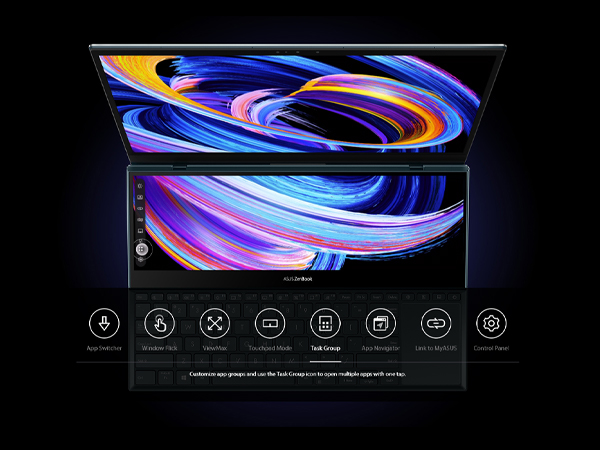
The ASUS ZenBook Duo 14 UX482 is a cutting-edge 14-inch laptop featuring a unique tilting 12.6-inch ScreenPad Plus secondary touchscreen that enhances multitasking and creativity. Powered by the Intel Evo platform with an 11th Gen Intel Core i7-1165G7 processor, 8GB LPDDR4X RAM, and a 512GB PCIe NVMe SSD, it delivers fast, responsive performance ideal for professional workloads. The laptop boasts a vivid Full HD NanoEdge main display, up to 10 hours of battery life, and advanced productivity tools like Quick Key and Task Group, all wrapped in a sleek celestial blue chassis designed for on-the-go professionals seeking next-level efficiency.




| ASIN | B08QV5HGHT |
| Are Batteries Included | Yes |
| Audio Details | Headphones, Speakers |
| Average Battery Life (in hours) | 10 Hours |
| Average Battery Standby Life (in hours) | 24 Hours |
| Batteries | 1 Lithium Ion batteries required. (included) |
| Best Sellers Rank | 276,590 in Computers & Accessories ( See Top 100 in Computers & Accessories ) 6,565 in Traditional Laptops |
| Brand | ASUS |
| Colour | Celestial Blue |
| Computer Memory Type | DDR4 SDRAM |
| Connectivity Type | Bluetooth |
| Customer Reviews | 4.4 4.4 out of 5 stars (96) |
| Date First Available | 2 Feb. 2020 |
| Delivery information | We cannot deliver certain products outside mainland UK ( Details ). We will only be able to confirm if this product can be delivered to your chosen address when you enter your delivery address at checkout. |
| Form Factor | Clamshell |
| Front Webcam Resolution | 1 MP |
| Graphics Card Description | Integrated |
| Graphics Card Interface | Integrated |
| Graphics Card Ram Size | 8 GB |
| Graphics Chipset Brand | Intel |
| Graphics Coprocessor | Intel Iris Xe Graphics |
| Graphics RAM Type | Shared |
| Guaranteed software updates until | unknown |
| Hard Disk Description | SSD |
| Hard Drive Interface | Solid State |
| Hard Drive Size | 512 GB |
| Hardware Platform | PC |
| Item Weight | 1.57 kg |
| Item model number | UX482EA-DS71T |
| Lithium Battery Energy Content | 70 Watt Hours |
| Lithium Battery Packaging | Batteries contained in equipment |
| Lithium Battery Weight | 0.3 Grams |
| Manufacturer | Asus |
| Maximum Memory Supported | 8 GB |
| Memory Clock Speed | 2400 MHz |
| Memory Technology | LPDDR4X |
| Number Of Lithium Ion Cells | 4 |
| Number of HDMI Ports | 1 |
| Operating System | Windows 10 Home |
| Optical Drive Type | No Optical Drive |
| Power Source | Battery Operated |
| Processor Brand | Intel |
| Processor Count | 4 |
| Processor Speed | 2.8 GHz |
| Processor Type | Core i7 |
| Product Dimensions | 32.41 x 22.2 x 1.73 cm; 1.57 kg |
| RAM Size | 8 GB |
| Resolution | 1920x1080 Pixels |
| Screen Resolution | 1920 x 1080 pixels |
| Series | ZenBook Duo |
| Speaker Description | Built-in speaker |
| Standing screen display size | 14 Inches |
| Voltage | 19 Volts |
| Wattage | 65 watts |
| Wireless Type | 802.11ax, Bluetooth |
S**N
had this laptop for about a month now. Moving from a 15" Macbook. Shipping was surprisingly fast. I preordered expecting to receive this middle of April but it showed up at my door in late march! What a great start! 2 Screens. Game changer with laptops! I find I'll always have my emails open on the bottom screen while my work is on the main. the "swap screens" button is genius for switching between tasks on the go. I was worried i would always trying to have at least 2-3 programs running to feel like I'm utilizing the duo screens. Now it comes pretty naturally and i don't feel guilty anymore even if i turn off the bottom screen just to surf. The bottom screen is noticeably darker. I always have it set to max brightness. DO GET THE NEWER VERSION, that lifts up the bottom screen! I did test drive last years model with that static screen, and that little bit of propping does make a huge difference! Having touch screen capability really nullifies the issue with the tiny useless track pad. I don't use the pen that much, but i did purchase a BT mouse. I love the build quality. There's no screen flex and keyboard is a rock and an absolute pleasure in typing. Even when the whole laptop is propped up on the folding stand it comes with (it did take me a while to figure this out!) it still feels planted! Sound is surprisingly good, not mind blowing. USBC charging FTW, and the battery lasts all day (at work) for me with medium load of emails and basic graphics (AI/PS) work. Cons? Small complaints. It's heavy. I only carry it from the car into the office in a backpack, and i notice it. This track pad is pretty garbage. you can adjust the tracking sensitivity so you can swipe edge to edge to help, but get a mouse. can't open single handedly. It does come with a case/bag(?) which has a little loop to store the pen. would love to have a slot or clip somewhere on the laptop itself. Unfortunately the strap in the bag that holds the pen down is lose enough that the pen always slides out every time I put it into my backpack sideways. I got the basic model (i7, 8GB memory, 528GB HD) wouldn't mind upgrading to 16gb, but I don't any lag. IDK if I would purchase the 15" version. having the 2 screens really nulls that extra size. I really love how small and compact this feels when closed and in my hands. Yeah, I would purchase again.
V**.
Use of second screen not intuitive. The USB 3.0 socket failed on most times. Could not make it work despite following all the instructions online. made do with a USBC extender.
D**G
Hi Guys, This review is after just having the Asus UX482EA, 14”, FHD, i7-1165G7, 8GB RAM, 512 SSD, for two days. I really wanted to have the 16GB version, but that was hard to find. What I wanted to do on this laptop is basic office stuff, Word, Excel, PPT, internet searching. The heaviest work would be reviewing high school football film. A little streaming. I am not a gamer. Pretty safe for the 8GB model. So, I just went for it. I think I was in the mood for something revolutionary. In short, I love this thing! I was debating between the Dell XPS 13” and this one. They have different applications, and I would have been happy with either one. I just wanted something different and not the standard clam shell, open it up and use laptop. This second screen set up is more than a gimmick and becomes particularly useful. The reason why I am posting this is for the external monitor question/answers that were minimal. I was able to hook up a 27” external monitor via the HDMI port. Like I did with my previous Asus Q324u 14”. Windows identified the external as a #3 display (Yeah!). This is great for me for breaking down game film. I have zero complaints really. Just the adjustments like in previous posts. You must move to the left a little bit to reposition for the keyboard and you have to get used to the touchpad on the far right. It is not so much the touchpad, but the left/right “mouse keys” on the far right. I, like most would be, am used to the pad at center point. So, invariably I keep hitting the space bar instead. Absolutely not a deal breaker. I am getting used to it and use a separate mouse anyway. The graphics, screen brightness (almost too bright at max setting), board keys, speaker sound, battery life are more than adequate for me. Also has a USB 3.2, so I do not have to carry a hub with me. But has the USB-C if I do! This unit (again with 8GB) was $300 less than the XPS and I got it in three days. After all the shopping and researching overkill! I'm super happy with this one! Maybe I'm too easy to please? I hope this helps someone out there! 3.31.21 Had this thing for almost 4 weeks. Still love it. Addressing some comments about the hard to see second screen plus or that you have to look over the top. I just found a $10 angled laptop stand on Amazon. Easy fix or adjustment. see added pic. for what its worth. 5.22.21 Update: Still love the thing. I'm with the posts that think the Duo is a fingerprint magnet. To address it, I put on a carbon skin designed for a Dell. Trimmed it down and here we go. Corrects my fingerprint OCD. note: I lifted the "Dell carbon circle". Now I have a teal blue spot on my lid. Just to be different.
A**V
Super
M**S
It is just so cool, the second screen is very, very helpful in many cases from note taking, to drawing, to texting. Great main screen colors but both screens could be brighter. The Asus pen is fantastic and works great.
Trustpilot
1 week ago
2 weeks ago



