
DOWNLOAD THE APP


Customer Services
Copyright © 2025 Desertcart Holdings Limited
DOWNLOAD THE APP

🔥 Level up your setup with KOORUI’s 180Hz curved powerhouse!
The KOORUI 24 Inch Gaming Monitor features a 1500R curved FHD (1920x1080) VA panel with a blazing 180Hz refresh rate and 1ms response time, designed for ultra-smooth gaming and professional multitasking. It boasts vibrant color accuracy with 99% sRGB coverage and a 3000:1 contrast ratio, enhanced by eye-care technologies like Flicker-Free and Blue Light Filter. Connectivity includes dual HDMI 2.0 ports and DisplayPort 1.2, plus VESA compatibility and adjustable tilt for ergonomic setups. This monitor is a sleek, bezel-less display that seamlessly fits into any modern workspace or gaming battlestation.


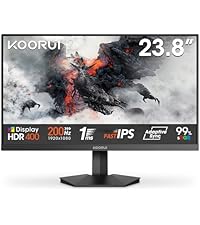


| ASIN | B0C6TGF13Z |
| Adaptive Sync | FreeSync |
| Aspect Ratio | 16:9 |
| Aspect ratio | 16:9 |
| Best Sellers Rank | 2,479 in Computers & Accessories ( See Top 100 in Computers & Accessories ) 65 in Monitors |
| Box Contents | 24 Inch Monitor, HDMI Cable, Power Adapter, User Manual |
| Brand | KOORUI |
| Brand Name | KOORUI |
| Colour | black |
| Contrast Ratio | 3000:1 |
| Customer Reviews | 4.4 out of 5 stars 2,409 Reviews |
| Display Technology | LED |
| Display Type | LED |
| Hardware Connectivity | HDMI |
| Has Color Screen | Yes |
| Image Brightness | m2 |
| Image contrast ratio | 3000:1 |
| Is Electric | Yes |
| Item Dimensions D x W x H | 53.6D x 31.9W x 67.9H centimetres |
| Item Weight | 4.22 Kilograms |
| Manufacturer | KOORUI |
| Maximum Display Resolution | 1920 x 1080 Pixels |
| Model Name | 24E6CA |
| Model Number | 24E6CA |
| Mounting Type | Wall Mount |
| Native Resolution | 1920x1080 |
| Network Connectivity Technology | DisplayPort |
| Picture Quality Enhancement Technology | Blue Light Filter, Eye-Care Technology, Flicker Free |
| Product Features | Curved |
| Product Warranty | 3 Year |
| Refresh Rate | 180 Hz |
| Resolution | FHD 1080p |
| Response Time | 1 Milliseconds |
| Screen Finish Type | Curved |
| Screen Size | 24 Inches |
| Screen size | 24 Inches |
| Screen surface description | Curved |
| Specific Uses For Product | Gaming |
| Total HDMI Port | 2 |
| Total Video Out Ports | 3 |
| UPC | 738060954130 |
| Viewing Angle | 178 Degrees |
P**X
Fantastic monitor! Huge upgrade!
Fantastic! I've upgraded from a 23 Inch 1080p 60hz TN panel Monitor. The 27E6QCA monitor is so much better in every single way. I have used this monitor for a couple of days now and I love it! It is super smooth with its 180hz refresh rate, the colours on the monitor are super nice, the 27 Inch display is really nice and I like the curved screen as well. I don't notice a major difference between 1080p and 1440p but I can notice that the image is less pixelated at times compared to 1080p. I now run a dual monitor setup with my old monitor and I haven't noticed much, if any, performance loss in my games. This monitor does not come with speakers which isn't a problem for me, as I use headphones. Regarding the setup of the monitor itself, it was super simple and really easy to set up. I believe it only came with a Display port cable and no HDMI cable. The only things I had to change was the refresh rate in windows display settings from 165hz to 180z and turn on the Adaptive sync in the monitors settings. ( Monitor settings are accessed from a joystick-like button on the back of the monitor on the right side. ) In conclusion, it was a huge upgrade from my previous monitor and I am very happy with it!
A**.
Amazing quality. 2K in 16:9 and up to 180fps...
I recently upgraded to the KOORUI 27-inch to use it with my new gaming PC. Catching it on sale made it an even sweeter deal. The 27-inch curved display with 2K (1440p resolution, 16;9 ratio) immediately stood out, delivering crisp and vibrant visuals that truly enhance the gaming experience. Paired with my AtomMan G7 Ti equipped with an RTX 4070, the monitor's 180Hz refresh rate ensures gameplay is smooth and responsive, even though I haven't fully pushed it to 180fps yet; running games at 144fps has been impressive. The monitor's design is sleek and its size complements my setup well (see pictures), especially when placed next to my 24-inch iMac—the KOORUI's minimal bezels make the screen feel more expansive without taking up extra space. It's also VESA compatible, which adds flexibility for mounting options. One downside - there's no HDR support, which would have been a nice addition for enhanced colours and contrast. Overall, I'm very satisfied with this purchase, getting a high-quality performance at a reasonable price made it a solid choice for gamers seeking excellent value.
A**)
Perfect for work reports and coding.
Perfect for work. Been using for over a year without issue. I bought this as I needed a good quality screen and I required a slightly higher resolution without being too large. This 27 inch (68.6cm) with QHD resolution of 2560 x 1440 was exactly what I required for creating reports and coding. At full resolution it provides a great amount of workspace without taking up too much physical space or being so large that I am constantly moving my head to see it. To further improve space efficiency I specifically picked this curved version. It works well with my laptop which ran windows 10, now windows 11 and I have had no compatibility issues. It's well built and isn't too heavy, I have it on a dual arm mount with my other monitor which I also plan to replace with one of these. I've had this for over a year at ths point and have had no issues. The only design change I would like is to move the monitor's menu button down a bit, currently towards the bottom right on the back of the monitor. It's about 9cm up and quite awkward to reach from the bottom. I can't reach from the side as my other monitor is in the way. If this was my right hand monitor It probably wouldn't matter so much.
J**D
Great Budget Friendly Gaming Monitor
Quality of screen and picture is great. For the price, you can't go wrong. Also very easy to assemble. Perfect for gaming, especially as I've only just moved into PC gaming and didn't want to dump a load on a monitor right off the bat when I've just spent 1.5K on the PC. Only gripe I do have; stand is flimsy enough that the screen shakes relatively easily. However, if not too animated at your desk, amazing screen to game on.
N**L
Amazing value 10/10 Amazing contrast and colours with some OSD tweaking :D
Amazing value, very wide. I was hoping that the colours were not washed out like other VA panels ive tried, and they were, but with some tweaking in the OSD, it looks better than my old IPS. I put the dark field bright effect on -10 which gave much richer blacks, put the response time on fast from normal because I couldn't notice a difference in ghosting between the two( however, the fastest mode does cause bad smearing), put it on the movie pre-set because I prefer the colours and then played around between the two gamma presets. I ended up choosing gamma 1 because dark blacks still retained lots of detail. Overall very impressed- amazing, also the 1000r curve is immersive AF and although this is 165 hz instead of 240hz, my rig doesnt push 240 on 3340x1440 anyway and it feels 85 percent as smooth. Btw the pixel density is solid, a bit sharper than a 24 inch 1080p on paper but not too noticeable so its not crap like 27 inch 1080. Also the monitor gets very bright and the stand was easy to attach.
B**?
Big, Curvy, and Fast - Just How a Gaming Monitor Should Be!
Upgraded to this KOORUI 27" QHD 1440P Curved Gaming Monitor, and let me tell you, it’s like stepping into a whole new world of buttery smooth visuals and eye-popping detail. If my old monitor was a rusty bicycle, this thing is a supercharged sports car. Let’s break it down: 🎮 180Hz Refresh Rate & 1ms Response Time – This monitor makes everything feel insanely smooth. Whether I’m fragging enemies in an FPS or scrolling through memes at lightning speed, there’s no ghosting, stuttering, or weird motion blur. It’s like my eyeballs have been upgraded. 🌈 QHD 1440P + VA Panel – The 2560x1440 resolution is a sweet spot between 1080p and 4K. Crisp, detailed, and colors look great for a VA panel. Blacks are deep, contrast is solid, and it doesn’t have that washed-out look some cheaper monitors suffer from. 🌊 1500R Curved Display – The curve isn’t gimmicky—it actually makes gaming and general use more immersive. It wraps around your vision just enough to feel natural but not so much that it distorts anything. 🔄 Adaptive Sync (Freesync & G-Sync Compatible) – No screen tearing, no weird hiccups. If your GPU can push high FPS, this monitor will keep up without breaking a sweat. 🔧 Build & Features – The build quality is solid, and the monitor itself is a dream to use. The only downside? The stand. It’s stable enough, but it takes up more space than I’d like and gets in the way a bit. Not a dealbreaker, but if you're like me and prefer a clean setup, you might want to wall mount it—which I’ll be doing soon thanks to the VESA compatibility. The Verdict: ✅ Insanely smooth 180Hz gaming experience ✅ 1440P is the perfect middle ground for crisp visuals without killing FPS ✅ Good contrast and deep blacks for a VA panel ✅ Curved screen adds immersion without overdoing it ✅ No screen tearing thanks to Adaptive Sync ⚠️ Stand is a bit of an obstacle—wall mounting recommended for a cleaner setup For the price, this is an absolute beast of a gaming monitor. Whether you're a competitive gamer or just want a gorgeous display for everyday use, KOORUI nailed it with this one.
A**N
Great product
Great value for money. My son was impressed by this screen and uses it along with others for his gaming set up
A**R
Good Well Priced Screen
I like this screen because the connections allow me to have an additional screen, something my old screen didn't have. The colours are clear and my game runs without problems. I have found that I'm not great at fiddling with the controls and have turned off the HDR because the screen continually brightened and darkened with it on. The one thing that sounds silly but bugs me is that when turning it off I'm never sure if it has actually turned off. My old screen just had a button that was on or off. This one continues to flash a blue light even after pressing it, I really miss that simple off /on button.
Trustpilot
3 weeks ago
2 weeks ago