Some deliveries may take a little longer than usual due to regional shipping conditions.

DOWNLOAD THE APP


Customer Services
Copyright © 2025 Desertcart Holdings Limited
DOWNLOAD THE APP

🎥 Elevate Every Frame — Shoot Like a Pro, Anywhere, Anytime!
The Hohem iSteady M6 Kit is a cutting-edge 3-axis smartphone gimbal stabilizer featuring advanced AI tracking, a versatile magnetic RGB fill light with adjustable color temperature (2700K-6500K), and a crisp 0.91-inch OLED display. Designed for smartphones up to 400g, it ensures ultra-smooth, professional-quality video stabilization with intuitive controls and broad app compatibility, making it the ultimate tool for millennial creators aiming to up their social media game.




| ASIN | B0BXGM2YYC |
| Audio Recording | No |
| Best Sellers Rank | #30,030 in Cell Phones & Accessories ( See Top 100 in Cell Phones & Accessories ) #59 in Cell Phone Handheld Gimbals & Stabilizers |
| Brand | hohem |
| Built-In Media | iSteady M6*1, Fill Light with AI Vision Sensor*1,Tripod*1 Carrying Case*1,USB-C to USB-C Cable*1,User Manual |
| Color | Black |
| Compatible Devices | for Samsung Galaxy S21/S21 Ultra S23 Ultra, for iPhone 16 15 14 13 12 11 Pro Max, for Huawei P60 50 40 30 20 Pro, for OnePlus 12 11 10 9,for cellphone Compatible Devices for Samsung Galaxy S21/S21 Ultra S23 Ultra, for iPhone 16 15 14 13 12 11 Pro Max, for Huawei P60 50 40 30 20 Pro, for OnePlus 12 11 10 9,for cellphone See more |
| Customer Reviews | 4.3 out of 5 stars 1,551 Reviews |
| Exposure Control Type | Manual (M) mode |
| File Format | MP4 |
| Folded Size | 1.06 inches (l) x 3.27 inches (w) x 5.85 inches (h) |
| Image stabilization | Yes |
| Item Dimensions D x W x H | 2.13"D x 6.54"W x 11.7"H |
| Item Weight | 551 Grams |
| Manufacturer | hohem |
| Maximum Weight Recommendation | 400 Grams |
| Media Type | Video |
| Model Name | M6 kit |
| Product Dimensions | 2.13"D x 6.54"W x 11.7"H |
| Screen Size | 0.91 Inches |
| Shooting Modes | AI Tracking, Fill Light Modes |
| Video Capture Format | MP4 |
| Video Capture Resolution | 1080p |
| Viewfinder Type | LCD screen |
| Warranty Description | 1 year |
| Water Resistance Level | Not Water Resistant |
U**N
Excellent Product! Worth every penny.
Know that I almost never leave amazon reviews, even on items I like. But I just happen to have a minute and I can't shut up about this thing. Now granted I have zero prior experience with filming, streaming, or any kind of media creation. I bought this to get good shots for social media marketing for my business, and only because I cannot yet offord to hire anyone to do these things yet. So I have no experience with other models, or any of this kind of tech in general. But.... I did do my research before buying, and I apparently did it well because I got the right gimbal. My phone is the s23 Ultra, and it's HUGE. Great for me because I have big hands, but I was worried about it being attached to a gimbal. It weighs 275 grams, this gimbal is rated for 400 grams, and it handles my phone like a champ. Motors don't struggle a bit, very smooth movement, very nimble. Took me a little bit of reading and a few instruction videos to get all the features figured out but once I played with it a bit I began to realize just how cool this thing is. The AI tracking feature.... I was skeptical that it would be any good. And its not good, it's great. You do have to keep your face in the shot or it can lose you, but just flash the okay symbol with your hand and it locks right onto you again. So user friendly. I love being able to use the hand signals to start and stop the tracking. This part may be phone specific, I don't know, but I was very pleased to find out that the zoom toggle on the gimbal itself, not only works to zoom the camera in their app, but also works on my phones native camera app. Which is super cool. Zero compatability issues with my phone, bluetooth connects easy, everything just works. Honestly I would have paid more than $200 for this. Especially after having read all the bad reviews on other brands and models, and seeing all the common complaints about other gimbals... this has none of those common issues. None. Only bad review I could find on this one were about it overheating and I have had no such issue. Battery life drains kinda fast if you are using the light on the AI tracker on 100%, but otherwise battery life seems great. I was testing it for at least a few hours at a time and only saw the battery deplete a bar when using the light. Havn't fully tested the battery life to be fair, but it does not seem to drain fast so far. again depends if you are using the light or not. I don't know what else to say. This thing is great and makes phone filming actually fun. Amazing tool. I own a business doing product design and 3d printing, so be on the lookout for a sweet custom designed hardshell/soft interior 3d printed case for this bad boy made by Unreal 3D, because I already got the itch to jump into fusion 360 and get on it.
J**K
Exceeded my expectations!
When I first unboxed the Hohem iSteady M6 Kit, I was immediately impressed by its sleek design and the promise of professional-quality stabilization. As someone who loves capturing moments on my smartphone, this gimbal seemed like the perfect tool to elevate my videography. Setting up the iSteady M6 was a breeze. The instructions were clear, and within minutes, I had my phone securely mounted and balanced. The build quality feels solid, yet it's lightweight enough to carry around without feeling cumbersome. One standout feature is the magnetic fill light. It attaches effortlessly and provides excellent illumination, making it ideal for shooting in low-light conditions or adding a creative touch to my videos. Using the gimbal, I was blown away by the stability it offered. The 3-axis stabilization worked like magic, smoothing out my shots even when I was moving quickly or filming on uneven terrain. The joystick control is intuitive, allowing for precise adjustments and panning. I experimented with various shooting modes, including the inception mode and motion timelapse, and the results were impressive. The Hohem app enhances the experience significantly. It’s user-friendly and packed with features, from object tracking to customizable settings. I particularly enjoyed the face and object tracking, which kept my subjects in focus without any hassle. The battery life is also commendable. I managed to get through a full day of shooting without needing a recharge, which is perfect for long outings or travel vlogs. What truly sets the iSteady M6 apart for me is its versatility. Whether I’m filming a scenic landscape, a fast-paced action scene, or a casual family gathering, the gimbal adapts beautifully. It’s become an essential part of my gear, helping me capture smooth, professional-looking footage effortlessly. Overall, the Hohem iSteady M6 Kit has exceeded my expectations. It’s a fantastic investment for anyone looking to step up their smartphone videography game. The combination of robust stabilization, ease of use, and thoughtful features makes it a standout product. If you're passionate about creating high-quality videos with your smartphone, the iSteady M6 is definitely worth considering.
M**D
Definitely worth using, even with new phones having Stablization.
For context, all of my experience with the Hohem M6 has been with a Samsung S23 Ultra. This is good and bad. The good thing is the Samsung S23 ultra is one of the largest and heaviest phones on the market. In that regard, the first time I used the Hohem M6 I thought it was broken. I was getting constant overheating warnings, about every 10 minutes. "Is it defective? Are the specs misleading?" Chalk it up to user error. It doesn't matter what gimbal you use, unless you have the lightest payload possible, it is necessary to balance the gimbal. I did remove my case to reduce the weight, although this may not be necessary with proper balancing. Assuming you use the same phone in the same position all the time, this is pretty much a five minute process one time to make sure it's centered/balanced, and then every time before you turn it on you should double check it's balanced (about one minute). After that, I've had no overheating issues whatsoever. As for the stabilization, the S23 Ultra has one of the best technologies on the market for camera stabilization. That being said, there's just no comparison to using a gimbal. It has several modes for locking the axis, including "lock" which really gives you an incredibly stable and cinematic experience when recording. The trigger and tracking stick are all incredibly functional across all applications on android. You get very limited functionality with zoom/focus wheels unfortunately, but I believe that's just the limitation of app developers and Hohem. Hohem if you're reading this, reach out to Larix/IRL Pro to see if the Hohem's additional functionality can be added to those apps. It would take your gimbal from one of the best to the absolute best in the market! Battery life is pretty good, although it's a bit difficult to test. While streaming, my phone can only really last 2-3 hours on it's own charge. Plugged into the Hohem, it will maintain a full charge, but then the Hohem itself only lasts about 3-4 hours. Presumably I could probably do some finagling to make the total kit last five hours even without an external battery pack, but that's already and incredibly long time to being going with the internal batteries on both devices! As for the "Kit" (the attachable light), it's a neat gimmick. It's only "decent" at tracking faces, and even then, you're not normally walking around a room talking to your phone for most content. If you're a solo content creator and you'd like this effect, say you're doing a cooking video or something where you're walking around an island, it can be helpful. For the most part, I'd say it's mostly a skip (I don't bring it with me because I don't want to lose it/add weight to the payload/don't need it). So yeah, if you're even a semi-popular content creator and you've been just carrying your phone or using a basic selfie stick, consider the upgrade to the Hohem. The base functionality you'll get on android will definitely make it worth it. If Hohem continues to update the functionality across all apps, it will be a 100% purchase.
J**E
Very good but not compatible with ext drives.
This gimbal works the way it is advertised. However, if you want to use it to record to a small external hard drive, this gimbal does not provide space to attach the hard drive. To me this seems like a real problem given that today’s phones can record with advanced codecs that often require external hard drives.
J**L
Just... WOW!
As a total newbie to gimbals, I can honestly say the Hohem iSteady M6 has been a game changer for my video content. The learning curve is practically non-existant, which is perfect for someone like me who’s never used a gimbal before. I was able to get it up and running in no time, and the results have been nothing short of amazing. I’ve been using my iPhone 16 Pro with the iSteady M6, and the footage quality has exceeded all my expectations. Whether I'm walking around or even running and filming outdoors, the stabilization is so smooth that it feels like I’m using professional-grade equipment. I’ve also used it for filming sports, and the results have been equally impressive—no more shaky, unusable shots. The gimbal truly takes my video quality to new heights, making it a must-have for anyone serious about content creation. One of the standout features is the tracking function. It’s incredibly accurate and has made it so much easier to "selfie vid" while moving around, etc. The versatility of this gimbal is also remarkable. It adapts seamlessly to a variety of filming styles, whether you’re shooting steady walking shots or capturing fast-paced action. I seriously don’t know why I waited so long to get a gimbal. After using the iSteady M6, I’m so glad I chose this one. The build quality and attention to detail are top-notch, which gives me confidence in Hohem as a brand. I wouldn’t hesitate to purchase other Hohem products in the future based on how well this gimbal performs. If you’re on the fence, consider this a good shove. You won’t regret it! This gimbal has truly elevated my videos, and I can’t wait to see what else I can create with it.
A**R
Sudden Failure and No Practical Repair Option Outside Warranty
I bought the Hohem M6 gimbal (~$200) and it worked fine initially, but it suddenly failed under normal use, showing Error 001, with the motors going limp and the battery behaving abnormally (showing charge but dying almost immediately). I contacted Hohem support right away and went through all troubleshooting steps: different chargers, cables, app reinstalls, firmware attempts (including a firmware push from their side), different phones, photos, serial number, invoice — everything requested. Support was polite, but the resolution was disappointing once the device was confirmed out of warranty. The only solution offered was a repair that requires international shipping to Hong Kong. Even after they waived the repair fee as a “goodwill gesture,” I was still asked to pay $53 USD just for shipping one way, plus weeks of turnaround time. At that point, the repair cost and logistics approach a large percentage of the product’s value, which makes it hard to justify. This isn’t a comment about customer service attitude — they were responsive and professional — but about post-warranty support practicality. If this gimbal fails outside warranty, be prepared for expensive international shipping rather than a simple replacement or local repair option. I’d recommend this product only if you’re comfortable with limited repair options once the warranty ends. I’ve asked in Facebook groups and many people have the same experience of it failing suddenly. For a 200 dollar equipment you would understand for it to work adequately for a few years without issue, not for it to fail suddenly from an internal error and just lose that investment because it costs about 1/4 of what you paid for it. And they’ve admitted the error but not willing to reasonably help.
D**.
A Must Have for Smooth and Professional Video Footage
I recently purchased the Hohem iSteady M6 Kit and I couldn't be more impressed. As someone who frequently shoots videos, I was looking for a reliable stabilizer, and this product exceeded my expectations. **Design and Build Quality:** The first thing that caught my attention was the sleek and compact design of the stabilizer. It's lightweight yet feels sturdy and well-built. The ergonomic handle fits comfortably in my hand, making it easy to hold for extended periods. **Stabilization Performance:** The stabilization performance of the iSteady M6 is outstanding. It effectively eliminates unwanted shakes and jitters, resulting in smooth and professional-looking footage. Whether I'm walking, running, or even cycling, the gimbal ensures that my videos remain steady and blur-free. **Versatility and Features:** One of the standout features of this kit is its versatility. It comes with a variety of mounts and accessories, allowing me to use it with different devices such as smartphones, action cameras, and compact cameras. The companion app is intuitive and easy to use, giving me access to advanced shooting modes like timelapse and panorama. **Battery Life:** I appreciate the long battery life of the iSteady M6. It lasts for several hours on a single charge, which is great for extended shooting sessions. Additionally, the ability to charge my smartphone or other devices via the USB port on the handle is a convenient bonus. **Overall Impression:** In conclusion, the Hohem iSteady M6 Kit is a game-changer for anyone serious about videography. Its exceptional stabilization performance, versatility, and long battery life make it a must-have accessory for capturing smooth and professional video footage. Whether you're a seasoned filmmaker or an amateur enthusiast, this product will undoubtedly take your videos to the next level. Highly recommended!
P**L
Excellent Design ! Use with much Ease
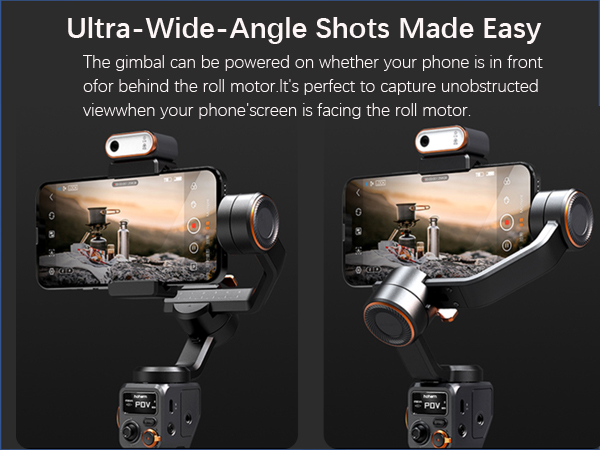
I am absolutely thrilled with my recent purchase of the iSteady 7.0 Gimbal! This dynamic duo has revolutionized my content creation, and I cannot contain my excitement in sharing my experience. First and foremost, the AI vision sensor is a game-changer. Say goodbye to the hassle of Bluetooth connections and app limitations. The face and body tracking are incredibly smooth, ensuring that every shot is perfectly framed without any effort on my part. It's like having a personal cameraperson following me around, capturing my every move effortlessly. The Magnetic Fill Light is a true gem, offering a spectrum of lighting options for every shooting scenario. Whether I'm going for a warm, cozy vibe or a vibrant, dynamic look, the Cold light, warm light, and RGB light options have me covered. The color temperature range from 2700K to 6500K is impressive, allowing for creative flexibility that I didn't know I needed until now. The iSteady 7.0 Stabilization is nothing short of magic. The gimbal's integration of the iSteady 7.0 stabilization algorithms ensures shake-free and professional-looking footage, even when I'm on the move. Walking or running, the gimbal works seamlessly, providing flawless stabilization that adds a cinematic touch to my videos. The 400g payload capacity is more than sufficient for my smartphone, making it compatible with most devices. The OLED display is a brilliant addition, offering a clear and convenient way to monitor various gimbal parameters. I can easily check Bluetooth status, battery level, gimbal mode, and more at a glance. It's a small touch that makes a big difference in ensuring a smooth shooting experience. What truly sets this combo apart is the control wheel. The ability to rotate the roll axis, control focus, and adjust lighting settings with a single versatile wheel is a dream. It simplifies the entire process and puts creative control at my fingertips. Lastly, the Ultra-Wide-Angle Shots feature is a game-changer. I love that I can power on the gimbal whether my phone is in front of or behind the roll motor. It allows me to capture breathtaking, unobstructed views and adds a new dimension to my content. In conclusion, the iSteady 7.0 Gimbal is a powerhouse for content creators. It brings together cutting-edge technology, exceptional design, and user-friendly features that elevate my videos to a whole new level. If you're serious about creating top-notch content with ease, this combo is an absolute must-have!
Trustpilot
3 days ago
2 months ago