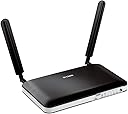
🚀 Unlock lightning-fast mobile broadband and never miss a beat!
The D-Link DWR-921/B is a UK version 4G/3G LTE unlocked mobile broadband router delivering up to 150 Mbps download speeds and 50 Mbps upload speeds. Featuring 4 Ethernet ports and dual-band WAN support, it automatically switches between 4G and 3G for uninterrupted connectivity. Designed for easy SIM card setup and secure wireless sharing, it’s ideal for professionals seeking reliable, high-speed internet on the go or at home, backed by a limited lifetime warranty.


| ASIN | B00BN36NMM |
| Are Batteries Included | No |
| Batteries | 1 Lithium Ion batteries required. |
| Best Sellers Rank | 34,213 in Computers & Accessories ( See Top 100 in Computers & Accessories ) 262 in Routers |
| Brand | D-Link |
| Colour | Black |
| Computer Memory Type | DDR3 SDRAM |
| Connectivity Type | 3G, 4G, HSDPA, HSUPA |
| Customer Reviews | 4.1 4.1 out of 5 stars (2,054) |
| Date First Available | 6 Mar. 2013 |
| Guaranteed software updates until | unknown |
| Item Weight | 294 g |
| Item model number | DWR-921/E |
| Lithium Battery Energy Content | 2 Kilowatt Hours |
| Lithium Battery Packaging | Batteries packed with equipment |
| Manufacturer | D-Link |
| Number Of Lithium Ion Cells | 5 |
| Number of Ethernet Ports | 4 |
| Number of Lithium Metal Cells | 5 |
| Operating System | RouterOS |
| Power Source | Hand-operated |
| Processor Count | 1 |
| Product Dimensions | 19 x 11.15 x 2.35 cm; 295 g |
| Series | DWR-921/B |
| Voltage | 240 Volts |
| Wireless Type | 802.11b, 802.11g, 802.11n |
S**N
The best 4G SIM router available for the price
I had used 3G dongles to get internet access and found them quite good and reliable, getting download speeds of between 2 Mbps and 3 Mbps, quite good enough for general internet use although not so good for downloads or streaming services. So, as an experiment, I decided to see how much better 4G might be using the same Smarty SIM but with a Wifi router which could be shared between several devices rather than only be plugged into one at a time. I knew that D-Link manufactured affordable quality hardware and, after reading dozens of reviews online, decided that the D-Link DWR-921/B offered all I needed insofar as a suitable router went. When the device arrived I had it up and running in ten minutes flat, despite the fact that the instruction manual was very sparse, immediately ran an online broadband speed test and found that my download speed had increased ten fold in one fell swoop to over 30 Mbps! As you can see for yourself if you look at the picture associated with this review. IMPORTANT: When you set up your router run through its Wizard to change the devices SSID (so that potential hackers receiving its signal won't know who manufactured it), set the device's wifi key (a password used to connect to the router wirelessly) to something really strong and uncrackable, set a simpler password the web-based interface used to manage the router (so that nobody connected to the router will be able to change any of its settings) and the encryption used by the D-Link to maximum, i.e., WPA2-PSK(AES), so nobody will be able to hack the router or intercept any of your data. Having enjoyed D-Link speed for a good few days now I can't imagine going back to anything slower and have to say that buying this device was one of my best decisions of 2020. Easy to set up, sturdy, reliable, tried and tested if you are looking for a reasonably priced router that can connect to a 4G network and grant internet access using only a SIM look no further. You are very unlikely to be disappointed if you pick the D-Link DWR-921/B.
A**R
Great value for money and does the job excellently...
I've never really been a big fan of D-Link (or some others to be perfectly honest) but that is because my experience has always really been focused on Cisco, Billion and Netgear and such... However on this occasion I was purely looking for value for money alongside ability. I had a job it needed to do and I have to say, this ticks all the right boxes. I weighed up going with a TP-Link offering but the D-Link was my choice in the end. Very good, easy out-of-the-box experience (OOBE); plugged in, switched on and popped in the now old fashioned, large SIM card on a Vodafone Pay As You Go to test, having selected a meaty data bundle for the limited testing. I did have to tweak the mobile settings as the auto-detect, although finding Vodafone (2g and 3g) kept dropping (according to front lights) and didn't want to connect using default APN and user settings (which are usually pretty generic). Having popped in the PAYG ones manually (APN: pp.vodafone.co.uk User: wap Password: wap) I only then had to force the device to use the 4g coverage; else it would insist on only picking out the 3g on auto-detect. Coverage throughout the home is more than adequate. Speed across the LAN is brilliant and multiple devices running in tandem from Alexa, through FireTV, laptops and printers, all working better than I would have expected which is a great bonus. With the Vodafone 4g signal at a good strength where we are now and their data bundles having massively improved, this will also double up as a handy travel companion (signal permitting). Why did we feel the need to try one of these (particularly having used out phones as hot spots thus far)? Well, the hot spot is limiting for the person who is providing it and the number of devices it can manage. Then you have the going out factor. In addition, Vodafone do offer broadband far more competitively priced than most (£20 a month all in) by not insisting on you taking line rental with it, unlike the likes of BT; however, alas not in our area apparently. So, the options having moved were a line and broadband/fibre (if available) with an alternative (in excess of £30 per month with line and service); or with such a good mobile signal,explore the options. Since you can now get a 5g (not massively rolled out yet, certainly not here) unlimited option for £20 a month it makes sense to look at today's alternatives rather than getting stuck, blinkered on past offerings. The questions you ask if you have a good mobile signal are; do I need a landline? If the answer is no, there are reasonably priced alternatives out there, dependant of course on your usage/needs. I admit that some bandwidth/data hungry families may well need the likes of fibre but that's what you have to investigate on an individual basis. This D-Link is perfect for our home use and streaming on a 3g and 4g signal strength, operating consistently between 50% and 75%.
J**T
Great sim card router
Purchased to use when fiber is down. Did try it and it worked fine using regular data sim from my phone.
P**N
Comprehensive 4G Solution
Works well. Easy to set up but you need a computer with an Ethernet socket to do the initial configuration: not great if you have gone over to Apple 100%. Fortunately, I had an old Windows laptop I could use. I used this router to provide whole house internet access when we moved house and waited 10 days for the ISP to get its act together. In fact I was very tempted to retain 4G and tell the ISP to take a hike (Smarty provide an unlimited data Sim for £20 a month). This unit has Ethernet sockets, plus a WAN socket, so you can use it as your regular router, or avoid being tied by where Openreach put your main socket; use 4G and locate the router near your TV, set top box, etc and use Ethernet cables for better streaming performance. In summary; good unit but a bit pricey.
O**C
THE WORST ROUTER EVER
THE WORST ROUTER EVER? SIGNAL IS CRAP - TRUST ME This box was only getting 1 bar 3G and disconnecting every half an hour. Compare this two the Huawei I bought it got 3 bars 4G. Terrible signal CRASHES EVERY HALF AN HOUR For some unknown reason it would loose connection with 3G and there would be an error about time and date, the only way to get it connected again would be to turn it off and on and repeat every 30 minutes, nice when your playing call of duty. NASTY INTERFACE / BUGGY I updated the firmware but still the interface looks like it is from 1999 and feels it too. It's not easy to setup like any of the competitors. This will be the last D-Link product I ever buy, I remember numerous customers using their home Wireless Routers the constant disconnecting issues only resolved by changing it to any other brand even the ISP's own routers functioned better. I should have learned from my customers.
C**Y
Acheté pour équiper d'Internet une maison isolée dans la campagne (l'autre option étant de faire tirer une ligne téléphonique aérienne ou partiellement enterrée, ce qui n'est pas donné). Après avoir pris connaissance des réseaux disponibles autour (1 antenne Orange 3G en hauteur à 6km en terrain dégagé), j'ai opté pour une carte prépayé Orange Let's Go, (la maison étant loué en saison, elle permet aux locataires d'accéder à Internet selon leurs besoins en achetant une recharge chez le marchands de journaux du village, ou par CB à l'écran). Côté réception, on obtient un débit 3G très correcte (au vu de la configuration) de ~1,3Mbps / 300ms, appareil à l'intérieur et antennes d'origine (pas de 4G sur le pylône [pour l'instant] mais les premiers test @home ne montrent pas de problèmes particuliers avec des débits ~ 35Mbps / 120ms). Côté Wi-Fi, pas de soucis, ça traverse les murs (pierres, briques, parpaings + coffrage placoplâtre), bonne réception dans la maison + jardin. J'ai aussi testé la fonction multi-wan (routeur désactivé sur une Freebox v5, raccordé à l'entrée WAN du D-Link, connection 3G en secours) avec un # ping 8.8.8.8. On perd parfois un paquet mais la connection switch rapidement sur la 3G en simulant une panne (débrancher la prise ligne de la freebox en marche) bien que les temps de latence s'allongent (ça reste de la 3G/4G). Par contre, ne rêvez pas, si la connection WAN saute pendant que vous regardez la TV par ADSL, même si vous accédez à Internet, ça coupera votre programme (ces services dépendants du FAI ADSL). En partie online, sur Xbox 360, permet d'éviter la déconnection mais de gros coups de lag peuvent se faire ressentir. Bref, je recommande chaudement autant pour équiper une maison isolée (prendre néanmoins le temps de se renseigner sur la couverture et la position des antennes), que pour avoir une backup 3G/4G afin d'éviter les interruptions de connections (en parte notamment).
A**I
Beautiful device so far so good.. as I expected.. expensive though but worth it
S**O
Avevo bisgno di un modem con sim stabile per fare smart work dal mare.... Devo dire che questo dispositivo mi ha stupito in quanto a facilità di utilizzo (ha settato in automatico tutti i parametri con sim vodafone), stabilità della connsessione (sia in wi fi che con cavo ethernet già in dotazione) sia per velocità della connessione (oltre a lavorare, nessun problema anche per guardare film in streaming). L'unica accortezza che bisgna avere è quella di accendere il modem qualche minuto prima, perché a volte ci vuole un po' prima di trovare il segnale, ma quello penso dipenda dalla rete. Per il resto preaticamente perfetto, leggero e compatto, si può portare in qualsiasi luogo con il minimo ingombro. Rapporto costo qualità direi imbattibile
M**N
Unser Internet per Kabel (Unitymedia) hat immer wieder Ausfälle, oft nur wenige Minuten - manchmal eine Stunde, ohne dass erkennbar wäre, woran das liegt. Dies ist für den Betrieb eines Büros auf die Dauer nicht erträglich. Nun unsere Lösung: Ausgang von Modem/Router von Unitymedia mit WAN-Port des LTE-Router verbinden und entsperrte SIM-Karte einlegen. Wenn das Kabel-Internet weggeht, schaltet der Router innerhalb von ca. 1 Minute auf LTE um, und man kann weiterarbeiten, ohne dass man den Wechsel an einem PC merkt. Der Empfang von LTE ist sehr gut und durch die großen Antennen besser als auf einem Smartphone. Bedingung ist natürlich ein "passender" Datentarif. Für die hier genutzte Fallback-Lösung rechnen wir mit etwa 1GB Volumen pro Monat. (Allerdings nutzen wir tagsüber im Büro auch primär nur E-Mail.) Sehr praktisch und funktioniert gut! ein paar Nachteile: - Man kann nicht einfach erkennen, ob man mit Kabel-Internet oder LTE (mit Belastung des Datenvolumens) surft. Man muss dazu im Web-Interface nachschauen. - Das verbrauchte Volumen über LTE wird nicht angezeigt. Man weiß nie, wie viel Datenvolumen über LTE verbraucht worden ist. - Der Wechsel von LTE zurück auf kabelgebundenes Internet funktioniert nicht immer von selbst. Nur neu starten hilft. - Es gibt kein weiteres Management des Fallbacks, also z.B. wann und wie der Fallback statfindet, oder Begrenzung auf ein bestimmtes Datenvolumen. - Das Gerät hat keinen richtigen Ausschalt-Timer, d.h. es kann z.B. nachts nicht komplett abgeschaltet werden. Das führt z.B. dazu, dass - wenn nachts das Kabelinternet / WLAN per Timer abgeschaltet ist - der Datenstrom immer über LTE weiterlaufen kann. (Man kann allerdings über Regeln zeitbasiert Ports sperren..) - Die Ports sind wirklich nur 100Mbit. Deswegen haben wir am Router einen Gbit-Switch angeschlossen, an dem dann alle anderen Geräte angeschlossen sind, um Daten schneller austauschen zu können.
I**U
Item arrived on time and as described. Setup was quite easy and the performance was as expected-no issues at all. My only concerns is on the price-it is on the high side. Apart from that, I would recommend this router anyone looking for 3G/4G router.
Trustpilot
3 days ago
2 days ago