


❄️ Stay Cool, Work Smart — Elevate Your Laptop Game!
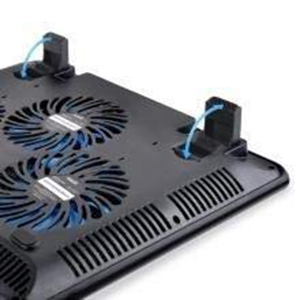
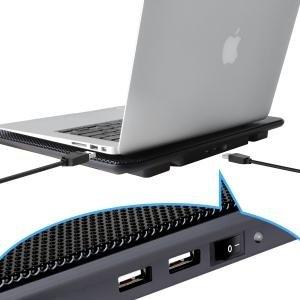
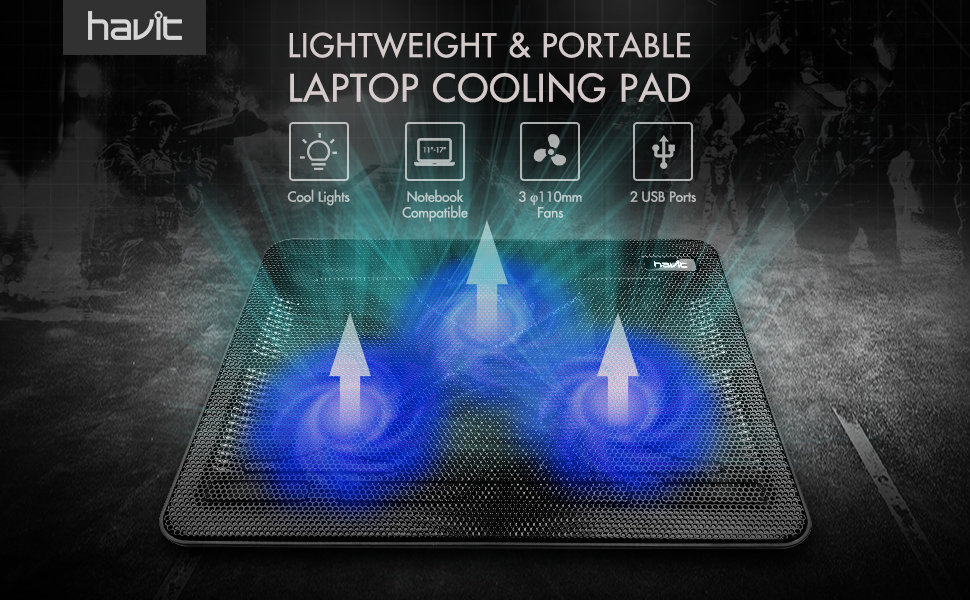
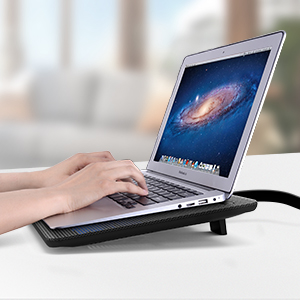
The Havit HV-F2056 Cooling Pad is a sleek, portable laptop cooler designed for 12"-17" devices, featuring three ultra-quiet 1400 RPM fans that efficiently dissipate heat. Its ergonomic dual-height stand enhances comfort and posture, while dual USB ports with a power switch add connectivity without sacrificing laptop ports. Crafted from durable metal mesh, it offers a stable, anti-slip surface that protects your laptop and boosts performance during intensive tasks or long workdays.


| ASIN | B00NNMB3KS |
| Best Sellers Rank | 1,060 in Computers & Accessories ( See Top 100 in Computers & Accessories ) 2 in Laptop Cooling Pads |
| Brand | havit |
| Brand Name | havit |
| Colour | Black |
| Cooling Method | Air |
| Cooling method | Air |
| Country of Origin | China |
| Customer Reviews | 4.4 out of 5 stars 39,017 Reviews |
| Enclosure Material | Metal |
| Global Trade Identification Number | 00716253088527, 06950676257533 |
| Item Dimensions L x W x H | 38L x 28W x 2.8H centimetres |
| Item Weight | 699 g |
| Item height | 28 centimetres |
| Item weight | 699 g |
| Manufacturer | Havit |
| Material | Metal |
| Product dimensions | 38L x 28W x 2.8H centimetres |
| UPC | 782903186721 682863334197 716253088527 653801186314 |
K**N
Great Value For Money!
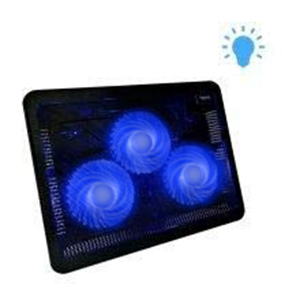
I've been wanting a cooling tray for my laptop for a while now, I play a lotta games and with summer coming, the warmer months are especially tough on my laptop. I spent a long while searching on Amazon for the right one and I am happy to say that this is exactly what I was looking for! I've seen people mention that the tray doesn't have any grip for when you place your laptop on it and moves about freely (note that the tray does have grip underneath it though so it won't move on other surfaces), it is true that the tray has no grip for your laptop, but your laptop should have grips underneath it already to stop it from moving about on surfaces anyway. At least mine does and I have no problem :) If not, I'm sure there's a way you can find something to use to keep it in-place. The tray itself is good for all sizes, I was concerned about it not being big enough as my laptop is pretty large, but thankfully I had no reason to be worried, there is even a little more room to play about with. The tray has 3 fans, that light up in a shade of blue, the fans are very good, my laptop has been kept nice and cool which is a relief to all the heat coming out of it beforehand! It easily powered by your laptop via the USB cable that comes with the tray which you simply plug into a USB port in your laptop and one of the USB ports in the back of the tray, you lose a port, but you also gain one in the back of the tray. I don't use the USB ports often, so I have no issue with this. The cable itself is very short so it is unobtrusive, just the right size! I rest the cooling tray on another normal lap tray to cushion it, currently I have it in the standing up position and surprisingly my neck hasn't been aching as much as it used too, this seems to improve my posture somewhat where I'm looking forward rather than down all the time. The negatives: - While the fans aren't very noisy, they're not super quiet, but probably the quietest ones you'll find for this price. It's mostly just a soft whirring sound, which can be soothing at times, but occasionally it grates my nerves after a while so I just stick in my headphones and listen to some music. It's nothing too distracting, I'm just very sensitive to noise - always have been. - The lights on the tray can only be switched off when the tray is powered off and not being used, this isn't really a bad thing, just that the lights are brighter than I thought they'd be and they also shine out sideways of the tray as it's mostly covered in metal mesh. I can see the lights on my walls and I have to keep reminding myself every time I move my legs it's not someone else in the room with me xD - My biggest gripe is what the fans do, they work perfectly fine! However like others have said previously, the fans can cool your lap as well (which isn't a bad thing), but what hasn't been mentioned is the cool air also moves around the sides of the tray, so my wrists are constantly cold and after a time they start aching. This will unlikely be such an issue in summer when it's warmer, but in the cooler months, it's very noticeable and distracting. For the moment however, I'm having to put a cover the front of the tray to stop it from making my wrists cold. - A couple teeny minor gripes, the switch to turn on the tray is at the back, quite awkward to reach round and turn it on, would've been better at the sides, but I assume it was so it wouldn't be easily knocked off when you go to lift it up. Also sometimes if you type too hard on your laptop, you can hear the echo of the mesh beneath your laptop echo and it's just strange xD Overall, it's great value for money, it may sound like a lotta negatives, but these are all minor, things that can be easily remedied with a little fiddling, nothing that requires you to spend more money, just with you being sensible about how to use it. Delivery time was very good, it arrived within two days and was packaged very well, no issues there either. I do think it's worth buying, I haven't tried any of the other trays, but I've read a lot of reviews saying this is one of the better ones and if like me, you're reluctant to spend a lotta money on something that might not work, let me ease your thoughts by saying this is definitely worth it!
L**Z
So good I bought two more
I purchased one of these for the laptop I used for university as I noticed it was becoming very warm underneath when on my desk. After a few days use their are a couple of things I noted that made this a great purchase; - The fans completely chilled the bottom of the laptop, but I have found that I rarely need to use it as the elevation and ventilation from my laptop just sitting on the cooling pad is enough. - The fans are very quiet when on. - I find it more comfortable to use my laptop when it is on the cooling pad as the pad has two small legs to lift it at an angle so the laptop is tilted towards me, and thanks to the sticky pads provided I have no fear of the laptop sliding. On top of all that, I use a gaming laptop that has had a lot of issues recently and I noticed it became very very hot underneath. I decided to try the cooling pad with it and after a day of use and testing the performance has markedly improved and the laptop doesn't feel hot underneath. However, unlike my university laptop, that does less intensive processes, the gaming laptop does need the fan on all the time to remain cool. Great product and the best thing I can say to review it, we now own 3 of these in our household.
D**Z
Nice buy and good quality.
At first glance and operation, all seems good. It's not a heavy base, fan is not too loud, nice LEDs. Fits my HP Pavilion laptop nicely. Retractable legs are a decent addition. The only things which stops it being a 5* would be the lack of option for fan speed. Then the placement of the fans, from my history of laptops, the main vents are nearer the top of the keyboard (on the underside) so the 2 fans would be better suited there and the single one lower. Other than that, it's a good buy for a good price (approx. £22)
S**Y
Works really well if you combine it with a fan controller
I bought this laptop cooler for my router (which gets really hot and becomes a bit unreliable) rather than my laptop. The cooler is about twice the size of the router but I have some other devices attached to the router which also get hot, so I put those on the remaining free space. The good news is that even though the air flow from the fans isn't particularly powerful, it's more than enough to cool my devices. Result. The bad news is that although the cooler is fairly quiet (about 22db at six inches from the cooler, according to an App I downloaded on my phone) it's still loud enough that it annoys me. This is a problem because my fibre broadband socket is in the lounge right next to where I sit, so that's where the router has to be, and it drives me mad. The obvious solution would be to reduce the voltage being supplied to the fans so they run a bit slower. While scouring Amazon for the requisite parts, I stumbled across the DollaTek USB Fan Speed Controller (£5.99 for three). This does exactly what I need without me having to take the cooler apart (or do any soldering)! In fact it does more than I need because it not only allows you to reduce the voltage (to reduce the noise) it also allows you to increase the voltage (up to 12V! to increase cooling). As a further benefit, when the fan controller is set to MINimum, the LED's on the fans don't illuminate. Handy! Then, as you increase the voltage the fans speed up and the LED's gradually get brighter. Nice! Without the fan controller the cooler produces 22db of noise at six inches. With the controller on MINimum the cooler produces just 16db at six inches, which is much quieter! (I can still hear it when the room is silent, but not when the TV is on.) With the controller on MAXimum the cooler produces a whopping 44db of noise at six inches, but the fans move MUCH more air. Any gamers who need a lot of cooling might find this useful. (Regular users probably won't though because the noise is too loud.) As we all know, energy costs have gone through the roof recently, and currently stand at about 36p per kWh. Without the fan controller the cooler consumes about 3.5W, which is almost nothing, and would cost me about 3p per day if I left it on 24/7. With the controller at MINimum the cooler uses less than 0.1W (less than 0.1p per day) and on MAXimum is uses 11.3W (10p per day). The final question though, is whether the cooler will still cool my devices when the controller is set to MINimum... and the answer is... yes! Job done! :-) To use the controller, all you do is plug the controller into your power source (laptop USB socket or USB mains adapter) and plug one end of the male-Type-A-to-male-Type-A USB cable (supplied with the cooler) into the female socket on the controller and the other end into one of the female sockets on the cooler. Done. BEWARE THOUGH - if you're using the controller YOU SHOULD NOT USE THE SPARE USB SOCKET ON THE COOLER TO POWER ANYTHING ELSE, because it won't be receiving the standard 5V power that a USB socket should have. Your device either won't work (if the voltage is below 5V) or could be permanently damaged (if the voltage is above 5V). I also don't know if running the cooler above 5V will reduce the life of the fans. Do so at your own risk!
R**S
Decent pad
Works very well and cools the laptop down when overheats
L**S
Has stood the test of time.
I purchased this in 2018 for a laptop that kept going into thermal shut down because it's own fan wasn't working properly. This did a great job, it was quiet, reliable and extended the working life of my laptop for a couple of years. It got clogged with dust and pet hair on a couple of occasions so I took the back off, cleaned it up - and away it went again. Many reviews are posted shortly after purchase and can only usefully comment on the reliability of an item in cases where it quickly proves unreliable. In this case I can report that it gave great service over a number of years and, although I no longer use it, I know that it won't let me down if I ever do need it again. Service above and beyond the call of duty!
R**S
Not bad - if your room is also cool.
So I spent a while looking for the best option for my MacBook Pro. Couldn’t find anything “standout” or that wasn’t clearly “Sponsored”. Also the heat build up in my MacBook Pro 2019 is specifically at the rear under the screen. Most of the fans available target everywhere else but here. I went for the least “gimmicky” option. Don’t really need Blackpool seafront flashing lights nor did I want to spend a chunk of money on something that isn’t effective. My initial thoughts on this are it’s cheap, affordable, light but fairly well built. I wouldn’t want to drop it on a hard floor but then this applies to most things. I subscribe to a well known “Mac app” that gives me an option of viewing the cpu temperature. I use very cpu intensive software in my music studio and often see my cpu temp spike when it’s pushed hard and often hear my internal MacBook fans whirring away. I like the fact you can use rear legs on this to raise your macbook away from the desktop creating a nice gap for ventilation. You can hear the fan kick in but it’s not off putting or distracting. The cooling part - in my honest opinion it’s very very much dependent on the temperature of your room. I know this may sound obvious but it’s true. So for example if you have your heating on and your room is hot this will hinder matters and will not allow the fan to do much for you at all. But what I’ve found is that if you lower your heating temp in your studio/office, with a bit of ventilation and use this cooling pad with the rear legs raised then you will see it work ok. I’ve noticed if I do this then my cpu temp does not spike quite as high as before. Not night and day but it is most definitely slightly cooler. So for me at this price it’s “ok”. I feel the only genuine external option for this would be a small air conditioner to provide cold air direct to the rear - I’ve not found an option like this (yet).
J**M
Does the job at the right price
Brought this to try and extend the life of my laptop and keep it from getting too hot while gaming on it. I have a Dell Inspiron 15 (with GTX960M graphics). Had it for about a month when reviewing and use it primarily on my lap. I've not done measurements on it but below is a quick breakdown of pros and cons The good Relatively quiet - yes there is noise, but any kind of background noise drowns it out. Fans on laptop do not spin up as much while it's on. Product seems made to a high enough standard in most cases (see cons). Nice to see a usb available to replace the one it's taking. I didn't find the switch at the back annoying as it always just leave it on. The Bad The metal mesh top means my laptop sometimes slides forward. The mesh top is plenty thick enough but can see how some people might think it's thin. It has give, but nothing major. One of the fans in my unit seems to catch on something and clicks - not always, but enough to notice. Doesn't drive me to distraction though. Blue LED fans - personal taste but I fail to see the point. Can be annoying. On lap I think that some people might find it raises the laptop uncomfortably high for their wrists - but think this might be the case for most cooling pads In summary I think it's a decent pad. I'm using it happily and do believe it helps keep the laptop a little cooler - especially while gaming. Also keeps the heat off your legs! It's a good price and well enough constructed. I would recommend.
Trustpilot
2 months ago
3 weeks ago



