
DOWNLOAD THE APP


Customer Services
Copyright © 2025 Desertcart Holdings Limited
DOWNLOAD THE APP

Type in Comfort, Work in Style! 💼
The Microsoft Natural Ergonomic Keyboard 4000 for Business is designed to enhance your typing experience with its split ergonomic layout, cushioned palm rest, and dedicated media keys, making it the perfect companion for professionals seeking comfort and efficiency in their workspace.


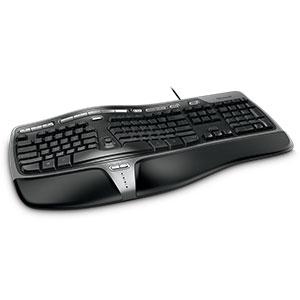


| Keyboard Layout | QWERTY |
| Hand Orientation | Ambidextrous |
| Button Quantity | 104 |
| Is Electric | No |
| Keyboard Backlighting Color Support | Single Color |
| Language | English |
| Power Source | AC |
| Compatible Devices | PC |
| Connectivity Technology | Wired |
| Special Features | Ergonomic |
| Number of Keys | 104 |
| Style | Business |
| Theme | ergonomic |
| Color | Black |
| Material | Plastic |
| Item Dimensions L x W x H | 19.8"L x 10.3"W x 3.26"H |
K**C
Great Ergonomics
I had bought this keyboard back in 2012 when I had tendonitis and needed to make my entire work set-up more ergonomic. This keyboard helped immensely! This keyboard comes with the extra bottom attachment to lift the keyboard, but I always found it more comfortable to use the keyboard without it (maybe just add a wrist-rest if needed). I type pretty often and very quickly, and it was easy to adjust to the split layout (only took a couple hours to remember which keys to hit with which hand...). The quality of this keyboard is pretty decent - I would still be using this keyboard to this day, but it had one-too-many liquid spills back in 2020 to the point that certain keys would not function, so that was that.I have used this keyboard for windows, linux, and mac (primarily mac) and can say that all the regular keyboard functions worked. All of the extras (i.e. 'media' buttons along the top and center) were inconsistent about working and depends on what system you are using. I didn't take too much time to force it into working, since I didn't really need those functions. I also travelled for work with this keyboard - although it's bulky, it does fit in the check-in bags, and the wired function is convenient since it doesn't require batteries.Although I loved this keyboard dearly, when it met it's untimely death, I looked for a replacement and I was surprised at the price this keyboard is currently at. It's definitely not something I would be able to afford back when I was working barely above minimum wage... I can't promise if it'll be worth the cost as there are other alternatives that could work just as well at a lower price. However, my experience of this keyboard was definitely excellent and met my ergonomic needs.
D**A
Works for what I need it for
I've been using this type of keyboard for years. I remember back in the late 1990/early 2000s, I was working as a medical transcriptionist and my supervisor at the time was using a "curved" white Microsoft Natural Elite keyboard. I was still using the typical, out-of-the-box, straight keyboard. She gave me hers to try out for a while. At first, I HATED it. My typing speed was terrible, I was pressing every wrong key, etc. But after I got used to it, I realized there was no way I could ever go back to a straight keyboard. Now, all of these years later I'm still working as a medical transcriptionist and have graduated up to the Microsoft 4000. I still have problems using a straight keyboard - in fact, when I'm using my laptop for work I cannot use the laptop keyboard and have to hook up my own keyboard in order to transcribe.Compared to all of the other "ergo" keyboards out there that I have tried (and I have tried quite a few), this is the best I've found. Now, I have never tried the Kinesis which I hear once you try and actually get used to you will never go back to anything else ever again and that it's the "best of the best." I have thought about trying one of those out, but I just cannot justify the cost. Perhaps if I was suffering from more carpal tunnel symptoms, more wrist pain, etc., I would give it a try, but as of now the Microsoft 4000 works for what I need it for. I am pairing it with an Anker wireless mouse, which took me a while to get used to but now I couldn't function without it! My sister was visiting me a few months ago and she was having a terrible time using my keyboard and mouse just to function on the internet and I then realized how somebody who isn't used to it feels. As I mentioned above, I've been using one of these "curved" split keyboards for nearly 20 years now, so I'm definitely used to it. With this keyboard, my hands feel like they are at a more natural position compared to a regular standard keyboard where they feel to be unnaturally squished close together.When I worked in-house at a local clinic (I currently work from home), we had occupational therapists come over to evaluate our work stations, etc. I was told I have hyperreflexia and that the best position for this keyboard was to keep the lower bottom "riser" attached and to keep the top legs folded up so that my hands are sloping down from my wrist placement. That is the best position for me, but others may be different.As I mentioned before, I have used this brand of keyboard for years, though I need replacements every six months or so as I am definitely NOT easy on my keyboards!! I always keep a spare one around which is good as the other day my Diet Coke spilled all over the one I was using. I thought I caught it early enough and got it all drained out, but nope, it was (and still remains) dead. So the spare I keep around does come in handy!!All in all, this is a great keyboard for those of us who type on a regular basis. My only complaint (and this is not with EVERY Microsoft 4000 I've purchased, only a few) is that there are times when the space bar is a bit sticky. I pound the keys so hard while I'm typing that I generally don't notice this, but I have had a few that I have noticed it on. Otherwise, all keys seem to depress well. The letters on the "common" keys do wear off around four or five months, but that is something I could care less about as I don't ever look at my keyboard when I'm transcribing (though those that attempt to use my keyboard have commented on it)!!
M**L
Good keyboard but it takes time to adjust.
I had a prior version of this keyboard (the Microsoft Natural Ergonomic Keyboard 3000) for my office PC. It did admirably, but after a year or so, my wrists were starting to hurt IN SPITE OF the ergonomics helping. This one is better rated. So far, it has helped, but it took at least a week of use just for my hands to BEGIN to get used to the differences. I'd do a pro/con list, but I'm not sure there are any "cons" as compared to "issues to expect" if you buy this keyboard.1. Expect a steep learning curve to get used to the layout. The "bend" in this keyboard is significant, and it will take time for your fingers to get used to hitting the right keys on a consistent basis. Give it one or two weeks of regular use before deciding if you like it or not. You can't know in a couple of days if it's helping you because you do need to re-learn your hand placement and fingering to some degree.2. There is a physical break in the left and right hand keys. This "no man's land" means you need to unlearn using the wrong hand for the wrong keys because you will either miskey or just hit nothing when you go to use your right hand to it the G key (or a similar situation). Likewise, some of the keys have an odd shape that takes getting used to. I had considerable issue getting used to hitting V and B correctly. Again, this is all about relearning how to keyboard properly. My best tip is to avoid looking at the keyboard while typing. For me, looking at the keyboard made it harder compared to just backspacing and repeating until I got it right. Passwords are about the only thing where I still watch what keys I strike.3. This keyboard is wider and "taller" than most. If you use a keyboard tray, clearing it might pose and issue (see next point below). You will likely have less room for your mouse as well, but I found it something I could live with.4. The keyboard has three (maybe four) resting positions. There's a removable front skirt that elevates the front. There are the standard rear folding supports to elevate the rear. So, that's resting flat (none), rear elevated, front elevated, and both elevated. Lying flat, the keyboard works fine with my keyboard tray. Set the way I find it's most comfortable for me, I can only push the tray in halfway before the keyboard hits the desk. This isn't a deal breaker for me, so I'll live with it. You keyboard tray may need to allow at least 3 inches of vertical clearance to not have an issue with this keyboard.I was divided on four or five stars, but since I need this more extreme curve to deal with wrist pain, it's not the product's fault, so I won't hold the awkwardness of it against the designers. It does what it's designed to do for a good reason. That comes with a trade off.
Trustpilot
1 month ago
3 weeks ago