
DOWNLOAD THE APP


Customer Services
Copyright © 2025 Desertcart Holdings Limited
DOWNLOAD THE APP
![ORICO USB 3.0 to SATA III 2.5" External Hard Drive Enclosure for 2.5 Inch 7mm-9.5mm SATA HDD/SSD Tool Free [UASP Supported],Black(2189U3)](https://m.media-amazon.com/images/I/81TBy8NceML.jpg)
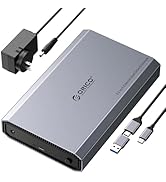
🚀 Unlock your storage potential with speed and style!
The ORICO USB 3.0 to SATA III 2.5" External Hard Drive Enclosure offers a tool-free, ultra-fast 5Gbps USB 3.0 interface with UASP support, compatible with SATA SSDs and HDDs up to 6TB. Its compact, durable ABS design features shockproof padding and broad OS compatibility, making it an ideal plug-and-play solution for professionals seeking reliable, portable data expansion.




| ASIN | B01M08LCXW |
| Best Sellers Rank | #85 in Enclosures |
| Compatible Devices | Desktop PC, Laptop, Smartphone, Tablet |
| Connectivity Technology | USB |
| Customer Reviews | 4.5 4.5 out of 5 stars (9,183) |
| Data Transfer Rate | 5 Gigabits Per Second |
| Date First Available | September 24, 2016 |
| Hard Disk Form Factor | 2.5 Inches |
| Is Discontinued By Manufacturer | No |
| Item Weight | 3.17 ounces |
| Item model number | FBA_ORICO 2189U3-BK-US |
| Manufacturer | SHENZHEN ORICO TECHNOLOGIES CO.,LTD |
| Material | Acrylonitrile Butadiene Styrene (ABS) |
| Max Number of Supported Devices | 1 |
| Memory Storage Capacity | 6 TB |
| Product Dimensions | 4.92 x 3.15 x 0.55 inches |
| UPC | 655779704859 714874073519 712073948195 |
G**E
Great external HDD enclosure, but...
This is a great enclosure. It looks nice and it's easy to install the drive. Once that's done it's ready to go, and it works very well. The activity light is a plus, as well. My only real complaint is that there is nothing with which to hold the drive tightly into the connector at the end. With other enclosures I've tried there has been a small, firm piece of foam at the end opposite the drive connection. This keeps the drive "pushed" snugly into the connector at the other end. Then, of course, you can use the foam that comes with the kit to keep the drive from moving up and down within the case. I used the thick piece, and I attached it to the top face of the drive itself. I had to use a credit card to hold the foam down as I was sliding the cover back on so that the cover clip didn't catch and tear the foam, but it worked well, and the drive is snugly in place. I worry a little about heat, but it should be fine. For the issue I mentioned, I used a piece of foam weatherstripping, cut to size. The sticky side to the plastic of the case, of course, and it holds the drive firmly forward and into the connector. The space is about 1/8", which is enough that the drive would wiggle out of the connector, and this firm foam will keep it from doing so. Overall, this is a very good enclosure, and to be able to turn an unused drive into a usable one for such a small price is very nice. I would definitely recommend this case to others, with the added caveat to be careful about the 1/8' space at the end of the drive.
D**A
Simple Easy Works Well
The case is extremely easy to open and place a drive inside. The exterior is a plastic that is non smudging, no finger prints, doesn't slip out of your hand. The case feel greats to hold and the drive is very secure in the case during transports. (read below about UASP and TRIM) I have used other Orico products before and they have been solid throughout the years. My suggestion is: Use a SATA SSD, not a mechanical hard drive. The heat generated from the mechanic drive won't have anywhere to dissipate. SSD you don't have to worry about fragmentation like a mechanical hard drive and the over all weight of the external enclosure will be less. NOTE1: UASP stands for USB Attached SCSI Protocol. It allows for faster read/write data speeds to and from storage devices. Compared to traditional USB 3.0 BOT, UASP performs up to 70% faster read speeds and 40% faster write speeds at peak performance. TRIM: (MAC - OS): In order to check if your enclosure supports TRIM, you’ll want to go to Apple > About This Mac > System Report > Hardware > SATA/SATA Express > and look for “TRIM Support” under the enclosure specs. If TRIM Support is not listed, your enclosure most likely does not support TRIM. If it is listed but says “No”, you can try turning TRIM on by using the trimforce command in terminal. Just open Terminal and type “sudo trimforce enable”. Once your computer restarts, check System Report again to see if TRIM Support changed to Yes. TRIM: Windows (10/11): Start button, type in the search box: cmd (run command prompt AS ADMINISTRATOR) type in this: fsutil behavior query DisableDeleteNotify if it returns "NTFS DisableDeleteNotify = 0 (Allows TRIM operations to be sent to the storage device)" Trim is turned on.
M**R
Works well for Windows XP, 7, and 10 with USB 2.0 and 3.0 on 8 to 15 year old Dell laptops
I love to do full drive clones of my Windows 7, 10, and XP systems periodically. That way if something bad happens, from a drive crash to a bad virus, etc., I can simply replace the drive, restore my latest backup of "My Documents", and I'm fully back in business, with all my installed Windows software and data. For a very reasonable price, this enclosure works consistently well for me with both old and new HDD's, large and small SATA HDD's, and large and small SSD's. Whether copying files directly in Windows, or using drive management software "Mini Tool Partition Wizard" for Windows, to copy drives or partitions. Linux Mint sees the drives OK in Linux or Windows formats and reads and writes files OK. I haven't tried things like cloning systems in Linux. My experience, thus far, is with older laptops, running Windows XP SP3 and Windows 7 with the latest updates. I would say I've used a few dozen of these with no problems. They consistently work, and seem consistent re the material quality, way they're packed, having the included USB cable work, etc. The worst thing I've had was a slightly misformed connector to clide the box halves together that required me to push it a little. It still worked fine. The included sponges which can be attached to help hold drives in place (two thicknesses) gives a secure fit with either wider or narrower drives, which I like. Lately I've had more problems getting the sponges off the backing -- I think the material is getting old / brittle, like they've had them in inventory for a long time. A little annoying, but not a big deal. I can't speak to EUFI vs. a BIOS, however, since I haven't messed with such systems with this product.
D**W
Decent Case, Not for Transport
I’m only giving it four stars instead of five stars because you need to know that the casing is not secure enough to make your SSD portable. Use this at a stationary location. Do not transport your SSD in this. It will work and it works beautifully. However, it needs to be on a flat surface and it needs to be in the middle of a table and not on the edge. This is not designed to guarantee protection if your drive falls.
J**T
Llego en tiempo y forma muy bien empaquetado y completamente sellado. La calidad es buena y funciona correctamente.
P**O
I have three of these now, for SSD backups and for an external SSD OS volume on an Fusion Drive iMac. It's more compatible with the APFS file sytem than the internal Fusion Drive from where I access my User files. No need to transfer those; just install the OS files and apps and it zips along. A cost-effective solution for better performance. I've used this current one to clone a 4TB SAMSUNG EVO860 which will replace the Fusion Drive and eliminate the need for the external drive workaround. I didn't notice that it was limited to a maximum 2TB drive. Why that should be, since it's a SATA -- USB 3.0 device? However, the transfer went smoothly and in the time I expected.
M**A
very good
ه**ي
الحافظه نفس المواصفات وجيده جدا وسريع بنقل البيانات لكن توقعت التوصيل في خلال يومين بالكثير لانه محلي وتوصيل داخلي لكن ايضا لم يتاخر
J**.
Excellent!!
Trustpilot
2 months ago
1 month ago