
DOWNLOAD THE APP


Customer Services
Copyright © 2025 Desertcart Holdings Limited
DOWNLOAD THE APP

💼 Upgrade your data game with the ultimate HDD adapter—fast, versatile, and built for pros.
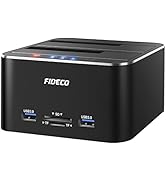
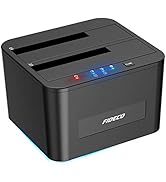
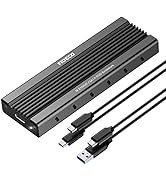
The FIDECO USB 3.0 to SATA/IDE Adapter is a compact, aluminum-bodied hard drive converter supporting up to 16TB HDDs and SSDs. Featuring USB 3.0 SuperSpeed (up to 5Gbps), offline clone functionality without a PC, and broad compatibility across Windows, Mac, Linux, and gaming devices, it offers plug-and-play convenience with hot swap and power switch protection. Ideal for IT professionals and data managers needing efficient backups, cloning, and file transfers.







| ASIN | B077MXC8SV |
| Batteries Required? | No |
| Batteries included? | No |
| Best Sellers Rank | 2,883 in Computers & Accessories ( See Top 100 in Computers & Accessories ) 623 in Adapters |
| Colour | Black |
| Customer Reviews | 4.5 4.5 out of 5 stars (2,740) |
| Date First Available | 21 Nov. 2017 |
| Finish | Glossy |
| Included components | HDD Adapter; USB Cable; Power Adapter, 4-pin Power; 3.5" to 2.5" IDE Converter |
| Item Package Quantity | 1 |
| Item Weight | 317 g |
| Item model number | FC-PL06 |
| Manufacturer | FIDECO |
| Material | Aluminium |
| Part number | FC-PL06 |
| Product Dimensions | 6.6 x 2.7 x 3.8 cm; 317.51 g |
| Size | Clone |
| Special Features | Offline Clone |
| Specific uses | DVD Player, PC |
| Specification met | USB-IF |
T**Y
Fantastic product!
Fantastic product. Well made, compact and has helped me offline clone two 1TB HDDs within a few hours. Super easy to use.
E**.
Great piece of kit.
Worked perfectly.
D**B
Great Product for backing up IDE or SATA Hard drives
Good Product, worked well and clear instructions included.
J**S
Does what you want it to do well, but depends on your use.
I'm happy enough with my purchase of this item, with it becoming an asset I have used on more than one occasion. It's surprisingly small, which is only a good thing. Easy to connect as all the cables are included in the box. The speed is perfectly reasonable for connected drives, and I have had no issues connecting, reading from, or writing to drives outside of one instance, but that was entirely my fault as I was just messing around more than anything. I also am having trouble when it comes to booting from any connected drives, but I am unsure if the device is capable of that so I can't hold it against it. My personal reason for buying this was the IDE connection in addition to the SATA connection. I had an old drive in the house but had no way to read it, so this seemed perfect for me. It's good value for your money, it does what you want it to do very well: reading and writing to drives. But if you're looking to have drives connected for long periods of time, you may want to go for more of a docking station.
M**I
works great with ssd/hdd - DOESN'T WORK WITH BLUE-RAY OPTICAL DRIVES! (still happy tho)
Like in the title - works as advertised - currently copying hdd to hdd with it but I assumed it would work with optical Blu-ray drives aswell as it is same connector. It doesn't, so buyers beware - good for cloning and hot swapping and working with ssd's and hard drives but doesn't recognise opticals. Offline future is super cool though - just plug 2 drives in and click middle button - off it goes, no computer needed. overall it looks like quality piece of gear including the adapter plug - where most of these chinesium devices come with the cheapest dodgy looking plugs - this one looks very decent :) so does the device itself.
W**H
Requires USB outlet
Works great reads IDE drives via USB works perfectly
R**O
Good value and worked well
Performed well
D**K
Looks good
Hopefully a great addition to the collection of IDE and Sata drives I have acumallated over the years. This is for a future project, so haven't had the chance to try it out yet, hopefully all will be OK. Arrived the following day via Amazon Prime, it looks good and well packaged.
S**A
Lo he comprado para poder acceder a discos duros IDE y Sata de ordenadores viejos desde mi portátil actual. Por ahora cumple su función. Lo compré sin función de clonación porque no me interesaba, solamente lo quería para recuperar fotos y datos puntuales. La velocidad de transferencia de datos es fluida y el ordenador (lo probé desde un Mac) reconoce los discos sata sin problemas. El ide lo reconoció pero no podía acceder a él, probablemente porque el formateo que llevaba, ya que era un hd bastante viejo (3gigas), no era compatible con el Mac o sencillamente estaba estropeado el disco por viejo y mal cuidado (llevaba rulando por casa de mi padre varios años, sin protección alguna). El sata una vez extraidos los datos que me interesaban lo formatee desde el mac (se calentó mucho el disco pero entiendo eso es algo normal y no es culpa del lector. Le puse un ventilador pequeño de los chinos mientras lo formateaba para rebajarle la temperatura) y todo perfecto.
A**O
Funziona egregiamente. Ho avuto modo di provare tutti e tre gli ingressi, per via di tre diversi hard disk in mio possesso, e sono rimasto soddisfatto della sua versatilità e della velocità di trasmissione dei dati col computer.
C**N
Quality
M**C
I've done two main things with this device. I've attached two SATA drives and cloned one to the other using the One Touch button. That worked without issue. You have to have the destination drive be the same size or larger. I also connected multiple drives to the device and then connected the device to a PC to use software for more complicated jobs. You can use a free software like Macrium or Easeus Partition, both of which are easy to use and will allow you to copy partitions from a drive to another without copying the whole disk. If you connect a single SSD (and maybe even a standard mechanical 2.5" disk) to it and connect to a PC, you don't need the power adapter. But if you attach two, you do. If you are doing something time-consuming and resource intensive such as cloning, I would recommend attaching the power cable even if you have only a single drive attached. The only issue I ever had was when I was trying to upgrade my main PC's Windows 7 installation to Windows 10, and the the program would fail because my PC was losing its connection with the attached SSD. I don't recall if that was due to my corrupted Windows 7 installation or if I had neglected to plug in the power adapter. Either way, I got it resolved and was able to complete the transfer. I had loads of trouble getting this Win7 install to upgrade to Win10, but that had nothing to do with this device. When I upgraded another Win7 install to Win10, I pulled the drive out of the laptop and did the One Touch cloning. That worked without any issue at all. I plugged the new drive into the laptop and went about upgrading to Win10 (I didn't want to upgrade the old drive to Win10 just in case there were issues during the upgrade process as there were when I upgraded the OS on my desktop). That upgrade went through without any issue. I had a 3rd laptop running Windows Vista. I wanted to upgrade it to Win7 and then upgrade that to Win10 (you can't go directly from Vista to 10). I ran into two issues, neither of which were related to this device. I ended up using this device quite a bit as I had significant software issues during this upgrade, and I ended up wiping drives and re-cloning multiple times. If you are going to upgrade from Vista to 7 to either stop there or upgrade further, you need to do one of two things if you don't have an advanced format disk and want to move to an AF disk (like a SSD, though it may be the case that any hard drive made today would be AF). If you are running Vista, chances are you do not have an AF disk, so if you want to freshen up an old PC and upgrade your OS and move to a SSD, you need to either upgrade to Win7 on the current disk before cloning or you need to download and install a couple of hotfixes and potentially some additional software. The hotfixes are KB2470478 and KB2553708. You might also need RST driver 9.6 or higher if you have an Intel SATA controller. If you clone first and try to upgrade to Win7, the install will not go through. If you clone first, you can still install the hotfixes, but you'd then have some extra steps because you won't be able to install a hotfix. It's much easier to install the hotfixes before you clone. Now back to this device. I've had it for 7 months. It's worked great for cloning but also for simply attaching a drive to it and then accessing that drive on another computer. I don't have any complaints about it in regards to its intended purpose. The one thing I would say, though, is that I wish they had included a cord, or two cords, to connect a SATA drive in a machine to this device. As it is, you connect the device directly to the drives, no cables involved (other than with the IDE drives and the power connector). I had an SSD in a desktop and had to install it with a 2.5" to 3.5" adapter so that it would sit in the case. This meant that if I wanted to clone that drive, I'd have to remove it from my case. However, if I could connect the device to the drive via cables, that would add flexibility to this. Granted, this is an edge case, and I assume that most people would be using this device because they want to replace one hard drive with another. Still, it'd be nice if I didn't have to attach all of the drives onto the device itself.
L**E
facile d'utilsation
Trustpilot
3 weeks ago
3 days ago