Some deliveries may take a little longer than usual due to regional shipping conditions.

DOWNLOAD THE APP


Customer Services
Copyright © 2025 Desertcart Holdings Limited
DOWNLOAD THE APP


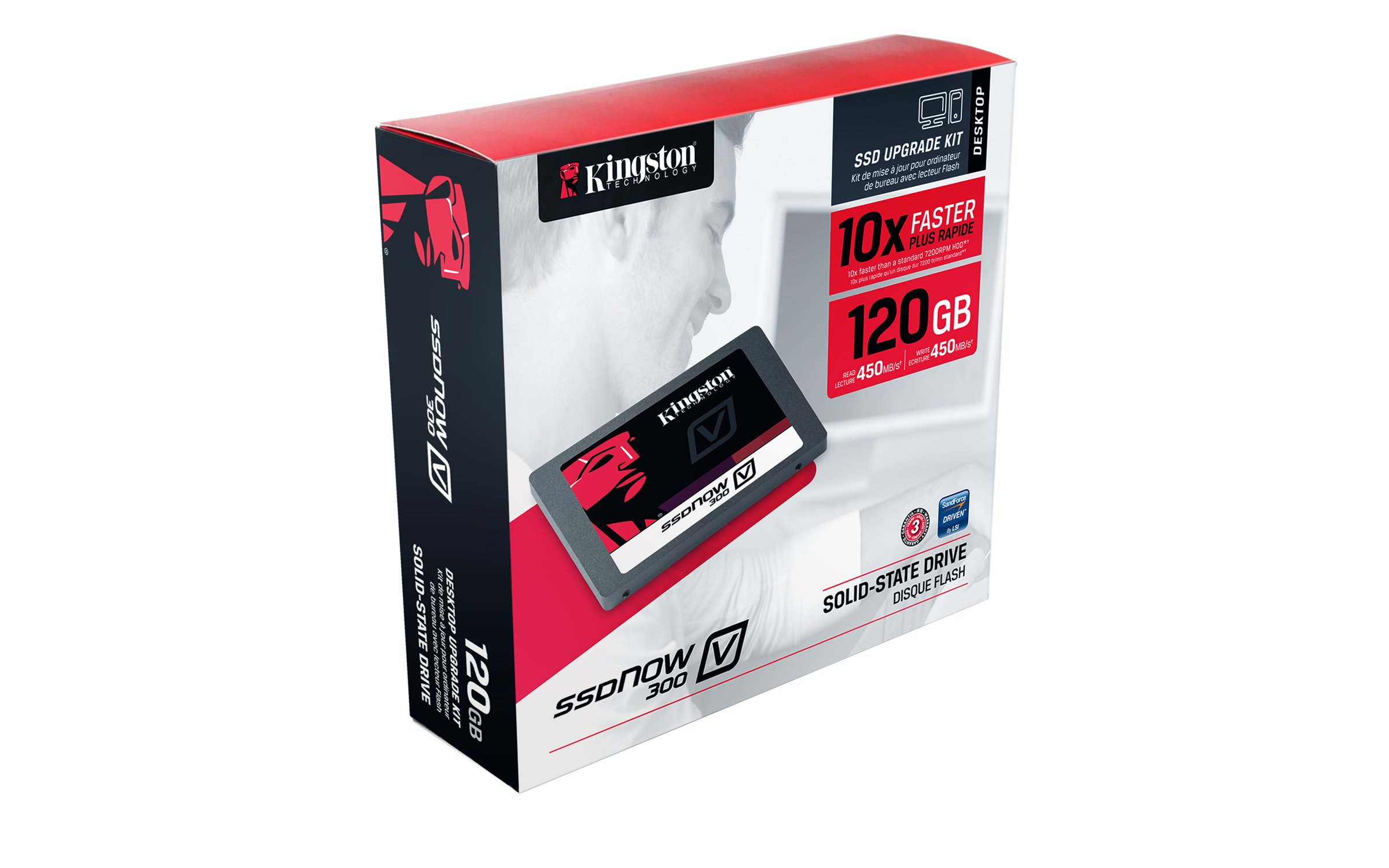

🚀 Upgrade Your Tech Game!
The Kingston Digital 120GB SSDNow V300 is a high-performance solid-state drive designed for desktop use, featuring a complete bundle kit that includes essential installation components. With faster load times, enhanced reliability, and a cost-effective design, this SSD is perfect for anyone looking to upgrade their system effortlessly.
| Manufacturer | Kingston Digital |
| Brand | Kingston |
| Item Weight | 1.87 ounces |
| Product Dimensions | 2.74 x 3.94 x 0.28 inches |
| Item model number | SV300S3D7/120G |
| Is Discontinued By Manufacturer | No |
| Number of Items | 1 |
| Size | 120GB |
| Manufacturer Part Number | SV300S3D7/120G |
J**U
Like putting a brand new heart in a dying laptop!!!
I installed this new SSD into my wife's Toshiba laptop. As is with many PC's, it had become clogged with the multitude of Windows updates and miscellaneous "stuff." The boot time had gotten up to a few ticks short of three minutes. You could hear the original installed 7200 RPM HDD working, and working, and working...just to get everything opened. She was about ready to throw it out the window! This kit was very complete, and extremely easy to do. Just watch the couple How To videos on Kingston's website. Yes, it is as quick and easy to do as their videos show. I was done in under 25 minutes, and the vast majority of that was spent waiting for the cloning software to create the new drive. I do recommend going through your existing HDD and cleaning up the junk files prior to cloning it tot he new drive. No sense on starting out with a bunch of crap on your fresh new drive. The cloning software on the supplied CD was super easy to use and did a great job with just a few clicks of your mouse.When I booted it up for the first time the time required for the system to completely boot up was right around 20 seconds!!! Subsequent boot ups were closer to 15 seconds. SMOKING fast. When the computer was up and running you could not tell anything on it had changed at all, except the super fast boot time. The desktop looked exactly like it did with the old drive. All shortcuts were exactly where they were and all worked. I have read a few reviews on this drive that said it was not a fast drive. While I have no actual testing data to back up my claims, I am telling you this drive is light years faster than the old HDD it replaced. Programs that used to take up to 15-20 seconds to load open up almost instantly. Click, and it is opened. No waiting. Is it the fastest SSD out there? Nope. Is it a darn good drive for the money? Absolutely!So far I can't be happier with my decision to by this drive and swap out the old dinosaur HDD. It was like taking the shock paddles from the hospital and jump-starting new life into an old system. If you are on the fence about buying this drive, do not hesitate to pick it up. You won't be disappointed. Wifey is very happy too! As the saying goes...If momma ain't happy, ain't NO ONE gonna be happy!
D**N
Yes! Absolutely yes! But read these caveats first.
I was skeptical about SSDs until I finally got this one installed and , man, now am I believer. If you have the skills to install one of these, you should order one right now! Here's why: I have a old Lenovo Windows 7, i3 desktop that took forever to get going from a restart or cold boot. The hard drive would grind away for 20 to 30 minutes on every mandatory "update" restart. All resources consumed. The keyboard would barely work. I just had to walk away and come back a half hour later. It was maddening, especially with the endless updates Microsoft sends out (You MUST reboot....) Sound familiar? . So imagine my surprise (and delight) when I booted for the first time to this SSD and Windows logon screen appeared in just 10 seconds! 10 SECONDS!!!! I could barely believe it. I log on and my desktop is up and running in another 5 seconds. Un-fricking-believable! Of course all apps also launch almost instantly now too (well, except for browsers, which are faster but still pokey thanks to all the calls on nearly every web page). If you want to breathe new life into your PC, this, without question, provides the best bang for the buck. Mine is now much MUCH faster than it was when new. Almost anyone with even moderate skills can install a SSD in a desktop PC but here a few tips that will smooth the process.1. First, make sure your equipment is up to the task. That means SATA II or III system, with open sockets to plug this thing into (Look where your current hard drive is plugged into the motherboard or controller. There should be empty adjacent sockets). And an extra power lead from the power supply. Most desktops of the last 3 or 4 years are probably OK but open up the case and check before you order. Also make sure you understand how to get into the BIOS settings, since you will have fiddle with the boot order during the install. (In my case, press F1 during boot)2. Save yourself a lot of time and just buy an SSD with enough capacity to cover whatever content is on your drive. I cannot stress this enough. That makes it super simple to clone the existing hard drive to the SSD with the included Arconis software and you will be up and running in a few minutes. I tried to go cheap and get a smaller drive and spent hours moving music, movies, pictures, etc onto an external hard drive. And uninstalling programs. And even then I struggled to get content down to the level needed to clone. Be aware that although the capacity of this drive is 240G, you will need to get your hard drive content down to about 220 or less to clone it. And don't forget to include all the extra partitions, etc. That became a major pain for me. Save yourself the trouble. Just buy the bigger capacity SSD. The time and aggravation it saves you is more than worth it.3. If you insist on going cheap and downsizing, begin by downloading a program called WinDirStat, which is free at downdload.com and other sites. It will show you how much content is in each directory. That makes it easier to determine where huge amounts or content are hiding. Then you can easily reduce the content to the level you need. I had about given up on reducing content to the necessary levels until WinDirStat discovered a special directory the manufacturer used to store a complete backup of the original Windows 7 install and all included software and drivers. 45 gigs! Once I removed that, I was good to go.4. Once you install the SSD and get it up and running, go to system settings and force it run a new Windows Experience Index. This apparently makes a few technical changes (Trim) that makes the SSD much faster. The cloning software also has this option but you can do in Windows and also immediately see the improvement in the speed of your hard drive. I went from the low 5s before to 7.6 after SSD installed (7.9 is the max score possible)5. The mounting bracket that comes with this SSD kit can only be securely mounted if your drive cage allows drives to be mounted to the SIDE rails. Screws must come in from each side. My case had some odd BOTTOM mount setup (but thankfully had an open bay for second drive) and no holes lined up on the mounting bracked. Be prepared to improvise if the hard drive cage does not have correct configuration. Not a big deal. This thing is very light and could probably just hang loose inside the case. But if you want a proper install, this is something to be aware of.
S**O
Precio calidad
Me ha funcionado muy bien como disco duro portatil, rápida transferencia en usb 3.0
J**L
Blitzschnelle Performance und zuverlässige Qualität
Die Kingston SV300S37A/120G SSDNow V300 SSD-Festplatte hat mich in jeder Hinsicht beeindruckt und ist eine absolute Empfehlung für alle, die ihre Computerleistung auf ein neues Niveau heben möchten. Mit ihrer schnellen Performance und der zuverlässigen Qualität setzt sie neue Maßstäbe für interne SSD-Festplatten.Die 120 GB Speicherkapazität bieten ausreichend Platz für Betriebssystem, Programme und Dateien, und sorgen für eine spürbar schnellere Systemstartzeit und eine flüssigere Arbeitsleistung. Die SATA III-Schnittstelle ermöglicht eine beeindruckende Datenübertragungsgeschwindigkeit, die herkömmlichen HDD-Festplatten deutlich überlegen ist. Programme starten in Sekundenschnelle und das Laden von Dateien wird zum Kinderspiel.Die Installation der Kingston SV300S37A/120G SSDNow V300 war denkbar einfach. Die 2,5-Zoll-Bauform ermöglicht eine problemlose Integration in Laptops oder Desktop-Computer. Die schwarze Optik verleiht der Festplatte zudem ein elegantes Erscheinungsbild.Was die Kingston SV300S37A/120G SSDNow V300 wirklich auszeichnet, ist ihre Zuverlässigkeit. Kingston ist bekannt für seine hochwertigen Produkte und diese SSD-Festplatte bildet da keine Ausnahme. Mit ihrer soliden Verarbeitung und der fortschrittlichen NAND-Flash-Technologie bietet sie eine langlebige Leistung und sorgt dafür, dass Ihre Daten sicher und geschützt sind.Die Kingston SV300S37A/120G SSDNow V300 SSD-Festplatte ist auch äußerst energieeffizient. Dank des geringen Stromverbrauchs trägt sie zur Verlängerung der Akkulaufzeit von Laptops bei und spart langfristig Energiekosten.Alles in allem kann ich die Kingston SV300S37A/120G SSDNow V300 SSD-Festplatte uneingeschränkt empfehlen. Sie bietet eine blitzschnelle Performance, eine zuverlässige Qualität und eine einfache Installation. Wer auf der Suche nach einer leistungsstarken und zuverlässigen SSD-Festplatte ist, wird mit der Kingston SV300S37A/120G SSDNow V300 definitiv zufrieden sein.
K**L
I HIGHLY recommend this Drive.
This product was recommended to me by someone that is very tech savy.Would I buy it again: 200% YesIt was very easy to install and my macbook easily recognized the Drive.The SSD drastically increased the speed of my macbook pro 13'. If you can put the extra money go for SSD it will change your life.Kingston is a very trustworthy brand and you cant go wrong with them.I HIGHLY recommend this Drive.
F**E
PC VECCHIO E LENTO CHE NON VOLETE CAMBIARE? ECCO LA SOLUZIONE ECONOMICA
Possiedo un vecchio computer di 5 anni fa, ultimamente era diventato parecchio lento anche nelle cose quotidiane: avviarsi, aprire facebook etc..Mi sono informato molto in giro sui forum perchè non avevo nessuna intenzione di cambiarlo, e ho visto che molte persone consigliano di installarci un ssd per migliorare la velocità. Dunque mi sono fatto consigliare questo modello poichè è ottimo come rapporto qualità prezzo ed è anche più veloce rispetto ad altri ssd di altre marche.Una volta arrivato a casa il problema era montarlo, ho visto che su youtube è pieno di video tutorial e alla fine non è un operazione molto complicata ma, sinceramente ho preferito rivolgermi ad un negozio di informatica vicino a casa mia che con 25 euro mi ha fatto il lavoro in giornata, gli ho portato il pc alla mattina e sono passato a riprenderlo una volta uscito dal lavoro.Ora vi starete chiedendo, il risultato? ASSOLUTAMENTE PAZZESCO, il computer è davvero rinato, velocissimo in tutto, per darvi un idea ad avviarsi l'ho cronometrato col cellulare, ci mette esattamente 4 secondi, incredibile.P.S. un plauso ad Amazon: tempi di consegna ottimi come al solito!
T**Z
Excelente rendimiento después de 7 meses de uso
Muy buena unidad de estado sólido los tiempos de arranque se han reducido drásticamente en Mi HP 15 principalmente la utilizó para programar en Android estudio y para hacer uso de juegos en steam y el rendimiento es fabuloso el arranque se redujo a 3 segundos desde cero hasta el inicio de escritorio y no he tenido ningún problema en general con ninguna aplicación la copia del disco duro la realice con la aplicación EasyUs que permite clonar el disco duro original de un terabyte a esta unidad de menos de 500 Gb de manera gratuita
Trustpilot
4 days ago
2 weeks ago