We remain fully operational. Our teams are working around the clock to ensure your deliveries continue safely.

DOWNLOAD THE APP


Customer Services
Copyright © 2025 Desertcart Holdings Limited
DOWNLOAD THE APP

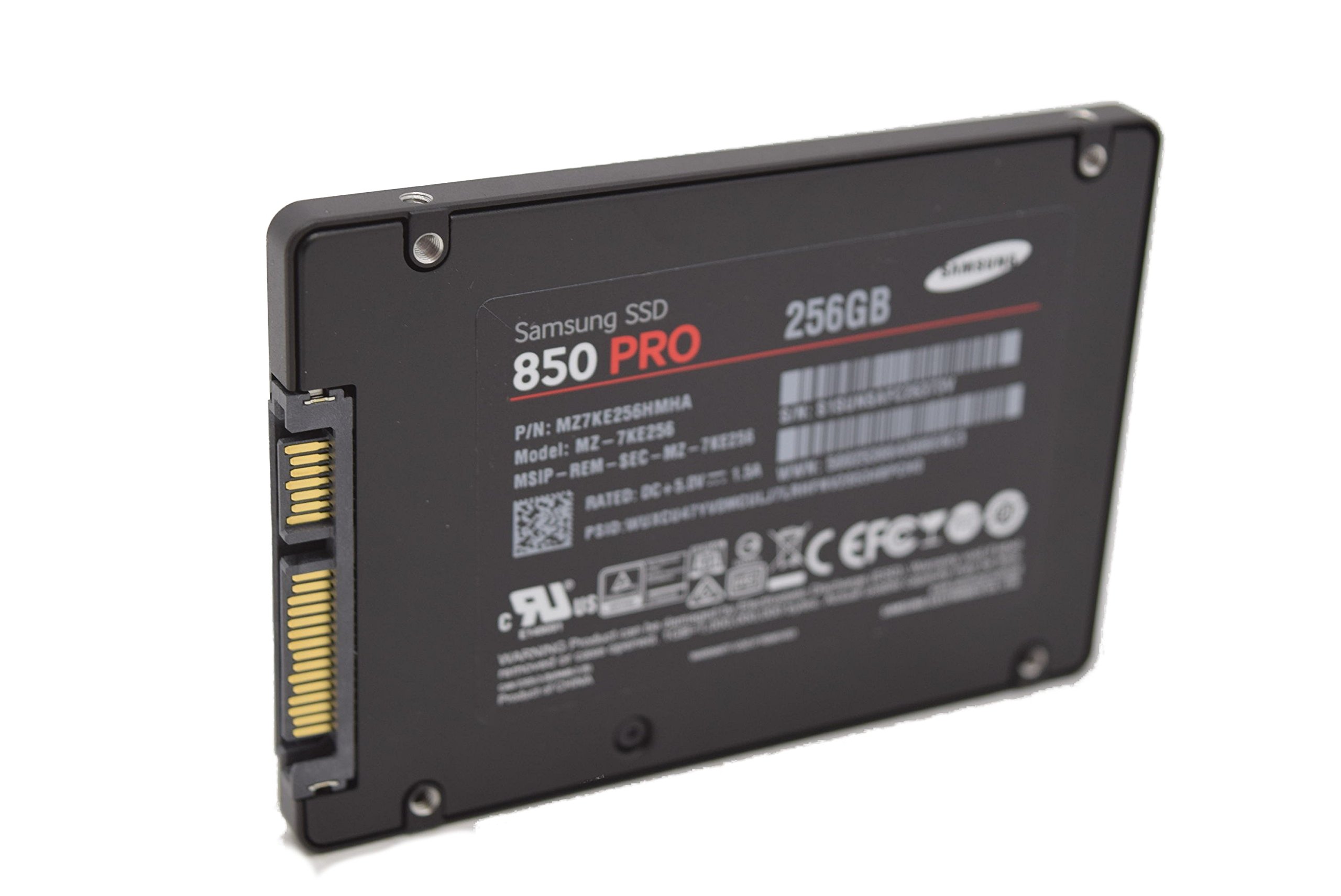


🚀 Unlock Pro-Level Speed & Security — Because Your Workflow Deserves the Best
The Samsung 850 PRO 256GB SATA III SSD delivers industry-leading performance with up to 550MB/s read and 520MB/s write speeds, AES 256-bit encryption, and a 10-year warranty. Designed for professionals and power users, it combines cutting-edge 3D V-NAND technology with energy-efficient features to boost productivity and battery life, making it the ultimate internal storage upgrade for desktops and laptops.





| ASIN | B00LMXBOP4 |
| Additional Features | Samsung SSD Magician Software| Samsung Data Migration Software |
| Best Sellers Rank | #296 in Internal Solid State Drives |
| Brand | Samsung |
| Built-In Media | 2.5” (7mm) SATA III (6GB/s) SSD & User Manual |
| Cache Memory Installed Size | 1 |
| Color | Black |
| Compatible Devices | PC |
| Connectivity Technology | SATA |
| Customer Package Type | Standard Packaging |
| Customer Reviews | 4.7 out of 5 stars 8,949 Reviews |
| Digital Storage Capacity | 256 GB |
| EU Spare Part Availability Duration | 10 Years |
| Enclosure Material | Nand Flash |
| Form Factor | 2.5-inch |
| Global Trade Identification Number | 00012302569109, 00846830069530, 04053162526419, 05054531422669, 08806086264631 |
| Hard Disk Description | Solid State Drive |
| Hard Disk Form Factor | 2.5 Inches |
| Hard Disk Interface | Serial ATA |
| Hard-Drive Size | 256 GB |
| Hardware Connectivity | SATA 6.0 Gb/s |
| Installation Type | Internal Hard Drive |
| Item Height | 0.27 inches |
| Item Weight | 66 Grams |
| Manufacturer | Samsung Electronics |
| Media Speed | 520 Megabytes Per Second |
| Model Name | 850 Pro |
| Model Number | BPSCS27759-MZ-7KE256BW |
| Number of Items | 1 |
| Read Speed | 550 Megabytes Per Second |
| Special Feature | Samsung SSD Magician Software| Samsung Data Migration Software |
| Specific Uses For Product | Gaming |
| UPC | 041114819713 846830069530 801940122216 734911147553 887276057484 386831419632 013686001643 012302569109 768451018684 809394437764 644535534311 036566692250 014444853726 797045621108 782386499431 734911381971 714547219985 160400842751 846237033783 702458676843 014445512417 722550157507 012302744957 796594240303 667649018294 803983045576 |
| Unit Count | 1.0 Count |
| Warranty Description | 10 Years/150TBW |
R**Y
The Fastest Samsung Drive I've Yet Used
What you want to know is this: is this SSD faster than the 850 EVO? When dealing with SSD's, does any appreciable difference in speed occur, since they are all so fast, anyway? The fact is this: I've been using Samsung SSD's of varying varieties for years, and when I recently replaced my Samsung 840EVO with this one (on my boot drive), the speed notice WAS undeniably different. Yes, I still has those couple of seconds of booting time after the POST routine finished, but instead of programs loading, they almost felt like they were POPPING, this thing is so fast. For example, when I log into Windows 10, I would get that slight lag time as the desktop loaded. Now, admittedly, we are dealing with very small time differences here, because my 840 IS fast. But when I put this thing in, when I logged in, the screen just POPPED open, almost like there was no load time. None of this is a scientific description, but it is the absolute experience I've had with this new type of memory that Samsung is using in the 850 PRO. It is still pretty pricey, so I've gone with the 250Gb version for my boot disk, and then run my other, larger Samsung 840's and traditional drives as secondary drives. And it is true that I am using this in a system that I built myself with only superior parts (motherboard, RAM, video, etc.), but there is absolutely no question to the answer you are looking for if you are investigating this drive: YES, it IS faster than the previous drives that Samsung put out (and still sells). Is it worth the price? Hard to say. First, is what type of computer user are you? What types of programs do you typically run? And what type of system do you have? For example, if the bottleneck is in another part of the system, you may not get the most bang for your buck by spending the extra on this PRO version. But if you have a modern, well-specified computer, you will notice a speed difference. I certainly did. And now comes the wait until the 850 PRO prices come down, because what you really want is something like this, but in 4Tb or larger. It will be a few years before we see such storage, and at reasonable prices, but this drive clearly shows it is coming. For now, if you are dealing with a desktop, consider my strategy of using it as the boot disk with all your programs installed, and other, less expensive drives for storage. If this is for a laptop, you have to ask yourself if your laptop is new enough and powerful enough (RAM, processor, video system, etc.) to warrant the extra expense. All SSD drives are fast, and generally, scream past the traditional spin platter drives we all grew up with. But there IS a difference in how the memory in an SSD is constructed (read the Samsung material here on Amazon to understand the difference in this particular type of configuration), and then, of course, there is the often-overlooked factor of the controller attached to the disk, which also has an impact on speed. Of all the Samsung drives I've purchased, this is the best, and fastest. Its a superb drive that is a window into the future of SSD drives. The holidays are coming soon, so you might watch it for temporary price drops. I cannot justify (or afford) the price of these in their largest size, but for a boot drive of 250Gb, I get most all the benefits for just a little over $100. This is a five-star product.
D**S
The best SATA SSD of mid 2014
If you're looking for a new SATA SSD and can afford it, this is the one to choose. + blisteringly fast reads & writes in every environment (random, sequential, small and large chunks) + unparalleled high and sustained write consistency across time, conditioned on overprovisioning (see below) + best warranty in the market: 10 years or 150TB writes, whichever comes first +/- reasonably priced, except for the $700 1TB model (yikes!) This thing is ridiculously fast. If you've never used a solid state system drive before, then prepare yourself for a huge treat. It's a categorical difference in system performance compared to a spinning disk. For the rest of us that have been fiddling with SSDs for years, you are accustomed to this class of data storage device. I can't say that this drive is worth it if you already have an SSD manufactured in the last couple years. However, if you are in the market for a new SSD and you can afford this one, your search stops here. Aside from price of the 1TB version, there is nothing to criticize about this drive. The smaller capacity models are actually pretty competitively priced. It does a great job as a fast read cache when paired with spinning disk array. It handles the churn of the workstation environment without a hiccup. Perhaps most importantly, its throughput is consistent over time and load, so long as it's highly (>25%) overprovisioned. It can keep up with my write requests over hours of gigs being written down, ensuring I never lose a bit of data being pushed. It is the current market leader in performance and consistency. Samsung did a good job with their earlier 840 Pro , but this 850 Pro takes things a step further. I deploy systems for a large variety of environments, from laptops to workstations to high-end enterprise-level data servers. Before this drive came out, I had to pick the right drive for the application. Was I putting together a desktop workstation and needed a good mix of generalized read and write performance? If so, then I'd order a SanDisk, either the Extreme II or, more recently, the faster Extreme Pro . Was I putting together a small-footprint database server with a write heavy workload? If so, then I'd order the Crucial M550 , Samsung 840 Pro , or OCZ Vector . Was I in a mobile/laptop environment or because carrying sensitive data and needed encryption (HIPPA compliance and all that)? Then I had to go with the Crucial M550 or Samsung 840 Pro . Don't get me wrong, these aforementioned drives are not bad by any means. I've deployed several of each in the appropriate setting and they all do well in their respective application. I've used the SanDisk Extreme II for a ZFS data server's L2ARC and ZIL cache and it performed beautifully. I've deployed the Samsung 840 Pro, Crucial M550, and SanDisk Extreme Pro in both read/write heavy workstation environments and they have all kept up very well (the SanDisk Extreme Pro does the best of those three). It's just that the 850 Pro takes things one step further and eliminates the need to pick the right drive for the right environment. This single drive replaces all these other drives which excel at their specific tasks and beats them all at their own game. It's downright remarkable. To top it all off, it's also got the lowest power consumption of any SSD on the market because it's the first to the market with the new 3D NAND cell architecture, so it's incredibly data dense while using so few chips. That makes it even more attractive for mobile/laptop use. A note on the endurance and the warranty here, as that is also a new move for Samsung here. They are offering an across the board 150TB write endurance or 10 year warranty, whichever comes first, on all drives. This is a very interesting move, as NAND cells have a fixed write lifetime and since the 1TB version has more NAND cells than the 128GB version, you would expect the 1TB version to have a longer life cycle. What this basically means is that you can only fill the 1TB drive up 150 times before your warranty expires, but you have to write 1200 times to the 128GB version to reach the same threshold. I'm not quite sure what Samsung was thinking when they made that calculation, because these NAND cells should have at least 1000 (heck, if not 10000) write life cycles, so they're definitely low-balling the 1TB version. It's possible that with density this high, it's more prone to bad NAND cells. Maybe they're just testing the waters with their first device using a 3D NAND architecture. Most consumers will get to 10 years before they hit 150TB write cycles, but this is something to consider for enterprise, as you could easily hit 150TB on a write-heavy data server. Packaging is just the standard fare for SSDs. Drive, CD, random booklets, and a couple Samsung SSD stickers. Yay stickers! They're too cheap to throw in drive screws--so much for "retail" packaging. I suppose though if you're willing to drop $700 for a 1TB drive, they figure you aren't hurting to source your own machine screws. Gone are the days of included SATA cables and everything. Alas, I miss those days where you couldn't lose a several hundred dollar retail box hard drive package in between the seats of your car... Accessories aren't the reason you are buying this though. It's the performance it offers. Scour the web for performance reviews if you want other thoughts and the nitty-gritty numbers, they are all unanimous in their findings. The Samsung 850 Pro defines the new standard for SATA SSDs. As always, don't forget to overprovision the drive to around 25%-30% capacity to maximize performance. It takes a huge performance hit without that step. To be clear, overprovisioning means leaving aside some percentage (25-30%) of the drive as unpartitioned and unallocated free space. SSD drives already have around 5-7% overprovisioning done already (that is why you see some written as 120/240GB capacity, etc), but going beyond the factory overprovisioning only boosts performance even more. Overprovisioning increases the "swap space" for the SSD controller, allowing it more room to do data read/write housekeeping. It's the classic trade-off between memory usage and performance, but it will make a large difference in the performance of the drive. Again, check the product review sites for detailed quantification of just how big a difference this makes (greater than an order of magnitude in write speeds in some cases). The one thing to consider, if you're in this ballpark, is to forgo SATA all together and spring for a PCI express based drive. Most of these PCIe drives have been limited to industrial applications with their multi-thousand pricetags like the Intel 910 series. However, the just released (2014/09) Samsung XP941 drives are amazing in their performance and run circles around any SATA based rive and not ludicrously priced. They're definitely something to consider if you're not wedded to the SATA interface. In summary, so long as you don't mind the premium for the 1TB version, this is the undisputed best SATA SSD drive of mid 2014 no matter how you slice it. Enjoy the ride.
R**N
The fastest hard drive ive ever looked upon.
I bought this hard drive to replace a Western Digital Black for extreme gaming. I play old games and new games, so this review will be detailed. My system setup consists of an i7 4770k CPU, Asus Sabertooth z87 MB, 32 GB G.Skill RAM @ 2400mhz, and of course, the Samsung 850 Pro. My tests will include games, system and programs, music and video, and a benchmark tool. 1. Games - When it comes to gaming, having an SSD dramatically decreased load times for most newer games. Old games are not really affected due to how little data most of them need to load from the hard drive in today's standards. The biggest improvement came with Star Citizen. SC is still in super alpha, so nothing is optimized and load times are outrageous. Were outrageous. It used to take me nearly 2 minutes to load into hangar, now with the 850 pro, its less than 30 seconds. Other games such as Planetside 2, Mad Max, Homeworld etc have also vastly improved loading times. And its not just load times that are improved. In some games such as GTA San Andreas you can move into a new area faster than the hard drive can load things like building textures and pedestrians. The SSD solves this, no more do things just pop into existence beside you. Skyrim also has a bit of this problem too if you use a mod to give you a fast ride. Overall in the gaming department, this is really where the SSD shines to me. 2. System and Software - Windows startup time is also another area that shines brightly with an SSD. Traditional hard drive takes 1 minute or more to boot, sometimes 45 seconds if you got a good drive and a fresh install of windows. With the 850 pro, my fully loaded Windows 10 Pro OS can boot up in 22 seconds. That's with no password and such. 22 seconds from power button to mouse moving on desktop. The system tray icons at the bottom right of the desktop used to take 2 or 3 minutes for all of them to load up after arriving to the desktop, now with the 850 pro they all pop up simultaneously and instantly. My web browser, Firefox, used to take about 2 or 3 seconds to load up after clicking, now before my ear can even register the second click of the mouse, the browser is fully loaded and ready to go. I have also noticed greatly increased performance in Microsoft office programs, especially excel and power point. Then came the real software test. WinRar. As a winrar test i packed up 10 GB of music to test speeds. It took less than a minute to package up (compress) the 10 GB using the Best compression method, where as on a traditional hard drive your looking at 30 to 45 minutes of waiting maybe even more since i used the best method. Unpackaging (decompression) was instantaneous at the click of the mouse. Every thing i do is like a flash of light. 3. Music and Movies - Not much to say here other than transfer speeds are high, but i wouldn't keep music or movies on an SSD, they don't play better or sound better, but they do take up limited space and put wear and tear on the drive. Best to leave them on the traditional hard drive. 4. Benchmark - I have included a screenshot of the benchmarking program i used to test this hard drive. As you can see all test results exceed the specifications of this hard drive. I could to many different tests using many different settings but i stuck with the default and most used one. Construction - The SSD's construction is very nice. It is very strong and solid, but also very light almost like paper. It is very smooth and slim and should fit nearly anywhere you want to put it. Also the sata and power connectors are stiff and strong. Software - The samsung magician software that is paired with the hard drive is also very nice. It shows the health and total data written to the hard drive, can change windows options to better suit the SSD and its needs, encryption, the works. The only thing is that Rapid Mode does not work for windows 10 yet but Samsung says they are working hard on it, it has something to do with the new way windows 10 manages memory. Conclusion - Overall, this is the greatest hard drive Ive ever seen. Its super fast, super strong, has great software, and is backed up by a monster 10 year warranty. I looked forward to many years of extreme gaming with this SSD. I would highly haft to recommend this SSD to everyone. It is a truly great product made by a great company from a great nation. You wont be disappointed with this SSD. If you found this review helpful, please like it!
C**Y
Great for RAID 0, Nice drive for USB 3.0/UAS
Update: Bought 2x additional 512GB SSDs for RAID 0 in my new X99/2011-V3 system and the tested speeds were 1 million MB/sec+ both read and write crazy fast. System specs: Intel Core i7-5960X Haswell-E 8-Core 3.0GHz LGA 2011-v3 140W Desktop Processor BX80648I75960X ASUS X99-E WS (Currently ASUS X99-A waiting on RMA) 2x EVGA 04G-P4-2988-KR GeForce GTX 980 Classified 4GB SLI 2x Corsair DOMINATOR® Platinum Series 32GB (4 x 8GB) DDR4 2666 (PC4-21300) 2666MHz C15 memory kit for DDR4 Systems (CMD32GX4M4A2666C15) 2x Samsung 850 Pro 512GB 2.5-Inch SATA III Internal SSD (MZ-7KE512BW) RAID 0 ASUS PB287Q 28-Inch Screen LED-Lit 4K Monitor Cooler Master Nepton 280L - PC CPU Liquid Water Cooling System, All-In-One Kit with 280mm Radiator and 2 JetFlo Fans Antec TPQ-1200 1200W Continuous Power with PowerCache Technology SLI Ready CrossFire Certified 80 PLUS SILVER Certified Modular Active PFC Power Supply IC Diamond TIM Accell UltraAV B142C-007B-2 DisplayPort to DisplayPort 1.2 Cable with Locking Latches (6.6ft /2m) Mad Catz R.A.T.9 Gaming Mouse Razer BlackWidow Ultimate Mechanical PC Gaming Keyboard Using this 1TB SDD in a Inateck USB 3.0/UAS enclosure. I wanted something mobile for when I am on the road and at home. I have stuck with Intel SSDs and have been extremely satisfied because I use them in RAID 0 and they perform and are very reliable long term I have yet have one fail knock on wood. But now my needs are different and this new V-NAND technology interested me so I bought it. If it goes well my future SSDs will be Samsung due to the "better" tech. Pros - excellent packaging - lightweight - fast, I only get best read speed of ~312MB/sec, and write speed of 168 MB/sec using the ATTO bench tool in the USB 3.0/UAS enclosure. A real file copy of a large file stayed consistent at 144 MB/sec the whole time. I am sure this drive would get better speeds in a computer with ACHI just didn't try it, I would like to try RAID 0 too but not until my existing drives need replaced or fail. I wish Samsung would make an USB 3.0/UAS enclosure that handled the drives capabilities. -the Magician Software is nice, I used it to create a SecureErase bootable USB because Win 8 doesn't let you do that via the OS and in the past I have had to do that manually with my Intel drives so this was very nice. I would say some of the optimizations I saw I would have to research more before I would trust them but there were many good ones I saw too like turning off prefetch/superfetch etc. Cons -software doesn't recognize SSD on USB 3.0/UAS so if you want to use it for lets say secure erase you have to take it out of the enclosure and install it in a computer. Also if you want to use the Magician features at all except for the performance measurement piece same deal. Overall my experience has been excellent with the drive it had the latest firmware woot (In the past I had to update these)! I will have to live with the drive like my Intels for some time before I know the real deal but I am heading towards Samsung from Intel as it stands.
T**R
Good speed boost - but some serious gotchas
I've never used an SSD before so had no idea what to expect. All in all, I like my 850 Pro, but there are some very serious gotchas. I hope my review helps out some other users before they encounter the gotchas I did. Some of the reviews are a bit over the top about how much this will speed up your computer -- but it does speed it up very significantly. However, it's not as dramatic as some suggest. I set up my new 850 Pro on a beefy Windows tower that has a separate HD for the operating system (Win7 Ultimate) and programs. I cloned the C drive to the SSD using the Samsung software included with the SSD, using an Anker SATA3-to-USB 3.0 cable and adapter. There is no need to format the SSD before you clone with this software -- it just works. My pc boots faster and Windows 7 comes up very quickly. So do all my applications that run off my C drive. What's most noticeable is how fast my browser (Firefox) loads. What's troubling, however, is that the Samsung migration software runs under Windows, so it doesn't really clone your HD (if what you're cloning is your OS drive) -- lots of files are omitted because Windows is running. And that's where I wound up with a huge problem that did not surface for several days. 1. The migration process did not copy my Restore Points, and -- worse -- it turned System Restore OFF without any notification. I should have checked this but didn't. So for days my automated daily System Restore never happened. Lesson: If you substitute this SSD for your C drive, after you clone and install the SSD as your C, go to System Restore and make sure you've got it turned on. FAR WORSE: The cloning process DELETED all my saved Restore Points. Not a good thing. 2. I use Acronis True Image to back up my drives. (Some people hate Acronis. I survive it. The interface leaves a lot to be desired, but it works. I've never really had a problem with it, and I don't think the problems I'm about to describe are due to Acronis.) Just like the Samsung cloning process messed up my System Restore settings (and lost my Restore Points), it totally gummed up my C drive backup settings. For days, the C backup process just wasn't happening. My fault again for not checking this after installing the SSD. One evening, Acronis tried to back up my C drive -- as apparently it had been trying all week-- but this time I noticed that it failed. So I tried to run the backup manually. This crashed my system and apparently corrupted the SSD. I could no longer boot from the SSD. Having saved my original HD with Win7 and my applications on it, I merely swapped and was back up and running -- though I'd lost some changes that I'd made to my C drive in the meantime. This failure wasted hours of my time. After some research on the Acronis site, I learned that an OS drive is assigned a hex ID -- and the Samsung migration software does not clone that. (Sorry - I'm not up on all the details about this. My description of the problem is lightweight.) The net is, Acronis couldn't "find" one of the SSD's partitions so the backup kept failing. Technically, this was not Samsung's fault -- I reconfigured the Acronis backup settings for the C drive and now the SSD is running fine and C backups are done as they should be. BUT, this problem killed my SSD in action and I had to start again from scratch. I'm going into all this detail because I think Samsung is not up front about the cloning process. You don't get a clone of your C drive. Samsung's migration utility does warn that any "open" files will not be migrated -- but let's face it, one of the most common uses for an SSD has got to be the C drive. And we all know that when you clone a C drive, it's best done outside Windows -- not with Windows running. Not being told something as obvious as that my Restore Points and settings will be deleted is a serious failure. Not being warned that any pre-set backups for the C drive need to be re-configured is a serious failure. When we use the word "clone" we expect an exact copy. You don't get an exact, working copy of your C drive. So, heads up. Bottom line: I really like the performance boost I get with the 850 Pro. I didn't like having to go through the hassle of learning about the cloning problem after the SSD was corrupted. We'll see if any other unexpected and undocumented problems crop up. In the meantime, I'm saving my original C hard drive in case the SSD goes south for some other unexpected reason. If anyone has advice or insights about any of this, I'd love to hear it. Like I said -- I'm not an IT pro. But I'm not stupid. I learn as I go, and I think Samsung owes its customers a more detailed, thoughtful caution about how the cloning process works and doesn't work. I have not yet used the "Magician" optimizing software Samsung includes. Frankly, I'm worried about how it works -- and about what else Samsung doesn't tell us. Would love any input on that as well, as I'd like to optimize the SSD if it's not risky. Would I buy this SSD again and recommend it? Yes. But beware of these gotchas.
W**Y
Great Product but Mildly Overpriced
I just switched over from PC to Mac and have had to do so on a budget, so after buying a manufacturer refurbished mid 2012 MacBook Pro and getting the memory upgrade, the solid state drive was next and then AppleCare. This was consistently reviewed as the best SSD on the market and thus I didn’t mind paying a few bucks extra since, with a 10 year warranty, I’m hoping that I can use this later on in whatever subsequent computers I end up buying. Some tests simulated 75 years’ of usage for these drives, which is laughably beyond the 3-6 years I’ve gotten out of traditional mechanical hard drives. The install was easy enough as the only time-consuming part of the process was the data transfer which I performed with a USB to SATA cable from Fry’s (electronics retailer in SoCal; Amazon’s cable took forever to arrive) along with the free version of the Super Duper software, after wiping the new drive with MacOS’s Disk Utility. The drive initially took a few seconds for the Mac to recognize, but after configuring the SSD as the correct boot drive (computer seemed to be looking for the old drive) the machine boots from off to usable desktop in 15-20 seconds. Most of the software, even bulky programs like iTunes and Microsoft Outlook, loads instantly. I still get the spinning beach ball on occasion, but, otherwise, for a mid 2012 MacBook running Sierra in 2016, the memory upgrade and SSD give me the feeling of running a genuinely brand new, late model computer. The only issues I had were identifying the SSD as the boot drive as mentioned above, enabling TRIM, and transferring my Microsoft Office license. The boot drive settings I figured out under system preferences, TRIM I was able to enable by Googling around for the correct machine code (don’t need extra software), and Office took a few calls and online chat sessions to figure out, but that’s not Samsung’s fault. Overall this is a fantastic drive that I highly recommend. The performance boost is incredible and what I also appreciate is that the computer now has no moving parts on the inside so that’s one less thing to have to worry about (besides the laptop screen) should I drop the thing when traveling. The only big issue I had was the price per gig, as $200 for 512 gigs doesn’t leave much wiggle room space-wise and $400 for 1 TB was beyond my price range. That said, I was able to buy an enclosure for the old drive which I now use for backups along with an old 1 TB USB drive for larger files. I would’ve been happier with 750 gigs for this price, but the 850 PRO and its 10 year warranty seems designed for heavier users while the EVO and its 5 year warranty is more for home users.
A**C
Still state of the art, 2+ years running
This is a fantastic line of SSDs that has been produced for several years, and there's a very good reason that they haven't changed them: they're stable, rock solid, reliable, and about as fast as a SATA SSD can be. The only real tragedy is that the global NAND shortfall has kept their prices high, so people who were holding off on purchasing one of these due to their expectation of price drops in 2016-2017 will be kept waiting even longer, or will have to pony up quite a lot of money to get one. The 850 Pro is pretty much the ideal balance between performance, cost, capacity, and reliability for business or personal use. There are faster SSDs (NVMe, mainly); there are higher capacity SSDs like the 850 EVO 4 TB; there are also more reliable SSDs for datacenter use with more write cycles. But this line of SSDs is in the middle of the pack when it comes to cost -- costlier than the Crucial MX300 and the 850 EVO, but cheaper than Enterprise SSDs -- while being very close to top of the line in performance and reliability, and with pretty good capacities. Again, it would be awesome if global market conditions were different and solid state drive prices weren't so stagnant (or even increasing), but in the absence of global market shifts, this is the best we have available for now. So you can either wait out the storm and hope that NAND is more available later, or buy in at what has been a near-constant price point with a known quantity SSD that has a low defect rate and excellent performance and price characteristics in the current market as of Q4 2017. I've had a positive experience now with five different 850 Pro SSDs at three different capacities (1 TB, 128 GB and 256 GB), so I heartily recommend them for a wide variety of use cases.
T**.
Awesome - Combined Desktop bootup and Video Project losd time cut from 30 minutes to 4 minutes :-)
I LOVE THIS Samsung 850 Pro! I already had a great computer... An ASUS Desktop i7, Windows 8.1, 32Gb Ram, 3Tb hard drive, Nvidia 660 something video card, and it worked great for almost everything... But I'm working on a long (over 2 hour) video project in Camtasia and Camtasia is only a 32-bit program and isn't generally designed for long videos, but my project about my www.FutureVisioning.com Hypnotherapy and Healing work grew over time way beyond what I thought it would be, so there was no way to switch to another program, and when Camtasia would have a problem and freeze or crash, it would take 3 to 4 minutes to reboot my computer, 3 minutes to reboot Camtasia and 20 minutes to load my project with my hard drive being used 100% of the time for the full 20 minutes... So every problem, crash or reboot wasted a frustrating half hour. I could see that the bottleneck was my hard drive loading into memory so I researched a lot about SSD's and the Samsung seems to be consistently the fastest and most reliable, especially with their new stacked technology it seemed the best performance and price wise, and I decided to get this Samsung 850 Pro 256 to speed up the project loading time, and I hoped that it would help with my boot up and program loading time as well. AND… OMG! :-) This is the face of a happy camper :-). The Samsung 850 came in 2 days with Prime, it was easy to install and took only about a half hour, (I got the cradle and the cable separately). The cloning software worked perfectly! I was thrilled… and now my desktop comes up in about 45 seconds and the background processes are finished about 15 seconds later.( I have read of some people booting in 15 to 20 seconds and i can't figure out how they do that but i am so happy now I really don't care! My Camtasia program opens in about 10 seconds, and my 2 hour 40 minute project with hundreds of edits opens to begin work in 2 minutes and has fully loaded all sound and video files on the timeline in 3 minutes! and rendering my project out to an mp4 seems faster as well. I expect that when Camtasia gets around to making a 64 bit version everything will take another leap in loading and processing time. I am using Adobe Premier Pro now to color correct my videos and I may use it for editing next time because it is 64 bit and has far more bells and whistles, like comlete color correction capabilities and in it I can scroll through at high speed and see every high speed frame and hear high speed audio. I don't know if I could have done this without the Samsung but it is bery cool to do that now. I don't even mind if Camtasia crashes now (which it doesn't seem to do as often) because it saves the last version reliably and it is so fun to use the stopwatch in my phone to see how fast everything comes back to life. Outlook opens faster, maybe 20 seconds, Word is almost instant, Firefox is also almost instant, I can have many programs open at once, and play many videos all at the same time. (I am not sure what the practical value playing many videos at once is because I can't follow them all, but it is still fun to do!) This is one of the most fun and satisfying purchases I have ever made! Thank you Amazon and Samsung!
Trustpilot
2 weeks ago
5 days ago