Desertcart purchases this item on your behalf and handles shipping, customs, and support to Australia.
🚀 Elevate your workspace with power, speed, and 4K clarity — don’t get left behind!
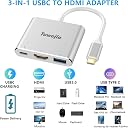
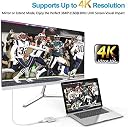
The Tuwejia USB C to HDMI Multiport Adapter is a 2023 upgraded, compact aluminum hub that expands your USB-C device with a 4K UHD HDMI output, a high-speed USB 3.0 port (5 Gbps), and a USB-C PD quick charging port. Compatible with a wide range of MacBooks, iPads, Samsung Galaxy devices, and more, it offers plug-and-play convenience and reliable multi-device connectivity for professionals on the go.


| ASIN | B07G44M4S3 |
| Best Sellers Rank | #183 in DVI-HDMI Adapters |
| Brand | Tuwejia |
| Color | Silver |
| Compatible Devices | 【Macbook】MacBook (manufactured after 2015), MacBook Pro (manufactured after 2016), MacBook Air (manufactured after 2018), iMac (manufactured after 2017), iMac Pro, Mac Mini (2018-2020), iPad Pro (manufactured after 2018), 【Motorola】moto g100, motorola edge 30 Pro, 【Samsung】 Galaxy S24/S23/S22/S21/S20/S20+、S10/S10+、 S9/S9+、S8/S8+ と Galaxy Note 20Ultra5G/Note 10/ Note 10+/ Note 9/Note 8, 【iPad】iPad 9; iPad Air 4/iPad Air 5; iPad mini 5 /iPad mini 6, 【iPhone】iPhone 15 series, iphone 16 series (not compatible with iPhone 16e), iphone 17 series (not compatible with iPhone 17Air) Compatible Devices 【Macbook】MacBook (manufactured after 2015), MacBook Pro (manufactured after 2016), MacBook Air (manufactured after 2018), iMac (manufactured after 2017), iMac Pro, Mac Mini (2018-2020), iPad Pro (manufactured after 2018), 【Motorola】moto g100, motorola edge 30 Pro, 【Samsung】 Galaxy S24/S23/S22/S21/S20/S20+、S10/S10+、 S9/S9+、S8/S8+ と Galaxy Note 20Ultra5G/Note 10/ Note 10+/ Note 9/Note 8, 【iPad】iPad 9; iPad Air 4/iPad Air 5; iPad mini 5 /iPad mini 6, 【iPhone】iPhone 15 series, iphone 16 series (not compatible with iPhone 16e), iphone 17 series (not compatible with iPhone 17Air) See more |
| Connector Type | HDMI, USB Type C |
| Customer Reviews | 4.3 out of 5 stars 12,380 Reviews |
| Finish | Hdmi,Projector |
| Finish Type | Hdmi,Projector |
| Item Weight | 1.44 ounces |
| Manufacturer | Tuwejia |
| Mfr Part Number | TWJ20180802 |
| Model Number | TWJ20180802 |
| Number of Ports | 3 |
| Package Quantity | 1 |
| Power Plug Type | No Plug |
| Specific Uses For Product | Camera,Monitor,Projector,Tv |
| Unit Count | 1.0 Count |
| Warranty Type | Limited |
L**.
Works perfectly and isn't too clunky!
I am really happy with this multiport adapter! It does exactly what it needs to do without any frustrating connection issues. Finding a good hub that actually works consistently can be tricky, but this one has been fantastic. All the ports connect seamlessly, and it handles everything I plug into it, from monitors to USB drives, without any lag or dropping the connection. Best of all, it isn't overly clunky or heavy. It has a nice, streamlined design that fits easily into my laptop bag and doesn't take up too much unnecessary space on my desk when I'm working. If you need a reliable, straightforward adapter that simply gets the job done without adding extra bulk to your setup, I highly recommend this one!
R**B
Works great with Samsung Galaxy Tab S7 and Samsung DeX
Lately I've been looking at laptops and Chromebooks to have something lightweight to take with me for certain business situations where breaking out my 19lb powerhouse laptop is just not practical. I kept running into one issue/concern/drawback or another and thought that maybe an android tablet would work. After looking around, I decided the Galaxy Tab S7 with the keyboard/touchpad cover would be perfect, especially with how far Samsung DeX has come in transforming the tablet into a more desktop-like experience. However, I need to be able to present or connect to my main machine via TeamViewer to demo software still in development on a large screen, so I started searching for a USB-C dongle that had HDMI, USB-C power (to keep the tablet charged), and a regular USB port in case I wanted to use an external mouse instead of the touchpad. I came across this unit, read the reviews, looked at the specs, and figured it seemed like it would be a good purchase. I was right! It works perfectly for my needs, looks nice, has a quality feel, comes with a little carrying pouch, and (most importantly) - it just worked right away when I plugged it in. I didn't have to dink around with any settings or perform any weird sequences of events to get things to work; just plugged the stuff in and bada bing bada boom! I haven't had the unit very long, so I cannot speak to the longevity yet, but this is a solid state device - and since the quality of the build appears to be there, I'd venture to assume that unless I abuse the device, it will probably last a long time.
R**E
Works with my Laptop to view the screen in Larger High def mode.
I use this device to connect my Asus Gaming computer with a high end NVIDIA graphics card to an HDMI monitor. When ever Microsoft or NVIDIA updates the drivers it defaults back to DVI output. My monitor does not have a DVI input. I cannot even get to where I can see the BIOS to change the output port back to HDMI so i plug this baby in and it works every time. Also I use it to connect my Laptop to my UHDR TV to view the laptop screen at a much higher resolution. Works great. Very happy customer.
B**E
budget friendly adapter
I recently got my hands on the GadgetPro USB-C multitasking marvel, courtesy of Amazon Prime, and it showed up right on scheduled. Dealing with my Macbook Pro, which boasts a solitary USB-C port, had always been a bit of a headache, especially when I aimed to connect it to an external monitor. My previous setup, I was using a mess of cables, an HDMI to USB-C contraption, which served its purpose but quickly became an ever bigger headache as it prevented me from simultaneously juicing up my MacBook and enjoying the monitor. Waiting for my laptop to recharge became a literal chore. I'm positively thrilled with this adapter, it resolves the charging dilemma while offering accessibility with its USB and HDMI ports. It's just practical. The quality and reliability of the connections are nothing short of exceptional, with all three ports working in perfect harmony. Adding to its charm, this multitasking hero arrives in a dapper cloth pouch, complete with easy-to-use pull strings. Weighing next to nothing, it's a breeze to carry around, snugly finding its place in my laptop sleeve. My optimism is high, and I trust this versatile solution to prove its worth over the long haul. In a nutshell, the GadgetPro USB-C multitasking marvel does more than it promises. I wholeheartedly recommend it, and I wouldn't hesitate to introduce it to my friends and family who may find themselves facing similar challenges with their Macbook Pro.
A**R
It "Just Works" (at least on my iPad Air 4)
I connected an HDMI cable between the adapter and my TV and plugged the adapter's USB pigtail into my iPad (iPad Air [4th generation] Model #MYHF2LL/A) charging port. At first, there was no picture on the TV--I had not plugged the "Official Apple Charger and Cable" that came with my iPad into the adapter dongle's USB port. Once the external power was provided, everything was bunnies and butterflies! I logged into my various streaming accounts (Netflix, Paramont+, Amazon Prime, AppleTV+, Peacock, & PBS) on the iPad and watched short clips on the TV with all 6 apps. YouTube worked fine and I would suspect all my other apps will work as well. Both sound and video quality on the TV were excellent--on my 10-year-old Visio flatscreen (with soundbar) no less. My one complaint: The sellers should tell the user that plugging the iPad charger into the adapter is NOT OPTIONAL--IT NEEDS TO BE DONE (in my experience, at least). In my reading of the documentation, I did not find that clearly stated anywhere. This is my first use of the adapter--if it keeps working as it did initially this will rank among the most satisfying purchases I have made on Amazon. Great value, quality, and performance (so far, at least).
M**S
Unreliable
I purchased the Tuwejia USB-c to HDMI adapter for my daughter so she could connect her LG monitor to her Macbook. I had trouble getting the monitor to receive the signal during the initial setup, which should have been a red flag. By plugging and unplugging the HDMI into adapter, I was eventually able to get the monitor to receive the signal. My daughter complained that the monitor frequently failed to receive any signal from the Macbook when she rebooted her computer. I tested the adapter on my other daughter's monitor with the same no signal result. The adapter also has second port for another USB-c cable, and I was able to confirm that signal problem was with the adapter because the USB-c cable worked directly in the Macbook, but not when it was connected to the adapter. I planned to return the defective adapter only to find out that the window for return is only 45 days. I selected the Tuwjejia because it had very good Amazon ratings and is an 'Amazon Choice' product. My suggestion for anyone searching for a similar adapter is to recognize that the 'Amazon Choice' designation can be made for several items in the same category. Be sure to look at multiple units and read the details. I also learned that this adapter has a lower refresh rate (@30Hz) than several other adapters (@60Hz) in the same price range, which means it likely has poor resolution. I've ordered the Anker USB-c to HDMI adapter, which cost $14.99, is a more reputable company, has an 18-month manufacturer's warranty, and can be return as late as 2.5 months after purchase.
M**W
The "Dongle" You’ll Actually Keep: Flawless 4K and Reliable Pass-Through Charging!
The Tuwejia USB-C to HDMI Multiport Adapter is a rare survivor. It’s a precision-engineered, 3-in-1 solution that prioritizes stability over "feature bloat." If you are a MacBook, iPad Pro, or high-end Android user, this is the definitive bridge between your ultra-slim device and the "real world" of monitors and legacy peripherals. The Engineering: 3 Ports, Zero Compromises The beauty of this adapter is its simplicity. It focuses on the "Holy Trinity" of mobile productivity: 4K HDMI Output: In my testing, the video signal was rock-solid. Whether I was streaming 4K video or presenting a detailed CAD drawing, there was zero latency and no "ghosting." It turns your phone or laptop into a desktop-class workstation instantly. USB 3.0 High-Speed Port: With 5Gbps data transfer, I successfully moved a 10GB 4K video file in under 30 seconds. It handles external hard drives, mice, and keyboards without the lag common in unpowered hubs. USB-C Power Delivery (PD): This is the game-changer. You don't have to choose between using your monitor and charging your device. It supports "Quick Charging" pass-through, meaning your laptop stays at 100% even while pushing a 4K display. Design & Thermal Management The aluminum alloy shell isn't just for aesthetics (though it matches the Space Gray MacBook perfectly); it acts as a massive heat sink. Even after four hours of continuous 4K output, the unit was only warm to the touch, not scorching. This is vital for protecting the internal circuitry of both the adapter and your expensive laptop. PROS Plug-and-Play Perfection: No drivers, no software, no "restarting" your computer to get it to recognize the monitor. It just works. Thunderbolt 3 Compatible: Fully optimized for high-bandwidth ports, ensuring you get the maximum resolution your screen can handle. Large Projection Ready: This is the best friend of the business traveler. I’ve tested it with multiple older projectors and modern 4K TVs with 100% success. Samsung DeX & iPad Pro Support: It successfully triggers "Desktop Mode" on Samsung phones and provides a flawless external display for the latest USB-C iPads. Rugged Portability: The cable is reinforced at the stress points, making it tough enough to be tossed into a backpack daily without fraying. CONS Cable Length: The built-in cable is relatively short (typical for these adapters). If your laptop is on a high stand, the hub might "dangle" slightly. 30Hz vs 60Hz: Note that at 4K resolution, most of these compact adapters max out at 30Hz. For movies and productivity, it's perfect; for high-speed competitive gaming, you might notice a difference. Single USB-A Port: If you need to plug in a mouse and a thumb drive at the same time, you’ll still need a larger hub. This is designed for minimalist portability. Overall Input The Tuwejia Multiport Adapter is a masterclass in utility. It solves the biggest frustration of modern computing: the lack of ports. It is a rugged, reliable, and aesthetically sleek tool that performs exactly as advertised. It provides "Large Projection" clarity and stable power in a package that fits in your coin pocket. Reviewer Pro-Tip: To ensure the most stable signal, always plug your charging cable into the adapter's PD port BEFORE connecting the HDMI to the monitor. This ensures the internal chip has full power to negotiate the "handshake" with the display, preventing any initial flickering! Who is this for? MacBook/Surface/iPad users, business travelers who give presentations, students in dorms, and anyone who wants to turn their phone into a desktop via Samsung DeX.
T**T
Compact and Perfect For My Needs
I needed a compact, functional adapter for my Legion Go while traveling, and this one is perfect. It lets me connect to a monitor via HDMI while charging my device, all in a small form factor that easily fits in my bag. It’s replaced my bulky dock when I’m on the go. If you want an easy way to connect your gaming device or laptop to an external display without the extra bulk, I highly recommend this.
F**O
BOM
BOM
A**A
Value for money.
Arrived in less than 24hours. Extremely quick setup, just plug and play. Picture quality on secondary monitor extending to was not bad at all. Unable to control audio when connected to secondary screen using this adaptor. Unsure if it us user issue or product issue.
J**O
Really good value for money!
This HDMI Multiport is what what I really needed to connect my devices, it's been working with chromebook and a dell laptop to connect to a screen. Really good.
M**U
Uygun fiyat
Bu fiyata işini tam yapıyor ve malzeme kalitesi sorunsuz. Vaadedilen bütün işlevleri yerine getiriyor. Gündelik işler için lazımsa orijinali yerine alıp kullanabilirsiniz.
N**K
Great product for the money, good quality and works really well.
This is a great adapter. The alternative is one with 8 different types of ports but I didn’t need so many. This 3 port attachment is perfect for convenient setup and comes with a small travel bag too! I use mine for USB mouse, HDMI port for second monitor, and you can actually charge your laptop through the 3rd lightening port which frees up the second lightning port on my computer. Very handy. Do recommend for those that don’t need 8 USB slots. Really good quality.
Trustpilot
4 days ago
2 months ago