⌨️🖱️ Elevate your media control game—compact, smart, and always connected!
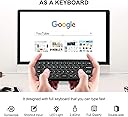
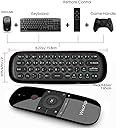
The WeChip W1 is a sleek, rechargeable 2.4G wireless air mouse and full QWERTY keyboard combo designed for seamless control of PCs, Smart TVs, Android TV boxes, and set-top boxes. Featuring intelligent anti-shake cursor technology, backlit keys for low-light environments, and a plug-and-play USB dongle, it offers a compact, ergonomic solution for efficient media browsing and typing. With strong anti-disturbance wireless connectivity and a long-lasting battery, the W1 is perfect for professionals seeking a versatile, space-saving remote control.


| ASIN | B07F8SXHJV |
| Battery Types | Mixing of lithium metal batteries, lithium polymer AA and lithium-ion batteries |
| Best Sellers Rank | 36,164 in Computers & Accessories ( See Top 100 in Computers & Accessories ) 295 in Computer Keyboard & Mouse Combos |
| Brand Name | WeChip |
| Button Quantity | 57 |
| Colour | black |
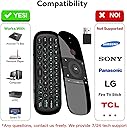
| Compatible Devices | Television, android tv boxes |
| Controller Type | Button Control |
| Customer Reviews | 4.0 out of 5 stars 3,942 Reviews |
| Item height | 1 centimetres |
| Manufacturer | WeChip |
| Maximum Number of Supported Devices | 1 |
| Maximum Range | 5 miles |
| Model Name | sb-sss-sser |
| Model Number | sb-sss-sser |
| Network Connectivity Technology | Wireless |
| Number of Batteries | 1 Lithium Metal batteries required. (included) |
| Product Features | Rechargeable |
| UPC | 732173936762 |
G**E
Compact remote with solid air mouse and full keyboard—snappy, lightweight, and plug-and-play ready.
Grabbed this for an Android TV box and occasional PC control—wanted something compact that didn’t need a full keyboard and mouse setup. The air mouse works spot-on once you get the hang of it—responsive, no lag, and tracks clean across the screen. Great for media browsing, YouTube, and app navigation. Keyboard’s small but usable—ideal for quick searches or login entries. Backlit keys help in low light, and the layout’s logical once you get used to the thumb typing. Plugged in the USB dongle and it paired instantly—no drivers, no faff. Used it in the van for media control and at home for a tucked-away HTPC setup. Battery life’s solid, and it charges via micro-USB—quick top-up and back in action. 👍 Pros ✅ Responsive air mouse—tracks clean, no lag ✅ Full QWERTY keyboard—handy for searches ✅ Backlit keys—usable in low light ✅ Plug-and-play—no setup needed ✅ Lightweight and compact—easy to stash 👎 Cons ❌ Small keys—thumb typing only ❌ No volume rocker—media keys are basic ❌ Micro-USB charging—not USB-C ❌ Needs line-of-sight for best signal 🧭 Personal Review If you want a compact remote that handles media, typing, and motion control without the bulk, the WeChip Mini earns its spot. I’ve used it across Android boxes, PC setups, and van media kits—no drama, just clean control and solid build. Proper stash-ready gear for anyone who wants their screen sorted without dragging out a full keyboard.
B**T
Works out of the box in Libreelec Kodi.
I wanted to use a remote for a Libreelec build I had (Kodi as an OS) but also needed basic keyboard as well. I had an MX-3 remote once but like others it suffers from the burnt out 2.4ghz reciever. So I decided to try another one. This works out of the box flawlessly. I can only assume the Libreelec team has ported the keymap into the build. no setup was needed and it is plug and play. Key notes: -the keyboard does disable and only enables when you flip it. -the power button does talk to the 2.4ghz receiver - this was the only button that has different behaviour -everything was supplied -other users report the metal shroud on the usb plug of the dongle coming apart, not happened yet to me but I have used a small usb extension cable to overcome this. keymap the keymap in Libreelec kodi is as follows: Home = Kodi Home (send you to the homescreen) Hamburger (three lines button) = short press is context menu in library, long press is side bar, during playback shows controls Back = does same as pressing backspace and sends you to the previous screen you were in Vol+/- = controls Kodi's Volume up/down/left/right = navigate while in library etc, during playback left and right act as skip (10s to jump through,) up and down also skip (jumps to halfway) OK = short press is the same as enter, long press in library brings up context menu, during playback shows up controls Power = does nothing while the PC is ON, however if you 'sleep' the PC and press it, it sends a power on command and the PC wakes up. some sort of special command. I'll have to see if I can get it to sleep the box. the keyboard uses the US keymap, so I had to change this in Kodi. Additionally there is another blue LED on the side visible when using the keyboard, this lights up when FN is pressed to indicate FN is on. it should be noted that FN is a lock key and not a press to hold. Airmouse was jittery for me, but I expected that in Libreelec. I don't use that anyway. remote buttons are clicky type, rather than soft rubber but in my opinion don't feel cheap and aren't loud either. Decent for the price, chargin cable included. Cons: only issue is the location of the back button, it's not intuitive to have it bottom right. this is ok if you are left handed but not for right handed. needs more buttons, mute, basic playback, and an info button. mouse button could (and should) be moved to a mini button much lower down so you don't accidentally activate it.
J**K
Works but don't trust the manual.
So I bought this for my nvidia Sheild, the original remote had issues, I'd used a button remapper but it was tike to upgrade. I choice this one, purely on price. Anyways, plugging the USB dongle into the shield, and it connected instantly no issues, all the buttons worked as expected. You can navigate fine, home, back, select etc. The top right button brings a cursor up on the screen, again that works fine. Pressing the button again turns it off (cursor disappears a few seconds after you have turned it off) Keyboard function works just like any other wireless keyboard. IR Learning ... this is where the manual is actually wrong, and gives incorrect instructions. The manual says to hold down the power button and ok button for 3 seconds and then press you button you want to program, ie the volume up key. This is not the correct procedure. What you must do, is first unplug the USB dongle from your device. The remote will then flash blue (it's trying to pair) wait until this stops. Now hold the button you want to pair for 3 seconds, and the blue light will rapidly blink a few times. Next point your old remote at the remote and press the key to be learn, again the remote will flash again. And that's it. Repeat this step for each key you want to learn. The manual also says when finished to press the mouse pointer button to save the learned keys, but because the other part was wrong, I dont know if that's also wrong (but press it anyways :) ) I have a sound bar connected to my bedroom tv using optical so can't control the volume with my main remote. Using this function, I was able to program the volume + and - for the sound bar the the volume button. Useful points. If you want to be able to turn your shield on with this remote, you must make sure you enable power to the USB port when the device is in sleep, this can be done in Device Preferences > System > USB port power (last two options). Another useful, key combo to learn which isn't mentioned in the manual is how to factory reset. This is handy if you accidentally program a a button in using IR learning. To factory reset the wechip remote simply hold down OK + Left arrow untilnl the device blinks. Sadly you can't remove the programming of a single button, so you will have to reprogram them all again, but at least you can reset it. So all im all it's an ok remote, works fine on the shield and I am sure other Android devices and similar. And forth price it's not going to break the bank.
S**P
This is awesome on my X96 Max Andriod box. Works really well.
This Air Mouse is awesome on my X96 Max Android box. It really dos work well. I have a Rii+ backlit keyboard and a Q5 Air mouse. But this WeChip is awesome love the fact you can move your hand around and the mouse cursor follows you around the screen. You can slow the mouse cursor down or speed it up but I dont think you will need to speed it up tho. I love the look of it and the feel of it too. And you have a built in keyboard underneath. I just wish you had some kind of cover to proctect your keyboard as that's where you place it down. It looks alot dearer than it costs. Great bit of kit. It turns my Android box on and off. It has learning capabilities as well. It is much better than my other Q5 Airmouse which doesn't move with your hand. It's a great bit of kit. Great price too. Also works on the Shield and Firestick but you will need a OTG cable for the Firestick tho but you can buy the OTC cable on Amazon. Update ********* I liked it so much I have brought another one for my other X96 Max Box while it's on offer.
S**S
Works with Shield Box and some TV functions
Good replacement for the NVIDIA Shield box I have, Quality is good and the keyboard on the rear makes using a search option so much easier . the only grumble I have is that the Air Mouse function has a lot of lag and controlling it is a little difficult and very slow to use, I cant find any method of getting it faster or to be more directional and accurate.
S**A
Excellent control for PC. Works flawlessly.
Excellent little controller. Bought it for my pc where I sit a distance away and wanted to use it with netflix. Let's just say it exceeds at that job in every way. Works in VLC and so on. Fully functioning mouse even in games. Only reason is doesnt get 5 is that sadly it womt work on my samsung 4k tv but in its defence it does list is has issues and my Samsung doesnt like third party accessories anyway. If the battery life is good the it will get 5 stars. Charged in less than 30 mins on a high speed wall charger. Great build quality too for 15 British bounds. Fantastic. Would have bought another and will do for my other media build. EDIT: Aug 2020. Still working flawlessly and it dont even need charging that often. Completely plug and play on PC. I have multiple PCs and was going to buy one more but all you do it plug in the dongle and it works instant!! Top notch and now 5 stars!!
P**E
Save your money
Absolute junk. Only had it a few weeks and now the light that comes on when you press a button stays on flickering for a while - drains the battery quicker. Plus the air mouse isn't as good as others I've tried and there's no mic. Waste of money... I've tried a couple of different third party remotes now, as well as the one that came with my Chromecast - they're all flimsy and don't last long.
W**B
Great budget remote for Android TV
Used with: Nvidia Shield 2017 Pro Model. This is my second of these remotes, the last one having lasted about 3/4 years before my young boys wore it into the ground! It's ridiculously easy to set up, just pop the USB-B receiver (included) into an available port on your device. Buttons are solid and have a nice feel to them (some remotes that come with cheap android boxes aren't fit for purpose), it also has an Airmouse function, a QWERTY keyboard on the back, and is re-chargeable via Micro-USB (Cable supplied). My only complaints about this remote is the lack of a backlight on the keyboard buttons (at night they're impossible to see) and the volume buttons are designed terribly, they're way too small! Also it's very easy to pick up the remote and hold it the wrong way around, before you realise what you're doing. These however are minor quibbles, because this is - in my opinion - the best cheap, generic, non-official remote out there for FireStock/Android TV etc boxes. Battery life - 4 Stars Volume Control - 2 Stars Comfort - 4 stars Overall - 4 Stars
Trustpilot
2 months ago
1 month ago