🧠 Clean smarter, not harder — let Roomba 504 own your mess!
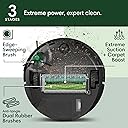
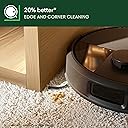
The iRobot Roomba Plus 504 is a premium robot vacuum featuring advanced PrecisionVision AI and LiDAR for precise obstacle avoidance and mapping. Its anti-tangle dual rubber brushes and 150x power-lifting suction excel at removing pet hair and dirt from all floor types. The self-emptying dock stores debris for up to 75 days, enabling hands-free cleaning. Compatible with Alexa, Siri, and Google Assistant, it offers customizable cleaning via app control and voice commands, making it ideal for busy, pet-friendly households seeking effortless, thorough floor care.


| ASIN | B0F7JVT5FB |
| Are Batteries Included | Yes |
| Batteries | 1 12V batteries required. (included) |
| Batteries required | Yes |
| Battery Life | 210 minutes |
| Battery type | Rechargeable Lithium-Ion Battery |
| Best Sellers Rank | #204,732 in Home & Kitchen ( See Top 100 in Home & Kitchen ) #173 in Robotic Vacuums |
| Brand | iRobot |
| Color | Black |
| Control Method | App, Push Button, Voice |
| Customer Reviews | 4.0 4.0 out of 5 stars (532) |
| Filter Type | Cartridge |
| Form Factor | round |
| Included Components | Docking Station |
| Item Weight | 15.57 pounds |
| Item model number | K151020 |
| Manufacturer | iRobot |
| Model Name | Roomba 504 |
| Power Source | Battery Powered |
| Product Dimensions | 13.8"L x 14"W x 4.1"H |
| Smart Home Compatibility | Smart Home Compatible |
| Special Feature | Anti-Fall, Automatic Dust Collection, Bagless, Dirt Detection Sensor, Edge Cleaning, LiDAR Navigation, Logical Navigation, Multi-Floor Mapping, Obstacle Avoidance, Pet Hair Pick Up, Precision Laser Mapping & Navigation, Room-By-Room Navigation, Scheduling, Selective Room Cleaning, Self-Emptying, Smart Mapping |
| UPC | 885155046000 |
| Warranty Description | 1 year limited. |
T**R
Whelp! That was unexpected!
This is my second Roomba. Things to know about my household: 2 x 80lb working dogs 2 x boys under 10 years And a dirt yard because we play hard out back! At any one given point, I dog sit the brothers of my dogs. So there is a lot of hair that if not swept daily or every other day, I have a 3rd dog I didn’t know about. I must say … this was fairly easy to set up. Literally … open the box, three pieces: the Roomba, the canister/charging base and brush. The device does not have to roll up onto the base to dock. Only has to back up to the device and have the metal contacts touch to dock and charge/connect. This allows for cleaning all the way up to the dock/base. No more cleaning under the unit. After installing the brush, we were ready to go. This unit is significantly bigger than my other unit, by 2-2.5” in circumference. Don’t ask me to math … I’m not doing it. :-) The unit came charged at 40%. Starting charging the unit at 8:47am. By 10:15am it was at 73% and it was fully charged by 11:07am. Before mapping my house, I picked up any loose strings, networking cables, nerf darts, dog toys. Because I already had a Roomba, downloading the required app “Roomba Home” , it was able to remember my SSID for my wireless network and I only had to provide my password. The device needed a software update straight out of the box. Honestly, expected. Stated 14 minutes until downloaded and installed. Based on 2GB Fiber, took 6 minutes to download and install over Wi-Fi. Afterwards, it was ready to map the house. Mapping my house thanks to the LiDAR was significantly faster than my other unit. Mapping took approximately 26 minutes. I mapped my house twice with my other unit at approximately 40 minutes a piece. While mapping, it was slightly louder than my other unit. I mapped without the brush installed. I installed the brush only when we were ready for the first clean. Once, fully charged and mapped, I did my first deep clean. I did not have to specify the amount of passes. The unit circles the edges of a room and the rotates back and forth in that area before moving on. This took three bin empties and 1 1/2 hours to need a charge. Had 9% left and docked itself to charge again. Upon charging back to roughly 25% to finish its final pass in the dining room (chairs lifted on top of table) and emptied its bin and docked. Emptying the bin is quieter than my other unit. Still had some “dog hair bunnies” left over but that’s because, in my opinion, the brush can’t get in between some tight areas. And honestly, it’s not supposed to. I really like this unit. The LiDAR is AWESOME. It’s fast. It’s bigger and less of a docking footprint. This allows for less manual cleaning. Would absolutely recommend to someone with a very active family like myself.
L**N
Best Robot Vacuum I’ve Owned — Great Value for the Cost
I’ve tried a few robot vacuums over the years, and this Roomba 504 has easily been the best by far. The suction is powerful enough to actually lift pet hair and dust instead of just moving it around, and the LiDAR mapping is spot-on. It navigates neatly around furniture, doesn’t slam into walls, and somehow manages to cover every inch of the floor without missing spots. The self-emptying dock is a total game-changer. I used to have to empty my old robot’s bin almost daily, but now it just empties itself and keeps going. It really can go weeks without me touching it, which makes it feel like I’ve outsourced cleaning altogether. The obstacle detection is smarter than I expected, too — it avoids cords, shoes, and even my dog’s toys without getting tangled up. Setup was quick, and the app makes it super easy to customize cleaning schedules or target certain rooms. For the cost, this thing is honestly the best value I’ve found. It performs like a top-tier model, keeps my floors spotless, and saves me a ton of time. If you’re looking for a robot vacuum that actually delivers on what it promises, this is the one to get.
D**N
If you love your older model iRobot vacuum, this will let you down
I very rarely write reviews, but I feel that this is necessary for anyone who has used, or has been using, older model Roombas, and is considering a newer model (or, specifically, this one), and expecting a product that is going to perform as well as their old one, because I can promise you that this won't be the case. I love my i4, and I love it even more after experiencing the 504 for the past 25 days. I owe my i4 a nice dinner and a day of pampering for even logically thinking that the much more expensive, updated, and modern 504 could ever replace it. How silly of me. I am uncertain if this is just how this product is designed to work, or if my unit is defective. However, some of the cons are definitely not due to defective behavior and are still incredibly valid. PROS: - CLEANING When it DID clean, the cleaning seemed well done. Suction was good for our laminate floor, and our area rugs seemed to get cleaned up just fine. I have zero complaints about its functionality as a vacuum, and was impressed with the job it did. - AUTO-EMPTYING DOCK It exists. This is not really a pro over similar models that also have self-emptying docks, but as I was coming from an i4 with no auto-emptying feature, it was a big plus for me. CONS: - BUGGY, LIMITED NEW APP The 504 can only run using the new Roomba Home app (older models use the iRobot Home app), and it cannot be connected to the iRobot app despite the app recognizing the device if you try to add new devices. Whether this is due to compatibility issues - which I'm less likely to believe because, again, the iRobot app DOES SEE the device, it just can't be added/controlled - or whether they are just forcing their new app for arbitrary reasons, I can't say. Regardless, they took the iRobot Home app and removed almost every feature that was good from it, and called it Roomba Home. I can't set quiet times where I want the vacuum to skip vacuuming for the day, I can't save multiple maps (you can only save ONE!), when the vacuum encounters an issue - which is insanely frequently - trying to get anywhere in the app and do anything is impossible because most functions are just replaced by a notification that says there's an issue, which often gives little to no information on what the issue is and the actual best way to fix it. - MAPPING WAS A NIGHTMARE This may just have to do with the terrible app again, but it took me 4 tries to map the first floor of our house. It's not a huge space, maybe 1000sqft or so, but the mapping failed over and over. I eventually found someone on Reddit who said they got the mapping to work if they made sure their phone stayed awake (i.e. screen didn't turn off) and on the mapping setting of the app for the entire duration of the mapping process, meaning you can't use your phone while it's mapping, and you have to make sure the screen never sleeps. Once I did this, it seemed to finally save a map. This honestly should have worried me more than it did at the time, considering this was the first thing you do after unboxing. Yeah, by the way, you cannot run this vacuum unless it has a map saved. It's not possible. So when my map kept failing, I was stuck in this non-cleaning limbo because it refused to do a single thing, vacuum-wise, until it had a map. Something this supposedly smart should be able to wing it without a map if it needs to, and it shouldn't have an app gatekeeping that ability. - NEW LiDAR IS TERRIBLE (OR MAYBE IT'S JUST DEFECTIVE?) The 504 gets lost or stuck a lot. A LOT. For something that's supposed to have some of the latest navigation technology in it, I am extremely disappointed. This thing could probably get "stuck" (and by stuck, I mean it tells the app to throw you a "I'm stuck" error even though it's not stuck on anything) in the middle of a completely empty basketball court with no walls. The number of times the vacuum said it was stuck or blocked by an obstacle, only for me to go downstairs and find it in the middle of the floor, not surrounded by anything, was incredibly frustrating. I got the 504 because I wanted to be more hands-off with my robot vacuum (not having to manually empty it all the time, etc. - I just wanted to set it and forget it until I needed to change the vacuum bag) but not only was I more hands-on than ever, it was a struggle just to get it to finish the cleaning job. At least my i4 did the job (well) and when it said it was stuck, it was legitimately stuck. - IT'S LAZY I know this sounds bizarre, but hear me out. Because of the new LiDAR navigation, it "sees" obstacles before bumping into them, unlike my i4, which bumper cars itself around my house with reckless abandon. However, this sight means that it looks at an obstacle, such as a chair leg, does some weird internal risk assessment calculation, and determines that this obstacle has an incurable infections disease and it cannot go anywhere near it, even though if it would just go around the stupid chair leg, it would see that it could clean under the chair no problem. This resulted in spaces under my chairs and tables not being fully cleaned. It didn't even want to TRY any amount of problem solving to see if it could clean around the obstacle; it just chose not to. It's the laziest thing I've ever seen. Meanwhile my i4 is out here busting its butt to gently ram into every possible surface it can find in an attempt to clean every inch around it like a cleaning demon with a singular purpose. I will be returning the 504 and, honestly, probably avoiding the iRobot brand altogether moving forward if this is the trajectory on which their vacuums and support apps are going to continue. If you can find an older unit with the older technology, and that uses the iRobot Home app, then I can't recommend iRobot enough, but these new products are a huge disappointment. My i4 will be reprising its role as the primary first floor vacuum like the absolute queen it is.
Trustpilot
1 month ago
2 months ago