

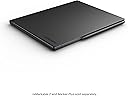


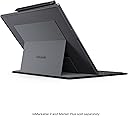

reMarkable 2タイプフォリオキーボード - ブラック。
Product ID: 724996278
Details
- キーボードの説明バックライトキーボード。
- サポートするキーボードのバックライトカラー単色
- スタイルコンテンポラリー
- ブランドreMarkable
- 商品の寸法19.7長さ x 24.6幅
- 商品の推奨用途普段使い
💡backlit single-color keys
📱wireless magnetic attach
⌨️64-key tactile keyboard
Desertcart purchases this item on your behalf and handles shipping, customs, and support to Australia.
⌨️ Elevate your note-taking game with the sleek power of reMarkable 2 Type Folio!
The reMarkable 2 Type Folio Keyboard is a slim, wireless keyboard case designed exclusively for the 10.3-inch reMarkable 2 tablet. Featuring 64 tactile, backlit keys with 1.3mm travel, it offers a seamless blend of typing and handwriting with two ergonomic typing angles. The folio protects your device with a stylish cover and requires no charging, drawing power passively from the tablet. Perfect for professionals seeking distraction-free digital note-taking with a paper-like feel.


| ASIN | B0BXPRZD97 |
| Amazon 売れ筋ランキング | パソコン・周辺機器 - 554,351位 ( パソコン・周辺機器の売れ筋ランキングを見る ) タブレット用キーボード - 1,241位 |
| おすすめ度 | 5つ星のうち4.5 179 レビュー |
| カラー | ブラック |
| キーボードの説明 | バックライトキーボード。 |
| キーボードバックライトのカラーサポート | 単色 |
| キーボードレイアウト | QWERTY |
| シリーズ番号 | 2 |
| スイッチのタイプ | タクタイル |
| スタイル名 | コンテンポラリー |
| セクション数 | 1 |
| テーマ | オフィス。 |
| パック数 | 1 |
| ブランド | reMarkable |
| ブランド名 | reMarkable |
| ボタン数 | 2 |
| メカニカルキーボードスイッチモデル | Cherry MX Brown |
| メーカー名 | reMarkable |
| メーカー型番 | RM710 |
| ユニット数 | 1.0 個 |
| 世代 | 第2世代 |
| 互換デバイス | タブレット、reMarkable 2。 |
| 付属品総数 | 1 |
| 利き手 | 左右共用 |
| 同梱商品 | キーボード。, フォリオケース。 |
| 品目寸法(L x W x H) | 19.7長さ x 24.6幅 x 1.3高さ cm |
| 商品のハイライト | 米国英語スリム、タクタイル、バックライト付きキーボードケース、10.3インチのreMarkable 2タブレット用(タブレットは含まれません)。 |
| 商品の推奨用途 | オフィス |
| 商品の追加説明1 | バックライト付き |
| 商品の重量 | 453 グラム |
| 商品外装素材 | フェイクレザー |
| 型番 | Type Folio |
| 対応デバイス | タブレット、reMarkable 2。 |
| 接続技術 | 無線 |
| 特徴 | バックライト付き |
| 製品の推奨用途 | オフィス |
| 通信・接続インターフェース | 無線 |
| 鍵盤数 | 64 |
| 防水タイプか否か | 非防水 |
| 電気 | いいえ |
| 電源のタイプ | パッシブ。 |
A**.
Versatile and useful
Very useful. I'm using it more often than I thought I would. The ease of switching from typing to writing by hand is fantastic; very intuitive and improves my note-taking. The only con is laguages available, but I understand that's a software limitation of the ReMarkable device itself. I wish it had Romanian :(
A**R
Yes! I finally have one!
Buying my Remarkable 2 second hand it didn't have the type folio so I've been using the on screen keyboard. A real keyboard is way better. Love it! Snaps in place. No charging, it uses your paper tablets power to operate.
S**.
Shortcuts & Windows or Mac
Was only Remarkable when I first saw it in use. Device works for 14 days before needing it to be charged again. The Remarkable is cloud based ecosystem in which all devices work in tandem with your data. The Remarkable pen also included with the original product which can be used with the keyboard Folio,which does not come bundled.
U**4
best type case cover
IT WAS BEST TYPE CASE COVER .
E**P
A Stylish Addition with Some Limits
I’ve been using the Type Folio for my reMarkable 2, and it has become an essential part of my workflow. The Type Folio is a great addition, offering a blend of handwriting and typing flexibility, which allows me to seamlessly switch between note-taking by hand or typing. The design is elegant and professional, making it perfect for meetings—when I pull out the keyboard, it often draws attention. That said, it does add noticeable weight and bulk to the reMarkable 2. While I haven’t weighed it, the Folio nearly doubles the weight of the device and adds significant thickness. One of the key features of the reMarkable 2 is its thinness and lightness, so if that is important to you, you might find the Type Folio detracts from the slim, paper-like feel that makes the tablet so unique. For longer note-taking sessions, I often remove the tablet from the Folio to regain that sleek, “paper sheet” experience. However, it’s still manageable to take notes with the Folio attached if needed. The typing experience itself is surprisingly pleasant. The keyboard feels tactile and satisfying. However, there are some compromises. For example, the lack of common features like a delete key and some unusual key placements require an adjustment period. Despite this, the overall experience is still impressive. One of the significant downsides is the limited functionality of the reMarkable 2 as a word processor. You are mostly confined to plain text typing, with no real support for text formatting, editing features, or app integration. While it’s great for distraction-free writing, it falls short if you’re looking to draft emails or complex documents. I often draft basic notes or outlines and then transfer them to my Mac or another device for final edits. It would be fantastic if reMarkable offered Word document integration to make the typing experience more robust. The price is definitely something to consider. At $199, the Type Folio is quite expensive for what it offers. To put it in perspective, it costs as much as a Nintendo Switch Lite! While I do appreciate having the option to type on my reMarkable 2, I feel the price is steep, especially given the limitations of its typing functionality. It’s a nice-to-have accessory, but at this price point, it’s something you should only invest in if you have some extra budget to spare. In my case, I was able to justify the purchase because I caught it on sale. In conclusion, the Type Folio is a fantastic accessory if you’re a reMarkable 2 power user, but it’s definitely not a must-have. If you type often and love the reMarkable ecosystem, you’ll appreciate the convenience it offers. However, its limited functionality and high price make it a luxury, rather than a necessity.
Trustpilot
3 weeks ago
2 months ago