Desertcart purchases this item on your behalf and handles shipping, customs, and support to Australia.
🎬 Elevate your stream game with AI-powered precision and ultra-smooth clarity!
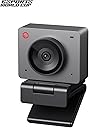
The OBSBOT Meet SE is a sleek, AI-driven webcam featuring a 1/2.8" CMOS sensor that delivers ultra-high frame rates of 1080p at 100fps and 720p at 150fps. It boasts intelligent auto framing with group and portrait modes, advanced gesture controls, and exceptional low-light performance thanks to Dual Native ISO and HDR technology. Designed for professional streamers and esports enthusiasts, it offers plug-and-play USB-C connectivity and extensive customization options, all wrapped in a stylish, compact design.


| Asin | B0DQ196WLW |
| Autofocus | Yes |
| Best Sellers Rank | #12,602 in Computers & Accessories (See Top 100 in Computers & Accessories) #57 in Webcams |
| Box Contents | OBSBOT Meet SE*1, USB-C to USB-A Adapter*1, USB-C Cable*1, Privacy Cover*1, Magnetic Mount*1, User Manual*1, Warranty Card*1 |
| Brand Name | OBSBOT |
| Colour | Black |
| Compatible Devices | Laptop, Personal Computer |
| Connectivity Technology | USB |
| Continuous Shooting Speed | 100 FPS |
| Customer Reviews | 4.4 4.4 out of 5 stars (1,108) 4.4 out of 5 stars |
| Digital Zoom | 4 x |
| Effective Still Resolution | 2 MP |
| Exposure Control Type | Automatic, Manual |
| File Format | MP4 |
| Focus Type | Autofocus, Manual Focus |
| Has Self Timer | Yes |
| Image Stabilization Type | Digital |
| Importer Contact Information | INM COMMUNICATION PRIVATE LIMITED, A-191, OKHLA INDUSTRIAL AREA, SOUTH EAST DELHI, New Delhi, South East Delhi, Delhi, 110020, Contact imoo - +91 7353108999 | [email protected] |
| Item Dimensions D X W X H | 22D x 45W x 36H Millimeters |
| Item Type Name | WEBCAMS |
| Item Weight Unit Of Measure | 60 Grams |
| Manufacturer | OBSBOT, OBSBOT, OBSBOT |
| Manufacturer Contact Information | OBSBOT |
| Manufacturer Part Number | MEET SE |
| Maximum Aperture | 1.8 f |
| Maximum Focal Length | 26 Millimeters |
| Media Type | NOT Available, Rely on Your PC/Mac |
| Model Name | OBSBOT Meet SE |
| Model Number | MEET SE |
| Model Series | Meet SE |
| Number Of Items | 1 |
| Number Of Packs | 1 |
| Packer Contact Information | INM COMMUNICATION PRIVATE LIMITED, A-191, OKHLA INDUSTRIAL AREA, SOUTH EAST DELHI, New Delhi, South East Delhi, Delhi, 110020, Contact imoo - +91 7353108999 | [email protected] |
| Photo Sensor Resolution | 2 MP |
| Photo Sensor Technology | CMOS |
| Screen Size Unit Of Measure | 2.8 Inches |
| Sensor Type | CMOS |
| Shooting Modes | Landscape/ Portrait/ Up-side-down |
| Upc | 783970236371 |
| Video Capture Format | MPEG, YUV |
| Video Capture Resolution | 1080P@100 FPS |
| Viewfinder Type | LCD screen |
| Warranty Description | 1 Year Manufacturing Warranty |
| Water Resistance Level | Not Water Resistant |
| Zoom Type | Digital |
User
Worth it!
Have to say it's pretty good. Accordingly to the price point it's worth it good clarity n video image.
User
Good - 3 weeks review
Amazing camera!Pros:- Great camera quality and great controls using the OBSBOT software.- AI features work beautifully.- Streaming friendly and doesn't heat up even after more than 2 hours of streaming - haven't tried longer streams so far.Cons:Main one - Auto focus is slow but I knew about it so I'm not complaining personally. If you want instant Auto focus, go for the OBSBOT Meet 2.
User
I have a question
The product is looking good but I have one question that product is waterproof or not and what is battery capacity??
User
Ottima webcam, con funzioni avanzate e… bellissima! Nota in recensione per installazione su Mac
Sono molto soddisfatta dell’acquisto. Avevo una webcam super basica 720p oppure usavo la telecamera del laptop. Con la Obsbot Meet SE ho fatto un notevole salto di qualità.Le cose che mi hanno impressionata di più sono:- la luminosità dell’immagine anche con scarsa illuminazione (ho trovato meglio deselezionare la correzione automatica di luminosità nei setting di Teams);- le numerosissime impostazioni con il software Obsbot Center (da scaricare dal sito): la webcam funziona anche senza installare questa app, ma con Obsbot Center si può impostare veramente di tutto di più;- le funzionalità dell’AI, zoom e gesture: fantastiche;- il design è davvero bellissimo, sia come colore (io ho preso il grigio) che come forma: avrei messo il design come primo punto che mi è piaciuto, ma non volevo apparire frivola…😅- dimensioni piccolissime;- viene fornito un adattatore da usb-C a usb-A.La definizione dell’immagine è buona. Ovviamente se si vuole di più, bisogna passare a modelli superiori a 4k. Per il costo (l’ho acquistata tra l’altro ad un prezzo scontato, 84 euro), secondo me è difficile avere di più.Come scritto sopra, il design mi piace veramente tantissimo, ma l’aspetto negativo è sulla praticità del supporto magnetico: non garantisce una grande stabilità, soprattutto con il cavo in dotazione che è rigido. Ho già fatto cadere la webcam 2 volte sulla scrivania in mezza giornata di utilizzo. Il lato positivo è che si può orientare la webcam a proprio piacimento (a parte l’angolazione del supporto in su e giù che è un po’ difficoltosa se si vuole un angolo piccolo verso il basso rispetto all’orizzontale). Probabilmente proverò con un cavo più flessibile: la cosa buona è che il cavo non è fisso come in molte altre webcam e quindi si può sostituire.Anche il copri obiettivo magnetico è esteticamente bellissimo ma non praticissimo. A parte il rischio di perderlo, perché è separato dalla webcam, se si aggancia magneticamente al supporto, si fa fatica a staccarlo.Per questi lati negativi sono stata indecisa fra 4 e 5 stelle, perché la praticità è importante, ma alla fine sono troppo entusiasta dell’acquisto come raramente mi accade e quindi do 5 stelle.Nota per installazione del software Obsbot Center su Mac: ho installato OBSBOT Center su Mac Mini e per poter utilizzare la camera virtuale (che permette di avere funzionalità aggiuntive rispetto alle impostazioni delle app per videocall) bisogna dare l’autorizzazione sotto General/Login Items & Extension e autorizzare l’estensione per Obsbot, oltre all’autorizzazione in Privacy&Security/Camera. Ci ho messo un po’ a capire dove mancava l’autorizzazione: spero questa nota possa essere utile.
User
Parfaite
Géniale !! La qualité est top, elle fonctionne parfaitement et est très compacte. Je l'ai achetée pour mon conjoint qui s'est lancé dans le stream et je compte me l'acheter également dès que j'aurai le budget. Je pense que c'est le meilleur rapport qualité/prix qu'on peut trouver sur le marché, moins chère que les grandes marques et tout aussi bien
User
Great video quality and value
Perfect Quality for Office meetings, handles various lighting and colour profile very well. Only downside: Initially slow to focus but great value for money!
User
Excellent webcam option
Simple and quick setup as a webcam. A lot of options for streaming and changing appearance via the dedicated app.Easy to use the app settings in teams or zoom via the virtual camera.Extreme settings in beauty and facial features affect the natural movement of the subject and interaction with background.Excellent as a webcam which is why I bought it.
User
Twitch Stream Camera
I have to say I am beyond impressed with the quality of this little camera! Not only does it work like a charm, it looks great on my twitch stream. I love the little magnetic cover for the camera, it's perfect for those pesky stream issues where you need to turn the camera off quickly but without actually turning it off. I highly recommend it for anyone looking to upgrade their setup. It's so small and easy to set up! Excellent view as well. The connectivity is point and click.
Trustpilot
1 month ago
1 day ago