

Desertcart purchases this item on your behalf and handles shipping, customs, and support to Australia.
🎯 Upgrade your game with pinpoint precision and zero drift!
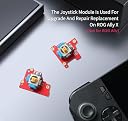
The GuliKit Hall Effect Joystick Module is a direct replacement for the ROG Ally X joystick, featuring advanced anti-drift electromagnetic technology for enhanced precision and longevity. Officially supported by ROG, it offers plug-and-play installation with reinforced durability and quick calibration, elevating your handheld gaming experience to pro-level performance.


| ASIN | B0DPPDNP7D |
| Additional Features | Anti-drift Hall effect magnetic joystick |
| Best Sellers Rank | #10,722 in Video Games ( See Top 100 in Video Games ) #2,254 in PC Accessories |
| Brand Name | GuliKit |
| Button Quantity | 16 |
| Color | Red |
| Compatible Devices | Rog Ally X |
| Connectivity Technology | Modular plug and play |
| Controller Type | Gamepad |
| Customer Reviews | 4.0 4.0 out of 5 stars (146) |
| Global Trade Identification Number | 06977836850182 |
| Hardware Platform | ROG Ally X |
| Item Dimensions | 3 x 4 x 3 inches |
| Item Weight | 50 g |
| Manufacturer | GuliKit |
| Manufacturer Part Number | Ally X |
| Model Name | Ally X |
| Model Number | Ally X |
| Package Quantity | 1 |
| Power Source | Battery Powered |
| Warranty Description | 1 Year |
I**N
Better replacement and clear mind
Very easy to replace, they were dead center calibrated from the pack, the feel of the pressure on the axis is more constant no matter of the angle you press them and fact that the stick drift is gone makes them an amazing purchase in my book. I was worried for some comments that they come with drift but at least on my unit, everything was perfect!
D**Z
Works Great! Definitely will need to re-calibrate your sticks after installation.
Easy swap!! & working great thus far. Here are important Tips: 1. When removing joysticks, definitely ensure the battery is disconnected before removing the ribbon and/or joysticks 2. Take your time to remove Joysticks 3. Don't forget to remove the Joystick caps from old and place them on the new boards before installing new joysticks 4. Reconnect the joysticks ribbons! 5. Don't forget to plugin the battery 4. If you are going to test/try them before fully closing up your Xbox Rog Ally X, you may need to plug in the charger to bypass the light sensor on the backboard, otherwise your Xbox Rog Ally X may not boot (happened to mine). 5. Upon boot up, you will need to re-calibrate as the sticks may have dead zones beyond the normal. You can use the following site to test your new joysticks (hardwaretester . com/gamepad) 1. Just open the above website on your preferred browser on the Xbox Rog Ally X 2. You may need to click on the Command Center button (left button - top most nest to the screen) 3. Once Command Center opens, located the toggle labeled 'Control Mode' and change it to 'Gamepad Mode' 4. Now your input should work on the page and be detected properly. 5. Take a look at all 4 Joysticks Axis, and see what your dead center Axis looks like, if its anything lower than 0.05, then it is considered highly precise. (I got 0.00002 which is AWESOME!) 6. Next you need to Test Circular motion, click on the 'Test Circularity' option to enable it 7. Slowly rotate the joysticks in a smooth circle 3 to 4 times, you will see what is like a circle form with different colors and with a text that states 'Avg Error %', this is the number you need to put attention. 8. If you get under 5%, your perfect, if you get something higher (like me, I got 18.5% on the left joystick & 20.4% on the right joystick) you need to continue to calibration. 9. Open 'Armoury Crate' from desktop and click on 'Gear' icon on top (if it does not open to that screen) 10. Select 'Calibration', then you will need to perform the calibration for 'Left Stick' and 'Right Stick' 11. Steps are simple of center calibration, 4 pointers, then circle motion (3 times) (You will need to back out by pressing B when calibration completes to get back to 'Calibrate' and select the other Joystick. 13. Once done with both Joystick, you can go back to the website and re-test. After re-testing I got 4.1% on the left & 3.8% on the right, big difference and its was definitely much more circular after calibration. Hope it helps!! & Thank you for making a great product!
M**M
One works, one doesn't
Left stick works great, good feel, exactly what I was looking for, and it calibrated perfectly. Right stick DOA it's stuck to the bottom, can't be calibrated. Swapped it for the oem and it works fine so I put in for a replacement and will wait to see if that fixes it. They get one more shot. Edit - Another bad set, same issue, stock ones work fine so not an install issue it’s definitely the sticks. Disappointed but it is what it is, I tried to reach out to support and found there was none which is sketchy on its own assuming something were to happen outside of the Amazon return period. I’d wait until a better company releases their version.
J**N
Must have
Easy install. Feel great, have had no issues..good peace of mind for no stuck drift. Remember to recalibrate the sticks in amerory crate after install
C**S
Perfect upgrade for the XAX
Responsive, will last a long time, easy to install.
E**S
Work Great - Once You get a Working Set
I managed to get a working set, but only because of the Amazon return policy. I read the reviews before ordering and saw that they’re not 100% reliable out of the box, and I found the same thing. On the first set that I received, the right joystick worked perfectly but the left one was completely non-functional. I swapped my original left joystick back in and requested a replacement. When the replacement joysticks arrived, I tried the new left one and it worked. It took me two sets to get one good set, but honestly I kind of expected this. Perhaps the testing at the factory isn’t that great before these are shipped out. Anyway, after calibration, these sticks work great. The movement is smooth, there’s no drift, and I like the feel of them over the OEM ones. This is a nice little upgrade for a reasonable price, which isn’t the case for most computer components these days. I’m removing a star because of the hassle of needing to disassemble my XBox Ally X multiple times to get a working set, but if they’d both worked in the first package it would be a solid five-star upgrade.
G**E
It’s easy to set up
It’s a good product so far
I**S
Faulty left joystick
The left tmr joystick was faulty. I will gladly update if this can be resolved. I have messaged guilikit directly. I did message them and received a replacement that worked perfectly. Changed my review the sticks work great
Z**A
Quality brand
Quality products , fast shipping!
M**D
The second set has restored all faith.
All is great now. In the first set. The left module was faulty. Initially I was cheesed off. However I was promptly refunded and ordered another set. Thankfully this one works perfectly. Very easy to install. They feel so much smother and more responsive. I also put some keyboard lube on the ABXY buttons, to make them quieter. It makes sense to do this at the same time, whilst the unit is open.
A**C
Great and affordable upgrade. Don't forget to calibrate.
Great upgrade at an affordable price. Honestly very happy. Once calibrated these are a night and day difference. Navigating the desktop and aiming in games etc etc feels so much more precise and not having to worry about the dreaded stick drift makes me feel far better.
A**R
交換後は必ずキャリブレーションを実施して下さい
AllY Xにて使用。 LRどちらも交換しましたがドリフトが直りました。 注意点としては交換直後はスティックがあらぬ方向に動くので個体不良を疑いましたが大丈夫です。 ArmoryCreate2から交換したスティックのキャリブレーションを実施することで正常になります。
X**R
Excelentes refacciones
Excelente para una ROG Ally X con drift, se sienten muy buenos. Espero sean durables.
Trustpilot
2 weeks ago
1 month ago