

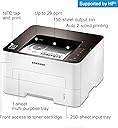



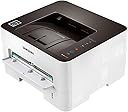


Samsung Xpress SL-M2835DW
Product ID: 67713607
Details
- BrandSamsung
- ColourNo
- Connectivity technologyUSB
- Controller typeAmazon Alexa
- Item weight16.4 Pounds
- Max print speed monochrome29.00
Samsung Xpress SL-M2835DW : desertcart.co.uk Review: Nightmare to Install - It works fine on USB and LAN. Could not get it to install on Wi-Fi. The procedure is to connect it temporarily via USB which I did, but the installer kept going round in circles saying the device was not found, even though it was there. This is very disappointing because Wi-Fi connectivity was the main reason I bought it. It seems you choose at setup time how you want to connect the printer, you have to re-install to change the connection method. As for Samsung/HP support - expletives deleted. The website is very pretty but after a couple of hours of trying to find out how connect to wi-fi I gave up. I tried this on 2 different computers, one running Win 7 and the other Win 10. Samsung Xpress SL-M2835DW Printerland's delivery was brilliant. PS - Eventually got it going by pressing the WPS button and using the printer diagnostics rather than the installation program to install it. PPS - even so it would not install on Win XP, either as USB or Wi-Fi connection; didn't try LAN, even though the P&P message came up, it did not appear in "Printers" in Control Panel. PPS - XP just wasted another 90 mins. Finally got it to appear in device manager, but then it disappeared again. Appears in the list of printers to add under "Add Printer" in "Printers & Faxes", but whatever I try I get "Patch Installer Has Encountered a problem" and installation fails. It appears to connect to the router OK. I've just spent £100 on a printer that I can't use properly. Review: it is still a great outcome. Print options could be slicker - I am impressed with the printing speed and how slowly the cartridge runs down. I've had this printer for almost a year and the cartridge is 93% full. Bearing in mind that I have only printed around 150 pages during that time...it is still a great outcome. Print options could be slicker. If there was just one or two windows where all selections could be chosen; that would increase the user-friendliness of this printer.


| ASIN | B00JCA4GW2 |
| Additional Printer Functions | All In One |
| B&W Pages per Minute | 29.00 |
| Box Contents | power cord |
| Brand | Samsung |
| Brand Name | Samsung |
| Colour | No |
| Compatible Devices | Laptops, PC, Smartphones, Tablets |
| Connectivity technology | USB |
| Control Method | App |
| Controller Type | Amazon Alexa |
| Customer Reviews | 3.8 out of 5 stars 570 Reviews |
| Dual-sided printing | Yes |
| Duplex | Automatic |
| Global Trade Identification Number | 00887276683485 |
| Hardware Interface | USB |
| Ink Colour | Black |
| Item Weight | 7.44 kg |
| Manufacturer | hp |
| Maximum Copy Resolution Black and White | 4800 x 600 DPI |
| Maximum Copy Speed Black and White | 29 ppm |
| Maximum Print Resolution Black and White | 4800 |
| Maximum Sheet Capacity | 250 |
| Maximum Supported Paper Size | A4 |
| Maximum print Resolution Color | 4800 x 600 DPI |
| Model Name | SL-M2835DW |
| Model Number | SL-M2835DW/XAA |
| Model Series | SL |
| Model name | SL-M2835DW |
| Network Connectivity Technology | USB |
| Number of Trays | 1 |
| Other Special Features of the Product | Auto Document Feeder |
| Output sheet capacity | 250 |
| Power Consumption Size | 400 Watts |
| Print media | Envelopes, Labels |
| Printer Output Type | Monochrome |
| Printer Type | Laser |
| Printing technology | Laser |
| Processor Count | 1 |
| Resolution | 4800 x 600 |
| Scanner Type | Flatbed |
| Series Number | 28 |
| Special feature | Auto Document Feeder |
| Specific Uses For Product | Office |
| Total USB 2.0 Ports | 1 |
| Total USB Ports | 1 |
| UPC | 191628388264 887276683485 191628508303 |
| Warranty Type | limited warranty |
| Wattage | 400 watts |
R**R
Nightmare to Install
It works fine on USB and LAN. Could not get it to install on Wi-Fi. The procedure is to connect it temporarily via USB which I did, but the installer kept going round in circles saying the device was not found, even though it was there. This is very disappointing because Wi-Fi connectivity was the main reason I bought it. It seems you choose at setup time how you want to connect the printer, you have to re-install to change the connection method. As for Samsung/HP support - expletives deleted. The website is very pretty but after a couple of hours of trying to find out how connect to wi-fi I gave up. I tried this on 2 different computers, one running Win 7 and the other Win 10. Samsung Xpress SL-M2835DW Printerland's delivery was brilliant. PS - Eventually got it going by pressing the WPS button and using the printer diagnostics rather than the installation program to install it. PPS - even so it would not install on Win XP, either as USB or Wi-Fi connection; didn't try LAN, even though the P&P message came up, it did not appear in "Printers" in Control Panel. PPS - XP just wasted another 90 mins. Finally got it to appear in device manager, but then it disappeared again. Appears in the list of printers to add under "Add Printer" in "Printers & Faxes", but whatever I try I get "Patch Installer Has Encountered a problem" and installation fails. It appears to connect to the router OK. I've just spent £100 on a printer that I can't use properly.
B**H
it is still a great outcome. Print options could be slicker
I am impressed with the printing speed and how slowly the cartridge runs down. I've had this printer for almost a year and the cartridge is 93% full. Bearing in mind that I have only printed around 150 pages during that time...it is still a great outcome. Print options could be slicker. If there was just one or two windows where all selections could be chosen; that would increase the user-friendliness of this printer.
S**R
Not Great For Duplex
I got this to replace my old Lexmak, which was great & fast especially for duplex which I do a fair bit. Sadly the duplex design of this M2835DW is rather rubbish. The first side comes completely out then gets picked up & taken back in. Not only is this slow, the reserve side in NEVER as straight as the first. I've found it easier to print all the odd pages, but the paper back in the tray & print the even !. On the old print the paper only came out 3/4 of the way before going back, so, less chance of being crooked. After about 10 months the left side of the pages started coming out fainter. Support said it to go back to have the internal mirror cleaner. So no overly impressed.
L**E
Love the product
Product was as described. Quick shipping. Love the product. Some issues to configure but managed to find references on the web to rectify them.
P**L
GREAT PRINTER...But with TWO HUGE WARNINGS!
The Samsung Xpress SL-M2835 laser printer is AWESOME ....EXCEPT FOR TWO HUGE STUPID ISSUES! *** ISSUE #1 concerns INCORRECT INSTRUCTIONS for properly setting up the printer for first-time use. The printer's lame Quick Start Guide neglects to mention a CRUCIAL step for getting it to work properly. *** ISSUE #2 concerns the type of paper you MUST use to avoid CONSTANT PAPER JAMS. PROS: This is my 4th Samsung laser printer. The Pros listed below apply to all my Samsung laser printers, including this Xpress model. 1. Samsung laser printers work like champs without ever breaking down. 2. They are efficient in consuming ink. 3. They print pretty fast for an inexpensive printer. 4. They easily connect to my PCs via my office network by Ethernet cable or by direct cable (to a PC). 5. This Xpress model has FABULOUS wireless capability. *** WIRELESS FEATURE: I bought this printer so I could print directly from my smartphones and tablets. This printer connects to Android mobile devices like a dream. Unlike Canon and HP laser printers, this Samsung never drops a wireless connection. CONS: ISSUE #1: INCOMPLETE SET-UP INSTRUCTIONS Caused Printer to Fail! IT TOOK 2 MONTHS TO GET THIS DARN PRINTER TO WORK CORRECTLY -- plus two trips to the Samsung repair shop -- before it worked properly...because of FLAWED SET-UP INSTRUCTIONS and moronic Samsung tech support monkeys. Previous Samsung printers had a 'fixed' paper tray. You simply pulled out the tray and loaded the paper. Easy. Done deal. The Samsung Xpress is about 20% smaller than the previous generations of Samsung laser printers. That's nice...EXCEPT...in order to make the paper fit into a smaller printer, Samsung had to create an EXTENDABLE paper tray AND a slot-sized 'hole' in back of the printer. The Set-Up Instructions FAIL to mention that the user must slide out the 'extension' from the back and underneath the paper tray!!!!! The back extension is not readily visible. AND THE DANG INSTRUCTIONS DON'T SAY A BLOODY THING ABOUT PULLING OUT THE BACK EXTENSION (on the paper tray). Therefore, I could NOT get the paper to lay flat in the tray. Samsung TECH SUPPORT IDIOTS made matters worse. No less than 3 Samsung tech monkeys told me that the paper laid at an angle in the paper tray (instead of flat). WRONGO BONGOS! Unless the paper lays FLAT in the tray, the paper WILL jam! Since the Samsung monkeys thought the paper laid at an angle, they had me send the printer to the repair shop twice. FINALLY, a Samsung tech support supervisor told me about the paper tray's back extension. WOW! I pulled it out. The paper laid flat. And the printer worked great. ISSUE #2: The Xpress Model DEMANDS A CERTAIN TYPE OF PAPER TO AVOID JAMS. On the bottom of the Quick Start Set-Up Guide IN VERY FINE PRINT, it says the Xpress model REQUIRES one of 3 specific brands and types of paper. IT IS VERY EASY TO MISS THOSE MICRO INSTRUCTIONS regarding the paper type. I STRONGLY RECOMMEND READING THOSE INSTRUCTIONS -- AND PAYING HEED! Previous generations of Samsung laser printers worked well with almost any type of paper. So, I loaded the SAME paper that works great in my old Samsung laser printer. THAT PAPER JAMMED AFTER THE 2ND PAGE NEARLY PRINTED. THEN...OH MY GOD...I tried nearly every brand of paper offered at my local Walmart without success. FINALLY, a Samsung technician asked me if I bought the specific type of paper recommended in the Set-Up guide. Ha, ha! That did the trick. Use the correct type of paper...and the Xpress model won't suffer paper jams. ISSUE #3: Samsung's tech support is beyond HORRIBLE. The VERDICT: AWESOME laser printer for people who need to WIRELESS PRINT From MOBILE DEVICES. BUT... REMEMBER THE CONS LISTED ABOVE...if you want it to work properly.
J**L
Excellent value, works flawlessy, network printing is a breeze!
UPDATE 2019.05.18: I've owned this printer just over 4 years at this point. It has been flawless. I still haven't tried the NFC tap-print cuz iPhone...but maybe someday. It suppose it is irrelevant anyway as the iPhone will print to it over the WiFi anyway and is honestly more convenient than having to walk over to the printer and tap it. I can just print from my phone anywhere where I have my home WiFi connection and then go pick up the job whenever I want. I'd say this printer gets used pretty often, almost daily at this point. With young kids, it is often being used to print out coloring projects. And of course it's very handy for recipes and printing sections of service manuals. I checked the lifetime counters, 1763 impressions printed, so that averages out to a page per day over 4 years. It says it has 80% life remaining in the imaging unit and 20% remaining on the toner cartridge. I *think* I have only replaced the toner cartridge once in 4 years (probably replaced it about 2 years ago). Hope that helps. ORIGINAL REVIEW: So far this thing is perfect. I bought it to replace another Samsung I had had for years, but smoked it with some dirty generator power (lesson learned). I haven't tried the NFC Tap Print (I will update when I do), but I use the network printing exclusively and it works brilliantly. The UPNP, mDNS functionality is a huge time saver, modern OS's sniff it out quickly, making setup about as easy as it gets. It prints fast, it's quiet, it starts up really fast, and I value the in-printer paper tray and top-paper outlet/tray, it means that nothing sticks out from the printer, period. Tremendous value and none of the hassle of ink-jet.
H**I
Five Stars
Very happy about the product, except one thing .... It is a bit noisy.
G**.
Its OK but several issues, would not recommend
1. The imaging drum has a 9000 page life, no other lazer I have owned has this (have owned HP, Lexmark & Brother). Retired Lexmark at 80000 prints due to page pick up issue. 2. The printer only seems to handle one print job at time, if you send a second, it just prints pages with symbols on the top and will print until you cancel job. So you have to wait and always watch what is coming out 3. When getting to the designed end of life (ie imaging drum) it blinks red endlessly - it starts at 8000 pages and will blink until you replace it at 9000. Would I buy it again, NO. It is cheap, it is CR recommended but the above issues are part nuisance and part real issue (printing endless pages w symbols which is wasteful) printer works well, very happy and easy to set up. driver takes a bit longer then my 8 year old Lexmark but.... However a particular office supply retailer has it for 50 less. First time I got scammed by AMZ.
Trustpilot
2 months ago
3 weeks ago