Buy anything from 5,000+ international stores. One checkout price. No surprise fees. Join 2M+ shoppers on Desertcart.
Desertcart purchases this item on your behalf and handles shipping, customs, and support to Australia.
🖼️ Elevate your WiFi game — mount it, ventilate it, dominate your space!
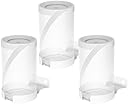
This premium aluminum alloy wall mount bracket is engineered exclusively for TP-Link Deco BE75 through BE33000 Whole Home Mesh WiFi 7 routers. Featuring a precision fit that avoids blocking ports or LED indicators, it optimizes signal reception and airflow with a bottom ventilation design. The integrated cable storage rack eliminates clutter, while the sleek powder-coated white finish complements modern home and office aesthetics. Easy to install and lightweight, this 3-pack bracket set is the ultimate space-saving and organizational upgrade for your WiFi setup.


| ASIN | B0D9T74MM6 |
| Antenna Location | Home, Office |
| Antenna Type | Internal |
| Best Sellers Rank | #61,859 in Tools & Home Improvement ( See Top 100 in Tools & Home Improvement ) #244 in Brackets |
| Brand | BANGCHEER |
| Built-In Media | 232g weight: 1 x aluminum alloy wall bracket + 1 screw package, 405g weight: 2 x aluminum alloy wall brackets + 2 screw packages, 567g weight: 3 x aluminum alloy wall brackets + 3 screw packages |
| Color | White |
| Compatible Devices | TP-Link Deco BE17000, TP-Link Deco BE22000, TP-Link Deco BE33000, TP-Link Deco BE75, TP-Link Deco BE85, TP-Link Deco BE95 |
| Connectivity Protocol | Wi-Fi |
| Connectivity Technology | Ethernet |
| Control Method | Touch |
| Controller Type | App Control |
| Coverage | Whole Home |
| Customer Reviews | 4.7 4.7 out of 5 stars (54) |
| Frequency Band Class | Dual-Band |
| Has Internet Connectivity | No |
| Has Security Updates | Yes |
| Is Modem Compatible | No |
| Item Type Name | wall mount |
| Item Weight | 154 g |
| LAN Port Bandwidth | 1000 Mbps |
| Manufacturer | BANGCHEER |
| Maximum Upstream Data Transfer Rate | 54 Megabits Per Second |
| Mfr Part Number | TP-BE85-WM |
| Model Name | BC-TP-BE85-WM-03 |
| Model Number | BC-TP-BE85-WM |
| Number of Antennas | 2 |
| Number of Ports | 2 |
| Operating System | Deco OS |
| Other Special Features of the Product | Alexa Compatible |
| Router Network Type | mesh |
| Security Protocol | WPA or later |
| Wi-Fi Generation | Wi-Fi 7 |
| Wireless Compability | 802.11a |
A**R
Solid construction and perfect fit. Really thick metal and holds the weight of my mesh routers without issue. Will use this brand again.
T**Y
Outstanding!!!!
D**L
Fits the BE95 perfectly. Very well made, heavy duty metal, just feels top of the line.
M**S
Good mount but didn't use as the BE95's were returned for BE63s. I did use the same manufacturer to mount the BE63s and it worked well. BE95's were too noisy because they have fans and run hot. Plus, unless you have greater than 2.5Gbps internet speed coming into your building, the BE95 are overkill. But these mounts, for either, are decent.
S**0
As someone is is pretty tech savvy i gotta tell you im SO happy i made the switch from the Linksys Velop 7s to these. I had the Linksys velop for 2 years and while it was ok it was plagued with constant issues. First of all the Linksys app sucks. It crashes and freezes where as the Deco app is FANTASTIC and simple to navigate. I will say for those who are looking for a simplistic app this might not be for you because you have so many more options and things to turn off and on that it could mess up your net all together but if you want to have all the settings, bells and whistles, this is the system for you. Now let’s talk coverage…..the Linksys even just by itself was horrible. Just one node couldn’t even give me WiFi out to the garage from the living room due to the fact it only has 4 WiFi antennas where as this has 8. The Linksys gave my ring stick camera a signal strength of 64 most of the time which is horrible….with just one of these its down to -28. Even my doorbell and driveway cam are down in the high 40s where as with the Linksys it would have been -65 or more for them. When i originally had just the one hooked up i was able to have every device running full tilt with no issues. I’m also running metronet fiber 1/1gbps up and down with 0 issues and potentially going to up it to 2 for the WiFi 7 devices we have now. So with just 1 i was able to get coverage with minimal lost signal to the back of the detached garage…the Linksys signal died once i just go to the work bench which was 1/4 the way into the garage. Ease of installation. Sweet lord this beats the Linksys by a mile. I kept on having issues and having to restart the connections, restart the fiber modem, etc it was just a mess. The child node was a pain in the butt to connect an stay connected at times. Now i will say the main difference between the 2 is i decided to wire backhaul the Deco routers. Only 2 so far since my moms roof angle doesnt allow me to place the 3rd like i wanted but ill figure it out. The system automatically even sees you have wired backhaul and configures the child node to the main node so you dont have to go thru the process of having it match the parent node. Features i like: you can set a schedule for the LED light. Say you go to bed around 9pm and wake up at 7 but you have one of these in your room. Well you either had to turn it off or on in the Linksys app….this one you actually have a schedule to you can set when to turn it off and when it comes back on - you get weekly reports on the system like how its running, wether it needs optimization, how many new devices connected etc, you can setup VPNs, IoT specific device protections, and malicious web protections all within the app. You get a 30 day trial then of course like everything now a days its subscription based but the prices aren’t bad for a year - you can choose devices that you want to connect to which node. Mine oddly enough was connecting my Nanoleaf panels to the living room node when the 2nd child node is in my room less than 6 ft from the router so i made sure it stays connected to that one. I could go on about the other features but there are so many. Lastly ports….this has 4 ports 2x2.5gbps ports and 2x10gbps ports with a SFP module to cut out the modem (if your fiber provider will let you) and hook directly to the modem if you have the proper Adapter module to make the connection which i highly recommend if they will let you. One thing ppl might experience is these do stay warm. In front of the devices where you see the 7 from top to bottom of the router, in the middle it does feel warm to the touch…thats why i do recommend you dont stick this in a cabinet or something….leave it out in the open or buy wall mount adapters for this it CAN be in the open to air. So dont worry about it feeling warm.
Trustpilot
1 month ago
2 months ago