Desertcart purchases this item on your behalf and handles shipping, customs, and support to Australia.
🖱️ Elevate your workflow with ergonomic precision and wireless freedom!
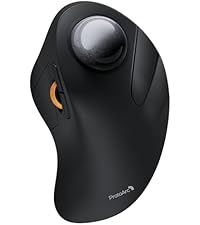
The ProtoArc EM05 NL is a rechargeable wireless vertical trackball mouse featuring a 62° ergonomic tilt to promote natural wrist posture and reduce fatigue. It supports triple wireless connectivity (2.4G, Bluetooth 5.1, and 3.0) allowing seamless switching between up to three devices. With 5 adjustable DPI levels (200-1600), it offers precise cursor control. Its thumb-operated trackball enables smooth navigation on any surface, complemented by quiet clicks and a frosted finish for a premium feel. Compatible across Windows, macOS, Android, and iOS, it’s designed for professionals seeking comfort, versatility, and productivity in one sleek package.


| ASIN | B0D7Q21GG8 |
| Additional Features | Ergonomic Design, Quiet, Rechargeable, Wireless |
| Antenna Location | Business, Office |
| Battery Average Life | 2 months |
| Best Sellers Rank | #377 in Computer Mice |
| Brand | ProtoArc |
| Button Quantity | 7 |
| Color | Red |
| Compatible Devices | Desktop, Laptop, Personal Computer, Smartphone, Tablet |
| Connectivity Technology | 2.4G Wireless , Bluetooth |
| Customer Reviews | 4.2 out of 5 stars 441 Reviews |
| Enclosure Material | Plastic |
| Finish | Frosted |
| Hand Orientation | Right |
| Included Components | Type C Charging Cable, USB Receiver, User Manual, Vertical Trackball Mouse |
| Item Weight | 0.17 kg |
| Manufacturer | ProtoArc |
| Mfr Part Number | Protoarc B0D7Q21GG8 |
| Model Name | EM05 NL |
| Model Number | EM05 NL |
| Mouse Maximum Sensitivity | 1600 dots_per_inch |
| Movement Detection | Trackball |
| Movement Detection Technology | Trackball |
| Number of Batteries | 1 Lithium Ion batteries required. (included) |
| Number of Buttons | 7 |
| Operating System | iOS, macOS, Windows, Android |
| Power Source | Battery Powered |
| Range | 10 meters |
| Special Feature | Ergonomic Design, Quiet, Rechargeable, Wireless |
| Style Name | Modern |
| Theme | Video Game |
| Unit Count | 1 Count |
| Warranty Description | 2 Year Warranty |
C**N
A definite upgrade to websearching and PDF reviews
This is an initial review after a full day's use of the mouse, but I'm pleased with the mouse so far. I didn't think I'd find an upgrade to a rollerball mouse, but even the small things, like the buttons on this mouse, and the placement, already make my functional use so much better. I really liked my previous mouse, actually my last 2, but in each new upgrade, the angle of the mouse and reach of the ball felt a little more comfortable than the last. This is an exceptional upgrade in how my hand feels holding the mouse, moving my thumb, and using the buttons. It took a minute to get used to the new position, then realizing the functions of the buttons, quick ease to change the cursor speed, not that I need that much, but useful. The forward and back buttons, especially useful in webpage surfing, is great, and easy to get to without really thinking about the button placement. The real think is the comfort of mouse setting. As I deal with maps, imagery, and coding, I don't like taking my eyes off the screen, and should be able to find my keyboard and mouse easy just by last placement, not by eyeing where they are. This should be a comfort level. As I'm already used to a rollerball mouse, this placement is already good, but now putting my hand down on the mouse, the way this mouse sits just feels more comfortable, and the wear and stress on my thumb is lower. This, however, is on personal use of the mouse. I've used flat rollerballs that use index finder, index and middle, and thumb rollers. I can function with any with ease, but extended use tires the fingers, especially from mouse to keyboard, moving screen items and typing. So far, I like this mouse. The design of the mouse seems to take up some more space than my previous model, I think mainly how the bottom of this spreads out for stability and comfort on your palm. Using this in conjunction with a small gel wrist rest, feels really comfortable in prolonged use. I have been really friendly with Logitech products, especially like their rollerball mice, and it comes down to the tracking. The last mouse was an off brand. While the mouse was nice, it held up well, the tracking and smooth movement wasn't there. For general document management and webpage surfing, it was fine. For precision work, it was not. The tracking on this, so far, is perfect, smooth, but this is so far just the first day use. Let's see over time. My previous off brand, tracking was never smooth, and sometimes quite frustrating. I'm not seeing with this, so far. I like this mouse, it's held up well to the first day use. It charged up well, came with minimal charge to at least get started, then we useable while charging. I'm using the USB, but this has Bluetooth function, if you go this direction. I'm happy with the USB. I'll write more later on the other connectivities. Each mouse is dependant on the user, use, function, and wear and tear on the hand placement, finger use, and overall ergonomic comfort. This works very well for me, thumb use, and placement of the hand. If you get a lot of thumb wear, this has some ease to it, and when not using the thumb, it has a natural resting place on the mouse. And the button functions, in turn, make this mouse quite functionable.
P**N
Easy to use - works great
Wasn’t sure I would like the vertical trackball but I’ve grown so used to it that it’s now my preference. The battery life is great and the buttons are holding up well. Much easier than a mouse for RTS games in my opinion. The cursor can jump quickly by default but you can adjust it in the settings. I like this one and will probably get it again when it breaks down. Seems pretty sturdy though so I’m expecting at least a 6-7 year lifespan here. I’m 6’2” with average hands for my size. The feel is nice and the wheel works great. It’s a little bulky so many not your “travel” trackball but a perfect one for the default desk work.
L**J
A Great Alternative to a Std Vertical Mouse, as well as to a Std Mouse & to a Std Trackball Mouse
I just received this alternative to a Std Mouse, (to a Std Trackball Mouse, and to a Std Vertical Mouse), and I must say it is all it claims to be in terms of use and functionality. The buttons work very well in their designed locations and the trackball ensures I minimize my hand/arm movements. I am enjoying the user experience. I had long ago moved from using a Std Mouse to using the Trackball alternatives, (of which I highly recommend the Kensington, Nulea, & Logi-tech options if someone is not ready to move to a Vertical Mouse). So while my current favorite option for a Std Mouse is the Logitech Ergo Trackball Mouse, when it was recently liberated (ie lifted/stolen) from my temporary workstation location, I decided it was high time to try the Vertical options available. I looked and tried several Vertical Mouse options, and although fairly comfortable with a few, I missed the use and functionality of having a Trackball Mouse. So when I discovered that Kensington & Logi-tech and a few other brands had some Trackball Vertical Mouse options I was thrilled. After reviewing the, (limited), options available I ended up selecting the ProtoArc Vertical Wireless Trackball Mouse, EM05 NL Bluetooth Ergonomic Rollerball Mouse for the following reasons: 1> A "true" vertical mouse setup with a 62' Tilt 2> A rechargeable mouse. Charging via a Type C USB cable option, with an included charging cable. 3> A 2.4 Hz Dongle along with Blue-tooth wireless connectivity options 4> Compatible with both Apple / Mac, Windows, PC Android, (this means in a pinch my significant other can use it as well for her Mac). As noted above I just received this mouse and have been putting it through its paces and so far, I think it's excellent. However, I am giving it 4 of 5 Stars, (as the system is not allowing me to give a 4.5 out of 5), for the following reasons: A> The trackball could be a little bigger even though it is thumb-specific, I have found the tracking of the larger trackballs for finger control tends to be a little easier to use, and therefore I would like the thumb trackball to be a little larger for that control. B> The Dongle could be set up for easier visibility. I find that keeping the Top and connecting edge Black requires a bright lighted area to ensure it is connected correctly and smoothly. So a brightly colored top and a white, (or other bright color connecting edge to the USB portion), would allow for faster and easier connection setup. C> Non-Programmability of Buttons prevents customization D> Lack of covering for the charging port and Dongle insert areas would be a plus from my perspective With that said, besides what I noted above, I also have the following recommendation: E> The creation of a Travel Size version of this or other Vertical Mouse. (As noted above I was using the Logitech Ergo Trackball Mouse and although it's big, I had a case for it so it allowed me to take it for some limited travel, so having the option to purchase a case would be a very good option. However, when doing serious traveling I defaulted to using a "miniature version" of the Std Mouse as space becomes a major restriction. So even with the feedback given above, I do want to stress that overall I am very happy with this ProtoArc Vertical Wireless Trackball Mouse, EM05 NL Bluetooth Ergonomic Rollerball Mouse, and I would highly recommend it to anyone, especially to those interested in transitioning to a vertical mouse and to anyone who would also appreciate having access to trackball functionality as well.
D**A
Excellent vertical design is super comfortable
Super comfortable, vertical design is superb for long hours and the configurable DPI setting enables flexibility for different tasks. Forward/back buttons make browsing research quick. Battery life is excellent, I work using this mouse 5 days a week 8-10 hours and recharge this once every 5 weeks maybe? Overall an excellent and worthwhile investment.
A**R
Comfortable, quiet, smooth - build quality just average
Pros: + As a trackball user since the 90s, this is my weapon of choice now. I'm ordering a second one to replace the first. + The ergonomic shape is very good, a big improvement over a palm-down thumb trackball. + Ball movement is super smooth, esp. compared to Logitech. + Buttons are very quiet. + Reliable wireless connection ( Cons: - The left mouse button is failing on mine, after 2 years, just outside the warranty period. - The left button was always so light I had to lift my finger in sensitive tasks to avoid clicking accidentally. - Would be nice if the base flared out wider and flatter where it meets the desk and your hand rests on it. - ProtoArc doesn't offer software to customize the functions, as far as I know. So I have to use two third-party programs for Windows: RawAccel to tweak the acceleration, and XMouseButtonControl to program the buttons (to set 4 and 5 to copy and paste).
C**R
Best trackball mouse I've used...ever!
Easily my favorite mouse ever. Love that its rechargeable, USB or Bluetooth, and easily connects and switches between 3 devices. Its very comfortable to use if youre into trackballs. Love it!
G**R
Lasted only three months
My mouse only functioned properly for three months before it became unusable due to the left button sticking. It also tends to scroll unpredictably and just seems to have a mind of its own. Before this, I liked the mouse. The battery could have lasted longer, although since it is a trackball you could still use it while recharging. Connectivity was great too. Given my experience, however, I cannot recommend this item. Mice need to be more durable than this one.
R**K
Fantastic choice for ergonomic trackball; I bought one for office & home
Basic description: essentially the trackball equivalent of the "vertical mouse." What do I think about it: Excellent. Ergonomic design is fantastic for me. Helps my shoulder vs. other trackballs because the angle of the arm impacts which muscles in the shoulder get used. It's just a comfortable, natural angle that allows my arm to be more relaxed while having good control of the cursor. This is also a much better value than the extra ergonomic Logi[tech] equivalent, which is nearly 2x the cost as I type this. And by the way, you'd have to use the cushion thing the Logi unit comes with to achieve a similar angle. Maybe it's great/fine, but if you want the steeper angle then why have a 2-piece design? Other aspects: Buttons somehow feel crisp while also being quiet. Effort feels just right to me. Weighting of the ball feels just right and it moves very smoothly. Scroll wheel could feel a tad tighter for my liking but this is being very picky; it behaves as I expect/want. Subjectively, the ProtoArc feels higher quality than the Logi M575 I'm coming from. The M575 doesn't feel cheap to me, but this feels nicer/higher end. If you like switching between DPI levels on the fly, there's a button on the mouse for this. I don't use this but the button is not in the way. My only open questions about this unit is how the Li-ion battery and buttons will hold up. The Logi units use plain old AA batteries, which makes them a non-issue to replace (though less convenient than Li-ion in some ways). The buttons fail on Logi units faster than I think they should. Time will tell here but I'm hopeful given that ProtoArc put the time and effort into creating a very thoughtful product.
C**E
Excelente producto
Muy buen producto, funcional la batería es buena, y muy fácil de configurar
R**Y
Qualité+prix=Wow !
Avant l'achat, je n'étais pas convaincu mais je me suis dit pour le prix, je vais l'essayer. Lors de la réception de la souris, l'emballage est digne d'une grande marque voir plus. Mais quand j'ai vu la souris et j'ai essayé, testé.... Wow ! Sérieusement, la qualité de fabrication, la solidité, le confort (++++), c'est beaucoup mieux qu'une souris d'une grande marque que j'ai eu à meilleur prix. J'ai une grande main et je n'ai pas besoin de replier ma main pour atteindre un bouton, ils sont à la portée de mes doigts. Bref, bien content, pour moi, c'est 5 étoiles. Un seul hic mais rien de majeur, la roulette de défilement, je l'aurais placé plus haut (sur le top) plutôt qu'entre les deux boutons droits et gauche. Mais plutôt de défiler avec l'index, je le fais avec le majeur, question d'habitude à prendre je pense.
E**O
Muy práctico cuando lo usas todo el dia
Para uso diario y prolongado es la mejor opción, no cansa la mano y te permite mantener una postura relajada. Y con su configuración puedes variar la velocidad de respuesta, lo que lo hace más cómodo al adaptarlo a distintas actividades.
B**O
Ergonomicidad
Un muy buen producto, se siente de buena calidad y es súper útil Al principio es un poco raro para adaptarse a él, pero después de unos minutos de uso es súper intuitivo Lo recomiendo 10/10
M**N
Lightweight, comfortable angle
To preface, this is not my first Protoarc product. I've also used their EM03 trackball, but that one is a finger ball (the trackball is located up front instead of on the side) and not angled, which doesn't help with my wrist pronation and carpal tunnel issues. Enter the EM05. Very solidly built mouse but doesn't have a lot of weight to it, so some people might not like that it doesn't have that "grounded" sort of feeling. Otherwise it punches above its weight I find - easy to connect to any device via usb-c, 2.4ghz usb dongle or bluetooth wirelessly. The trackball rolls smoothly and is very easy to pop out and clean, but the ball won't just drop out of its slot. The metal scroll wheel feels okay but still lacking compared to the industry standard in the Logitech infinite scroll wheel in terms of smoothness and tactility. I also like that it has this sort of extended "lip" at the bottom to cradle the edge of your hand as you cradle it around the mouse. The angle on the EM05 is very comfortable compared to other vertical trackballs I've tried prior like the MX Ergo. I personally prefer the steeper angle so I can get my wrist as vertical as possible to avoid the overpronation but obviously not everyone will like this. For any left-handers wondering, this mouse is unfortunately not going to be for you with the buttons all located specifically for right-handers. Hopefully Protoarc produces a left-handed version of this in the future for the lefties out there.
Trustpilot
2 months ago
2 months ago