


🖥️ Elevate your Mac workflow with precision and style—don’t get left behind!
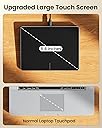
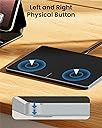
The ProtoArc Wired Trackpad T1-A is a sleek, space gray touchpad designed exclusively for Mac users, featuring high-precision optical tracking, dual physical click buttons, and multi-touch gesture support. Its ergonomic, ambidextrous design and plug-and-play USB connectivity make it the perfect accessory to enhance productivity on MacBook Air, MacBook Pro, iMac, and Mac Mini devices.
| ASIN | B0D2L1P93G |
| Additional Features | Ergonomic Design, Portable, Wired |
| Antenna Location | Office |
| Are Batteries Included | No |
| Are Batteries Required | No |
| Battery Average Life | 2 months |
| Best Sellers Rank | #252 in Computer Touch Pads |
| Brand | ProtoArc |
| Built-In Media | 1 x USB-C Charging Cable, 1 x User Manual |
| Button Quantity | 2 |
| Color | Space Gray |
| Connectivity Technology | USB |
| Customer Reviews | 2.5 out of 5 stars 40 Reviews |
| Enclosure Material | Metal |
| Finish | Glossy |
| Hardware Platform | Mac |
| Item Dimensions L x W | 6.4"L x 4.8"W |
| Manufacturer | ProtoArc |
| Mfr Part Number | Protoarc B0D2L1P93G |
| Model Name | T1-A |
| Model Number | Protoarc B0D2L1P93G |
| Movement Detection | Optical |
| Movement Detection Technology | Optical |
| Number of Buttons | 2 |
| Power Source | Battery Powered |
| Special Feature | Ergonomic Design, Portable, Wired |
L**1
Simply does not work
This is my second attempt at a replacement trackpad for my iMac. First one didn’t work at all and this one did work somewhat but the gestures were all off and became not feasible to actually do any work. I then brought it to work to connect to my work pc and there was a driver error and it was completely unusable. I would have returned it, but I’ve already discarded the packaging. So now I’m just out $50. And on top of that I had to go ahead and purchase the Apple certified trackpad to replace it so I’m actually out of pocket $250 at the end of the day. Very disappointing
A**R
Unreliable
Most functions are as expected. Drag function set to three finger and worked until it no longer did. Gave up and reverted to mouse. Thought would be a good value when compared to apple product. Disappointed.
S**.
Lower cost alternative to the Magic Trackpad, great size, looks awesome, works great!
My work computer is a Mac Studio. I bought the magic trackpad 2 at the same time I bought the Studio. I love it. I have a Mac Mini that I use only occasionally with a TV for training purposes. I wanted a trackpad for that computer as well but I couldn't really justify spending what a magic trackpad costs for a computer I might use once a week at the most. I decided to give this one a try. I like the big size. It's pretty comparable to the magic trackpad size. I also am satisfied with it being a corded trackpad. It would be a pain to try to keep it charged anyway. Speaking of the cord, it has a braided cloth cover and feels like a nice quality cord. I also like the fact that it will plug into a USB-C or USB-A port and the adapter is tethered so you don't lose it. The real question though is how does it work. The appearance is great. It has a beautiful polished bevel edge around it that looks very upscale. It appears to be either mostly or all metal construction which is also a plus. The trackpad is quite responsive. The motion is fluid and precise. It works quite well. There is a couple of things that are a little different though. The Apple Magic Trackpad can be "clicked" anywhere. If you are looking for a tactile click, you have to be on the bottom edge of this trackpad and you have to press harder than I would prefer. However, you can also just tap it and you can tap it anywhere. The tap is quite sensitive and does not require much effort at all. Just a light tap will register. That leaves only one thing I had an issue with. If you want to drag something, the hard click and drag doesn't work well or at all depending on where you are on the pad. At first I was perplexed. Then I read the instructions. A three finger drag does the same thing and you can be anywhere on the pad to initiate it. Aside from those quirks, I'm quite happy with it. If you want a less expensive alternative to the Magic Trackpad, this is one you should consider.
N**A
No ease tab
Not happy that click cannot be done on easy tab. You actually need to click.
A**R
Not Compatible with Mac Computers
This product does not work with Mac computers. It can move the cursor but that's about it. None of the gestures work. Clicking with your fingers does not work. To click you have to exert a lot of force on the left or right sides of the touchpad with your other hand and it is not something you would want to have to do very often. This is a terrible product and should be removed from the Amazon store since it does not work as described.
M**Y
Don’t buy
It’s junk, junk, trash that’s where it is now,,, that’s the last time I try to save money,,,,,,,,,,from now on it’s apple products for my Mac products almost every time I try to save money it ends up costing me more money,,,,,,take my advice you get what you pay for,,,I’m sorry apple it won’t happen again😎
M**N
Very good trackpad with a few quirks...
I'll start off by saying that I am a big fan of ProtoArc products and I have several items (mice, trackballs, and a mechanical keyboard) of theirs that I love. That said, I had pretty high expectations for this trackpad based on my previous experiences with my other items. This product mostly met that with just a few things that I think could be improved if this product were trying to (I assume) compete with Apple's own products. Here's what this pad does well: 1. It's easy to connect. 2. It's a great size - large enough to be useful and but not so big that it takes up too much space. 3. It's a beautiful design and it's packaged very nicely - looks and feels like a high end product. 4. It works well and seamlessly with the Mac OS Here's what I wish it did better: 1. You have to press a little "hard" to make this respond to the command. This is one thing that ALL of Apple's trackpads, whether it be on a laptop or the Magic Trackpad, does exceptionally well. It's very sensitive and effortless. This pad requires a bit more effort and while for me this is not a dealbreaker, for some it will be an annoyance for sure. 2. And as a separate but somewhat related point, there is no way to adjust the sensitivity on this, which to me is a significant drawback. 3. Some clicking functions are only supported in a certain area of the trackpad, whereas on the Apple one, it can be done anywhere. Is this a good trackpad? Absolutely. In fact it's better than most all of the rest I have tried, and it's a beautiful, easy to use, NICE product. Also, it is much cheaper than the "official" Apple one. But is it a GREAT trackpad that can completely replace the Apple one? Not quite yet. I think with some modifications it definitely could be, actually...but at this time, we aren't there yet. I would still recommend this anyway because I will definitely keep using it and I really like it (Which is why I only took off one star) but hopefully these drawbacks can be fixed/tuned up to make this the GREAT trackpad that this no doubt can be!
R**T
I may have gotten a bad one maybe.
The trackpad looks very well made and it looks very nice and very modern. The trackpad itself works flawlessly, impressively even. BUT, I can not get the left and right click buttons to work properly. The rest of the device is amazing and I really want to use it so that I can tilt my desk how I like it but a regular mouse falls off, this would fix that issue for me but the physical clicking buttons not working properly and the lack of a tap-to-click function are making it impossible to use for me. This may be just the one I received and the rest of them may work fine.
Trustpilot
1 month ago
1 day ago