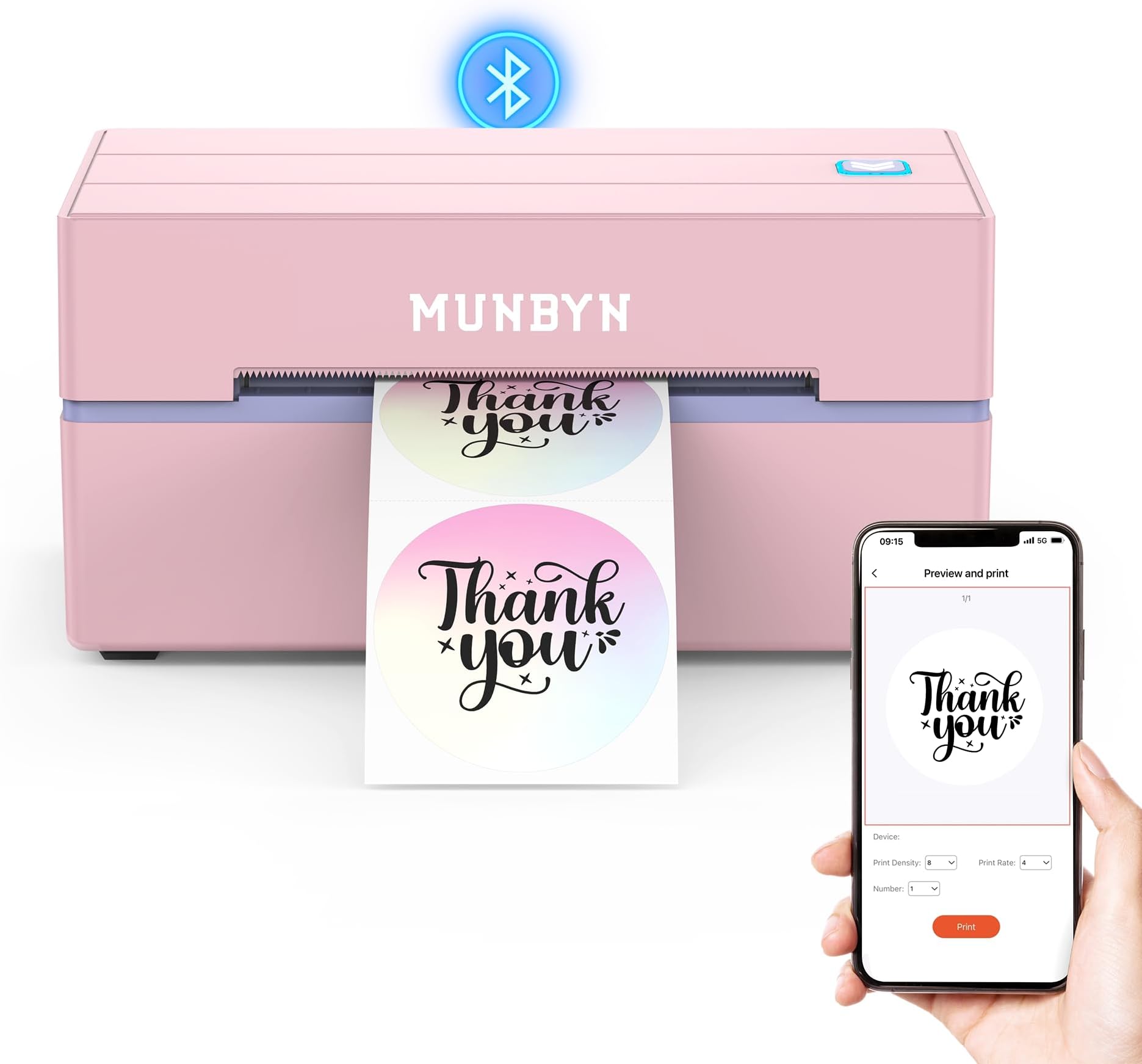
🚀 Print Smarter, Ship Faster, Stand Out Effortlessly
The MUNBYN Bluetooth Thermal Label Printer 130B is a compact, wireless 4x6 label printer designed for small businesses and home offices. It delivers ultra-fast printing speeds up to 72 pages per minute at 203dpi resolution without ink or toner, using thermal technology. Compatible with iPhone, Android, Windows, macOS, and Chrome, it offers seamless Bluetooth and USB connectivity. With over 3,500 design elements and 2,000 templates, it enables unlimited label customization. Trusted by over 80,000 entrepreneurs, it supports all major shipping carriers and marketplaces, making it a reliable, cost-effective solution for professional shipping and branding needs.


| ASIN | B0D3PVP6VM |
| Additional Printer Functions | Print Only |
| B&W Pages per Minute | 180 ppm |
| Best Sellers Rank | #1,533 in Office Products ( See Top 100 in Office Products ) #11 in Desktop Label Printers |
| Brand | MUNBYN |
| Built-In Media | Labels |
| Color | Pink |
| Color Depth | 1 bits_per_pixel |
| Color Pages per Minute | 1 ppm |
| Compatible Devices | Laptops, PC, Smartphones, Tablets |
| Connectivity Technology | Bluetooth |
| Control Method | App |
| Controller Type | Android |
| Customer Reviews | 4.5 out of 5 stars 2,757 Reviews |
| Dual-sided printing | No |
| Duplex | Simplex |
| Hardware Interface | USB |
| Is Electric | Yes |
| Item Dimensions D x W x H | 8"D x 6.88"W x 4.72"H |
| Item Weight | 2.3 Pounds |
| Manufacturer | MUNBYN |
| Maximum Copy Resolution Black and White | 203dpi |
| Maximum Copy Resolution Color | 203dpi |
| Maximum Copy Speed Black and White | 180 ppm |
| Maximum Media Size | 4 x 6 inch |
| Maximum Print Resolution Black and White | 203DPI |
| Maximum Sheet Capacity | 500 |
| Maximum print Resolution Color | 300DPI |
| Model Name | ITPP130B |
| Model Number | ITPP130B |
| Model Series | ITPP130B |
| Number of Trays | 1 |
| Other Special Features of the Product | Portable |
| Output sheet capacity | 72.0 |
| Paper Size | 4X6 Inches |
| Print media | Labels |
| Printer Connectivity Type | Bluetooth |
| Printer Output Type | Monochrome |
| Printer Resolution Horizontal in Black and White | 203 Inches |
| Printer Type | Thermal |
| Printing Technology | Thermal |
| Resolution | 203 x 300 dpi |
| Scanner Type | Portable |
| Special Feature | Portable |
| Specific Uses For Product | Office |
| Total Usb Ports | 1 |
| Warranty Description | 2 Year Manufacturer |
| Warranty Type | limited warranty |
K**S
A Reliable and Convenient Printer for Small Business Owners
I recently purchased the MUNBYN Bluetooth Thermal Shipping Label Printer for my small business, and I must say, it has exceeded my expectations in many ways. As a new business owner, I was looking for a printer that would be easy to set up, reliable, versatile, and reasonably priced. The Munbyn printer has delivered on all fronts. Before purchasing the Munbyn printer, I compared it with the popular Rollo printer, weighing the pros and cons of each. Ultimately, I decided to go with Munbyn, and I'm extremely satisfied with my choice. Not only is this printer aesthetically pleasing, but it is also compact enough to fit perfectly in my limited workspace. Despite its small size, it packs a punch when it comes to performance. The print quality is exceptional, and the printer's speed is impressive. Moreover, as a bit of a tech enthusiast, I was pleasantly surprised by the seamless setup process. Unlike some other reviewers, I encountered no issues during the setup. The instructions provided were clear and concise, and within minutes, I had the printer up and running smoothly. It was a relief to start using it without any frustrating technical difficulties. Additionally, one of the factors that influenced my decision to choose this printer was its reasonable price. It was not outrageously expensive, making it a cost-effective option for a small business owner like myself. During my initial testing phase, I did experience a few partially printed sheets. However, I quickly discovered that a minor readjustment of the labels inside the printer was all it took to resolve the issue. Since then, I haven't encountered any further problems, and the printer has consistently produced high-quality prints. One of the standout features of this printer is its Bluetooth connectivity. Setting up the Bluetooth connection with my phone was a breeze, and it eliminated the need for multiple wires connected to a computer. Being able to print directly from my phone has been incredibly convenient and has saved me a significant amount of time. The wireless functionality of this printer is a game-changer for me as a small business owner. To put the Munbyn printer to the test, I decided to print some custom T-Shirt Care labels for a recent order I received. The results were fantastic. The labels came out crisp, clear, and professional-looking. It gave my products a polished touch, which I believe will leave a positive impression on my customers. In conclusion, I highly recommend the MUNBYN Bluetooth Thermal Shipping Label Printer to fellow small business owners. Its easy setup process, reliable performance, compact design, and reasonable price make it an ideal choice for those starting out. The Bluetooth connectivity adds a level of convenience that traditional wired printers can't match. With this printer, you can expect excellent print quality and a hassle-free experience. Trust me, you won't be disappointed.
N**Y
Excellent Wireless Label Printer for Small Business & Shipping!
I’m very impressed with the MUNBYN Bluetooth Thermal Label Printer (130B)! This printer makes printing 4×6 shipping labels so easy and convenient — especially since it connects wirelessly via Bluetooth. Whether I’m on my phone, tablet, or computer, setup was fast and smooth. It’s compatible with iPhone, Android, iPad, Windows, macOS, Chrome, Etsy, and eBay, which makes it super versatile for my small business. The labels print clearly and crisply every time, and the printer runs quietly without any fuss. I also love that I don’t need ink — just thermal labels — which saves money and keeps things simple. Overall, this is a reliable, efficient label printer that’s perfect for shipping packages whether you’re at home or in the office. I’d definitely recommend it to anyone who wants a wireless thermal label solution for their business!
B**E
A Total Game Changer for My Small Business
This printer has been absolutely amazing for my small business. I’m always looking for tools that make my process smoother and more efficient, and this one truly delivers. Being able to print my shipping labels quickly and clearly has saved me so much time. The setup was straightforward, and the app is very simple and user-friendly. I love that I can design and print directly from my phone using Bluetooth without needing anything complicated. Everything feels intuitive, even if you’re not super tech-savvy. One of my favorite features is that it’s thermal — no ink or toner needed. Not having to constantly reorder ink cartridges is such a money saver and one less thing to worry about. The print quality is crisp and clear, and my labels scan perfectly with no issues. If you’re a small business owner shipping orders regularly, this is 100% worth the investment. It’s convenient, efficient, and has truly streamlined my workflow.
M**S
Reliable, fast label printer that makes shipping from home much easier
The MUNBYN 130B Bluetooth thermal label printer has been a great addition for printing shipping labels at home. Setup was straightforward across multiple devices, and once connected it prints 4x6 labels quickly and consistently. The print quality is sharp and clear, with barcodes and text scanning easily without smudging or fading. Since it’s thermal, there’s no ink to worry about, which keeps operating costs low and maintenance simple. Bluetooth connectivity works well with both mobile devices and computers, making it easy to print directly from shipping apps or marketplaces. The compact design doesn’t take up much desk space and it runs quietly while printing. It’s especially useful for small business shipping, online sales, or even organizing packages at home. For best results, loading the labels carefully and aligning them before printing helps prevent misfeeds. Running a quick calibration when switching label types also keeps prints centered and consistent. Overall, this is a dependable and efficient label printer that streamlines the shipping process and saves time compared to using a standard ink printer.
A**W
Good printer, but labels need frequent re-centering
I use the MUNBYN 130B Bluetooth thermal label printer for small business shipping, and overall it does a good job, but there are a few quirks worth knowing. Print quality is solid. Text and barcodes come out clear, and the Bluetooth connection works well once it’s set up. It’s fast enough for everyday shipping and works fine for 4x6 labels. My main issue is label alignment. The labels don’t always stay lined up, and I usually can only print a few labels before needing to re-center or adjust them again. It’s not a deal breaker, but it does slow things down during bulk printing. I suspect using a label stand instead of feeding from a loose stack or roll would probably help with this. Once it’s aligned, it prints accurately, but it’s a bit finicky about staying that way. For smaller batches it’s totally fine, but if you’re printing a lot at once, expect to pause and adjust. Pros: Clear, crisp label and barcode printing Bluetooth works well for wireless printing Compact and easy to set up Good for small business or home shipping Cons: Labels can shift and need frequent re-centering Not ideal for high-volume printing without a stand Overall, this is a decent thermal printer for light to moderate use. If you pair it with a label stand and don’t mind occasional adjustments, it does the job well.
D**L
Small but mighty!
I got this thermal printer on the recommendation of a business colleague. I run a small custom reusable press-on nail business. When I first started out, I would jump through hoops to print shipping labels. Not anymore! I've had this baby for about a year now, and I can't imagine printing labels the old way. Plus, I can make custom stickers in a heartbeat! I love how this printer is very small and light, extremely easy to set up, and compatible with my iPhone, Mac or Windows computer. Also, their customer service is fantastic! They walked me through fixing my issue (it turns out I was using lower-quality labels). Two things you should keep in mind: 1- You should use Munbyn labels. Trust me. I got other "high quality labels", but they were not actually high-quality. They kept jamming and the print quality was horrible. Once I switched to the Munbyn labels, perfect printing, perfect print quality. In the photo, the Munbyn label is on the left, and the other brand is on the right. Even if it wasn't jamming, you can see that the writing is very faded and not clean. 2- The printer is bluetooth, but you can only print bluetooth from your phone, not from your computer. To print from your computer, you will need to use the cord provided. They may have other printers that will, but this one will not.
I**!
Great for small business
I love my printer! It’s super easy to use and design my stickers. This thing is fast and worth the money you don’t need ink for it like that’s cool. I figured it out in less than ten minutes compatible with my iPhone and it prints the images pretty clearly!
T**S
Excellent printer - but the app needs work
The printer itself is great. Crisp and clean thermal printing. The app though.... because it's translated from Chinese - it takes a little getting used to. To delete previously made labels you have to click "operate" (I think manage would be a better word there haha). The saving function is also a little weird. After you save a label, if you edit it you can't save over it again. You have to save it under a different name and then delete the other one. It's got a few more interesting quirks like that with saving. Last thing is there is NO cancel button. If you print 20 labels only to realize that they are printing landscape instead of portrait - you better just flip the power switch. Otherwise you will be wasting a lot of labels. Make sure you test print because the direction it prints is a little confusing itself - and a lot of clicking around to figure out how to change. The videos of how to use the printer online aren't super helpful. Great value for the money though, and small, light weight and cute. I love the options for colored labels and that you can upload a photo that it can print on your labels.
Trustpilot
4 days ago
1 month ago