Desertcart purchases this item on your behalf and handles shipping, customs, and support to Australia.
⚡ Elevate your network game with speed and control that means business
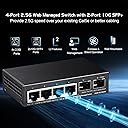
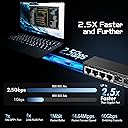
The Binardat 4 Port 2.5G Web Managed Switch combines 4 multi-gigabit 2.5G Ethernet ports with 2 high-speed 10G SFP+ slots in an ultra-compact metal case. Designed for professionals, it offers advanced Layer 2 management features like VLAN, LACP, QoS, and security through an easy-to-use web interface. Its fanless, energy-efficient design ensures silent operation, making it ideal for home offices and small business environments demanding reliable, high-speed connectivity.


| ASIN | B0CWNZWFTS |
| Best Sellers Rank | #422 in Computer Networking Switches |
| Brand | Binardat |
| Built-In Media | 2.5G Managed Switch |
| Case Material | Metal |
| Case Material Type | Metal |
| Compatible Devices | Desktop |
| Customer Reviews | 4.0 out of 5 stars 616 Reviews |
| Data Transfer Rate | 2500000 bits_per_second |
| Included Components | 2.5G Managed Switch |
| Interface | RJ45, SFP+ |
| Item Weight | 0.37 kg |
| Manufacturer | Binardat |
| Mfr Part Number | 2G06-04210GSM |
| Model Number | Mini 4x2.5G+2x10G SFP Managed |
| Number of Ports | 6 |
| Platform | Not Machine Specific |
| Switch Type | Managed |
| Warranty Description | 1 Year |
B**N
Absolutely amazing! (2) 10Gigabyte speed ports and (4) 2.5gb ports
GREAT EASE OF USE . SETUP IS EASY! I learned so much about my server. This thing has been bulletproof! Functionality is great ! 2 10Gigabyte ports and 4 2.5 gigabyte ports! It has jumbo packet size! I use 15,000 packet size transfers with my server (supermicro server plugged into 10g port on this switch) I have 2.5 gigabyte ports on archer BE9300 router plugged into 2.5g port on switch. Brightness on the lights are great! Green and yellow tells me the connection. Using Cat6a cable (10gb/persecond transfer speed) Server is a finally wifi 120Tb server! This switch has port config you use and internet browser, type in the IP of the switch into the web address, and it opens the software. GREAT EASE OF USE . SETUP IS EASY! TO SET UP ON A WINDOWS COMPUTER GO TO CONTROL PANEL GO TO YOUR NETWORK ADAPTERS AND IT WILL SHOW YOU EACH ETHERNET ADAPTER. Plug in your Cat6a cable to the switch to your computer. In control panel network adapter settings right click the Ethernet That pops up in adapter settings when you plug it into the computer. Right click it go to properties , Then find IPv4 click it then click configure change the IP address to the IP address that is in the instructions of the switch. Then go to the internet browser type in that IP address in the instructions in the switch. Then change the IP address to whatever you want it to be so that you can go into your router and go to DCHP and reserve that IP address so it doesn't bounce around and change on its own basically you manually assign it an IP address like 192.168.0.5 ( router is on IP 192.168.0.1) So if you go to your router settings go to DCHP reserve, you can make a static IP address and make it so that it is permanently at the IP address that you tell it to be at by typing in the IP address under DCHP reserve. So many things that are amazing about this. When you are all finished go back to control panel network adapters right click the adapter properties IPv4 selected configure Change back to automatic. Now you are done!
B**.
Great Value
Am still really surprised that this is handling a segmented VLAN for our trunked home network, without a single minute of downtime over the past 3 months. The SFP+ slot was incredibly useful. Silent operation, even the power supply doesn't have the weird hum most other units have.
T**3
Can be good, maybe not what I needed tho
Let me be clear, it is exactly as advertised in the sense that you can absolutely vlan off all 4 2.5 gig ports also I can if I wanted bond them all or any combo to achieve up to a total of 10gb via the 2.5gb ports... I think these LACP features were the primary reason for me going with a managed version vs an unmanaged version, the truth is I would rather just have a transparent switch that is also capable of aggregation on those ports but also alows me the full bandwidth pass threw of the sfp ports because the plan was to add this into a low cost 10gb sfp+ enabled homelab setup that is just an amalgam of various systems of a variety of specs and one of those NAS systems that is ultra low power with super low wattage archive smr drives is a always on target that is only equipped with dual 2.5gb nics and uses large capacity nvme solid start targets for write caching but not at crazy speeds just better than the slow SMR drive speeds especially when not in a stripped array and I thought perhaps this will enable me to tie into the in place sfp+ network and also give me a few slower options so I can retire one whole system that is acting exclusively as networking fabric with hot copper 10gb nics and similar quad 2.5gb nics that end up taking to many pcie lanes and power but that system also has dual 1gb nics onboard that provide my "management" network for all the servers in the rack but iv only recently upgraded from unstable copper 10gb ethernet that is running more that 30m to my rack with a 2.5gb backup but now the same copper that was the 2.5gb backup can be used as a dedecated management line while the cat7 copper can be downgraded to either 2.5gb or even 5gb which all my 10gb hardware can do 5gb and 2.5gb and at 5gb that 30m copper is more than enough and my new 10gb sfp+ network is stupid stable with some low cost mellanox connectx 3 nics so i dont have a need for a 10gb copper backup so i was going to instantiate a 5gb copper network for the allways on ring of my homelab and reserve the sfp+ network for when my hypervisor based container orchestrator determins that HPC is needed for the task... This is all well and good but I need a switch that is low power and can transparent to my firewall provide these different tiers of network and all be in the same subnet as the master and this switch seems to be setup more like a firewall or DHCP device than a transparent switch but an unmanaged one won't have the same LACP features I need and many of this same port spec ones iv seen don't enable the use of both sfp+ bridged so one can be the uplink and the other simply a pass threw with the switching bandwidth to also provide all 4 2.5gb nics with there max bandwidth of course at the cost of bandwidth to the client sfp port when the slower nics are fully utilized... Perhaps I'm the dense one and there is some other layer level that would better serve these needs... But also at what cost, if it's cheaper to keep the low cost n300 mini itx system in place that serves this exact application well than that is what I shall do... I am also going to purchase the exact same switch but the unmanaged version so I can test it against my very asscentric usecase lol... I actually was considering purchasing 2 more of these to see if I can bond all 4 ports on both and get basically a 4port sfp+ switch going that is considerably cheaper than any low port count sfp+ 10gb switch iv ever seen and short cat6e cables are super cheap so... Ya ... Just a curiosity... ...but I'm also addicted to buying s#!t at this point so it's probably still going to happen even if they end up in a box after never to see the light of any of my blinking lights weird servers setups again lol...but no if I did that I would certainly use them as these switches are ultra low power realtek based and are far cheaper than mini PCs simply for networking lol... That basically why I ended up with so many odd ball systems in my homelab to begin with, just me opting for cheaper pcie nics than shelling out hundreds for dedecated switching with the added bonus of more compute and memory and storage to nievly offer up to the misunderstood container master in an etempt to win favor and maybe eliveate some of my troubleshooting tribulations ...but alas more systems of a varity of archetcturs and performace capabilities with some being required for basic communication is an exacerbation of my troubles... Who could have thunk it... Lol
S**Y
Excellent product
Excellent product. If you have any problems, contact them and they'll fix it. I had a minor issue with the firmware it came with, but they sent me a more recent firmware with fixes, and that solved the problem. It's a common issue with any device.
J**7
8 Port SFP+ 10G Managed Switch Login Problem
I wish they didn't mix reviews but they do, this review is for the 10G08-0800GSM. I wanted to write this before I have more experience with this switch to help if you're having a problem getting past the login on the web ui. My login screen did not change to the settings pages after entering the default credentials, it just stayed on the login. What i found is if you check the "remember password" box on the login it will then go on when you enter them. Just a glitch in the firmware that I guess they will soon fix but I saw someone else wrote a review about the same problem and it shakes my confidence in this switch a bit. It does get warm and I wish they had used a perforated case like my Mikrotik but you get what you pay for. The first time I powered it up it got to 51C but today I've had it idling for about 2 hours, in the identical environment, and it's not gotten over 42C. I've gone ahead and designed a 3d printed fan holder to help keep it cool since I plan on rack mounting it and don't know how it's going to do under load. It's currently drawing just under 10 watts with 3 SFP+ LC-SR transceivers idling. I'd also point out that Amazon refers you to the manufacturer for warranty information and when I checked the manufacturer website I couldn't find any. There may not be any manufacturer warranty so you may want to do your own research and see what you can find.
B**U
8-port SFP Switch Does Not Work & Slow to Boot
This review is for the 8-Port 10G L3 Managed Fiber Switch 10G08-0800GSM. I have 3 different 10G SFP switches and this is the only one I didn't get to work. Pros: * Very compact Cons: * Does not properly boot up. I can't access the web portal on 192.168.2.1 with a direct connection to the laptop which is not connected to any other network. Arp -a doesn't show the switch. The SFP module and Ethernet cable are known to be good as they work on other switches. * Gets very hot, probably because it is so compact. * Out of 4 different SFP+ ETH modules only one worked (though other switches had the same issue). Only the 10Gtek ASF-10G-T worked. I have a feeling the switch doesn't work with Broadcom chips. The following SFP+ modules didn't work: 10Gtek ASF-10G-T80, tp-link SM5310-T, ASFPTEK AT-SFP-10G-T-80 * It takes 28 seconds for the SYS LED to start blinking. This is very consistent. According to the manual, a blinking SYS LED means "Starting". So that means it does not start booting for 28s. Every other switch starts booting as soon as it gets power. * It takes 52 seconds for the connected SFP ports to be recognized. The second worst switch took 36 seconds, i.e. 16 seconds faster. * The status LEDs are below the ports. If you want to check the LEDs and the switch is not above eye level, you have to tilt it up or lift it up to see the LEDs.
M**W
Not the easiest to setup, but it was also not the hardest and in the end, it seems to work well.
OK , I got these in yesterday and it took me a few moments to get connected and figure out how to save the config after I made changes, but other than that I am impressed. I haven't tested any speed yet, but I was able to trunk several vlans to and between the switches and then out to an AP without issue. I am pleased and seriously looking at the bigger versions now. If they die randomly I will update, but so far, so good.
T**R
Good little switch that does not last.
This review is for model 2G06-04210GSM. That is 4 x 2.5GBASE-T with 2 x 10GBASE-T. It has a small switch to select managed and unmanaged modes, and the managed mode allows setting a variety of parameters including VLAN assignments. The good: The product idea is excellent, and allows for daisy-chaining 10G backbone with 2.5G attachments. Or adding several low speed devices to a 10G server port. It met my needs really well, and mainstream brands don't seem to have this set of ports available. The bad: The switch runs very warm, and the little switch to go between managed and unmanaged modes is not centered in it's little window, so you can switch it once to unmanaged, and then basically need to open the box if you ever want to switch it back again. The Binardat website has no warranty info, no firmware updates for any of their products, and no forum or customer service links, and does not acknowledge that this model even exists. They do have a way to send them a web-form. The ugly: It worked for about a year and a half, until the day we had a power outage, and it never came back. it won't boot, won't respond to management port, wont reset to factory defaults, and has link lights on for the 10G ports even when nothing is plugged in.
M**X
Bom desempenho
Para ja funciona como pretendido.
D**P
Multiplica tus conexiones!
Este switch me ha encantado, viene acompañado de su enchufe y poco más, la verdad que no necesita nada más, es plug&play tan solo tienes que enchufarlo, conectar tus cables de ethernet, uno desde el router hasta el switch y listo, ya estarás repartiendo tu señal por cable a donde necesites (siempre que te llegue el cable claro). En mi caso lo tengo detrás de la tele dado que necesitaba como mínimo cinco conexiones y la verdad que encantado. Este switch a diferencia de muchos lleva carcasa metálica, nada de plástico como la mayoría y tiene peso, no da la sensación de que este vacío por dentro jajajajajjaa. En la parte delantera están las 9 conexiones más la entrada de corriente. En los laterales tiene salidas de aire para mantener el sistema a una temperatura 🌡️ aceptable. En la zona de abajo tiene 2 hendiduras para poder colgarlo a la pared. La potencia da hasta los 1000mb que por ahora es el máximo en España así que te será suficiente para repartir tus conexiones. ✅ Pros: 👍 Carcasa metálica, no sensación de producto chino 👍 8 puertos para repartir tu conexión 👍 Se puede colgar 👍 No más caídas del wifi 🛑 Contras: 👎 La verdad que por ahora no le veo Contras... Es algo más pesado que otros supongo que por la fuente de alimentación, espero que no se caliente demasiado pudiendo marcar la madera..
カ**ー
2.5Gはなかなか見つからない
2.5Gはなかなか見つからず、それにそんなに多く有線で使用しないのでコンパクトな物を探していたので即購入。個人的には良い買い物をしたと思っている。
J**N
Great for most homes
Excellent product for home networks with 2 or more routers/access points. 2.5Gbps ethernet is great for uplink connection. 1 Gbps ports can be used to connect down stream access points and/or routers. It is also a great value for the price. I recommend it.
P**N
Good value for money
Very good switch! Gets a bit hot but no issues so far!
Trustpilot
1 week ago
4 days ago