Desertcart purchases this item on your behalf and handles shipping, customs, and support to Australia.
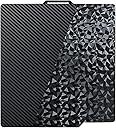
๐จ๏ธ Elevate your 3D prints with the ultimate dual-surface build plateโbecause your creations deserve the best!
The IdeaFormer-3D PEO PET Smooth Build Plate is a premium, flexible spring steel sheet designed for Bambu Lab 3D printers. Featuring dual PEO and PET surfaces, it offers exceptional flatness, warp resistance, and optimized adhesion temperatures for PLA and PETG filaments. Compatible with multiple Bambu Lab models, it ensures consistent, high-quality prints with easy maintenance.


| Brand | IdeaFormer-3D |
| Color | Smooth PEO+Smooth PET |
| Compatible Devices | For Bambu Lab X2D X1 X1C X1E P1P P1S P2S A1 |
| Customer Reviews | 4.0 out of 5 stars 241 Reviews |
| Item Weight | 0.38 kg |
| Material | Metal |
| Product Dimensions | 10.12"D x 10.12"W x 0.24"H |
W**N
Great once you follow instructions
GREAT (once you adjust settings like they tell you). With only changing the build plate type, the first print adhesion was pretty poor and I cancelled the print. THEN I read the instructions (in the listing and included in the box) better... keys for success with Bambu P1S: CLEAN the build plate with isopropyl alcohol. Use Smooth PEI/High Temp Plate as build plate type. Use build plate temp of 60-65C in filament settings (all layers).
A**X
Stunning holographic finishes and excellent first-layer adhesion!
This dual-sided plate is a game changer for my Bambu Lab A1. The PEO side leaves a beautiful, multi-dimensional pattern on the bottom of prints that catches the light brilliantly perfect for decorative items or custom branding. The PET side provides a smooth, sleek finish that rivals professional injection molding. Adhesion is surprisingly strong for a smooth plate, and parts release easily once the spring steel is flexed. Itโs a must-have for any maker who wants to elevate the visual hierarchy of their prints.
L**.
Do Not Buy for P1S
I have a P1S and after trying a thick initial layer, and messing with all the settings multiple times, I cannot get anything to stick to it!!!! Itโs very frustrating! Nothing will print clean on either side no matter the settings. On top of this it scratches very very easily, I scratched it with my fingernailโฆ all the other reviews I read said that the only success people were having was on there other printers, not for a P1S.
A**R
Poor Adhesion for PETG-HF
Very cool when you can get it to stick. I tried everything. I was using Bambu PETG-HF. I probably spent more money on filament trying to get it to stick than I did on these plates. I found raising the heat helped with adhesion but then I had other issues. It would probably work decently for smaller prints, but you need to make sure the plate is spotless. UPDATE: I was able to get decent prints with Petg after tweaking settings for weeks, but the biggest improvement I had was by using magic erasers to clean the surface of the plate. I thinking it slightly roughs the surface up, but doesnโt ruin the effect. Normal sponges werenโt cutting it. The second best change was to utilize a chamber heater set to 35c.
J**S
Dual-sided and fits Bambu A1 well.
UPDATE: After printing 2 different plates, 1 plate twice (broke off needed pieces removing supports - lesson learned), all prints have completed without any issues. I have yet to re-clean the plate since I started using it. On my 4th print, will clean with soap and water after this. No stringing, warping, or adhesion issues using PEI plate settings. A+ Out of the package: Washed the plate with Dawn soap and warm water, dried and placed on my Bambu Labs A1. Currently printing a CyberBricks remote controller housing on the carbon fiber side, using Overture Matte Gray PLA with a 4mm outside brim and 0.2 gap. So far so good. Will give update if any issues with warp or adhesion. Bed is set at 65ยฐC Extruder at 220ยฐC.
T**Y
Close enough
I struggled with the rating on this. The sticker used on this is very easily scratched even a plastic scraper will scar this plate. I have to use hairspray with every print not a big deal just a call out. The plate fits the xy dimensions well, but the alignment guide is a fraction to big for my p2s. That being said as long as you don't touch the plate during the print it works fine. I'm going to take my dremel and carve the edges down so it fits properly.
A**R
Won't stick to plate
I tried different filament and none will stick to the base plate. Very disappointed ๐. I contacted the company and they were wonderful to work with . They sent me a new plate and I'm extremely happy with it. Thank you for your fast attention to this matter will be shopping with you again. Tom Zimmerman
W**7
Easy to use and works great.
This was my first time using a textured build plate on any of my printers, and Iโm really pleased with the results. For this setup, I tested it on both my Bambu Lab P1S and X1C. Initially, I expected some additional configuration since itโs a third-party build plate, but the process was surprisingly simple. The only adjustment needed was selecting โSmooth Build Plateโ in the Bambu Slicer app. The X1C requires one extra step, and that is to disable "Enable detection of build plate position." As with most smooth build plates, getting good first-layer adhesion can be a bit tricky. My go-to solution is a light coat of hairspray on the surface; works like a charm and consistently gives me perfect prints.
ใ**ใ
ๅฎใฃใฝใใๆๆ ขใงใใใชใใใ
ใใผใใชใใใใใซใใฏใชใชใใฃใฏไฝใใงใใใ็จ้็ใซใฏๅๅไฝฟใใพใใๅคๆฎตใ่ใใใฐใใพใใฎใชใฎใช่จฑใใๆใใ
Trustpilot
1 month ago
1 week ago