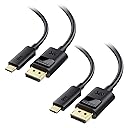
Desertcart purchases this item on your behalf and handles shipping, customs, and support to Australia.
🚀 Elevate your workspace with ultra-HD clarity and unbreakable connections!
The Cable Matters 2-Pack USB-C to DisplayPort 1.4 cables deliver premium 8K@60Hz and 4K@240Hz video output, compatible with Thunderbolt 4/USB4 devices like MacBook Pro and Dell XPS. Featuring locking latches for secure connections, advanced audio support, and durable build quality, these 6-foot cables are engineered for professionals demanding flawless, future-ready performance.


| ASIN | B0BNW5SS4M |
| Best Sellers Rank | #28,617 in Computers ( See Top 100 in Computers ) #192 in Computer DisplayPort Cables |
| Brand | Cable Matters |
| Brand Name | Cable Matters |
| Cable Type | USB |
| Cable type | USB |
| Color | Black |
| Compatible Devices | USB-C computer (e.g. MacBook Pro, Dell XPS, HP EliteBook), DisplayPort 1.4 UHD monitor and gaming) |
| Compatible Phone Models | ASUS ZenPad, HP Spectre 12 X2 / Pavilion X2, Nexus 5X / 6P, OnePlus 2 |
| Compatible devices | USB-C computer (e.g. MacBook Pro, Dell XPS, HP EliteBook), DisplayPort 1.4 UHD monitor and gaming) |
| Compatible phone models | ASUS ZenPad, HP Spectre 12 X2 / Pavilion X2, Nexus 5X / 6P, OnePlus 2 |
| Connectivity Technology | DisplayPort |
| Connector Gender | Male-to-Male |
| Connector Type | USB Type C |
| Connector type | USB Type C |
| Customer Package Type | FFP |
| Customer Reviews | 4.6 out of 5 stars 4,697 Reviews |
| Data Transfer Rate | 0.48 Gigabits Per Second |
| Frequency | 240 Hz |
| Indoor Outdoor Usage | Indoor |
| Item Length | 1.8 Meters |
| Item Shape | Round |
| Item Weight | 0.15 Kilograms |
| Manufacturer | Cable Matters |
| Model | 201036-BLK-1.8mx2 |
| Model Name | USB-C to DisplayPort Cable |
| Number of Items | 2 |
| Number of Pins | 24 |
| Other Special Features of the Product | Data Transfer, High Speed |
| Outer Material | Plastic |
| Part Number | 201036-BLK-1.8mx2 |
| Recommended Uses For Product | Connecting USB-C devices to DisplayPort monitors, presentations, high-definition visual output, and entertainment purposes |
| Special features | Data Transfer , High Speed |
| Specification Met | [Infers_partial_compliance: Rohs, Usb-if, Intel Thunderbolt] |
| UPC | 810115181682 |
| Unit Count | 2.0 Count |
D**O
Great cable
Overall, it's a great cable. Thus, white connecting from RTX 4080 to LG Ultrafine 5k monitor, I got only 4k. So I have to return. But the quality is great!
A**R
Value for money
"Flawless 5K Clarity: The Cable Matters USB C to DisplayPort 1.4 Cable delivered beyond my expectations. Crystal-clear 5K resolution with vibrant colors makes every viewing experience breathtaking." "Seamless Connection: This cable is a true plug-and-play marvel. Instant and steady connectivity between my USB C device and DisplayPort monitor, no hiccups whatsoever." "Robust Build: The Cable Matters cable boasts durability. Reinforced connectors and sturdy construction reassure me of its long-term reliability." "Versatility at Its Best: With support for audio and video, this cable is a versatile powerhouse. Whether for work presentations or gaming, it handles every task impeccably." "Future-Proof Investment: With DisplayPort 1.4 capabilities, I'm ready for the future of high-res content. This cable ensures I stay ahead in the tech game."
E**N
Excellent compatibility with MacBook air M1
After trying several different USB-C to DisplayPort cables, this is the one I decided to keep. My setup is a MacBook Air M1 connected to an MSI PRO MP273 monitor via DisplayPort. One of my main goals was to enable Variable Refresh Rate (VRR) / Adaptive Sync on the external monitor, and this cable successfully did that. At first, macOS only showed fixed refresh rates (50Hz and 60Hz). After enabling FreeSync in the MSI monitor's OSD menu, macOS immediately detected Variable Refresh Rate support, and the VRR option appeared in Display Settings. The connection has been stable and reliable. I tested multiple USB-C to DisplayPort cables before settling on this one. Some cables were significantly more expensive, including newer DisplayPort 2.1 models, but compatibility was inconsistent. This Cable Matters DisplayPort 1.4 cable provided the best balance of price, stability, and compatibility for my setup. The cable feels well made, the connectors fit securely, and I have not experienced signal dropouts, flickering, random disconnects, or display wake-up issues. Video quality is excellent and text remains sharp and clear for everyday office work, web browsing, and media consumption. For anyone using an Apple Silicon Mac (especially an M1 MacBook Air) with an MSI monitor that supports FreeSync/Adaptive Sync, this cable is worth considering. If you're troubleshooting VRR support, make sure FreeSync is enabled in the monitor menu, as that was the key setting that allowed macOS to recognize Variable Refresh Rate on my system. Overall, this cable delivered exactly what I needed at a reasonable price, and it has been the most reliable option among the several cables I tested.
N**0
Ravi
Service client particulièrement réactif et produit d’une qualité exemplaire. Une recommandation sans réserve.
V**R
Funciona perfeitamente
Cabo funciona perfeitamente.
P**O
Connection issues - Resolved
UPDATED REVIEW Cable Matters sent me the HDMI version of this cable to try out. I am using it with my home monitor an 4k LG - so far so good with no connection issues and I am getting the same quality picture - although a bit more deep color using the default setting for HDMI2 port compared to the on the display port port. But it can be adjusted. I am now using the CM display port cable at work - with another LG 4k monitor - with no issues there as well. It connects each time. ORIGINAL REVIEW This is just a PSA. Connecting to an LG monitor and Macbook usb-c this cable sometimes will not show anything on the external monitor since LG does not recommend using a cable that converts one format to another. In this case LG only wants you to connect display port to display port. Otherwise they cannot guarantee that it will always work. I dont know if this is an issue with this particular cable or all display port to usbc cable, but most likely it is since I have the same setup at work (albeit older model LG, but same specs) and this issue happens with a different brand cable. The issue here I think is that the OS gets confused as to what's connected to the computer so the usbc port is displaying somewhere in a parallel monitor universe and something within the config needs to be reset. This happens when you wake up your computer from sleep or switching from one monitor to the next. At work, we constantly connect and disconnect monitors - when going to conference rooms and back to our desks. So this is really a setup that has to work 99.999% of the time. Otherwise it gets frustrating having to restart your computer. Your monitor is fine - its not broken. When connecting the LG Monitor > HDMI > Apple HDMI/usbc adapter > Macbook during the issue you will get a green screen with a fat cursor as pictured above. My coworker experiences this issue as well and he only uses the HDMI with adapter setup. So like I said its a PSA, converting from one connection type to another is not recommended.
Trustpilot
3 days ago
3 weeks ago