Buy anything from 5,000+ international stores. One checkout price. No surprise fees. Join 2M+ shoppers on Desertcart.
Desertcart purchases this item on your behalf and handles shipping, customs, and support to Australia.
🎯 One Remote to Rule Them All — Simplify, Customize, Dominate
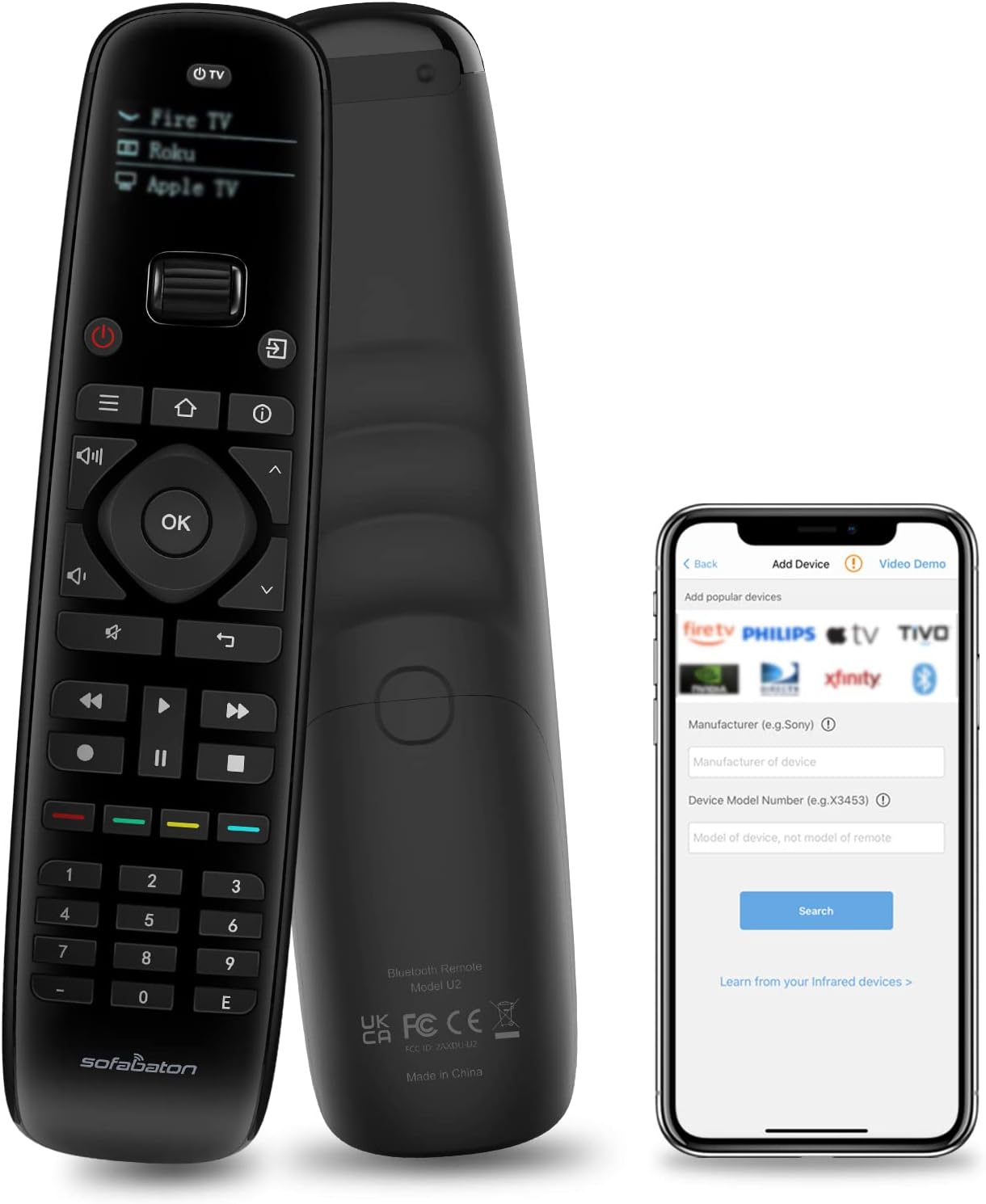
The SofaBaton U2 Universal Remote is a powerful all-in-one smart controller compatible with up to 15 devices including TVs, soundbars, and streaming players. Featuring Bluetooth and infrared connectivity with a 35-foot range, it offers enhanced signal strength and customizable macros via its dedicated app. Its ergonomic design includes a scroll wheel and OLED display, making it a modern replacement for multiple remotes, ideal for tech-savvy professionals seeking streamlined control.


| ASIN | B0BY8P1HZM |
| Additional Features | Ergonomic |
| Battery Type | Lithium-Ion Polymer |
| Best Sellers Rank | #17,623 in Electronics ( See Top 100 in Electronics ) #786 in Remote Controls (Electronics) |
| Brand | SofaBaton |
| Button Quantity | 15 |
| Color | black |
| Compatible Devices | DVD/Blu-ray Player, Home Theater, Set Top Box, Stereo System, Television |
| Connectivity Technology | Bluetooth, Infrared |
| Controller Type | Sofabaton APP |
| Customer Reviews | 3.3 out of 5 stars 849 Reviews |
| Item Dimensions L x W x H | 7.87"L x 1.97"W x 1.18"H |
| Manufacturer | Sofabaton |
| Max Number of Supported Devices | 15 |
| Maximum Number of Supported Devices | 15 |
| Maximum Range | 35 Feet |
| Model Name | U2 |
| Model Number | U2 |
| Number of Batteries | 2 AA batteries required. (included) |
| Special Feature | Ergonomic |
| UPC | 795063906597 |
J**N
The perfect universal remote
I really, really don't understand where all the bad reviews of this remote are coming from on Amazon. I needed a new universal remote and I wanted something better quality and easier to use than my previous one. This one looked good but I was wary about the 3.5 rating it held. I read the reviews but then looked elsewhere online and found those reviews to be more favorable so I took a chance. So glad I did. This remote is near-perfect. Here are some of the best features: - The build quality is solid. Contours well and feels good in the hand (not cheap feeling at all). And while I can't speak for the V1, as I haven't tried one, I can attest that the V2 is ultra-responsive. - The remote is app-controlled, which is huge. No more searching for device codes that may or may not work. No more slog of waiting for your remote to systematically try 1000s of signals for a device that has no code, hoping that one of them will connect. The app works great and finding your device is super quick and easy. And if for some reason you can't find your device in the database, you can just import it directly from the original remote. And you don't have to worry about ever losing your settings because they are stored in the app as well and you can just copy them over again. - Multiple layouts. You can seemingly create as many layouts as you want and switching between them is as simple as scrolling the little wheel up and down. - Individual butting mapping. Also a phenomenal feature. I have each of my individual remotes imported as separate layouts but then I also have a custom layout that includes all of the buttons I most commonly use for each of the others so I hardly ever even have to switch between layouts to control all of my devices. That is beyond nice. I only really have two very small nitpicks that would have caused me to give this 4.5 stars (instead of 5) if Amazon allowed half-points. They are: - The buttons don't light up. You can of course see the screen just fine in the dark but not the buttons. I watch TV in the dark a lot so this is a little bit of a drag. Not a deal-breaker by any stretch but as much cheaper controllers have lit buttons, I don't really see why they couldn't have included that feature on this one (especially for the price). - The buttons are extremely clicky. This may not be a big deal for everyone (and it really isn't a huge one for me either) but when I'm watching TV on the couch late at night and my wife is sleeping next to me, the buttons on this remote are surprisingly loud and actually wake her up sometimes. Again, minor nitpicks. I've been using this remote for about a month now and it's absolutely fantastic and worth the money. If anything ever happens to this one I won't even think twice about buying another one.
D**K
I really wanted to like this remote.
Of course no support for a new 2023 tv. The TCL 2023 lineup (75Q750G in my case) ditched roku (thankfully) and went to Google Tv (the best tv os out there!!!). Unfortunately this makes all previous TCL remotes and support pretty much non existent. First let me say that i played around with this remote for around 5 hours, finally getting it to a semi-ok state. Unfortunately to achieve this, I am using many IR commands instead of bluetooth. On the new remotes there are short and long presses for certain buttons (for instance home button, a single press take you to the home screen, a long press would take you to settings, the power on/off actually seems like its 2 different commands as well as when hooked up bluetooth, the remote will only power off the tv, it will not power it on, etc etc). This alone makes it very hard to program the remote to the buttons with short press keys. After browsing the forums, it looks like support has been non existent for some time now, which is very upsetting. Being one of the only universal replacements after harmony, you would think sofabaton would support the latest and greatest and make sure they stay on top of new releases, but that is not the case. Also no mic for voice control? There are literally 9$ universal remotes that actually support voice control, but a 60$ fancy remote cant? The device often lags before it send commands. Ive also seen it send a double command a few times. I uploaded a screenshot of my current profile, as you can see the bluetooth profile only supports the buttons outlined in red (which the numbers and playback controls arent even present on the tcl remote and are just a waste) and all the blue outlined buttons are custom IR commands. And to top it off, I lose all long press functions of the stock remote as well. What a joke huh? Ive also uploaded pictures of the stock remote, and tv model just incase somebody from sofabaton actually reads this and wants to help the community and their brand. Unfortunately thats just half of it. So the reason I even bought this remote is because I own a bose sound bar that lacks ARC(HMDI port) and uses optical and I do not want to have to use 2 remotes. (I also have a gripe with TCL not allowing their remotes to be programmed to support more than just the tv like the remote that comes with the ONN device, which happens to be the best remote imho.) Well thankfully the bose system uses IR, so that was actually an easy setup. The problem is when I went to create a macro to turn the sound bar on and off when i press the power for the tv. It maybe worked twice out of the 10 times I tested it, to the point I got rid of it and they have separate power buttons. The remote is much bigger than it should be, and makes it feel a bit clunky and outdated. As I stated before, I really wanted to like this remote, but I am having a hard time doing so. An updated TCL bluetooth profile that actually works would be a start.
M**B
Pretty easy to setup but a button stopped working after 1 month
UPDATE 2: Since Sofabaton replaced the defective one and told me to just keep the old one, I figured I'd take it apart to see what was wrong with it and just get an idea of the construction. The good news is it's relatively easy to open up (there are two screws under the rubber "nubs" on the bottom, just FYI). The buttons use a metal disc/membrane style. I was able to peel up the plastic covering the number section and I did see some corrosion or something on that metal disc for the "4" button which is why it didn't work. I used a little IPA to clean it, put it all back together, and it's working now. The metal discs are only held in place by the plastic sheet so if you had to do this on some other key in the middle, you may have trouble trying to get to it, but fortunately for me it was on the edge. So far, so good, I put this in my other room controlling just a few devices and it's working good so far. I'm attaching a photo of my disassembly and testing. I used an external power supply to test it out in place of a battery when I was working on that button (screwdriver is pointing to that flaky "4" button disc). My replacement is still doing well too. It seems like sometimes it doesn't "wake up" when I press a button even though the screen turns on. I've noticed this after a few days, and pulling the battery and putting it back in actually seems to get it working better. "memory leak" possibly? :) UPDATE: I reached out to the manufacturer and they were very helpful in sending out a replacement U2 remote which solved the issue (where the "4" button wasn't sending anything). Curiously, when setting up the replacement (I still wish there was a backup/restore feature) I noticed that the Denon AVR-S930H I previously used was now missing some of the discrete "input" commands, but I used a S950H model instead which had them all. So that tells me their command database gets changed/updated and maybe not always for the better. You might have to experiment with similar models to find one that has what you need. And I'm still hopeful that future app and/or firmware updates will add some of the missing functionality I'm hoping for. --- Original review: I wanted a replacement for my aging Logitech that's been having issues. This one seemed to fit the bill the best out of all the options. It was pretty easy to setup using the app on my Android phone. A couple things became apparent though after using it for a bit. PROS: - I like the bluetooth support and I programmed a few keys to manage my HTPC so I could play/pause, etc. without having to use my wireless keyboard. - The app is pretty basic but easy to use, not much of a learning curve. - The IR power seems to be about the same as my Logitech was. At least, it works from the same distance and I don't feel like I have to be aiming right at the device like some cheaper remotes I've had over the years. CONS: - The "4" button no longer sends anything, no matter what device I'm controlling. It doesn't show anything on the display to indicate it's sending IR, like it does for other buttons. That's just weird. Maybe it never worked... I don't remember if I'd seen it working before, but I noticed after 1 month that when controlling my Xfinity X1 box, which I finally got to respond by adding an IR repeater (known issue with weak IR receiver on the XG1v4 box), I could put in any other # but not 4. Then I tried on my Tivo, Blu-Ray, Denon receiver, etc. and nothing, it just doesn't send, as if the button is physically dead. It clicks fine (super loud clicks like all the others), so maybe it's software/electronic related? - Once you setup a device, you have ZERO ways of modifying the type of device. Yes, you can modify key assignments, but you can't change what the device is. Like if you get a different Blu-Ray player, you can't change from Samsung to Sony, you have to delete the old device and setup a new one from scratch. Normally that wouldn't be terrible, but in my case I had a bluetooth device to control my HTPC and I had all kinds of custom buttons setup for it. Then I switched to a different computer and wanted to pair it up again with the new one and keep all of those button assignments, but you can't do that! I had to delete it and then spend a bunch of time remembering what all the customizations were. I should be able to pair it to a new device, right? - This brought up another aspect - there's no way to backup your configuration, or even view how your devices are setup. I have a list of all my devices (makes, models, etc) but maybe I want to make sure I put in the right info when I set it up? But again, all you can do in the app really is change the display name and modify buttons. - The remote does not have distinct buttons for things like page up/down that most cable boxes have (or I could have used that for Tivo thumbs up/down which is how I had my Logitech doing it with those separate up/down buttons on those). I worked around it by using a couple of the "color" buttons for page up/down but that only makes sense to me. Good luck to anyone else using the remote with instructions taped to it. :) The other color buttons I used to mimic the Xfinity "A", "B" (didn't care about C or D) buttons, so again, doesn't make a bunch of sense, but those are less common across other remotes so I'm fine with that. It would have been great to have a couple of "customizable" buttons though, for generic use. In the end, given the shortcomings and the fact that "4" doesn't work at all, I'm probably going to eat the cost of this and it'll become e-waste, unless the support email I sent to Sofabaton results in getting a replacement or something. I don't know if I can exchange through Amazon since I didn't keep the packaging, but I'll try that avenue if Sofabaton doesn't come through for me. On the flip side, if Sofabaton and/or Amazon does get me a replacement eventually, I'll bump my review, because the other cons I mentioned were kind of known in advance and maybe, just maybe, those could be addressed for the most part with some software/app updates, and my workaround for missing customizable buttons is good enough that I could live with it.
W**M
Review of SofaBaton U2 Universal Remote
The SofaBaton U2 offers some great features for managing multiple devices. Its infrared controls eliminate the need for a base station, and it supports a wide range of devices, making it very versatile. Once set up, it’s easy to use, even for older adults or those less familiar with technology. The app-based setup process adds flexibility by allowing configuration through a smartphone or tablet. However, the setup process isn’t without its challenges. The app is not very user-friendly, and the instructions could be clearer. Bluetooth connectivity during setup can also be unstable, requiring multiple attempts to complete the process. Tips during setup: -Gather the manufacturer’s name and model number for each device you want to control before starting the setup. -During the testing phase of setup, use the app on your phone or tablet to test the buttons instead of pressing them on the remote itself. -Watch a tutorial video to help guide you through the process, as it can simplify navigating the app and completing the setup. Overall, the SofaBaton U2 is a practical choice for consolidating remote controls. Despite some minor frustrations during setup, its functionality and ease of use make it a solid option for managing home entertainment systems.
J**K
After 2 months I definitely recommend!
Update 01/03/2025: After almost 2 months this remote is still going strong. Have not had to put in new batteries yet, the original ones are still good. The double-clicking issue that I talked about below is still happening, but sporadic. I'm guessing that it is a problem with the remote, but is a minor irritant. I've had to reconnect it back to my phone twice now, in order to reset the programming. Don't know what is happening but those were early on and haven't had to do that for the past month. Other than those two minor issues, it works as good or better than I could have hoped. I definitely recommend it for those of you who are looking for a Harmony replacement. Original review 11/12/2024: Like most others, I have been needing to replace my old Harmony remote for awhile now. After reading all of the reviews I decided to take a chance on this one because most indicate that it works a lot like the Harmony which I loved. I was a bit apprehensive because I'm 70 yo and have forgotten more than most people ever learn about computers and programming. Since I really had no other options (within my budget) I went ahead and purchased this, and so far I'm glad that I did. First things: Programming was very simple, it immediately recognized my LG TV, Sony stereo, Roku streaming box and Sony blue ray player. I did have to go in and manually set the volume up, down and mute on the TV, Roku and DVD so that they used the stereo for audio, but that was very easy to do. The remote, from the start, works exactly as needed so far, although there my be some functions that will need to be adapted that I haven't found yet. There are a couple of things that I see as "not a problem" but keeping a watch on, and that is that most of the buttons want to "double click" when you push them. A little irritating, but after a week it doesn't seem to be as bad as at the start, so either there is a break in period where it gets better or I'm learning to push gentler so it doesn't register the 2nd click. The 2nd thing that keeps my rating at only 4 stars is that it uses 2 AA batteries instead of having a charger and internal batteries. Maybe I'm just used to the Harmony, but that would be a huge improvement. Overall I'm very happy with the results, not perfect, but good enough for $50 compared to $300 for a new Harmony without any support. Wholeheartedly recommend!
T**S
Infuriatingly awful
I don't often publicly share thoughts on equipment I've purchased, but I'm feeling the need to write a review of the SofaBaton U2 to hopefully spare other poor saps the headaches and heartaches that I've been through with this universal remote. Tl;dr: I hate this remote. I really wanted to like the SofaBaton U2. I have a fairly simple setup that I wanted to control (TV, Denon avr, AppleTV, cd changer), and CEC has unsurprisingly been somewhat finicky lately. I didn't want to spend a fortune on a remote with a lot of bells and whistles that I wouldn't use. Specifically, I didn't want something with a big screen that I need to charge constantly, and I'm unwilling to spend big bucks on a discontinued Harmony remote. The U2 seemed like the perfect fit. Unfortunately, it has been trouble from day one, especially with regards to its inability to properly control the AppleTV. Setting up the remote is actually pretty simple through the app, but in my experience, nothing after that worked properly. First, I noticed that many of the buttons for both my TV and AVR weren't functioning properly with the U2. Even after remapping keys through the app, certain buttons like "input" or "setup" for the avr were entirely missing or simply didn't work. The solution I found was to learn the old remote. This seemed to work alright; luckily I still have all the other remotes. However, the AppleTV is where things broke down entirely. You have the ability to add this remote as either Bluetooth or IR. Neither option entirely works! First, and most troublesome, is the lack of a functioning home button. No matter how I tried to remap this (options include menu, home, homepage, and others), nothing worked on either Bluetooth or IR. This button always functions instead as "back." This is a huge problem for me because my partner often works from home at sometimes weird hours, and I need to use my AirPods during these times if I want to watch something. To connect to the AirPods, you have to press "home." "Back" does not work. And, you cannot have the U2 learn the original AppleTV remote like you can with the others. Contacting support did absolutely nothing. They kept going in a circle of telling me to alternately add the remote as Bluetooth or IR and remap keys. They couldn't get it through their head that these solutions didn't work. So that was a dead end. I did end up finding a weird workaround; however. If you add a random remote to the U2 (I think I did a Directv remote) you can have the AppleTV learn this as a new remote. This finally let me set up a functioning home button! But now there was a new problem. In order to do certain commands, such as pulling up the control menu on the AppleTV, you have to long press the home button. "No problem," I thought. I'll simply create a macro for this and have the remote press home many times. Nope. This didn't work. And again, SofaBaton customer support could not provide a solution. This, as far as I can tell, is a dead end. The final straw for me, though, is just how badly this remote works even on the commands it has successfully learned. It's IR signal is weak. Buttons constantly either need to be pressed multiple times or, even more maddeningly, it will randomly decide I pressed something multiple times. Scrolling through shows, etc is a nightmare as you're constantly skipping multiple rows at a time without meaning to. I'm done with this remote. The inability to learn basic commands for the remote I use most often, the finnicky response to button presses, and even little things like the lack of backlit keys have forced me to give up on what I really hoped would be a great universal remote. I hope I can spare someone from going through all this by shouting into the void here. If someone has a better suggestion for a universal remote that's not discontinued and doesn't cost a fortune, I am all ears! Thanks for reading my rant.
D**N
What should be easy proves to be difficult
First of all I should have read the negative reviews before I ordered not one but two Sofabaton remotes with the intention of replacing my much loved Logitech Harmony remotes that became useless when I foolishly decided to allow my cable provider to remove my slow but relatively dependable cable and install fiber optic with Sagemcom control streaming boxes. Sure I negotiated a much better price for my package but the resulting tech issues have cost me a huge amount of time and angst over the past two weeks. The problem is that many reviews describe the Sofabaton as a worthy replacement for the Harmony and even Wirecutter rated it as "best buy". I'll take that up with the NY Times this week but here's my review of a few of the issues. 1) Pairing this remote with my basic bedroom setup of Samsung TV and sound bar plus a Roku 4K device for streaming was a nightmare. I was stuck between trying to get someone (anyone!) from Optimum to help figure it out and having to communicate with Sofabaton's support tech people who are HQ'd and responding from Hong Kong. Much the same as many other tech gizmo manufacturers you can't reach them by phone and this leads to extended email communication that comes in as Chinese but AI translates to English. This means frustrating communications as well as time gaps when you're trying to figure out terminology and pairing. 2) Eventually I was able to connect my streaming device to the new remote but ONLY by the "teaching from the original remote". Trying to enter the model number of even a relatively new soundbar proved very difficult as Sofabaton recommended a different model number and when finally paired reduced the soundbar to a silent brick. It took hours to figure out how to disengage the remote pairing and get the sound bar to operate. 3) In other reviews that are more positive I read that users liked the button setup and overall feel of the device. I have to strongly disagree on a few items: The keys are tiny and unlit and if your lights are off and you're going to sleep good luck on figuring out where the power button is. The screen is very poorly backlit (expectable on a low priced device) and very difficult to see the tiny print of the loaded devices. When I finally got the TV and sound bar connected using the roller scrolling device was pretty clunky. After everything finally got connected it turned out that the "6" key was nonfunctional and when hit would send the channel selection into wild unspecified channels. 4) My one positive comment is that despite working with a 12 hour time difference and using AI to translate language the response of the Sofabaton tech support was good. Their responses were as prompt as they can manage and while clear the terminology issues created by language differences is an issue. The problem is that the device is not easy to program in the "Macro" settings where the reason for a universal remote lies. What's the point of a universal remote if you can't even pair the most simple of operations easily or at all? My final comment is that I now have to go back to work and try to find a universal remote that is comparable to my Harmony at least in terms of function and ease of programming. I'm very disappointed with the Sofabaton.
J**E
Perfect remote, bad reviews are user error from one small fire TV "issue"
Before I start gushing over how incredible this remote is, the fire TV issue. My TV (a toshiba fire TV) wasn't listed, but before doing "learning mode" for every button I decided to try the "fire TV" setting. That was it. All fire TVs use the same remote setup, so whatever brand and model of fire TV you have, you just choose the one "fire TV" remote setting. That's it, so simple it's confusing. And that is the main thing most people leaving bad reviews are struggling with. Now for the actual amazing features. So I just added 3 remotes to this thing, fire TV, sound bar, and Nvidia shield (which uses bluetooth and is the tricky one). Not only did I get all 3 added on and an easy way to move between them, but within the remote configuration *you can assign keys from other remotes to a different remote* So I used the Nvidia shield remote as my main remote (it is needed the most). The macros change the TV input (because fire TVs don't have a button for cycling input, you have to go to the home screen). Made two more macros to switch the sound bar between movie/voice boost and music/bass boost modes at the press of a button. The volume directly controls the sound bar (which means I can switch to optical output now instead of HDMI/ARC). And the extremely handy extra "TV Power" button up top controls the TV power. And the input button controls the sound bar input switching for when the cats walk on it. Every single control I need for every device in the room is mapped to one remote, no need to even switch between them with the extremely handy scroll wheel up top (but it can still do that). All of this was easy to set up. Never opened a manual. Never had a device connect to my phone so easily, all done in app, no pairing fiddliness necessary (except with the shield but that's the shields fault, it's always like that with everything). Absolutely superb device. When reading through the reviews it sounded like the bad was just user error, but I wasn't 100% sure. Very happy to see that is the case, this works perfect. Maybe a little tech literacy required, but the UI is excellent and it communicates exactly what is necessary to move on. No bizarre button combinations, no messing with extensive menus. Everything you need is right there, you just need to know what you actually want the remote to do because it can't quite read minds.
F**A
Superou minhas expectativas.
Bom, apesar de inúmeras avaliações negativas, pelos mais diversos motivos, e observando que as avaliações também estão misturadas entre U1 e U2, resolvi comprar uma unidade deste controle. Tenho um Harmony 650, mas infelizmente alguns botões começaram a falhar o que deixa a experiência muito ruim. Enfim, sobre o Sofabaton U2, que comprei no dia 13/05/25 e foi entregue na minha casa no Brasil no dia 19/05/25, mais rápido do que algumas compras feitas aqui, posso dizer neste pequeno tempo utilizando, que superou e muito minhas expectativas. A facilidade em programá-lo e criar as Macros, é muito satisfatória, apesar de não ter as "Activities" a forma fácil de usar o scroll pra trocar entre os dispositivos, torna desnecessária qualquer "activities", pois ao selecionar o dispositivo e apertando o botão que configurou a macro, ele faz o trabalho parecido ao de uma "activity". Faço comparação com o Harmony no que eu utilizava nele, e não em recursos que existiam, mas não eram utilizados por mim, portanto minha comparação é muito pessoal e pode ser que não atenda a necessidade de outros. Tive um Harmony One por volta de 2012 e 2014, porém quebrei pisando em cima sem querer (Claro), fiquei muito chateado e comprei o 650, mencionei isso, pois a quantidade de dispositivos parece que não, mas faz diferença, o ONE tinha a possibilidade de usar 15 o 650 cai pra 5, o que é uma diferença grande. O Sofabaton U2, tem a possibilidade de utilizar 15 dispositivos entre Infravermelho e Bluetooth, e as macros funcionam com botões de dispositivos IR e BT misturados, o que eleva ainda mais as possibilidades de combinações. Vou voltar em outro momento para complementar minha experiencia com o controle, mas posso dizer que é um excelente produto, muito bem construído, bons materiais, e apesar do preço podemos classificar em uma categoria acima de muitos controles vendidos por aí. Resumindo, boa construção, facilidade de configuração e uso, me deixou satisfeito com o controle adquirido na Amazon EUA (Minha primeira compra na Amazon USA). *Em avaliações onde a reclamação era referente ao Wake, com a possibilidade de acender a tela ao pegar, isso não acontece, portanto pra não ter esse aborrecimento, deixe a opção ativada, mesmo que provavelmente gaste um pouco mais de pilhas, mas nada que um par de recarregáveis não resolva. **Em avaliações onde a reclamação era referente ao barulho das teclas, acredito que por ter comprado em 2025 essa seja uma nova remessa ou não tenho tanta sensibilidade com o barulho dos botões, pois o original da minha TV Philips de 2024 é mais alto do que o do U2. ***Em avaliações onde a reclamação era referente ao apontamento do IR, não tive esse problema, em nenhum momento precisei direcionar o controle para o dispositivo como se fosse uma mira laser, bem tranquilo e sem falhas. ****Utilizando em Vídeo Games, somente funcionou nativamente no Xbox Series, no PS5 só funciona através do CEC, que funciona bem, mas não é de forma Nativa. Acho que por enquanto é isso, espero ter ajudado com a minha experiencia inicial.
W**E
Is A Nice RC
Is good for old people to use it compare with modern RC which very less button
Y**V
Poor quality
Takes several presses and seconds to wakeup. After sleep recognizes several presses suddenly. In 2 months several buttons lost click response.
S**U
Easy to setup, program and use. Great price.
Great remote for replacing all your remotes. It's easy to setup and use but can use lights under the buttons for use in the dark. The learning feature is easy to use and you can program all the buttons very quickly. I found that there aren't enough buttons for all the commands on some remotes so you have to choose the ones you absolutely need. The other way around this is to create 2 remotes and splt the commands over these. I put basic functions on the first and setup functions on the second. Overall it's a great remote.
F**N
Não substitui um Logitech
Duas coisas: alcance ruim e banco de dados de equipamentos muito fraco. No meu caso, dois problemas sérios. Eu possuo um HT, receiver, MD, Cd player, etc e não programei quase nada - os mais modernos ok, ou seja, praticamente não me serviu. Então fica a dica: dá conta do básico mas nunca vai substituir um Logitech. Paciência.
Trustpilot
1 week ago
4 days ago