


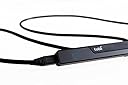
Tobii EyeX Gaming Peripheral
Product ID: 51744352
Review: How do you check out people? - Bought this for facial recognition login on my PC. It works great and recognises me instantly. Yet to try it using my brother or someone else to see how good the facial recognition is. Only drawback is finding somewhere to mount it as it has to be pretty close - about an arms length away. Also has a great feature called "Gaze Trace" which basically shows where you are looking. Try it with some pictures of people - full size, head to toe pics - it can be most enlightening as to where you look first!! Review: This tracker is a very interesting deal. Using it ... - This tracker is a very interesting deal. Using it to develop a custom Processing App. Works smoothly, but sometimes the Operating System does not connect with the Driver (can't find tracker). A simple restart, or software reinstall solves it.
| ASIN | B01G3RAJI6 |
| Are Batteries Included | No |
| Brand | Tobii |
| Customer Reviews | 3.9 3.9 out of 5 stars (28) |
| Date First Available | 11 Sept. 2016 |
| Guaranteed software updates until | unknown |
| Item Weight | 90.7 g |
| Manufacturer reference | 12004575 |
| Product Dimensions | 31.75 x 2.03 x 1.52 cm; 90.72 g |
R**N
How do you check out people?
Bought this for facial recognition login on my PC. It works great and recognises me instantly. Yet to try it using my brother or someone else to see how good the facial recognition is. Only drawback is finding somewhere to mount it as it has to be pretty close - about an arms length away. Also has a great feature called "Gaze Trace" which basically shows where you are looking. Try it with some pictures of people - full size, head to toe pics - it can be most enlightening as to where you look first!!
P**O
This tracker is a very interesting deal. Using it ...
This tracker is a very interesting deal. Using it to develop a custom Processing App. Works smoothly, but sometimes the Operating System does not connect with the Driver (can't find tracker). A simple restart, or software reinstall solves it.
Z**E
Three Stars
Good product but tricky to set up
R**R
I love everything about it but the cable!
I bought this because I have arthritis in my hands and can't always use them properly. My research led me to a software product online called Project Iris which allows you to create custom shortcuts to interact with the computer using your eyes. It's quite challenging to hit exactly where you want to on the screen with standard programs, but anything with a target size of no less than 1cm2 is going to be OK, and in fairness that isn't what it's designed for. Reasons why I marked it down to 4 stars are really to do with the cable. It's a very specific and unusual cable and it only comes in one length, which is about 2m. THe distance from the tracker to my USB port on the laptop is around 10cm, so that's an awful lot of spare cable hanging about. While I did find a similar cable online, it's not capable of supporting the tracker, in fact it has upset the tracker so that it won't work in that USB port at all any more, so that was annoying. I contacted them asking if they could supply another size of cable but they couldn't, but were prepared to send me a second cable free of charge, so that was pretty good service. I love it, I am condidering owning several so I don't need to carry it from place to place.
J**.
Works great! Awesome for games that are supported.
This thing is awesome! It just works. You plug it in, attach it to your monitor where it tells you, run through a brief calibration, and that's it. There are a lot of windows functions that this integrates pretty well with like task switching, windows hello, and moving your mouse to where you're looking (if you turn that function on). The task switching functionality is pretty useful: hit alt-tab and look at the application you want to switch to, then release the keys, it will select what you're looking at. As for gaming, it's fantastic! I've played this with both Elite Dangerous and Arma 3. It worked pretty well by default, but after making some adjustments to the settings, wow, just wow. It adds such a layer of immersion to the games. Dogfighting in Elite is fantastic. All you have to do is keep your eyes on your target, and the camera will track it while you maneuver your ship around. Looking around the cockpit and interacting with the various screens is fantastic. Plus, it also frees up some keybinds since you really don't need to specifically open UI panels anymore, just look to the left or right of your cockpit and the panels pop up, and you can navigate through them like normal. This thing really shines with flying in Arma 3. Being able to look around the aircraft while coming in to land, or keeping your eyes on your target without having to use any extra controls is fantastic. It's also pretty neat being able to aim down the sights, but still look to the left or right with your guy's head if you see something is pretty nice. It took me about a day to get used to it, but now I can't play without it. Thankfully the games I regularly play are supported. They mostly focus on simulator games at the moment, but for those games, it's pretty damn awesome.
A**R
Awesome
For the games i use it for it is fun and addictive to use once you get used to having it you barely notice the awkwardness of using it. Makes some games a lot more immersive and easier to handle. I like using it for the division especially.
R**T
really awesome. works well with some games and is great ...
really awesome. works well with some games and is great for going through windows programs. if you look at an item on the screen and move your mouse just a fraction of an inch it moves right where you are looking. the same in game. when you move your head up and down or side to side it moves the in game camera just as though you and moved the mouse.
X**D
It's fun, but not something that I can consistently use
It's fun, but not something that I can consistently use. I can see how this would be better for folks who don't use a mouse, or need accessibility options or something. Using it with games though just feels more weird to me than helpful, even after a couple hours of adjusting things. Also, setup out of the box was not easy at all, as there was no mention of where to download the proper software. I had to just find it on the web after an hour of looking around. This was a while ago though (I'm reviewing this late), so maybe their site has changed since.
J**.
Didn't meet my expectations. Messed up other settings on ...
Didn't meet my expectations. Messed up other settings on my PC. Positives were that Tobii customer service was very responsive with emails and tried to be very helpful, and Amazon allowed me to return it with no issues.
Trustpilot
3 weeks ago
5 days ago