


Desertcart purchases this item on your behalf and handles shipping, customs, and support to Australia.
🖨️ Print smarter, save bigger, and stay effortlessly connected.
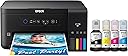
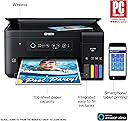
The Epson Expression ET-2700 EcoTank is a wireless all-in-one inkjet printer designed for home and office use. Featuring cartridge-free printing with up to 2 years of included ink, it delivers up to 6,500 black and 5,200 color pages at a sharp 9600 dpi resolution. Its supersized refillable ink tanks reduce costs by up to 80%, while wireless connectivity and an intuitive control panel enable seamless printing from multiple devices. This eco-friendly printer combines high volume output, vibrant color quality, and user convenience in a compact, energy-efficient design.


| ASIN | B074V54TWR |
| Additional Printer Functions | Copy |
| B&W Pages per Minute | 1 |
| Best Sellers Rank | #918,367 in Office Products ( See Top 100 in Office Products ) #455 in Ink Tank Printers |
| Brand | Epson |
| Built-In Media | 1x bottle 502 Black (127 mL), 1x bottle each 502 Cyan, Magenta, Yellow (70 mL), CD-ROM for product setup, Expression ET-2700 EcoTank all-in-one, Power Cord, manual |
| Color | Black |
| Color Depth | 24 bpp |
| Color Pages per Minute | 1 |
| Compatible Cartridge | EcoTank Ink Bottles |
| Compatible Devices | Laptops, PC, Smartphones |
| Connectivity Technology | Wi-Fi |
| Control Method | App |
| Controller Type | Push Button |
| Customer Reviews | 3.8 out of 5 stars 363 Reviews |
| Display Type | LCD |
| Duplex | Yes |
| Global Trade Identification Number | 00010343936300 |
| Hardware Interface | USB |
| Ink Color | Cyan, Magenta, Yellow, Black |
| Item Type Name | Epson Expression ET-2700 EcoTank Wireless Color All-in-One Supertank Printer with Scanner and Copier |
| Item Weight | 11 pounds |
| Manufacturer | Epson |
| Maximum Copies Per Run | 20 |
| Maximum Copy Resolution Black and White | 1200 x 2400 dpi |
| Maximum Copy Resolution Color | 1200 x 2400 dpi |
| Maximum Media Size | 8.5 x 14 inch |
| Maximum Print Resolution Black and White | 1200 x 2400 dpi |
| Maximum Sheet Capacity | 100 |
| Maximum print Resolution Color | 9600 |
| Model Name | ET-2720 |
| Model Number | ET-2700 |
| Model Series | Expression |
| Number of Trays | 1 |
| Other Special Features of the Product | Wireless |
| Output sheet capacity | 100 |
| Paper Size | 1 |
| Power Consumption | 12 watts |
| Print media | Paper (plain) |
| Printer Connectivity Type | Wi-Fi |
| Printer Output Type | Color |
| Printer Type | Inkjet |
| Printing Technology | Inkjet |
| Resolution | 9600 |
| Scanner Type | Sheetfed |
| Special Feature | Wireless |
| Specific Uses For Product | Home/Office Document Printing |
| Total USB 2.0 Ports | 1 |
| Total Usb Ports | 1 |
| UPC | 010343936300 |
| Unit Count | 1 Count |
| Warranty Description | Limited Warranty |
| Warranty Type | limited warranty |
| Wattage | 12 watts |
C**S
EXCELLENT QUALITY PRINTER, VERY EASY TO USE AND SERVICE
I am extremely happy with the quality and ease of use/maintenance with this printer. I was paying (on average) $25.00 for each black printer cartridge and up to $45.00 for a multi pack containing the color print cartridges for my previous inkjet printer/cartridges. The cartridges were small and prone to failure, necessitating constant replacement. This is no longer the case. This printer costs $15.00 per very large bottle to fill the tank. For a total of $60.00 I filled all of the tanks and had some left over. This was done a couple of months ago and I have barley made a dent in the capacity. The print quality is excellent and I have not had to do any sort of maintenance on the printer. It is an exceptional quality and value. I highly recommend it...
P**R
Looks like a great solution!
My ET 2700 arrived the other day and I quickly jumped in to set it up. A few things. Why can't these things just be SIMPLE??? Just getting the blue packing tape off of it was a pain. The part you would expect to be an issue-loading the ink-actually was pretty straightforward and pretty clever. Then the hook-up to my Mac computer. Put in the CD/DVD. Links to the Epson site. Why? What's the point? Anyway, download what looks like the package you need. Nope. Download another. Nope. Just download them all. One of them has to actually work. Then go through the steps. All of them. Oh, and by the way you need a USB cable or the whole exercise is in vain. One and a half hours later some of the things actually work. Why isn't Wi-Fi working? The computer sees the printer but..nothing. 2 hours later still nothing. iPhone and iPad can't get the printer. Then I read the fine print...Duh! No Air Print capability. Shouldn't have cheaped out and coughed up the extra cash and bought the ET 2750. Google search time. After finding, trying and discounting some third party solutions to print from a non Air Print printer I found HandyPrint and after a simple install and set-up Voila! It worked. Why 4 stars? Because after all the stupidity and idiocy to set it up when everything is working it does exactly what it is supposed to do. And yes, it could be called "bare bones" because there is no paper tray and no visual menu screen. So what? The paper sticks up and there's only one button to be concerned about..ON/OFF. No two sided printing? Flip the paper over and stick it back in! I think expectations versus cost have gotten a little messed up.
M**4
Terrible printer
I purchased this one to replace an Epson WF that was an ink drainer. However, this one doesn't print from devices as easily as it says...only from within the Epson app, can't print emails or anything else outside app on a device. It's not double sided print or uses thicker paper. It's to print regular single sided prints only. And the biggest disappointment is I can't return it even if you own 1 day, didn't see that anywhere when I bought it. Wouldn't have gotten it from Amazon. Stuck with something that isn't going to work for my needs and doesn't work as it describes it would. Update. I've had this printer for a year...I HATE IT!! Still can't print using wi-fi and now one of the ink won't print at all, so you can only use a black and white printer. Such a waste of money!! Now to purchase a real printer, that will be less than this money waster.
I**S
Experience a much neater easier printer!
Compared to other printers I've owned, it prints very nice, clear, clean and much faster. The unit is easy to maintain and take care of. I like the black color because after a few years with the bone colored models they start turning a sour yellow, lol, that's very hard if not impossible to clean up. I really like the refill ink bottles, first I've had. If you're the patient type it's a much neater task to perform. I haven't had to call tech support yet so I can't elaborate on that subject but considering it's the first canon that I've owned it can't be any worse than the other market dominating brands. It was delivered on time and undamaged, Very satisfied.
T**C
It Does The Job
I love that this Epson model (ET-2700) can print a page without making a hundred different noises before printing. When you submit a print job, it just prints. Beautiful. The scanner is good, but I will miss the document feeder. You pay $250 for a printer, and you have to scan pages individually. A PITA, to say the least. The installation instructions were easy to follow. I like the ink system. Time will only tell if I really can go two years before having to buy new bottles. But so far, after a couple of weeks with this printer, the ink is still above the fill line. In a year or two I'll edit this review to update how well it does in the long run. Note: This printer has a VERY small footprint. It doesn't weigh much at all. I got it to replace an Epson WF-7610 that went on the fritz. I got that printer for under $150. Three years later I find that you have to pay $100 more to get a lot less features. But hopefully the economic ink system will justify the cost after two years.
D**E
Scans well, but color print quailty is poor
I waiting until I had this for a few months before I posted this review. There are good things about this unit and some not so good. The good things: The ink really does last a long time. I print a lot and I have only used about 20% of the tanks so far. The copy function works well for my black and white copy needs. Scanner is fairly good and works ok for most of the drawings I scan into my computer. The bad: My biggest complaint is the poor color print quality. Even using the premium paper Epsom recommends, I find the quality to be the worse of any of the printers I have ever owned. I have tried all the settings and several different brands of paper and still not happy with the results when printing colored sheets. I also didn't realize when I ordered this that it can only print on light paper. No cardstock or heavier papers. All of the other HP and Lexmark printers I owned could handle heavier weights so this was a big disappointment. Overall I can only give this a 3 out of 5 rating.
S**R
We really like it!
As small business owners we really like this ecotank printer! It has saved us so much in ink already! Our other printers were always needing new cartridges..... this printer doesn't have the option to do double- sided so if that is something you use frequently this might not be for you, however, if you're someone who wants just a simple printer then this is perfect! I feel because this machine doesn't have every little option, it is much faster in spitting out a simple copy of something! Definitely the perfect printer for us!
B**R
There's no display on this unit and it's impossible to configure
I prefer Epson printers over other brands because I've always found them to be relatively simple and economical, and the Epson apps don't take over my computer and intrude like those of the leading brand. And the EcoTank feature is fantastic; you can't get a less expensive ink solution unless you go the route of buying aftermarket refillable cartridges - a strategy that has its own problems. But I didn't realize at the time I ordered that this printer is a model without a display screen, which means that configuring it is always a ridiculous combination of button pushes and holds, translated from the user's manual. And there's no verification whether the process works until you try to print and it either prints or errors out. When it disconnects from wi-fi for some unknown reason, it's the whole process all over again. And I've never succeeded at getting it to connect directly with any wi-fi enabled device. So the only reliable use for this printer is hard-wired to the computer. There is a lot to like about this printer, but I'll never make the mistake of buying one again that doesn't have a display. And no thanks to Epson, whose sales information never highlights that difference.
C**M
Highly recommended company
Unfortunately, the printer didn't last long as I expected it to be. Although I still believe Epson is a very good brand as the old one i was using still very good to this day which is 7 years old. Most of all ink saver. customer service is amazing! The company has integrity and 100% customer focus. When I ordered this printer 5 years ago and the delivery was delayed to the promised date. I got a call from the company and was offered a 50% discount. So grateful and unexpected. A company with good values and ethos. Highly recommend 👌
P**T
You will print with abandon!
I am a teacher and have been printing with abandon for months and haven’t run out of ink!!! Good enough quality for what I print. Not photo quality. Definitely worth the money to save on endless ink cartridges.
T**L
Just buy it!
Yes yes yes yes! I'd definitely get the next model up that allows for full bleed printing(if available). But this printer is amazing! Ink lasts forever and a day! Edit: The system like all cheaper systems does not last! *bangs head against wall*
M**.
Reliable no hassle printer-scanner
Amazing. Ink lasts FOREVER...been using it for home use for past year...both color and b/w. 300 copies the ink levels have barely moved. *note Try to copy 1 full color photo each week to keep heads from drying... then you'll be able to trust it when you need it. Love the reliablility of this printer. Highly recommend.
R**O
Very noisy, Wifi iffy, the first few pages dirty, now ok.
As other reviewers have said, the Wifi connection is difficult to set up and unstable. I have my desktop computer attached to the printer via usb and the wifi works through it, as long as the computer is not asleep. The printer is much faster than my previous C88 but really noisy. The print is clear and the colors good for my purposes. However, pages are already showing smudges of black ink on the edges, I will have to clean something inside the printer… This within the first ten pages of use. We will see what the future brings. It will be nice not to have to change cartridges all the time (when I can hear that there is still ink in them!). Also, the design pf the unit is brutalist. Revised one week later: I tried out the scanner which was very quiet! And also quick, compared to my Epson dedicated scanner. Also, I read the instructions about removing ink smudges inside the printer: I basically printed a few empty pages and that took care of the problem, at least for now. I tried a full page poster on ordinary paper and found there was barely a difference in the color saturation between normal and quality (and probablly the settings in between). But on glossy photo paper the colors were okay. I don't know enough to fiddle with the settings for better results, unfortunately.
Trustpilot
2 weeks ago
3 weeks ago