Buy anything from 5,000+ international stores. One checkout price. No surprise fees. Join 2M+ shoppers on Desertcart.
Desertcart purchases this item on your behalf and handles shipping, customs, and support to Australia.
๐๏ธ Relive & digitize your legacy tapesโbefore they fade away!
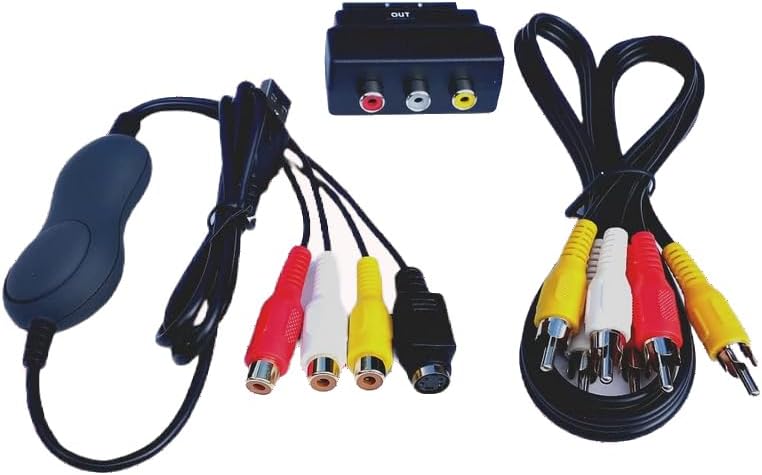
The TIMRUS CREATIONS VHS and Camcorder USB Video Capture Kit is a versatile, plug-and-play solution designed for professionals and enthusiasts to effortlessly convert analog tapes (VHS, Hi8, MiniDV, and more) into high-quality MP4 files or DVDs. Compatible with the latest Mac (including M1/M2 chips) and Windows 10/11 systems, it includes all necessary cables, user-friendly software, and detailed HD tutorials backed by UK-based support. Compact and reliable, itโs the ultimate tool to preserve your priceless video archives with ease and precision.

| ASIN | B0049BI45Y |
| Best Sellers Rank | 58,584 in Computers & Accessories ( See Top 100 in Computers & Accessories ) 74 in External TV Tuners & Video Capture Cards |
| Box Contents | AV Adapter, TF Card Reader |
| Brand | TIMRUS CREATIONS |
| Brand Name | TIMRUS CREATIONS |
| Compatible Devices | VHS players, VCRs, Camcorders |
| Compatible devices | VHS players, VCRs, Camcorders |
| Connector Type | RCA |
| Connector type | RCA |
| Current Rating | 1 Amps |
| Customer Reviews | 4.4 out of 5 stars 681 Reviews |
| Finish type | Matte |
| Item Dimensions | 15.4 x 14 x 4.5 centimetres |
| Item Weight | 0.22 Kilograms |
| Item dimensions L x W x H | 15.4 x 14 x 4.5 centimetres |
| Manufacturer | TR Computers |
| Manufacturer Part Number | JP-HV-0023 |
| Model Number | Video-2-Mac Deluxe |
| Number of Items | 1 |
| Number of Ports | 1 |
| Package Quantity | 1 |
| Power Plug Type | Type A - 2 pin (North American) |
| Product Finish Type | Matte |
| Product Warranty | Manufacturers warranty for 12 months from date of purchase |
| Specific Uses For Product | VHS Players, Camcorders |
| Specific uses for product | VHS Players, Camcorders |
| UPC | 609722876452 |
| Unit Count | 1.0 count |
B**N
One word: Amazing!
I have for a while been wanting to save all VCR and VHS recording onto the computer without finding the right solution. I have for months researched and read forums and reviews of different products that claim to do what this does, for a higher cost, but ultimately they all have failed for different users. Not one had anything above 3 stars and the majority required a PC with an old version software. Others required a CD-rom drive or lastly just mentioned it was working on Mac without giving clear indication as to what iOS operator was functional. I also found companies that provided somewhat of similar recording and savings for lot more costs. Then finally noticed this and was hesitate due to knowing it may not work with a mac update... however, I am on macOS Mojave, Version 10.14.5 and it works flawlessly. The instruction document provided is superb and easy steps to follow and most FAQ questions or troubleshooting is answered. The program can be downloaded from the net and overall the experience so far has been smooth. As for picture quality, obviously you won't get 720p or higher but you do get a well satisfied quality. In my case I just copied VCR cassettes which are 18 years old and they have clear picture with bright colors. Not only is the program good and the instructions clear but you also get all the necessary cables to connect and save all your old recordings. It's awesome.
A**R
Great piece of software/hardware ..would recommend
Did lots of research to see what looked like the most reliable package available, what would work with my OS version (El Capitan V10.11.6) and my hardware (MacBook pro 13 inch - Mid 2009) and this one seemed to fit. It also comes from the UK and there was a support email (.co.uk) and a UK address for the supplier in Knutsford which I thought presented less risk if I had any problems. The package arrived when expected (in fact a day earlier) and contained all the elements described on the Amazon listing. I downloaded the required s/w using the supplied link (there is a DVD supplied) to ensure I have the latest version. I took time to read the supplied paper Guide and this advises watching the downloaded tutorial video first. I watched it 3 times before I started to install the s/w and h/w. My tip would be.....MAKE SURE YOU DO THIS !! The instructions in the video are very clear and simple but if, like me, you are not an IT tech head, it will take you a little longer to feel comfortable with all the info presented. I had the tutorial video open (in a separate window on my Mac) as I proceeded with the installation, pausing it at each step to ensure I performed the instructions precisely. Everything went very well, the s/w customisation screens were all as described and depicted in the video and the whole solution works very well. I never leave reviews on Amazon (I'm always a little dubious about how genuine some of them are!) but felt I must give some real / honest feedback on this product as (for my H/W and OS combination) it does precisely what it says it does ...which in todays world is a bit of a rarity!
S**N
n just fine. Unit came with a orang/gold standard DVD R ...
Works with OSX 10.13.n just fine. Unit came with a orang/gold standard DVD R for the software and talked about updates from a site that didn't work. All seemed a bit homemade. I just used the license key from that and downloaded the latest anyway by searching for VideoGlide. The actual hardware was fine, come with composite cable, with scart convertor, can accept s-vhs (no cable) and plugs into USB. The software has quite a lot of options and the basic looking manual does a good job of explaining them and gives some hints. These options are actually useful and do have an impact. The end results are what I would expect from 25 year old VHS over composite. This is probably as good as it is going to get with those constraints.
N**B
Incredible and oh so simple.
Wow! what can I say.... I ordered this wonderful little godsend nearly a year ago, just after Christmas in 2012 in fact... and I've only just got around to using it; When it arrived (very quickly from the seller) I confess that I was terribly disappointed at the plain, very small, white box it came in and the contents; a home-recorded type and unmarked CD-R, a few leads that looked much like many I already owned, and a strange plastic oojamaflip thingy that looked a bit cheap... Well, once again I've learned not to judge a book by its cover, nor a little white box by its contents! A couple of days ago, when once again I couldn't sleep and wandered downstairs at 04:10 to my iMac to do some work, I saw 'the box' and thought I really should get around to fiddling with it... So I stuck the CD into the computer and up popped a window with an Instruction PDF, a couple of executable APP files and a video tutorial. Having read the reviews, I opened up the instructions and was immediately impressed with the detail, which I then followed to the letter. And to cut a not very long story short, I very quickly had an INCREDIBLE digital copy of a video that I took nearly 27 years ago!!! the quality of the output is almost exactly the same as the original which you view in a preview window while recording. I plan to edit the latter in iMovie or Final Cut Pro for viewing in Apple TV, my iPad etc and also to burn to DVD via iDVD. The instructions are also very comprehensive with FAQ and a contact email in case of any problems, this is to an individual, NOT a generic 'customer service'. ([email protected], I suspect you're the 'T' from TRcomputers, and if you're reading this, I'm just thrilled with your fab gadget!) - . Without the instructions I'd have had very little idea about the choice of best settings so I would advise you to make sure you DO follow them. (I didn't use the video tutorial, but the info looks great and the narration sounds ideal and comprehensive) In conclusion, this is an amazing little box of tricks for a ridiculously low price considering I can now convert my huge number of precious home recorded VHS tapes at last and relive all those happy memories once more. I'm going to try and attach a very short clip of a family walk taken way back in 1987 to show the quality of this wonderful little bit of kit which is HIGHLY recommended and no, I promise I don't work for the company!
S**R
The best option available
I'm running OS X 10.6.8 on a MacBook Pro and this works a treat. It was really easy to set up, the software came with a serial no. specifically for my name and clear instructions both on the CD and printed. The hardware supplied is good quality compared to SCART connectors I've bought from high street stores or Amazon. Once installed, the USB thingy was detected without trouble. Following the instructions for uploading it is very easy to start transferring your VHS tapes. For reference one hour is about 7GB at the 'standard' settings. After making one long video, I had a little issue where subsequent videos stopped recording after a couple of minutes. I emailed TR computers who replied very quickly (at the weekend) with some tips - he suggested switching from MPEG4 to H.264 but actually I didn't even need to do that as I just restarted the programme and it worked just fine. Feels great to upload old memories and transfer them from an unreliable medium like VHS (two tapes chewed up today as haven't used VCR for years and it's clearly showing its age). Highly recommend Video-2-Mac.
J**1
Worked really well until Video Capture stopped working
Bought this in 2022 and was great until video capture stopped working. Left it alone for a few years but really need to transfer old VHS to digital so I'm trying again to find a solution. I cannot work out why OBS will not detect the EM28284 video driver. Most frustrating. Would anyone know how to fix this? Running Catalina 10.15.8 on a MacBook Pro (Retina 2012) Intel i7.
J**N
A bit clunky, but it works
I've used a couple of applications for copying audio to my Mac over the years, and a commercial application for recordingTV from a USB receiver, so I was expecting something with the usual record/playback-pause buttons rather than the unfriendly and non-intuitive drop down menus and rather strange window to click on to stop recording (Very easy to click in here by accident and then have to start all over again!). Then there is no in-app editing; instead you have to launch another application which I eventually discovered on the accompanying disk. Having used the recommended settings I found that a 90 minute film would not fit onto a standard single layer DVD so there's a big trade off between file size and quality. I wouldn't recommend using this to copy material from old videos if you could go out and buy new DVDs for just a few pounds more, but if you have irreplaceable material you want to keep then it's probably worth the efffort to learn to use it.
S**S
Fantastic bit of kit
We recently lost a family member , so I thought I would gather all of our old camcorder and VHS together so we could take time to remember. This item turned up 3 days earlier than expected, its comes with all the leads I needed, and there is a DVD with the files ( my Mac Book hasn't got a DVD player though , so I downloaded the required files, there are pre-printed instructions for this also) Read the text file, watch the video....and you will easily install it, but read and watch them 1st!!!! The great thing about both the instructions and the video file is that they are done in the UK, so no silly spelling, and the video is easy to listen to ( English chap, you can watch him install it on his Mac, takes you through step by step). Then...it just works!! Honestly, Im not young enough, or have the knowledge to mess about with how stuff installs, but it was easy, and it does just what it says on the description. There is other software included for editing etc, but I used the stuff already on the Mac. So, Im about 50% through all of the old recordings we have, the worst bit is not this bit of kit, its the speed at which old VHS and Camcorders go, 30 years ago we thought they were advanced ( and they were), but now of course we are so used taking videos on our phone, and then reviewing them , moving FFW and RW (old terms here) so quickly.... you just have to set the old stuff off to play , press record on the software, and walk away, come back later and edit the file down ...... and then you will be able to review at the speed we now are used to, so it also serves as a reminder, things were done at a slower pace back in the day! So, this was a really worthwhile spend, its got facilities the layman may never use (I likely wont), but its also easy to use same time.... totally satisfied.
P**P
Pretty bad video quality
The video quality straight out of vhs or video8 recorder is pretty bad. Using an old DV recorder in between the vhs / video 8 to straighten out the video because it has a Timebase corrector. This way you get much better video, without it, it really is a wobly mess that makes you seasick. It works, but they should make a version with a timebase corrector, the direct quality is pretty terrible
A**O
Reviewed by a Professional Filmmaker, Works and is a great straightforward package for beginners or anyone with MACs
Grateful to be the first Canadian to review this on Amazon.ca. I found this product on amazon.uk after buying a faulty cheap one here on amazon.ca. I Read a lot of reviews and did research and found that it was the more update and best product to convert hi8 tapes to digital. I was pleasantly surprised when I saw that amazon.ca had this product as well for a reasonable price. Software is up to date via 2018 with High Sierra OSX If your looking for a working way to convert hi8, or VHS tapes to digital on your newer MAC, then here is your solution! I have tested this on my newer macbook pro and it works perfectly with great quality. The instructions are easy to follow, you get a key for the software, the software is also available for a free download online if you need the latest version.... but you need the key to make it work. I was debating on whether to go with firewire or thunderbolt to firewire converter, but honestly.... the technology is out of date, firewire is no longer mainstream tech. This dangle works with Mac, and works fast so it definitely can handle your conversion of your home videos. I have tested 1 home video so far, and the video is smooth, it is the best possible quality ranking at 200 gigs per hour and plays back perfectly. With the software you can also change lighting, contrast and stuff but I would just wait until you put into a linear software such as final cut. The software it comes with also allows you to choose your quality, so if you wanted you could record straight to h264 but since I am editing the video or want it at the highest quality; I am sticking with 4:2:2.
G**.
Goede service
Helaas kan ik geen analoge video grabben op mijn macbkkoair 2018 omdat waarschijnlijk de usb-c aansluiting problemen geeft. Gelukkig is leverancier zo vriendelijk om de videograbber zonder problemen terug te nemen
S**E
Excellent product!
Excellent product. Allows for transfer of VHS to digital seamlessly and easily.
A**R
Good product. Easy to use once setup.
We used this product to transfer videos from a Mini dv cassette camcorder to a MacBook. It worked well. The instructions were good and the video tutorial was quite helpful.
Trustpilot
1 month ago
1 month ago