Desertcart purchases this item on your behalf and handles shipping, customs, and support to Australia.
🖥️ Keep your GPU alive, even when the screen’s not — virtual displays made effortless!
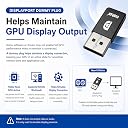
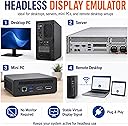
The FUERAN 2 Pack DisplayPort Dummy Plug emulates high-resolution monitors (up to 4K@17Hz and 1080P@60Hz) to maintain active GPU output without a physical display. Featuring plug-and-play installation, durable aluminum housing with heat dissipation, and a status LED, it’s designed for headless PCs, servers, and remote workstations across Windows, macOS, and Linux platforms.
| ASIN | B07D5G96D8 |
| Best Sellers Rank | #715 in Audio & Video Connectors & Adapters |
| Brand | FUERAN |
| Color | DP-2560x1600@30Hz-2P |
| Compatible Devices | Desktop, Laptop, Mini PC, Server, Workstation |
| Connector Type | DisplayPort |
| Customer Reviews | 4.5 out of 5 stars 124 Reviews |
| Finish | Hdmi |
| Item Dimensions | 1.9 x 0.39 x 0.8 inches |
| Item Weight | 1 g |
| Item dimensions L x W x H | 1.9 x 0.39 x 0.8 inches |
| Manufacturer | FUERAN |
| Mfr Part Number | display port dummy plug |
| Number of Items | 2 |
| Number of Ports | 1 |
| Package Quantity | 1 |
| Power Plug Type | No Plug |
| Specific Uses For Product | PC |
| UPC | 605621078799 |
| Unit Count | 1 Count |
| Warranty Description | 12 |
D**!
Enables full resolution remote access
So you're here because you found that when you try to remotely connect to a headless (no monitor) PC with some graphical remote access software, you're getting like 800x600 or 1024x768 resolution. Yes, you might be able to manually change it, but you have to do that every time you connect. It's not 1998, programs and websites aren't designed for low res like that. This is the fix. Plug this in, and you will immediately get the high resolutions you expect when you connect. No drivers, works with Windows and Linux as far as I know. I don't have a mac, so no idea there.
M**C
Worked exactly as intended. Great buy!
They work. Trick the computer to think that it has a monitor attached.
T**.
Only 5 of 5 stars thus far, ask Why!
I use VNC to my systems, and a lot of the time, my PC is hooked to my primary display (TV) watching something. Having the "second" display (virtual via emulated DP) is great as I can still get work done. On my Win10 ESXi nested lab machine, this also fixes a lot of visual issues due to previously, no monitor detected. If you are in IT and have a personal lab, this is a must-have item.
I**T
Does Exactly What It Says On The Tin
Super useful for running a headless server that freaks out when there's no display connected.
L**.
Great for VR without a monitor.
After a while of owning a VR headset I realized it could also be used as a HMD for a virtual monitor/screen, so in order to save some spaces I tried to use it without an external display. Nothing would come out, and apparently the video drivers don't load up if you don't have some type of 'monitor' hooked up to your device in order to provide the video. Enter the display emulator. Plugged it in, worked instantly. Now I can enjoy video in whatever size I want with no space being taken up.
E**N
It's fine I guess.
They are fine for just a simple dummy plug. If you want resolutions and refresh rates that are not there by default you can just make custom ones in Nvidia control panel or AMD software. If you want HDR though this is not a good option. I used it for moonlight streaming until I tried setting up HDR and found it just can't be modified to advertise support for it, so I used VDD instead.
S**T
Poor Man's iDRAC/ILO with vPRO AMT - Mama Didn't Tell Me
If you use a headless desktop system with Intel vPRO AMT and processor graphics as a de facto server, you will need one of these! Without it, the processor-based graphics subsystem will shutdown (power-save) with no monitor attached. As a result, you will not see the BIOS screen as the machine boots using a vPRO AMT remote management program like the free and open source MeshCommander program. The display emulator dongle is an inexpensive, yet essential hack for this use case. Works great for me!
B**W
Works well, but questionable quality
I bought the 2 pack for use on two remote servers in the same location and same environment, one a Windows machine, the other an Ubuntu machine. The emulators did exactly what they were designed to do. However, after 2 months, one of the devices stopped working. I tried using that device in both machines, and it worked in neither. Conversely, I tried the working device in both machines, and it worked with both. So, obviously, one of the two devices failed after just 2 months. I reached out to Fueran, outlined what I stated above, and received the following reply: "Hello This proves that this product has broken down, does not work, and needs to be repurchased. Our products are tested before leaving the factory. We must ensure that the product can operate normally before it can be sold, However, the life of the product is not guaranteed, The product warranty is free, and the round-trip shipping needs to be paid by yourself. Because this product is not expensive, If you have a warranty, the round-trip shipping is more expensive than repurchasing. So warranty is not recommended, thank you" Although I understand their logic and the economics they outlined, that isn't really how a warranty works. It is offputting, to say the least. Obviously, my sample is too small to be statistically relevant, but it is worth keeping in mind when purchasing this product.
J**R
Aunque ponga que es 2560x1600@60Hz, realmente solo va a 30 Hz
Si vas utilizar RDP no vas a tener problema, pero si quieres usar Parsec u otro sistema, la emulacion realmente solo va a 30 HZ
G**D
It works
The emulator works as expected.
J**M
Jalan bien
Muy practicos y de facil uso
S**L
Funktioniert wie erwartet
Die beschriebene Auflösung wird wie beschrieben simuliert. Für meine Anwendung genau das was ich gesucht habe.
P**K
Does not support 60Hz at 2560x1600
Incorrect frequency stated in the item description. It does not support 60Hz at 2560x1600. Works at 30Hz at this resolution.
Trustpilot
2 weeks ago
1 day ago