


⚡ Stay Wired, Stay Ahead: The Ultimate Ethernet Upgrade for the Connected Pro
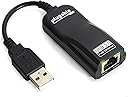
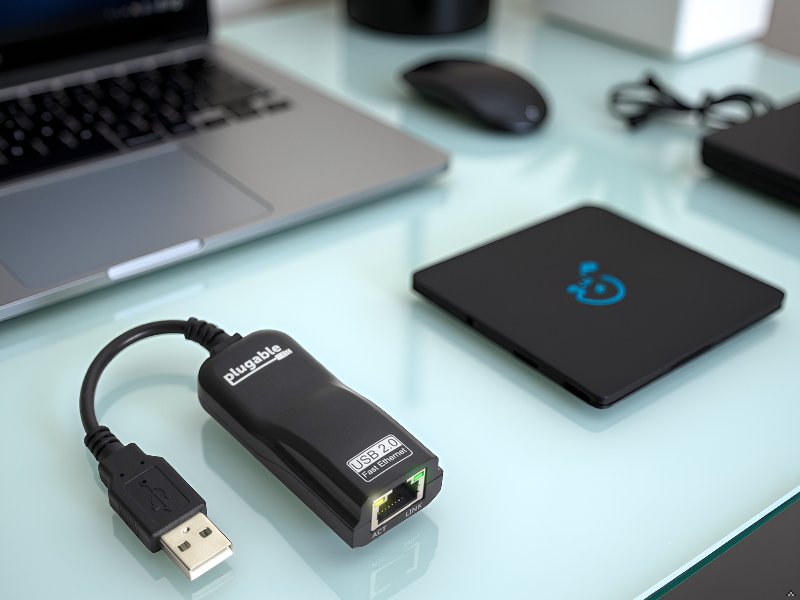
The Plugable USB 2.0 to Ethernet Adapter delivers reliable 10/100 Mbps wired networking via a compact, driverless USB solution compatible with Windows, Linux, Chromebook, and Nintendo Switch. Featuring plug-and-play setup, broad OS support, and lifetime expert assistance, it’s designed for professionals seeking fast, stable internet connectivity anywhere.




| ASIN | B00484IEJS |
| Best Sellers Rank | #707 in USB Computer Network Adapters |
| Brand | Plugable |
| Built-In Media | Network adapter |
| Color | Black |
| Compatible Devices | Desktop |
| Compatible Operating System Family | Linux, Windows |
| Customer Reviews | 4.6 out of 5 stars 3,948 Reviews |
| Data Link Protocol | Fast Ethernet |
| Data Transfer Rate | 480 megabytes_per_second |
| Global Trade Identification Number | 00649241909835 |
| Hardware Interface | USB 2.0 Type A |
| Item Dimensions L x W x H | 6.5"L x 4.33"W x 1.1"H |
| Item Type Name | Plugable Network Adapter - Fast Ethernet (USB2-E100) |
| Item Weight | 56 g |
| Manufacturer | Plugable |
| Mfr Part Number | USB2-E100 |
| Minimum Required Operating System Version | Windows XP |
| Model Number | USB2-E100 |
| Number of Items | 1 |
| Product Dimensions | 6.5"L x 4.33"W x 1.1"H |
| UPC | 649241909835 |
| Unit Count | 1 Count |
| Warranty Description | no warranty |
A**G
Worked Great for my 48" TLC ROKU TV (Update 01/12/19) added powered HUB too
Bought one in Feb, 2017 for my 48" TLC ROKU TV. The thing worked great till my two cats discovered it as a new toy. Just bought another this November to replace the now cat toy still being played with as it didn't survive the abuse of being shot through the house for hours of fun. For me it was plug in and restart ROKU TV twice and 'WIRED NETWORK' showed up instead of Wireless. Router picked up ROKU TV as wired and a different MAC address. Wireless is okay but for streaming and PLEX wired runs much more smoothly. I would recommended it as it works even with my old linux laptop with bad rj45 jack. Update: 02/18/18. The only problem I've had is with the ROKU TV dropping the device and instead of defaulting to wireless I'll have to reconnect to wireless manually (No Biggie) or reboot TV to get the USB LAN to show up again. May do this every two weeks or so. Not sure if it's an always on thing as when used on a regular computer this doesn't happen, but I power computers down when finished. The ROKU TV only goes into a low-power sleep mode and may not be picking up the device upon wake as the USB LAN powers down on sleep. 01/12/19 update. Solution to fail to find USB LAN on wake of ROKU TV found. I installed a powered USB 2.0 Hub to have flash drive for OTA TV pause and USB LAN working at same time. With USB LAN powered at all times ROKU TV picks up on it being there and no longer requires restarts to get it working again. Also nice to have both TV pause and wired LAN working at same time, only wish I'd done this sooner. I'm using the "Plugable 7 Port High Speed USB 2.0 Hub with 3A Power Adapter" https://www.amazon.com/gp/product/B003Z4G3I6/ref=ppx_yo_dt_b_asin_title_o00__o00_s00?ie=UTF8&psc=1 sold here on Amazon, other powered USB Hubs may work well also. All Smiles now. I added a picture of powered Hub I'm using now.
T**Y
Worked with Onn brand Roku TV. Roku software compatible. AX88772, Expensive for USB 2.0 10/100
Pros: • Worked with Onn 40” Roku TV • Works even after power cycling TV • Name brand that I’ve used other Plugable products • Will likely work on other brand Roku smart TVs • AX88772A chip set based, identifies as ASIX Elec Cons: • Costs more for a 10/100 USB 2.0 adapter than a 2.5 Gbps USB-C 3.1 adapter! • Runs rather warm This worked flawlessly on an Onn brand 40” Roku smart TV. If you look you will find that almost no 40” smart TVs come today with built in Ethernet. I looked. Most manufacturers only put ethernet in 43” and above TVs now and only provide WiFi. I was replacing an older 40” smart TV and could only fit a 40”. I had pulled ethernet to the TV years ago, and strongly preferred using wired ethernet and not putting the traffic on WiFi. The official Roku web site does recommend this USB Ethernet adapter for streaming players, but does not provide any information about any TVs, either their own brand, or other brands running their software. The only information they provide is related to 43” and above TVs that have ethernet built in. I contacted Roku by chat (they don’t have telephone support). I was unable to get a direct answer from the support person. Based on a few YouTube videos, and the fact that this specific adapter was mentioned as supported on streaming players with somewhat similar software I figured I would try it. It ended up working fine. I’ve only just set it up, but did power cycle without having fast turn on enabled. This apparently powers down the USB port. I found comments from users using other brand adapters that they need to set up networking after waking up the TV. This does not seem to have any issues, although I did just set it up. The procedure I found others use successfully, and that I also used successfully is as follows: 1. Perform initial TV set up and account login using WiFi. 2. Plug in this adapter connected to your network through Ethernet. 3. Perform a network setting reset to clear the WiFi set up. After the TV reset after clearing the WiFi settings, it still was working fine, and was showing all the icons, and other content from the internet. Going back into the network settings showed that it was in fact using ethernet and showed the IP address. The wired network did not show up until the WiFi settings were cleared. This TV, like most only has a single USB port though. I have ordered and I am waiting to be delivered a small powered USB hub and USB flash drives. Roku TVs also support pausing live TV if you have a flash drive installed. This should allow both live TV pause, and ethernet through USB. If there are any issues, I will update this review. My only complaint with this USB Ethernet adapter is the price. It is significantly more expensive than USB 3.0 10/100/1000 adapters and even more expensive than 2.5 Gbps ethernet adapters! That seems wrong for an old technology USB 2.0 10/100 adapter. I guess it is the price to pay though for Roku software compatibility. I would only recommend this adapter if you have some specific use case, such as the Roku TV though for software compatibility. For a computer, or even other TVs that run other operating systems I would definitely suggest a gigabit or 2.5 Gb adapter for higher performance and surprisingly lower price. Roku software is apparently only compatible with a limited number of 10/100 ethernet chip sets. This pluggable uses one of those compatible chip sets, and in a reliable design. UPDATE 5/9/2025: Confirmed that the Plugable USB Ethernet adapter is based on the (Roku supported) AX88772A chip set. It identifies as ASIX Elec I also confirmed that on the Onn 40" Roku TV it did work with a powered USB hub and a USB Flash drive. This allows simultaneous use of both an ethernet connection through USB, and Live pause for OTA TV. While I can't confirm this, I fully expect that this will be the case on most Roku TVs, at least those with the current software version.
D**Y
Wii has Internet! Plug It and Forget It
My Wii got kicked off Wi‑Fi because apparently it’s “not secure enough.” Thanks Eero! I shoved a Plugable USB 2.0 to Ethernet Adapter into the back and plugged in a cable. Instant internet. No drivers, no begging, no overpriced Nintendo nonsense. It works because it has the same ASIX AX88772 chipset as the original Nintendo adapter - basically Nintendo’s secret handshake. The original? Overpriced and probably haunted by ghosts of Mario past. This one? Cheap, legal, and actually gets the job done. My Wii is online, and my wallet didn’t cry.
R**H
Works fine for Wii-U, some "delays"
I got this primarily to get my Wii-U off of the wifi and onto my hard wired network, where it should enjoy ~100Mb/s to 1Gb/s speeds for downloads from the Store. So, I can't speak to other use cases. Overall, when it's running, this thing works fine. I am very happy with overall speeds, although it still took roughly 30+ hours to download NBA 2k13 (which is around 22 gb) from my 6 Mb/s internet connection. Fairly reasonable, congestion and flow control taken into consideration. However, I do have a gripe, which I am not sure is the fault of this device or the Wii-U, which is: network connectivity is more fragile than I'd like. I consistently have the experience of booting up the Wii-U, clicking on my profile to start up, only to have the Wii-U tell me network services are not available, or have the Netflix app fail to connect to their servers. I've found that by waiting patiently an extra 10-30 seconds on each screen (Wii-U User select screen, Wii-U menu, Netflix menu), I can more reliably avoid problems. But it does seem that the Wii-U will reset the entire USB stack when launching applications (including the User select screen, the Wii-U menu and of course the netflix app), because I see both the LINK and speed LEDs turn off momentarily when each of these screens is loading. It is unclear to me whether the Wii-U resets everything, or if this device itself aggressively resets itself based on some signal. Overall happy, wish I didn't have to use it so gingerly. Not sure if that's the fault of the Wii-U or this device.
J**E
Works great!
I bought this because my laptop's ethernet slot decided to give up for some weird reason so I've been using wireless connection which is practical for laptops and sufficient for my needs. But when I moved to my apartment for college, I had to move from cable to dsl which showed significant decrease in download speed. I read a lot of reviews for many different products and decided to get this one instead. Even though I am not familiar with the brand, I went ahead and bought this one because it has the least negative review. It came after two days (Prime) and just finished testing it 10 mins ago. I used speedtest.net to test my speed through wireless and wired connection. Results are below: Wireless: Averaged 14 Mbps Download Wired with Plugable USB-Ethernet: Averaged 24 Mbps Download It may not seem a lot, but to me, the extra 10 Mbps is a big improvement. I am now using the speed that I'm paying for and I'm very happy with it. I can't review the quality yet since I only had it for a few minutes but I can already tell that the case and usb wire is solid and could handle some abuse. Installed this on a Windows Vista 64-bit with no problems what so ever. True plug-and-play device. When prompted, just let Windows locate the driver for you, that's what I did. If mine didn't install, I had a browser opened in the plugable driver download website (just be careful to pick the right version).
A**A
Finally, a wired adapter that works with my Insignia Roku TV
Have a Roku TV that is supposed to be wireless-only (why can't they include an rj45 jack anyway?). Even with a wireless router positioned right behind it, still had problems with adaptive streaming sites changing resolution streams multiple times during playback. Searched Roku forums and found an older Belkin adapter mentioned, but that's not available, and has a replacement listed that did not work for me. My son had purchased an HDE adapter for his Wii some time ago (and neglected to tell me), so I tried that and it did work with my TV. so I got one of those, too. Don't know if it was just defective, but the new one didn't work, neither on my TV or the Wii, or even on a laptop, so back it went. Still searching, because I proved to myself that something could work. Finally found this brand mentioned as working after another search, even though the seller says it doesn't. At this point, for $12 I figured what the heck. And it worked... With the other adapters not working I had tried everything, resetting to original settings, unplugging and re-plugging power, USB slot, Cat 6 cable, nothing. With this adapter, all I had to do was unplug the power cord after installing, plug it back in, turn it on, and it worked. A little slower initial boot, but that's pretty minor to have a working wired connection with no more adaptive streaming fluctuations. Before, Netflix thought i only had 4 Mbps down on a good day, and afterward, that had tripled (according to the test in their app). With another separate speed test app, I'm actually getting as high as 54 Mbps down (out of 60 possible) now. Edit, 6 weeks later, still using it every day, still working fine except for one incident where it didn't connect after a power on, but I just removed power again and restarted, and has been OK since.
C**Y
Great WiiU Ethernet adapter
Works great as a WiiU ethernet adapter, which is very needed these days as the WiiU wifi support is aging. I've used this for 2 WiiU's without issue.
S**K
It works with Roku TVs!
I bought this for one reason: my Sharp Roku TV can't connect via wifi and has no ethernet port. I bought the TV on clearance and I suppose I got what I paid for. It's always had this weird thing where it will just turn itself off and restart over and over when I first turn it on. I have learned to turn it on and then walk away for ~10 minutes to let the TV figure itself out, and then it stays on and works fine, just no wifi. Which, honestly, is okay because I can get to Netflix or whatever through other devices (PS4, FireTV, etc). But I bought this hoping I could at least get the TV to stop freaking out about not having an internet connection. And...IT WORKED. After connecting this adapter and a factory reset, it no longer turns itself off over and over for 10 minutes. It still can't use Netflix because it wants to "Activate" itself before letting me use the apps, and it will only let me activate using wifi, which doesn't work. But the TV otherwise works perfectly and has ended 3+ years of headache with this TV. For anyone else wanting to use this for a Roku TV - it works! Depending on your model, it might not let you activate the TV over Ethernet, but it should let the TV function okay otherwise.
H**A
ASUS Win8で問題なし
ASUS ノートブック X205TA ( WIN8.1 BING-32B / 11.6inch / Z3735F / eMMC 64GB / 2GB / BT4.0 ) で高速で安定して使えています。 今のところトラブルはありませんが、こまめにフォローのメールが入り、メーカーの対応もよさそうです。
J**)
Works on Wii-U.
After having purchased a U-Green USB ethernet adapter which actually stated it works for Wii-U, the console would not recognize it at all. However, this little gem works great. You go into the settings and under the network set-up, choose wired and the console initializes the LAN connection with this Plugable USB adapter. Works great! Highly recommended! Worth the money! Much better than the wifi speed.
J**Y
Ottimo prodotto ma reso per cambio progetto
Il prodotto e ottima ma e stato reso per cambio progetto. in poche parole volevo trasformare il mio vecchio router adsl in un router 4G mettendo questo adattatore e una chiavetta 4G, ma alla fine ci ho ripensato ed ho restituito il prodotto. Funziona perfettamente ed i materiali sono di ottima qualità. consiglio l'acquisto.
K**K
Good One
good and worked fine with surface pro
C**N
Adaptor to connect my Touchmix 16 to a router
This was exactly what I needed to link up my router to the Touchmix 16 mixer- in order to get the WIFI working better. The 2.0 was the key- buying a 3.0 means you waste your money as the Touchmix 16 needs an older version of adaptor to enable it to work. I tried 3- 3.0 ones and they didn't work at all.
Trustpilot
1 week ago
1 week ago