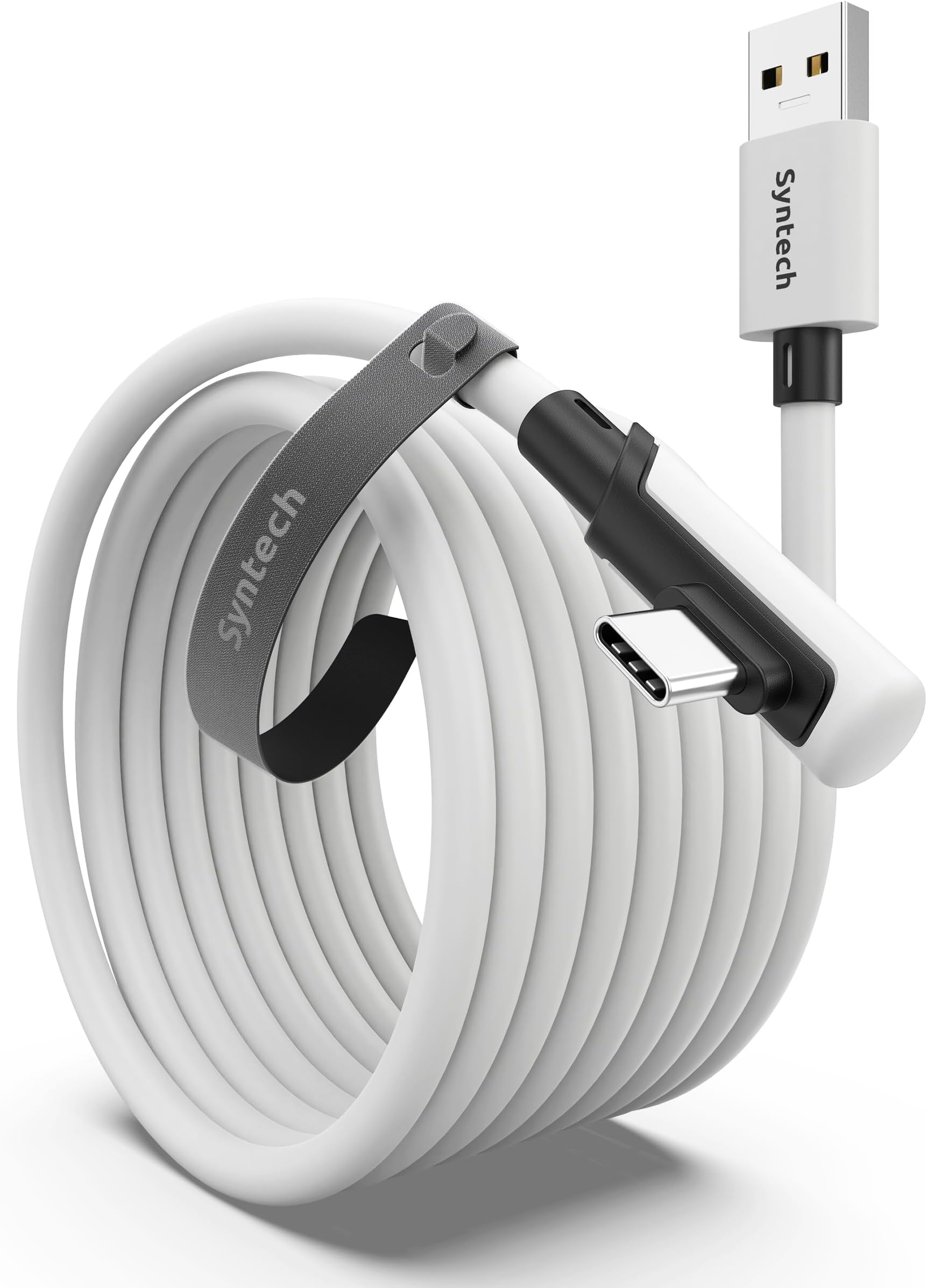
🎮 Level up your VR game with Syntech’s ultra-reliable 16FT link cable!
The Syntech Link Cable 16FT is a high-speed USB 3.0 to USB-C cable designed for PCVR gaming with Meta Quest and Pico headsets. It delivers up to 5Gbps data transfer for stable, low-latency VR streaming, supports full-body movement with a flexible, tangle-free design, and features a durable build with ergonomic connectors and an 18-month warranty.


| ASIN | B098399X91 |
| Best Sellers Rank | #1,097 in Cell Phones & Accessories ( See Top 100 in Cell Phones & Accessories ) #1 in Cell Phone Virtual Reality (VR) Headsets #131 in USB Cables |
| Brand | Syntech |
| Cable Type | USB |
| Color | White |
| Compatible Devices | Meta Quest 3S, Meta Quest 3, Oculus Quest 2 |
| Compatible Phone Models | Meta Quest 3S, Meta Quest 3, Oculus Quest 2, Quest 1, Quest Pro, Pico 4, Pico 4 Pro, Pico 4 Enterprise;PC VR Steam VR |
| Connector Gender | Male-to-Male |
| Connector Type | Usb |
| Customer Package Type | Sealed cardboard box |
| Data Transfer Rate | 5 Gigabits Per Second |
| Date First Available | July 26, 2021 |
| Ethernet cable category | Cat 6 |
| Frequency | 60 Hz |
| Indoor/Outdoor Usage | Outdoor |
| Item Weight | 10.6 ounces |
| Item model number | Mark32 |
| Manufacturer | Syntech |
| Maximum Voltage | 525 Volts (DC) |
| Number of Items | 1 |
| Number of Pins | 28 |
| Outer Material | Plastic |
| Package Dimensions | 9.84 x 8.74 x 0.79 inches |
| Recommended Uses For Product | Pc |
| Shape | Round |
| Special Feature | Quest 3S/3/2 link to pc |
| Specification Met | CE, FCC |
| Unit Count | 1.0 Count |
| Wattage | 50 watts |
D**N
Works great!!! Don’t even think about other cheaper cords
Amazing, feels great, works perfectly for connecting your headset to your pc, usb 3.1 connection, no worries, durable, tight fit, length is great for anything you need. Depending on what port your pc has you might suffer from your headset dying I usually get 2-3 hours of sim racing.
E**C
Works as advertised.
Works well enough. Holds a steady connection, assuming you don't snap it in half. My only complaint would be that it doesn't actually charge the Quest during use, but I feel like that's more of a Quest thing than a cable thing. Also the length of cable on offer is insane. I got 33 feet, and it is So Much. Measure the length of distance between your PC and the midpoint of your actual play area. Then add the distance between the midpoint of your play area, and the furthest corner. Then buy the size that encompasses that amount. I chose 33 to be safe, but MAN is it a lot. Also, the weight of the cable can be a bit bothersome, since it throws off the balance of the headset, but that could depend on the length of cable again. TL;DR: Does what it says, can't really ask for more. Won't charge during usage.
R**A
Solid cable, would buy again
Cable has a great length, works great with vr headsets, controllers, keyboards, charging devices, etc. Would not recommend bending it due to how thick the cable is, but the white coloring matches well with the quest headsets. Never had the cable unplug, and while it is kinda stiff due to the thickness it can fold up pretty well. It is also pretty durable, as it has survived being moved all over my setup and changed ports numerous times. Overall a solid 9/10, sometimes the right angle end can block the use of controllers, but it isn’t necessarily meant for controllers anyways.
G**H
Very good
Probably the best link cable to get right now, very sturdy and long and dosent get in the way of thing most of the time it does not fully charge ur headset while playing but i usually get a good 2 to 3 hours of playtime works very well only complaint is the small velcro that support it on your headset looses the actual velcro part and just becomes soft after awhile
D**S
Works fine as a basic power cable!
I just needed a really long power cable that would attach to my Quest 3 so I could use my 30w UBS-A plug (I lost my USB-C charger but had one for USB-A.) Cons: I can't find any for my intended use case! Pros: Long! More than enough to let me use any outlet in my living room, and the one in the dining area. I can't speak to the wired link connection I run virtual desktop and thus am wireless on that connection. I would assume it would work the same! The included self-adhering strap helps keep the cord where you it on the headset strap, helping to keep you from tripping on it. The cable feels okay enough, semi-thick but not excessively heavy, and it should be fairly durable. I'm able to keep my headset charged at 100% off my USB-A GaN charger, even at the heaviest load of gaming and streaming/recording simultaneously.
R**X
An inexpensive solution for my quest three
Works great with my quest 3. Nice and long and charges, but it charges slowly when connected to a PC.
M**N
Great choice
The cable ended up being fully compatible with quest link and I can finally play PCVR games with a stable, uninterrupted connection
P**S
Does Not Work With Quest 2
Upon opening and first using the cord it worked for hours but after using it once when I went to plug it back-in I got met with "You have been disconnected from your PC, Unplug and reinsert the link cable to continue using meta link" or something like that. So I did and didn't think much of it and the connection continued to work. Then that same message continued to pop up constantly on my second day with this cable. Then my device on the quest app said my device had an issue, then the entire app on my pc froze and had to run self diagnostics to fix itself and after trying to fix it for like two hours I had no luck and was stuck in the same loop. Which led me to look at the one star reviews on here of this cord and wouldn't you know it, everyone with a one star review has the same issue or worse. So after doing more research I would only recommend buying the Oculus branded $80 meta link cable unfortunately. I say this because not only will it guarantee compatibility but any third party cord is not covered by your Quest's warranty and if it were to damage your quest you would be out of luck. Also I see this issue is common with third party type C to C cables as well. The Oculus link cable is type c to c though so if you are looking for a type A to C then I am not sure what your best bet is. I'm sure their is a solution but it is definitely not this cord! I forgot to mention I know my motherboard ports and I had this in a 3.2 Usb Port like it requests and like I said it worked for hours then it just shut down on me when I went to reuse it after having to charge my headset as this cord does not charge it at all and that's when the problem got worse and worse to the point I tried every port on my pc. I don't know what Mark did to lock down the market for this device to only work with his $80 Cord but Kudos. Will be returning this product for that one, hope this helped!
中**人
高いな〜と思いながら買いましたが ちゃんとしっかりしてます 長さもちゃんとあり ギターシールドくらい太いので 何回か椅子で轢きかけましたが大丈夫でした。
H**I
The line is very long and the transmission is relatively stable. But the charging is slow, and the wire is thick and a bit heavy.
N**A
Le câble fonctionne très bien avec le Meta Quest, la connexion est stable et le débit est suffisant pour le PCVR. Les 6 mètres sont vraiment pratiques pour avoir de la liberté de mouvement. Bonne qualité dans l’ensemble, aucun souci à l’usage.
F**.
On the brightside, it does what it says on the tin, you can use this cable to do Quest Link and that works fine. Charging the device or rather keeping it at the same battery level seems to be dependant rather on your usb port moreso than the cable itself.
A**7
عندما وصلني المنتج وجدت أن الصندوق مفتوح وتم استخراج محتوياته ومن ثم تم إرجاعها مرة أخرى،على الرغم من ذلك قررت ان استخدم المنتج وأجربه ، لأن إجراءات الاسترجاع تأخذ وقتا طويلا ولا يوجد تعويض لأن المنتج وصلني من الخارج. ــــــــــــــــــــــــــــــــــــــــــــ تجربتي استمرت حوالي 20 يوما على نظارة الواقع الافتراضي " اوكلس كويست 2" تم توصيلها بجهاز كمبيوتر والمنتج ادائة بالنسبة لي رائع جدا حيث لا يوجد اي تقطيع او تأخير في نقل الصورة. مع العلم ان السلك عند اختبارة ينقل بيانات بسرعة 2.2 جيجا على منفذ يو اس بي إصدار3.1 وهذا مناسب بالنسبة لي. ـــــــــــــــــــــــــــــــــــــــــــ -توجد لدي ملاحظة وجب التنبية لها، وهي ان بعض الاشخاص و أرى حالياً انهم غالبية يواجهون مشكلة تقطيع الصورة وذلك حسب بحثي البسيط يرجع الى ان الاشخاص يوصلون السلك بمنفذ يو اس بي اصدار2.0 وهذا الامر خاطئ، يجب عليكم توصيل السلك بمنفذ 3.0 او 3.1 لأنه الاسرع على الاطلاق حتا لا تواجهو اي تقطيع بالصورة او بالمحتوى المعروض، وإذا توفر عدة منافذ ذات الاصدار 3.0 او 3.1 يجب ازالة اي جهاز مشبوك عليها سواء فأرة الكمبيوتر او لوحة المفاتيح ودع المجال لسلك نظارة الكويست فقط حتا تستفيد من كآمل السرعة، لانهُ كلما كان هناك أجهزة اخرى مشبوكة على نفس منفذ اليو اس بي سواء إصدار 3.0 او 3.1 كلما كانت السرعة تنقسم بين جميع هذه الاجهزة وهذا لا يدعك تأخذ الاداء الكامل للسلك. ــــــــــــــــــــــــــــــــــــــــــــ يمكنكم الاستزادة بالمعلومات بالبحث في محركات البحث عن هذه الكلمة وسوف تفهمون اكثر" USB Controller"
Trustpilot
2 weeks ago
1 month ago