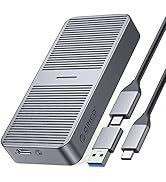
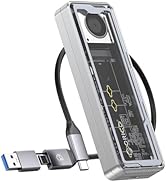
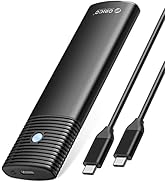
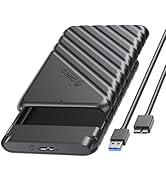
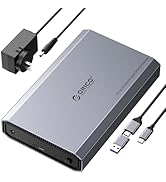
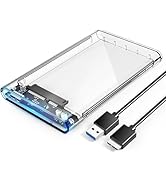
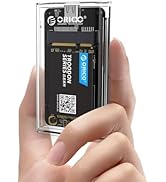
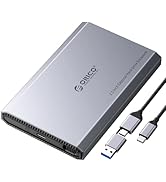
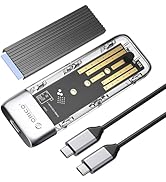
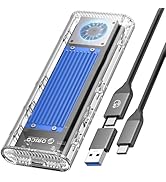
🚀 Upgrade your data game with ORICO’s ultra-fast, ultra-sleek NVMe enclosure!
The ORICO M.2 NVMe SSD Enclosure leverages a Realtek RTL9210 chip and USB 3.1 Gen 2 interface to deliver up to 10 Gbps transfer speeds, supporting PCIe NVMe M-Key SSDs from 2230 to 2280 sizes with capacities up to 8TB. Its aluminum top ensures efficient heat dissipation, while included accessories like dual cables, screwdriver, and rubber fasteners guarantee a smooth, tool-assisted installation. Compatible across Windows, Mac, Linux, and gaming consoles, this portable enclosure is designed for professionals demanding speed, versatility, and reliability on the move.


| ASIN | B08G14NBCS |
| Best Sellers Rank | #7,933 in Computers ( See Top 100 in Computers ) #42 in External Hard Drives |
| Brand | Orico |
| Built-In Media | 1*Thermal Pad, 1*USB C to C cable +1*USB A to C cable or 1*ALL-NEW 2-in1 data cable, 1*m.2 ssd enclosure, 2*Rubber Fastener |
| Color | Black |
| Compatible Devices | Desktop, Gaming Console, Laptop, Smartphone |
| Customer Reviews | 4.3 4.3 out of 5 stars (4,439) |
| Data Transfer Rate | 10 Gigabits Per Second |
| Enclosure Material | Aluminum |
| Hard Disk Form Factor | 22 Millimeters |
| Hardware Interface | USB, USB 3.1 Type C |
| Hardware Platform | Windows |
| Item Dimensions L x W x H | 29L x 13W x 108H millimeters |
| Item Weight | 0.1 Kilograms |
| Manufacturer | ORICO Technologies Co.,Ltd |
| Memory Storage Capacity | 8 TB |
| Supported Devices Quantity | 1 |
| Warranty Description | 12-month |
L**N
good and easy installation
good design come with type c and usb cables and screw driver and heat sink pad
A**D
Exceptional Build Quality and Performance
I recently purchased the ORICO M.2 NVMe SSD Enclosure and have been thoroughly impressed with its performance and build quality. The enclosure is made of premium materials, giving it a robust and durable feel. It's not just about looks; the enclosure is highly functional and comes with all the necessary accessories, making it a complete package. Included in the box are a USB to Type-C cable, a Type-C to Type-C cable, a T5 screwdriver, an additional screw, and two rubber locks to securely fasten the M.2 SSD inside the enclosure. This attention to detail in providing every accessory needed is a huge plus, ensuring a hassle-free setup. The installation process was straightforward, thanks to the included tools. The rubber locks are particularly noteworthy as they keep the SSD firmly in place, ensuring stability and reliability. The enclosure's compatibility with various SSD sizes adds to its versatility, making it a suitable choice for a wide range of users. In terms of performance, this enclosure lives up to its promises. Data transfer speeds are exceptional, leveraging the full potential of NVMe technology. Whether for gaming, data backup, or general use, the speed and efficiency it offers are remarkable. It has significantly enhanced my data management and transfer experiences, making it a valuable addition to my tech arsenal.
M**K
Good product
Good product overall that comes with a thermal pad. Having one or maybe two thermal pads in the box would be great, though.
R**D
All okay
Working
S**O
Good
Good
T**R
Good Unit came with bad cable
Came with a bad cable was to return but tried another cable laying around and it worked fine.
M**I
Done the job efficiantely
The USB 3.1 Gen 2 (10 Gbps) interface is fast and reliable, allowing me to transfer large files quickly and easily. The NVMe PCI-E support ensures compatibility with a wide range of SSDs and the UAS support ensures compatibility with both Windows and Mac systems. The build quality of the enclosure is excellent, with a solid and durable feel to it. The included screws make it easy to install an SSD and the LED indicator provides a visual indication of the enclosure's status. Overall, I highly recommend the ORICO M.2 NVMe SSD Enclosure to anyone looking for a fast and reliable solution for external storage. The compact design and fast transfer speeds make it a great choice for anyone who needs to transfer large amounts of data on-the-go.
S**N
Only USB C working
i cant use the USB A to connect to my computer it keeps giving errors but when i use USB C it works i tried other cables and the same issue persists
A**W
Easy to use and swap drives in and out of, fits almost every standard size of NVMe (save for 2110 I believe), and provides sufficient read and write speeds for a transfer drive. Quite pleased with it and for the price I'd quite happily recommend it.
M**A
I purchased this NVMe SSD enclosure because it had a decent price, in addition to using a design that provides a heatspreader for the SSD. While it supports NVMe SSDs with no problem, it is important to understand that this does not act as a HBA, instead when a drive is installed, it will show up as a “Realtek RTL9210 NVME SCSI Disk Device”. This means that you will not be able to update the firmware of the SSD in the enclosure or access any other low level functions. Instead all you will get is the SMART data, and the ability to initialize and format the drive in addition to normal reading and writing of user data. This means that if you need to update the firmware of your SSD, you will need to take it out of the enclosure and then connect it to the m.2 slot of a PC. (((Performance))) While the RTL9210 chipset supports NVMe and SATA, the enclosure is only wired for NVMe, thus you must use an NVMe SSD. The chipset also runs at PCIe 3.0 X2, but provides a USB interface of USB 3.1 Gen 2, for a speed of 10Gbps. In terms of real world performance, when using it with a Western Digital SN770 1TB drive, on a 10Gbps USB port (USB 3.2 gen 2), the enclosure reached a real world read speed of 1016.12 MB/s, and a real world write speed of 973.39MB/s. In repeating the tests on a 5Gbps USB port (USB 3.2 gen 1), the performance dropped significantly across the board, even in areas where the interface does not seem to be saturating, for example, performance drops in Q32T16 4K random reads and writes, even though the drive cannot offer 4K random at speeds fast enough to saturate either a 5Gbps or 10Gbps interface. Under a 5Gbps port, the read speeds dropped to 442.36MB/s and the writes dropped to 414.54MB/s. This overall indicates some additional overhead is taking place when the enclosure is operating in the 5Gbps mode. (((Installation and Setup))) The enclosure is quite easy to set up and install. Simply unscrew the single torx screw holding the cover that doubles as a heatsink/ heatspreader. Then lift the heatspreader up at the area you just unscrewed (The heatsink hinges out rather than slides). The bottom half of the case is made out of plastic, but has a metal threaded insert for the screw mount of the heatspreader. The top heatspreader is made out of aluminum. The thermal pad is a standard 1mm thermal pad, though the protective film is a bit thick, thus be sure to remove both pieces of protective film before closing the lid. The gap between the SSD and heatsink is about 0.99mm when closed. To install the SSD into the enclosure, first remove the PCB of the enclosure (there are no screws or clips holding it in place). Then insert the rubber retainer for the SSD in the hole that corresponds to the length of your SSD. A standard 2280 SSD would require the use of the 4th hole (hole farthest from the USB-C port on the PCB). It will take some effort to get the rubber peg through the hole as it relies on a friction fit to stay in place. Next, insert your SSD, and while pressing it down, also bent the rubber retainer out of the way enough for the SSD into position, then allow the rubber groove to grip onto the end of the SSD. Next, take the thermal pad, and notice the protective film on both sides of it. Peel off one side of the protective film and place the thermal pad onto the SSD (make sure to fully cover the controller and DRAM IC of the SSD (if available), covering the NAND package is not really needed as they do not get very warm, though it is not an issue if it is covered since the heat spreader does not have much thermal mass and does not dissipate a large amount of heat, this it will not overly cool the NAND package. After the thermal pad has been placed on the drive, peel off the remaining protective film slowly. Once that is done, install the heatspreader by first placing the lip of the heat spreader into the groove at the front of the case where the USB-C port is located, then bring the other end of the heatspreader own, closing the case like a clamshell. This will ensure no sliding motion that can cause the thermal pad to shift or rip. In my testing with a WD black SN770, the controller reaches a temperature of 71C under a sustained write intensive load, while the NAND reaches a temperature of 46C. The setup process is simple and straight forward. On the first power up of the enclosure with the SSD installed, let the enclosure run for a little while to give windows time to install any needed generic drivers. After that, head to your disk management utility, and then initialize the SSD (I recommend using the GPT partition table). After that, you can create a new NTFS volume for the SSD, and then begin using it as you would any other flash drive. (((Closing Thoughts))) If you need a lot of storage (especially in the 1TB+ range), an NVMe enclosure is a far better value and also allows for far better quality. Many standard flash drives that are 1TB+ often use very low binned NAND which will not consistently saturate a 10Gbps connection during extended writes, while many decent TLC NAND based NVME SSDs, will easily offer over 1GB/s even when the pSLC cache has run out, thus in the vast majority of cases, the enclosure will perform exactly the same from 0-100% fill. Update: So far the enclosure continues to work very, well with consistent performance, even for demanding workloads. The controller does not get very warm, and using it for recording higher bit rate footage with a camera for an extended period of time yielded great results. So far I have used a second one with a 2TB SSD, and I eventually plan to purchase a 4TB SSD to use with it.
M**Z
Muy buen material y justo hecha para SSD M.2 NVMe, transmisión de datos muy rápida.
A**K
Does exactly what it is described it does. It’s smaller in reality than the pictures indicator, but it’s a good brand and a good product. Also includes two short cables, usb-c to usb-c and usb-c to usb-a, and a small pentalobe screwdriver
A**R
جدا حلوه و ممتاز اذا لابتوب و تبغا شي اسرع من HDD خارجي
Trustpilot
2 months ago
1 month ago