


Desertcart purchases this item on your behalf and handles shipping, customs, and support to Australia.
🌐 Elevate your networking game—digitize, organize, and conquer the contact chaos!
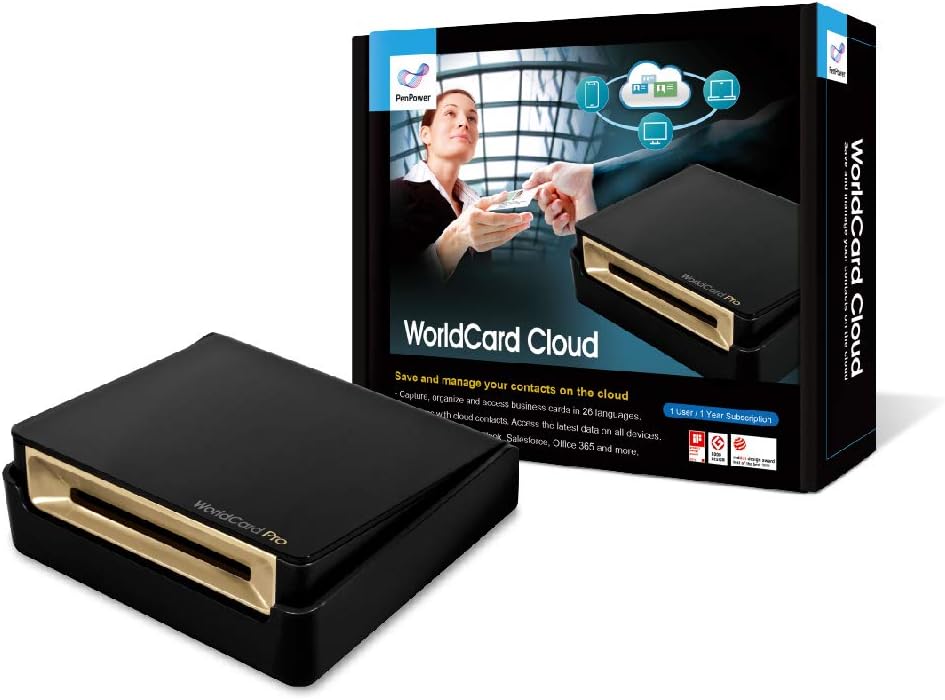
PenPower WorldCard Cloud is a 1-year subscription business card scanner and contact management solution featuring award-winning design, advanced OCR supporting 26 languages, and cloud-based AI recognition. It enables seamless syncing across devices and integrates with major CRM and contact platforms, empowering professionals to digitize and manage contacts efficiently from anywhere.


| ASIN | B08W54WMVD |
| Best Sellers Rank | #239,502 in Office Products ( See Top 100 in Office Products ) #11 in Business Card Scanners |
| Brand | PenPower |
| Color Depth | 1 bits |
| Connection Type | USB |
| Connectivity Technology | USB |
| Customer Reviews | 3.4 out of 5 stars 796 Reviews |
| Item Weight | 0.35 kg |
| Manufacturer | PenPower |
| Media Type | Business Card, Paper |
| Minimum System Requirements | macOS and Windows |
| Model Name | WorldCard Cloud |
| Optical Sensor Technology | CMOS or CCD |
| Resolution | 300 |
| Scanner Type | Business Card |
| Standard Sheet Capacity | 1 |
| Warranty Description | 1 year |
B**M
Works pretty well and is on par with today's OCR technology
I was looking for a business card scanner to help digitize my collection of cards. Based on my background (see below) I knew that there wouldn't be a perfect scanner out there and would have to find the best one available. I have tried a couple out now and this one is the best so far. It was easy to setup, works as it should, and has minimal errors. Setup: The setup is pretty easy and straight forward. Install the provided software (and activate it), plug in the scanner, calibrate it, and start scanning your cards. No OCR technology is perfect so it's important to check the data after the scan to make sure it's accurate. I know that's not ideal, but there is not (and may never be) an OCR software that is 100% accurate. Reason for 5 stars: It's very rare that I give 5 stars to a product that doesn't work 100% of the time but here is why. I am very familiar with OCR technologies and the software that is available in the marketplace and not a single one will be perfect. It's not the software's fault, it's the images you're scanning. It would have to be the most crystal clear image with no pictures or fancy fonts to get a perfect read. After testing out several different business card readers, this one is by far the best and most reliable. It is the best of the best (even though it's not perfect) which gets it 5 stars (I'm open to comments with your thoughts on giving 5 stars to a product that isn't perfect but is the best of its kind). My Background: I am a data consultant and work with large volumes of vendor invoices (up to hundreds of thousands for some projects) and run Optical Character Recognition (OCR) to turn the images into text-searchable documents. I have spent countless days researching the best OCR software available to use at my company, and the best one still isn't all that great. It's not always the software's fault, more often than not, it's poor quality images that are difficult to interpret (O's and zeros often mixed up, etc.). It's crazy to think that in 2016 there still isn't a way to reliably convert images into text-searchable documents, but hey, we do the best we can. Because of this, I knew going into this purchase that unless the business card was white, contained no images, and used a very basic font that it would likely have some errors. Overall I am very happy with this scanner. So far it is the best one I have tried and does a pretty good job. While I may have to make some corrections every now and then, it still saves me a significant amount of time versus inputting the business card manually. If you are looking to purchase a business card scanner then I would highly recommend this one. There are limitations with all OCR programs, but this one performs the best and will have the fewest errors. Writing in-depth reviews to help other shoppers has become a hobby of mine. If you found this review helpful please mark as helpful below. Also, feel free to ask any questions and I will answer them for you!
S**S
Mediocre hardware, terrible Mac software
I really wanted to like this. I really wanted it to at least be "good enough" that I could use it. I didn't need it to be great...just "good enough". Sadly, it failed even to meet those expectations. As others have pointed out, the USB cord's connection point to the device is within the cavity where cards exit at the back. This was a terrible idea, as it constantly gets in the way of cards, preventing them from feeding. Even if that problem didn't exist, the device is very finicky at feeding cards. Since it doesn't sense the edge of the card, if it doesn't pick the card up right away when it tries to feed it (happens often), the scan only shows half the card. The software should be able to overcome that, but it doesn't. Basic functions like copy & paste don't work in the Mac software. Ok, let me qualify that...they work, but only in pop-up dialogs. When you are inside a contact and click on the address, it pops up a dialog box to break down the address into street, city, etc. Command-C and Command-V work there. But in the main contact window where you have to enter things such as Notes, they don't work. You get a beep error. Sure, you can right-click, but this is an interface failure. I like to add notes to contacts indicating where I collected the card. Since you can't batch edit contacts that are scanned, and you can't use Command-V in the notes, this is not even possible. I could export to a CSV and do it there.....but what a stupid workaround to something that should be simple. That then requires I import the CSV into Contacts instead of using the cleaner option of a direct sync to Contacts, which ensures information isn't lost. In terms of other aspects, the fact that the software insists on using pop-ups to edit so many of the items within a contact makes edits extremely tedious. This software actually makes the process of editing a scanned card LONGER and MORE WORK than just manually entering the card info into the native Contacts or MS Outlook for Mac. For software to make something more difficult and time-consuming than the manual process really is an achievement in terrible UIs. So yeah...I really wanted to be able to use this. But it barely feeds cards and the software is terrible. So it's going back. I haven't seen great reviews of the alternatives, which leaves me thoroughly disappointed.
R**C
Good Product
It works! I accumulated over 300 business cards and this did the job far better than the CardCam app on my iphone ever could. The scanner scans images in black and white and the more exotic cards with colorful backgrounds or odd shaped logos will end up needed special care after the scanning is completed. All told, from installation to the scanning of the final card, the whole process took about 2 hours. There are a few problems which keep this from getting 5 stars. 1. Cards images are rarely ever scanned properly. As the card feeds into the scanner, the cards tend to swerve to the right or left, creating a cruved image. In most cases, this isn't an issue and the information on the card gets scanned just fine even with this distortion. But, if you want the image to be high quality, this isn't the scanner for you. 2. As with many optical character recognition (OCR) software, there is almost always a degree of guesswork when scanning certain fonts. Fonts in frequently used families (e.g. Courier, Times New Roman, etc.) come out fine, but all others are 50/50 at best. 3. Cards don't fully eject from the device when the scan is complete. Not a big deal breaker, but when doing large batch scans, it can add a level of inconvenience. Of the 300 scans, a few problems did pop up repeatedly. 1. If the image is curved after the scan, phone numbers and other contact information may be affected. (An "i" could be interpreted as an "l" and vice-versa. 2. When one phone number is separated from another by a "|", you may get an extra digit in the phone number. 3. Phantom company names seems to be a recurring problem. I can't blame the software as it seems to be isolated to cards from individuals with long titles or long department names being mistaken for company names. 4. The software is well designed for identifying these problems and made resolving them very easy. I could sort by multiple fields and find the cards for individuals with missing names, missing companies, etc. and correct them pretty quickly. Overall, it's the easiest card scanner I've used. I wish the image quality of scans was better and the card feeder better able to capture the card without distortion.
W**.
Wish I had bought this years ago.
I was in the market for yet another business card holder when I became aware of the mini card scanners. I decided that this was the better answer to organizing and quickly retrieving information from the 400+ business cards that I have collected to date. I spent a lot of time evaluating reviews of the various scanners on the market and this one seemed to meet all of my criteria. I received it recently and I am amazed. It does everything I need. It is easy to use and quick to install. I started using it almost immediately upon opening the box and now I have set aside time every day for scanning cards. The cards scan very quickly and you have the option of capturing both sides of a card as needed. The OCR function works very well but depending on the design, layout and fonts on any specific card you may have to spend an additional minute editing. In my case most formal business cards work the best and get completed very quickly. Most of the editing I end up doing is for cards from artists, and local small businesses who are trying to be more creative to stand out. Even so still easy to use. Also, I am a Mac OS X system user and this works great. Others I looked at were Windows based only. Great product. May have to buy more as gifts for some friends.
L**R
Works OK, text scanning requires a lot of editing
I've been intrigued with business card scanners for many years. I finally bought this one, on the basis of favorable reviews. I've scanned 15 cards (I probably have 1000), and it works OK, but it's nothing to write home about. So far I've relied on the minimal Quick Guide and the online help to figure out how to use it. An online manual is included, and I'm planning to read it. The unit is small and installs pretty easily. It didn't work for me until I registered my purchase (not a great scheme, since I might be returning it). After I figured out how to scan cards, I scanned some. My cards are from the hospitality and hotel industry, so they feature a lot of graphics and stylized logos as part of the company names. This scanner did NOT handle them well. Usually it just disregarded them. There's a LOT of editing required with the OCR on my cards. Sometimes the OCR is perfect, but usually it messes up the company name and/or address. I will keep it for a while and read the manual, but for now it looks like I will return it to Amazon. I want to keep track of my business card collection, but I'm not ready to spend a lot of time correcting faulty OCR on the information that's on them. It wouldn't be so bad if it got the company names right, but far too often it doesn't. This thing is pretty slick, but it isn't accurate enough for my needs, at least at my present low level of skill in operating it. UPDATE: The day after the above, I looked at the manual and fairly carefully tested the unit on 20 cards. The 80-page manual is highly detailed and reasonably helpful, but hard to find. It appears when you click Index under the Help menu. Pretty strange, IMHO. The content is intelligible English, with a bit of Chinese English thrown in. Card scanning and OCR is only marginally effective. Of 20 cards scanned, only 7 produced good, clear images. Another 8 produced questionable images, typically very low contrast on cards printed in light-colored ink. Five produced illegible images. Yesterday's scans produced 15 good images out of 15. That may have had something to do with my procedures -- today I "calibrated" the scanner, while yesterday I didn't. I regard the scanner as having failed my tests for imaging. OCR isn't very good, either. It works after a fashion, but isn't nearly reliable enough for my needs. Out of 20 cards scanned (some producing sub-optimal images), it correctly OCR'ed 11 names and put them in the correct field in its database. Two of these had minor spelling errors. Out of 20 cards scanned, it only got 3 company names right. Eight more were partially right, and 9 were missed completely. This mostly had to do with company names being part of logos, expressed in graphics rather than standard fonts, etc. Again out of 20 cards scanned, it correctly OCR'ed and categorized 13 addresses; 11 cities, states, and ZIPs; 13 phone numbers; and 10 email addresses. The accuracy of the phone numbers and emails seemed to be good, but I didn't do any testing. The bottom line for me is that this scanner partially does the work of scanning and OCR'ing business cards, but it isn't accurate enough for my purposes, at least at my present level of skill. I am going to send it back. If you really need a business card database and have the time to correct a lot of OCR errors, it might be a pretty good tool. I am a very busy person without any administrative assistance, so using this device is just out of the question for me. A final word about the the built-in database: I didn't work with it much, but it seems to be flexible and powerful. Apparently it works with a lot of different languages, including those not expressed in Roman alphabets. The problem is populating it with accurate data.
E**Y
Card reader is crap
The card reader is a worthless pile of crap. It take 5 to 7 attempts to get it to pull a card through the reader. Thinking about sending it back except for the hour I invested in loading 340MB of software to my computer and navigating firewalls because the file source is Taiwan which is blocked. Video typical issue put card in then watch screen as it tries to scan but doesn't feed the card. It doesn't matter if i load card to the left, in the middle or on the right. Damn thing has 1 job to do and it can't do it. Adding to the poor performance of this product, after fighting with the card reader for a couple of hours and getting approx 50 cards into the software, I saved the database. However, the software can not read the database it just saved so all of the work is lost. Horrible... Horrible product.
M**C
Very good business card reader
This unit works great for reading business cards. As with most business cards readers, it is not perfect. But, it is one of the better ones I found with regards to accurately putting the correct information in the correct fields. I have tried 5 - 10 different scanners, including smart phone apps, and the software is the most accurate. However, if errors are noticed, the software allows you to highlight areas on the scanned card and put that information in the correct field. The units reads cards very quickly. I can easily scan one card after another. It will take a little longer to verify the information is correct and make any changes. The only con I can mention is it has trouble reading company names when they are in a logo format rather than a text format. Overall, I am very happy with this business card reader.
M**E
Initial Problems, but now Good
Initially had a lot of trouble with the unit due to licensing bugs with the software blocking it form a successful install of the software. (I don’t like software licensing. Too often it stops the people who paid for the product from being able to use it.) After tech support provided a new, updated version, it is now working. You have to be careful to feed the cards square to the slot, as there isn’t really a guide to prevent you from putting them in crooked. You also need to be careful that the exit slot isn’t blocked. But once you get used to it, you can scan a bunch of cards pretty quickly. Name recognition is good, but not perfect. But computers still aren’t as good as people as understanding context, etc. One really, really nice feature is that you can export images in .jpg format of what you scanned. As far as I know, this is the only Mac business card scanner that will let you do that. I also tried it on drivers licenses and credit cards. I seems to do OK on the drivers licenenses. But credit cards, with the raised numbers are too thick. Overall, it is quite portable, which is a nice feature if you want to take it with you to a trade show, or the like.
K**R
Erfüllt allenfalls Basisbefürfnisse
Habe mir den Scanner gekauft um endlich von meinen vielen Visitenkarten in Papierform runterzukommen. Dafür habe ich im Internet nach Tests für diese Geräte gesucht und mich mangels besseren Wissens für den vermeintlichen Testsieger entschieden... Die Verarbeitung des Gerätes ist in Ordnung und es tut was es soll - und zwar auf dem niedrigst möglichen Level... Scannen funktioniert nur hakelig und erfordert einiges an Geduld bis man den Bogen raushat. Der Scanner hat so seine Probleme mit dem Erkennen von einigen sprachspezifischen Buchstaben und Zeichen. Sehr Vieles muss nachkorrigiert werden. Adressen erkennen funktioniert fast nie, Telefonnummern und emails dafür aber immer. Das größte Manko dieses Gerätes ist aber die mitgelieferte Software. Eigentlich sollte es ja möglich sein EINEN SAUBEREN DATENSATZ zu haben und Daten problemlos mit Microsoft Outlook auszutauschen. Das ist leider reines Wunschdenken!!! Gerade die Synchronisation zwischen den mitgelieferten Programm und Outlook kostet mich einiges an Nerven. Nie kann man alle vorhandenen Informationen sauber synchroniseren, immer fehlt igendetwas. Mir ist es sogar passiert, dass das mitgelieferte Programm bein Synchronisieren flugs meine Kontakte in Outlook durch Erstellen von Duplikaten verdoppelt hat. Dadurch habe ich wahrscheinlich mehr Zeit zum Bereinigen verschwendet, als wenn ich brav alle meine Vitenkarten (einige hundert) per Hand eingegeben hätte. Mein Fazit ist, das dieses Grät und die mitgelieferte Software unausgereifter technologischer Spielkram sind, der im Endeffekt meinen Anspruch Zeit bei der Verwaltung meiner Kontakte zu sparen in keinster Weise erfüllt hat. In Schulnoten ist das für mich eine glatte 6.
C**D
Business card scanner
It is working fine and is easy to access. However, the software was provided for only one year. If they had given the software with a perpetual license, it would have been better.
M**O
scanner biglietti visita
Ottimo!!!😊 molto professionale e facile da usare. In breve tempo si impara a usare. Sono molto soddisfatto anche molto pratico
J**H
Go for it
Good product, you can go for it. Happy after using.
R**T
Product doesn't work as expected.
It is complicated. It requires a paid membership to use. It might already be out of date and time to sign up for a membership even if you wanted to.
Trustpilot
3 days ago
2 months ago