Buy anything from 5,000+ international stores. One checkout price. No surprise fees. Join 2M+ shoppers on Desertcart.
Desertcart purchases this item on your behalf and handles shipping, customs, and support to Australia.
🎮 Level up your game across every platform—because your controller should be as versatile as you are.
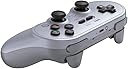
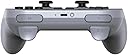
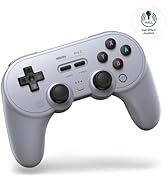
The 8BitDo Pro 2 Bluetooth Controller is a versatile, multi-platform gamepad compatible with Switch, PC, Android, iOS, macOS, and more. Featuring pro-level back buttons, customizable profiles via Ultimate Software, motion controls, and a 20-hour rechargeable battery, it offers a premium gaming experience with enhanced grip and seamless mode switching. Perfect for both retro enthusiasts and competitive gamers seeking precision and adaptability.


| ASIN | B08XY8H9D5 |
| Batteries | 1 Lithium Polymer batteries required. (included) |
| Customer Reviews | 4.6 4.6 out of 5 stars (10,896) |
| Date First Available | March 15, 2021 |
| Item Weight | 8 ounces |
| Item model number | 6922621501725 |
| Language | English |
| Manufacturer | 8Bitdo |
| Product Dimensions | 6.06 x 2.56 x 3.98 inches; 8 ounces |
| Rated | Rating Pending |
| Release date | April 12, 2021 |
| Type of item | Video Game |
M**N
The best PC game pad you can buy, but still not perfect
I had one of the the original 8BitDo SN30 Pro+ game pads and loved it, so when the Pro 2 came out, I eagerly bought one. It still has everything that was good about the old version. It's comfortable to hold, you can use it wired or wireless, the analog sticks and triggers are very precise, the d-pad is accurate and feels good, and it's got a very respectable (>20 hour) battery life with a rechargeable, replaceable battery pack. The most useful feature the Pro 2 adds for me is the ability to program multiple profiles into the game pad. If you play PC ports of console games or if you play games from other regions, you're probably used to games swapping which buttons are used to confirm/cancel, and so I like having profiles I can use to switch the positions of the X/Y and A/B buttons so they always match what I expect. The Pro 2 also adds two paddle buttons underneath the control, which would be useful... if I could do anything with them. Much like the "Star" button on the original Pro+, which is still here, this button can only be configured in 8BitDo's software to copy another button on the controller or to enable/disable turbo mode, or to execute macros that replicate pushing several other buttons in sequence. Copying buttons isn't useful for me, and macros would be useful if I played fighting games and wanted to cheese command sequences, but... I don't. Pushing one of them to execute a macro also interrupts and cancels any other button you were pushing on the controller, so you can't use them while you're moving with the sticks, for example. I would love to be able to map the star button and paddles to arbitrary key presses; let me use them to take a screenshot, record a video, or display a custom overlay. All of those would be great, but they're not possible right now. They don't even show up as buttons in the operating system's control panel, so nothing else can use them even if you wanted to use other joystick mapping software. My disappointment with that aside, this is still my favorite PC game pad.
M**G
Better than the the Switch Pro Controller
So I had the SN30Pro+ which was really nice! But playing Monster Hunter I really wanted to try out the paddle buttons (The ones on the grips) and figured, why not? This controller, is great. Finally, we're past 3rd party controllers being the trash you hand to a guest or friend. No, this controller is great. Having used it vs the Switch Pro Controller? I can easily list why this controller is what you get instead. -It's dpad is vastly better than Nintendo's controller -The paddle buttons help in many games & are fully customizable with profiles letting you switch fast. -Easily switch between PC/Switch with a flick of the switch on the back so you're not buying extra controllers for no reason. Can also do Android/iOS but I've not tested them, so I'm not commenting on that. -Great battery life with the included pack and if it runs out of batteries, you can easily open the controller and throw in some AAs. -Has actual triggers with a pressure range, yes doesn't work with Switch games since Nintendo neglected to have that? But it works well on PC. -It's way cheaper. This is my daily driver on PC/Switch. The paddle buttons make some games much more fun to play....which sounds gimmicky and market-speech-y but I'll elaborate. Running around in a shooter you can set the a paddle button to be jump so you don't have to take your thumb off the aiming stick. So when playing Horizon Zero Dawn (on PC) I got the left paddle for crouch/sliding so I can slide at a bot without moving my thumb or I can jump with the right one. In Monster Hunter setting them as directional buttons so you can navigate your item bar without moving your thumb(I know there's a radial menu, it's great but doesn't have enough for EVERYTHING). Or be a lazy bum and play Sonic the Hedgehog with 1 hand by making it a jump button. What's it missing? Doesn't have NFC for amiibos, that's it. It's got gyro and all the buttons you need. Any complaints? ....Not really? I wish it worked with PS4, that'd really let me just bum around with one controller a lot better. Honestly I don't have a problem with it other than...I guess you gotta update the firmware? Which doesn't happen too often but has solved some complaints you might see in other reviews. Look, if you've been wanting that Switch Pro controller, but you don't want to shell out $70, grab this, you won't be disappointed. Especially if you like platformers because the SwitchPro's dpad is ...ooooookay.
F**R
Great update to an already great controller
I've owned the 8BitDo SN30 pro for a couple of years now, and while it's a fantastic controller, the digital triggers make playing some games somewhat annoying. When I saw that the Pro 2 was coming out (and for the great price), I decided to snag it on pre-order, and it arrived today. First impressions - The Pro 2 feels great in the hand and the build quality is what I expect from 8BitDo. I connected the Pro 2 to my Windows PC via Bluetooth on the Xbox setting and had no issues playing my usual games. The mobile app worked fine for setting up the rear buttons, and they work well. Coming from the SN30 Pro, this controller is a much needed upgrade and works better for my needs on PC. For iOS, it currently is not detected via Bluetooth, no matter what setting I used (as 8BitDo stated in the Q&A section). I have an iPad Air 4th gen with a USB C port, and was able to use a USB C cable to connect the Pro 2 to my iPad on the Apple setting and it works fine. I'm hoping that a future firmware update will add wireless connectivity to the iPad, but for now a USB C cable is just a minor inconvenience for me. About the only downside I've found so far in the limited amount of time I've had it is that the rear buttons are slightly too easy to press. The good thing is that the center profile button is easy to press to disable them, so if they become too annoying disabling them is just a button press away. I've not had the controller long enough to comment on the battery life, but since the Pro 2 has the ability to use regular batteries, I don't see it being an issue.
K**R
Great controller, with a couple issues
So I've used this controller for maybe around a month now, and this is a truly great controller, but it has a couple issues that could really use some more improvement (one of which is solvable, the other requires a new revision). First, the good: The analog sticks feel great, feeling like a mix of dualshock and switch pro design. Face buttons are satisfying to push, not too mushy and not too firm. The start and select buttons feel identical to a SNES controller, so perfect. The dpad is an improvement over the sn30 pro (without handles) that I also own. The paddles are satisfying and easy to press, but maybe a little too easy. Accidental presses aren't common for me, but they have happened. This is the best nintendo style dpad I've ever used, frankly. Bumpers are accessible and easy to press. The ergonomics are pretty good overall, but I feel that the handles could have come out at a slightly different angle for a bit of an improvement, at least with my hands. As for some less important things, swapping between platforms is a breeze, much more intuitive than it used to be. The text on the back of the controller denoting what mode the selector is in would really have benefitted from being more legible, but it's still fine. The multiple profiles and the way you switch between them is very convenient, if that's your cup of tea. So all this sounds great, but here's the bad: The software literally blue screens my entire computer. This is beyond unacceptable, I don't even understand how this is possible. I managed to create 1 profile 1 time before the blue screen got me. 8bitdo is doing some seriously weird stuff with their software to cause a problem like that. I use this machine for work and for gaming, it's rock solid, the problem is 100% in their software. The analog triggers are very mushy and unsatisfying to press. They're somewhat reminiscent of the triggers on the ps3 controller, only mushier if my memory serves me right. At least they are curved so that your fingers don't slip off the triggers, so the situation isn't quite as bad overall, but these analog triggers are very disappointing, especially when they're arguably the main selling point for PC users. So they're functional, but very unsatisfying and they feel like they could break at any point. Given the price and the features, it's hard to not recommend this controller even with the issues. The main thing to ask yourself is if you're okay with mushy triggers. If the answer is yes, then go for it and you won't be disappointed.
M**M
Very compatible and very versatile for Alps sticks
So what can I say that hasn’t been already said about this? Well, there are pros and cons to this device, but I’m not sure if the cons are bad or the pros are good So let’s get the bad stuff out of the way The cons: – The joysticks are not hall effect but Alps (nothing is perfect) – It is not HD rumble – there is no NFC reader or writer for when you use it in the switch setting(which lets be fair, isn’t used often in most of the games, except a select few) And I have to say for cons they’re pretty minor now onto the pros – It’s ergonomic shape is similar to that of a PlayStation dual shock controller(whether that be PS1-3, 4, maybe not the five but still) which makes this great for PlayStation gamers -It has an app that can be used whether it be iOS or android, that helps you enable programs and set profiles for certain games which can be changed manually on the device (which means it’s easier to do macros for certain fighting games) -It comes with a “removable” battery pack, which means if you don’t wanna use the included battery pack or it starts to fail, you can just do what old-school third-party controllers did, and put in a couple of AA batteries which is a very nice touch -The D pad, lately a lot of controls haven’t had a very decent D pad(this includes switch and PlayStation) but this one satisfies a lot of people especially considering that the original SN 30 start it off as a remake of the super Nintendo entertainment system controller. As time went on. They had a joysticks. Then they added the grips, which makes sense considering Nintendo and PlayStation were once a team so it’s safe to say this controller honors both. -this is a bit of a bonus feature, but if you pair it with the PS1/PS2 receiver made by the same company. You literally have a perfect controller for PlayStation systems before PS3. (and because we don’t longer have RadioShack this is very helpful because there are not a lot of third-party controller support for the older game system anymore.) so this is a big Pro. Now, in all honesty, this is a very good controller the pros slightly outweigh the cons(unless you exclude that NFC con) either way this is a solid controller. That is very good and very compatible. Do I recommend it? Yes I do. (2022) But if you can get the Hall Effect versions that came out 2024
J**E
This is my Go to Controller for PC now
I have basically zero complaints about this product. I was actually pretty hesitant when I got it, usually off-brand controllers feel cheap in your hands and don't work as well. That is not the case here. I enjoy the PS5 controller a lot and after mine suddenly stopped working on my PC I needed to find something that would work for me, decided to pick one of these up because it's designed similarly to a PS5 controller and I prefer that over the other models that are more Xbox/Microsoft designed. These controllers are great, in fact I would say the next couple controllers I pick up will likely be all from 8bitdo, as you can tell once you get the controllers in your hand, they are high quality, and they feel extremely good in your hands. Plus there is variety for everyone, if you have smaller/bigger hands, if you're playing retro/new, there's something there for everyone. Everything worked out of the box for me, no issues whatsoever (can't say the same for official controllers from Nintendo or Sony on PC). Just flip the switch on the back to the proper setting and off you go. The only problem is if you're the type of person who needs to look down at the buttons as they might not be in the same location depending on what you're playing. But all of that is pretty hard wired into my brain at this point so I usually have no issues when playing games. Definitely worth the price, if you're on the fence, pick one up (whichever style you like), I don't think you'll be sad that you did.
B**Y
All-around excellent multi-use controller.
This is an awesome multi-functional Controller. It's not perfect, but it's pretty darn close. It is lightweight, relatively high build quality, and has some great features for my use-cases. My favorite thing about this controller is its ability to swap between multiple control APIs via a convenient switch. I'm a PC gamer who also does a lot of emulation. It is really awesome that I can use Xinput for my Steam/Windows games, then easily swap to SDL and get full motion controls when emulating Wii/Wii U/Switch games. I can swap to Dinput on the rare occasions I game on my Android phone. It makes swapping devices, games, and button mappings a breeze as the Bluetooth pairs quickly and it basically registers as a separate controller for each API. This is subjective, but I personally like the Playstation/SNES layout mashup thing they have going on. I play Rocket League and my muscle memory is hard-locked to DualShock 4 for that game. It's nice to be able to use this controller for that very niche scenario lol. Dpad is excellent, and is positioned in a way that is favorable to retro gaming. Buttons are pretty decent, triggers are OK. Joysticks are also decent, but occasionally have a plastic grindy feeling to them. My biggest gripe is that this controller doesn't have the hall-effect joysticks they are using in their new "Ultimate" controller. I really wish they would make an "Ultimate" version with this layout.
D**S
Buy This Controller Now
I bought this for my Nintendo Switch and It's my favorite controller for it now. I went through 2 of Nintendo's official Pro controller's that were both over priced junk ($70 a piece). They both quickly got the dreaded drift problem. This controller's quality is apparent immediately unlike the Switch's Pro garbage controller. The controller feels good in my hands and the buttons feel great as well. But most importantly the analogs feel like high quality as well and no dead space either. Even the D-Pad is fantastic. And it doesn't feel like a tiny kids toy in your hands like the Nintendo Pro controller does either. They spaced it just right so that your hands are comfortable and don't get tired fast. I am shocked at how good of controller that it is, especially for $50. As far as some things that 2 other reviewers have claimed....no this controller does not have a quality issue to where the left side of the controller's clam shell is slightly off from the right. That is totally not true. It's perfectly aligned on all angles including its shell. And then the other reviewer claiming that it's hard to connect and program this controller's buttons with the app....again it's simply not true. I don't know what phone he has or what he is using his app on for this, but mine connects and reconnects on the fly with no problems when programming it with the app. And the app is super easy to use and understand instantly...no instructions required. As far as controller color I suggest gray like I got because the buttons are marked (personal preference of course). I can't speak for it's use on any other devices but for the Switch it's a awesome and must have controller. Sell or throw away your Pro controller immediately and buy this gem instead and don't look back. No sense in playing with an overpriced subpar junk Nintendo Pro controller (that's gonna fail you fast anyways) when this diamond has finally come to save your misery (and your wallets weight too). And then they throw in extra features to boot such as turbo and is usable on other platforms as well. Yeah definitely buy you 1 or 2 of these immediately when they come back in stock. I can definitely see why these sold out because they are great. I'm glad that I pre-ordered mine in advance.
K**R
Battery life has a shorter lifespan than a mayfly
I like that it's a controller at a great price and has a good grip, reminds me of the good old PS2 days. Got this because I didn't want to spend money on $400 XBox controllers, didn't disappoint. Well packaged, feels premium, cables have great feel, standard stuff. Bluetooth is a little wonky, sometimes it works sometimes it sucks. I recommend wiring the controller to your PC for the intended use of this device. You can also go into Bitdo's website to download some customization for the controller and adjust sensitive of the joysticks. Nothing much to else to say.
S**H
Very decent product
I would highly recommend this nostalgic looking controller, I would loved it more if it had wireless wake-up for the Nintendo Switch but they clearly mentioned this in the description/reciews, so take note of that. Otherwise this is great.
R**E
Great controller
Had it for a while now. Originally bought it for the Switch but I still use it on my PC now. Lasted more than the two joycons I bought.
K**R
Controle perfeito, posteriormente quero adquirir outros modelos, mas...
O controle é 100% original, funcionou em todas as plataformas que testei: emulador snes9x e zsnes, dolphin (tanto no celular como no pc), emulador de ps2 (para celular e o pc), além de outros jogos para pc e celular, retroarch e afins. Minha única crítica é a respeito da demora para entrega. O produto ter demorado para chegar é devido a compra ser internacional. Provavelmente é possível achar o mesmo controle com um preço semelhante (talvez 10 reais mais caro) na loja da 8BitDo no AliExpress (mesmo com a compra sendo internacional), porém a demora com certeza será menor que a demora que eu tive nessa compra. Demorou cerca de 45 dias para chegar em minha casa. Do mais, ótimo produto.
A**H
Sturdy and smooth controller
This easily connects to Android and iOS devices. Fairly easy to connect and use. Serves my purpose of using this to play games on mobile and ipad.
Trustpilot
1 month ago
1 month ago