Buy anything from 5,000+ international stores. One checkout price. No surprise fees. Join 2M+ shoppers on Desertcart.
Desertcart purchases this item on your behalf and handles shipping, customs, and support to Australia.
๐ Connect, Switch, Power Up โ Master your dual-device workflow like a pro!
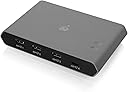
The IOGEAR USB-C 2 Port Switch (GUS4C2) is a versatile KVM switch designed for professionals managing both Mac and PC setups. It features 2 USB-C ports for seamless peripheral sharing, supports up to 85W power delivery to keep devices charged, and enables fast 10Gbps file transfers. With multiple switching options including hotkeys and a remote button, plus LED indicators for active host status, it streamlines multitasking across platforms. The device comes with a 3-year limited warranty and lifetime technical support, making it a reliable choice for efficient workspace management.


| ASIN | B07W4FT5QC |
| Additional Features | Multiple Ports |
| Best Sellers Rank | #586 in KVM Switches |
| Brand | IOGEAR |
| Built-In Media | Access Pro USB-C 2-Port Keyboard Mouse and Peripheral Switch with Power Delivery, 1 x Switch Button Cable, 2 x USB-C 3.1 G2 Cable (1m), 1 x Quick Start Guide, 1 x Warranty Card |
| Color | Black |
| Compatible Devices | Laptops |
| Customer Reviews | 3.3 3.3 out of 5 stars (90) |
| Data Transfer Rate | 10 Gigabits Per Second |
| Enclosure Material | Polycarbonate |
| Global Trade Identification Number | 00881317518989 |
| Hardware Interface | USB |
| Item Dimensions L x W x H | 7.5"L x 6.25"W x 2.25"H |
| Item Weight | 0.65 Pounds |
| Manufacturer | IOGEAR |
| Mfr Part Number | GUS4C2 |
| Model Number | GUS4C2 |
| Number of Ports | 2 |
| Operating System | Windows 10 |
| Total Usb Ports | 2 |
| UPC | 881317518989 |
| Unit Count | 1.0 Count |
R**E
Switch between PC tower / MacBook. Great upgrade
Decided to do a review in regards of liking the product. First receiving, I did have difficulties in getting the peripherals to switch between the two PCs with this box. It would not switch automatically at first if the other PC went to sleep. Before actually buying, S/O unknownsoloโs review. I did the same exact thing in knowing this problem might occur. (Review Keysearch: sleep , sleeping) It now works flawlessly, love the hot keys as well. The RIGHT shift key double click makes it easier to lock the left shift from switching the KVM. So in times you want to game, you can lock it and just game. Although sometimes forgetting will get annoying, but I love the USB-C mechanics. I had upgraded from a basic button only USB KVM switch, so it was a stretch to reach behind my organized desktop. The button that comes along with this too is attached with a sticky strip near the back-bottom of my monitor like a back button, another easy button to switch for the peripherals. Awesome product if you know what youโre doing! ALSO: Since they gave option to rate the CAMERA quality. I had actually plugged in my Logitech camera to this switch. Works fine and perfect, the with the Logitech StreamCam Plus Webcam. If you are switching between PCS with a camera on the KVM box, make sure you update or check to see if your camera is live and not paused! In recordings, not checking your camera means it could freeze. So just quick checks if you were to be on call or live recording for something.
S**I
Sort ofworks, but not well for the price
The set of features are fairly nice, including the control for switching inputs is nice for hiding the switch itself as well all of the cables away. However, while all of the features generally work, I have run into a few issues with the product. In some situations when connected to my MacBook Pro, the product just stops working randomly. I found that I need to unplug and replug the power charger pass through before it works again. Since I have tucked away the switch and am using the remote to switch, this is annoying. Since this can happen in the middle of a meeting, I wouldn't recommend using this configuration for work. You could not use the power adapter functionality, but then a different product likely makes more sense. Additionally, I have run into issues when connected to a Windows PC (on the non-charging port), where the switch will stop working for 5 seconds or so before allowing keyboard/mouse through again. As a result, I wouldn't recommend this product for gaming either. While the core functionality and the form factor of the device are nice, the issues I encountered coupled with the price point don't seem to make sense to me.
A**R
Doesn't work, can't switch between devices (USB-C GUS4C2)
Worked for a day, but now with 2 USB-C devices connected (a Windows 10 desktop PC and a 2018 Macbook pro) I cannot reliably switch. The cabled switch button simply won't respond. If I remove one or the other cable from the back of the device, the remaining device will become active (and that is how I'm typing this review, right now.) The switch and cable are in the same shape as when I received the device, as I've only had it for a week. Very disappointed.
A**R
Easily switch between two computers that have USBC.
This device is perfect. With only USBC power delivery from the primary or secondary PC it's easy to share a Corsair dual USB plug keyboard between PC's. (edit) After several years of use I started to have issues switching between computers. Sometimes the keyboard won't power on or the motherboard USB stops functioning on one of the 2 connected PC's.
G**L
Works as expected. No issues so far,. DISABLE USB Selective Suspend Settings!
*** MAKE SURE YOU CONNECT A POWER SUPPLY *** *** MAKE SURE YOU DISABLE USB Selective Suspend Settings **** I am connecting the switcher to a Lenovo p1 laptop and a gaming desktop (ASUS motherboard) Connection cables: - I am using 2x Apple MacBook pro 2 meter type-c to type-c cables Power supply: - The provided type-c cable - Apple Type-c charger Keyboard and mouse: Both are Logitech devices RGB First time initialization: it took several seconds the first time for the device to recognize the devices I connected when everything was booted up in the operating system I have let the Operating system Recognize everything Disconnecting and Switching between computers: I can disconnect and reconnect the cables from the switch when the computer are on or off without issues. Switching takes a regular time for the operating system to recognize the keyboard and mouse witch can take a couple of seconds, time will depend on the computer speed. CONS: The BIG cons is the lack of power supply and connection cables !!!!! I suspect you need an efficient power supply and reliable connection cables. I am unsure of the power need for it to work properly, so I went with Apple power supply and connection cables. Conclusion i am very happy with the product and didn't see any problems so far The remote control is a BIG PLUS, just lack of feedback on what computer it's connected to. As a work around, I have two different RGB settings between the two computers So my keyboard is not illuminated the same. Love the product.
E**C
Has problems when reconnecting
This product works great most of the time, but like many modern accessories it tries to be too smart for its own good. My setup includes my personal desktop and my work laptop, and I use this product to switch between them. It has a feature that automatically switches away from inputs that have been disconnected, and that feature tends to get tripped up when I'm plugging my laptop back in. This means that when I add my laptop back into the mix, I often have to unplug all cables providing power to the device (both connections to computers and the usb-c power adapter I have plugged in) and then reconnect them all in order to get it to properly communicate with my laptop. It's super annoying. Once everything's connected though, it works fine.
S**N
I bought the GUS4C2. I've installed it on my home PC. I got a security warning from SmartScreen that says Publisher is not defined. I couldn't installed it on my work PC, because Symantec AV didn't let me. Without the software, transition is not seamless and required the switch button. With the switch there is a delay when moving back and forth a computer. For my need I had to use other cable then the 2 that came with i. Both are USB-C to USB-C. I had to find a USB-C to USB-A in order to plug my home PC.
Trustpilot
1 week ago
2 months ago